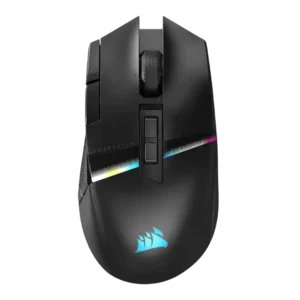
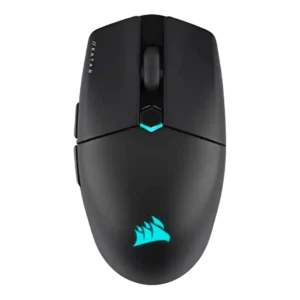
Compare Corsair Darkstar RGB vs Corsair Katar Elite Wireless

P1 Corsair Darkstar RGB
P2 Corsair Katar Elite Wireless

Comparison Takeaways

Corsair Darkstar RGB

Where It Has the Edge

  • MMO gaming suitability is 4.3 vs 2.0. MMO suitability was strongly supported across every review, mainly because of the programmable controls, side cluster, and genre-focused...
  • durability over time is 4.3 vs 2.5. Durability over time has limited but positive support from the click rating and durable-feeling switch performance.
  • premium feel is 4.4 vs 2.6. Premium feel was a common strength, tied to the styling, materials, build, lighting, and overall flagship presentation.
  • palm grip comfort is 4.1 vs 2.5. Palm grip support was generally positive, especially for larger hands, while one smaller-hand reviewer found the taller shape...

Corsair Katar Elite Wireless

Where It Has the Edge

  • software stability is 4.6 vs 2.4. Only one review directly addressed software stability, but it reported harmonious iCUE behavior without lag, bugs, or crashes.
  • battery life is 4.1 vs 2.4. Battery life is broadly good, usually cited at up to 110 hours over Bluetooth and around 60 hours...
  • firmware reliability is 4.0 vs 2.6. Firmware reliability evidence is limited but positive, with reviews noting firmware update support for the mouse or checking...
  • handedness options is 3.4 vs 2.0. Handedness support is mixed: the body is often described as ambidextrous or nearly so, but side-button placement still...
Average score
Product 1: Corsair Darkstar RGB
4.0
Product 2: Corsair Katar Elite Wireless
3.9
2.4GHz connectivity
Product 1: Corsair Darkstar RGB
4.5

2.4GHz connectivity was repeatedly highlighted through Slipstream or dongle support and was consistently treated as the best gaming connection.

Product 2: Corsair Katar Elite Wireless
4.3

2.4GHz Slipstream connectivity is the main gaming connection and is consistently associated with stable, low-latency performance.

acceleration control
Product 1: Corsair Darkstar RGB
4.5

The reviews that mentioned acceleration treated the 50G rating as part of the mouse’s strong sensor specification set.

Product 2: Corsair Katar Elite Wireless
4.4

Acceleration specs are repeatedly cited at 50G, reinforcing that the sensor has plenty of headroom for fast movements.

Accuracy and tracking precision
Product 1: Corsair Darkstar RGB
4.5

Reviewers consistently found tracking accurate and precise across games and surfaces, with strong flick performance and only minor caveats versus slimmer FPS-focused mice.

Product 2: Corsair Katar Elite Wireless
4.4

Reviewers repeatedly describe the sensor and tracking as precise, especially for flicks and FPS aiming, though one creative-work review found fine-control harder because the mouse felt too light.

balance and weight distribution
Product 1: Corsair Darkstar RGB
4.4

Weight distribution was consistently positive where discussed, with reviewers saying the mouse felt balanced or easier to flick than heavier MMO competitors.

Product 2: Corsair Katar Elite Wireless
4.6

Only a couple of reviews address balance directly, but both describe the mouse as well balanced with its built-in battery.

battery life
Product 1: Corsair Darkstar RGB
2.4

Battery life was the most repeated weakness, especially with RGB enabled, where reviewers cited roughly 20-25 hours and lagging rivals.

Product 2: Corsair Katar Elite Wireless
4.1

Battery life is broadly good, usually cited at up to 110 hours over Bluetooth and around 60 hours over 2.4GHz, though competitors can last longer.

Bluetooth support
Product 1: Corsair Darkstar RGB
4.2

Bluetooth support was widely noted as a useful secondary mode for travel, productivity, or extra devices, though not the preferred gaming connection.

Product 2: Corsair Katar Elite Wireless
4.1

Bluetooth support is useful for travel, laptops, tablets, and battery saving, but reviewers recommend 2.4GHz for gaming performance.

build quality
Product 1: Corsair Darkstar RGB
4.4

Build quality was repeatedly praised as solid, premium, high-quality, and free of creaking or rattly parts.

Product 2: Corsair Katar Elite Wireless
4.0

Build quality is mostly solid for the price and weight, but reviewers differ on creaks, standard feel, and whether it feels special.

button customization
Product 1: Corsair Darkstar RGB
4.6

Button customization was one of the strongest themes, with iCUE enabling remapping, assignments, gestures, lighting, DPI, and macros.

Product 2: Corsair Katar Elite Wireless
4.3

Button customization is strong through iCUE, with reviewers noting remapping controls, key assignments, and adjustable settings.

button responsiveness
Product 1: Corsair Darkstar RGB
4.4

Click and button response were usually praised as responsive or snappy, although one reviewer noted accidental DPI-button brushing.

Product 2: Corsair Katar Elite Wireless
3.6

Button responsiveness is mixed: some reviewers praise responsive zero-gap clicks, while others found the main buttons too easy to trigger or too soft.

cable flexibility
Product 1: Corsair Darkstar RGB
2.2

Cable flexibility was a repeated weakness: reviewers described the cable as stiff, hard, or not paracord-style.

Product 2: Corsair Katar Elite Wireless
3.1

Cable feedback is middling; reviewers note the cable is plain rubber or non-braided, though one found it flexible enough for modest pushback.

charging convenience
Product 1: Corsair Darkstar RGB
3.0

Charging convenience was mixed: USB-C wired use helps, but reviewers criticized the lack of a dongle extender, stiff cable, and no wireless charging.

Product 2: Corsair Katar Elite Wireless
4.2

Charging convenience is good thanks to USB-C, wired play while charging, and a rechargeable battery, though some reviewers still mention periodic recharging.

claw grip comfort
Product 1: Corsair Darkstar RGB
4.3

Claw grip comfort had limited but positive support, with reviewers saying palm and claw grips felt good or were suitable.

Product 2: Corsair Katar Elite Wireless
4.0

Claw grip comfort is generally strong, with the shape repeatedly described as aimed at claw users, though not every reviewer loved the rear support.

click latency
Product 1: Corsair Darkstar RGB
4.5

Click and wireless input response were described as fast, instant, or below 1 ms, supporting strong latency impressions.

Product 2: Corsair Katar Elite Wireless
4.5

Click latency evidence is positive overall, with reviewers praising fast actuation, zero-gap design, and instant-feeling clicks.

click noise
Product 1: Corsair Darkstar RGB
4.3

Click noise was generally acceptable to quiet, with reviewers describing clicks as whisper quiet, not overly noisy, or moderate in volume.

Product 2: Corsair Katar Elite Wireless
No score yet
connection stability
Product 1: Corsair Darkstar RGB
4.1

Connection stability was mostly positive, but one reviewer had out-of-box dongle recognition trouble that required updating iCUE.

Product 2: Corsair Katar Elite Wireless
4.5

Connection stability is a strength, with reviewers reporting stable, reliable connections and no hiccups or noticeable lags.

cross-platform compatibility
Product 1: Corsair Darkstar RGB
4.2

Cross-platform support has limited positive evidence, with reviewers showing Steam Deck use and stating Windows and Mac compatibility.

Product 2: Corsair Katar Elite Wireless
4.3

Cross-platform compatibility is supported by one review noting PC or Mac connectivity through wireless, Bluetooth, or wired modes.

debounce customization
Product 1: Corsair Darkstar RGB
4.0

Debounce-style customization had limited support through the Button Response Optimization setting mentioned in iCUE.

Product 2: Corsair Katar Elite Wireless
No score yet
DPI range
Product 1: Corsair Darkstar RGB
4.6

The 26K DPI ceiling and fine DPI adjustment were widely noted as high-end, even if several reviewers implied most players would not need the full range.

Product 2: Corsair Katar Elite Wireless
4.5

The DPI range is broad, commonly cited at 26,000 DPI with configurable stages, giving plenty of sensitivity headroom even if most reviewers did not need the maximum.

durability over time
Product 1: Corsair Darkstar RGB
4.3

Durability over time has limited but positive support from the click rating and durable-feeling switch performance.

Product 2: Corsair Katar Elite Wireless
2.5

Durability over time is only directly criticized in one review, which worried that the thin dongle-cover plate could break easily.

ecosystem integration
Product 1: Corsair Darkstar RGB
4.2

Ecosystem integration was supported through iCUE, Corsair gear management, device syncing, and Corsair lighting or profile control.

Product 2: Corsair Katar Elite Wireless
4.3

Ecosystem integration is strong for Corsair users, with iCUE, multipoint dongle pairing, RGB synchronization, and broader Corsair-device integration.

ergonomic design
Product 1: Corsair Darkstar RGB
4.2

The ergonomic design was usually praised for comfort, control, and a right-handed shape, but it remains specialized around its thumb-grip layout.

Product 2: Corsair Katar Elite Wireless
3.7

Ergonomic design is intentionally compact and ambidextrous-leaning, but reviewers note this inclusiveness sacrifices some hand-filling comfort.

fingertip grip comfort
Product 1: Corsair Darkstar RGB
3.3

Fingertip comfort was split: one reviewer could transition easily, while another found fingertip grip uncomfortable due to side-button access.

Product 2: Corsair Katar Elite Wireless
4.1

Fingertip grip comfort is one of the mouse's strongest ergonomic themes, especially for small hands and users who prefer compact control.

firmware reliability
Product 1: Corsair Darkstar RGB
2.6

Firmware reliability has limited evidence, but one review linked a DPI-dropout concern to possible future firmware fixes.

Product 2: Corsair Katar Elite Wireless
4.0

Firmware reliability evidence is limited but positive, with reviews noting firmware update support for the mouse or checking updates in iCUE.

FPS gaming suitability
Product 1: Corsair Darkstar RGB
4.2

FPS suitability was better than typical MMO mice thanks to sensor quality and flickability, though it was not framed as a pure FPS specialist.

Product 2: Corsair Katar Elite Wireless
4.5

FPS suitability is strong, with reviewers repeatedly praising fast swiping, flick shots, precision aiming, and competitive Overwatch or shooter use.

glide smoothness
Product 1: Corsair Darkstar RGB
4.3

Glide was mostly praised thanks to large PTFE feet and smooth movement, though one reviewer noticed edge drag when the mouse was tilted.

Product 2: Corsair Katar Elite Wireless
4.4

Glide smoothness is a major strength, with PTFE feet and low weight repeatedly producing smooth, effortless movement.

grip texture
Product 1: Corsair Darkstar RGB
4.4

Grip texture was a consistent strength, with rubberized or textured side areas helping control, pickup, and stability.

Product 2: Corsair Katar Elite Wireless
4.2

Grip texture is generally praised on the sides, though the smooth top finish attracts fingerprints and can look greasy.

handedness options
Product 1: Corsair Darkstar RGB
2.0

Handedness support is limited because reviewers described it as right-handed and explicitly warned left-handed gamers away.

Product 2: Corsair Katar Elite Wireless
3.4

Handedness support is mixed: the body is often described as ambidextrous or nearly so, but side-button placement still favors right-handed use.

left and right click quality
Product 1: Corsair Darkstar RGB
4.4

The left and right clicks were widely praised for optical switches, crisp feel, snappiness, and a pleasant clicking experience.

Product 2: Corsair Katar Elite Wireless
3.0

Left and right click quality is divided, with some reviewers praising satisfying main clicks while others found them soft, undefined, loose, or less precise.

lift-off distance
Product 1: Corsair Darkstar RGB
4.3

Lift-off distance was configurable through iCUE or lift-height settings, with reviewers noting it as part of the performance tuning toolkit.

Product 2: Corsair Katar Elite Wireless
4.2

Lift-off control is supported through iCUE settings, with reviewers noting adjustable lift height or calibration options.

long-session comfort
Product 1: Corsair Darkstar RGB
4.0

Long-session comfort was mostly positive thanks to grip, shape, and weight, though one smaller-hand reviewer reported temporary wrist and finger pain.

Product 2: Corsair Katar Elite Wireless
3.9

Long-session comfort is mixed: several reviewers found it comfortable for hours, but some reported initial fatigue or faster tiring for non-ideal grips.

macro support
Product 1: Corsair Darkstar RGB
4.5

Macro support was broadly supported through iCUE assignments, in-game macros, productivity mappings, and programmable actions.

Product 2: Corsair Katar Elite Wireless
4.3

Macro support is well supported in iCUE, with several reviews noting game-specific macros, key assignments, and app-launch actions.

materials quality
Product 1: Corsair Darkstar RGB
4.4

Materials were generally viewed positively, with soft-touch matte plastic, rubberized grips, and premium-feeling construction noted across reviews.

Product 2: Corsair Katar Elite Wireless
3.1

Materials quality is mixed, with textured sections liked but the smooth or thin plastic top criticized for fingerprints, shine, or a less premium feel.

MMO gaming suitability
Product 1: Corsair Darkstar RGB
4.3

MMO suitability was strongly supported across every review, mainly because of the programmable controls, side cluster, and genre-focused design.

Product 2: Corsair Katar Elite Wireless
2.0

MMO suitability is weak in the only direct review, which found the six-button design too basic for MMO play.

MOBA gaming suitability
Product 1: Corsair Darkstar RGB
4.3

MOBA suitability was also strongly supported, with reviewers repeatedly grouping the mouse with MOBA/MMO play and complex-control games.

Product 2: Corsair Katar Elite Wireless
3.2

MOBA suitability is mixed, with one review saying the button count felt too basic while another grouped the lightweight design with MOBAs.

motion consistency
Product 1: Corsair Darkstar RGB
4.3

Motion was generally smooth, precise, and consistent, though one reviewer noted accuracy and speed were not as pinpoint as a lighter FPS mouse.

Product 2: Corsair Katar Elite Wireless
4.1

Motion consistency is generally strong, with reviewers reporting steady tracking, no shakes, and only one note about DPI feel being a little off compared with other mice.

onboard memory
Product 1: Corsair Darkstar RGB
4.4

Onboard or hardware profiles were repeatedly noted, including up to five stored profiles and hardware-level settings for use without iCUE running.

Product 2: Corsair Katar Elite Wireless
3.5

Onboard memory is useful but limited; reviewers repeatedly note it can store settings, yet commonly only one active profile fits on the mouse.

palm grip comfort
Product 1: Corsair Darkstar RGB
4.1

Palm grip support was generally positive, especially for larger hands, while one smaller-hand reviewer found the taller shape somewhat unwieldy.

Product 2: Corsair Katar Elite Wireless
2.5

Palm grip comfort is weak overall; most reviewers say the small, tapered rear lacks support for palm users, despite a few finding it usable.

polling rate
Product 1: Corsair Darkstar RGB
4.5

Reviewers repeatedly highlighted the 2,000Hz wireless polling capability, though one measured run averaged below the advertised maximum.

Product 2: Corsair Katar Elite Wireless
4.2

Most reviewers highlight the 2,000Hz polling headline as a performance advantage, while a few note the practical difference may be hard to feel or connection-mode dependent.

portability
Product 1: Corsair Darkstar RGB
3.7

Portability was decent thanks to dongle storage and Bluetooth, but accessory omissions and the lack of a cover or extender limit convenience.

Product 2: Corsair Katar Elite Wireless
4.3

Portability is a clear plus, helped by the compact build, low weight, dongle storage, laptop friendliness, and travel use.

premium feel
Product 1: Corsair Darkstar RGB
4.4

Premium feel was a common strength, tied to the styling, materials, build, lighting, and overall flagship presentation.

Product 2: Corsair Katar Elite Wireless
2.6

Premium feel is weakly supported and negative in the one direct review, which described the light plastic as less premium than expected.

profile switching
Product 1: Corsair Darkstar RGB
4.3

Profile switching was supported through top buttons, on-the-fly changes, software presets, and multiple profile systems, though the software could be confusing.

Product 2: Corsair Katar Elite Wireless
3.9

Profile switching is mixed because iCUE can manage many profiles and DPI stages, but the mouse itself has limited onboard profile capacity.

programmable buttons
Product 1: Corsair Darkstar RGB
4.7

Reviewers repeatedly emphasized the 15 programmable inputs as a core strength for MMO, MOBA, productivity, and complex-control use.

Product 2: Corsair Katar Elite Wireless
4.3

Programmable-button support is strong for a simple six-button mouse, with most reviewers confirming all or nearly all buttons can be programmed.

RGB features
Product 1: Corsair Darkstar RGB
4.0

RGB lighting was feature-rich and customizable, but reviewers often noted that some zones are subtle, hidden by the hand, or costly to battery life.

Product 2: Corsair Katar Elite Wireless
3.6

RGB is present and customizable but generally modest, often described as minimal, logo-focused, or not very useful during actual use.

scroll wheel quality
Product 1: Corsair Darkstar RGB
3.4

The scroll wheel drew mixed feedback, with tactile texture and readable steps offset by repeated complaints that it was stiff or hard to press.

Product 2: Corsair Katar Elite Wireless
2.9

Scroll wheel quality is the most consistent hardware complaint, with reviewers citing stiffness, weak tactility, muddy turns, or insufficient grip despite some positive texture notes.

sensor performance
Product 1: Corsair Darkstar RGB
4.6

The Marksman 26K sensor was repeatedly treated as flagship-grade, reliable, and strong for both MMO/MOBA play and faster shooters.

Product 2: Corsair Katar Elite Wireless
4.5

The Marksman optical sensor is consistently treated as a strength, with high DPI specs and flawless or precise tracking in most gaming tests.

shape comfort
Product 1: Corsair Darkstar RGB
4.3

Shape comfort was generally praised, especially for larger or medium hands, though smaller-hand and fingertip use could feel less natural.

Product 2: Corsair Katar Elite Wireless
3.6

Shape comfort is highly grip-dependent: some reviewers found the small tapered shape comfortable, while others found it peculiar or too specialized.

side button quality
Product 1: Corsair Darkstar RGB
3.4

Side-button opinions were mixed: some reviewers found them accessible, while others criticized the unique layout as awkward or hard to manage.

Product 2: Corsair Katar Elite Wireless
3.4

Side button quality is mixed: some reviews liked their clicky feel and separation, while others reported extra force or even game-registration issues.

skate durability
Product 1: Corsair Darkstar RGB
3.0

Skate durability remains uncertain because reviewers praised glide but explicitly said long-term smoothness was still unknown.

Product 2: Corsair Katar Elite Wireless
No score yet
software stability
Product 1: Corsair Darkstar RGB
2.4

Software stability was a concern in multiple reviews, including detection issues, profile problems, and random DPI dropouts.

Product 2: Corsair Katar Elite Wireless
4.6

Only one review directly addressed software stability, but it reported harmonious iCUE behavior without lag, bugs, or crashes.

software usability
Product 1: Corsair Darkstar RGB
3.3

Software usability was mixed: iCUE enables deep control, but several reviewers called it confusing, unintuitive, or a slog.

Product 2: Corsair Katar Elite Wireless
4.1

Software usability is generally positive because iCUE is powerful and detailed, though some reviewers mention a learning curve or less intuitive layout.

surface compatibility
Product 1: Corsair Darkstar RGB
4.4

Surface compatibility was supported by surface calibration and reports of smooth tracking across surfaces.

Product 2: Corsair Katar Elite Wireless
4.0

Surface compatibility is mostly good on pads and tested surfaces, but some reviewers warn the feet can sound or feel less ideal on bare desks.

switch durability
Product 1: Corsair Darkstar RGB
4.5

Optical-switch durability was supported by claims of greater reliability and a 100-million-click rating, suggesting strong long-term switch confidence.

Product 2: Corsair Katar Elite Wireless
4.3

Switch durability is supported by repeated 60-million-click claims for the Omron switches, though this is primarily spec-based rather than long-term wear testing.

switch feel
Product 1: Corsair Darkstar RGB
4.4

Switch feel was described as crisp, snappy, quiet, cushiony, or satisfying across reviewers, giving the main clicks a premium feel.

Product 2: Corsair Katar Elite Wireless
4.5

Switch feel is mostly positive, with Omron switches described as satisfying and good-feeling across multiple reviews.

tilt gesture controls
Product 1: Corsair Darkstar RGB
4.4

Tilt gestures were a signature feature praised by most reviewers as useful and innovative, though a few found them sensitive or unreliable.

Product 2: Corsair Katar Elite Wireless
No score yet
value for money
Product 1: Corsair Darkstar RGB
3.3

Value is mixed: reviewers liked the features and innovation, but the $170-$250 pricing was repeatedly called steep or a deterrent.

Product 2: Corsair Katar Elite Wireless
4.1

Value is split by outlet: many reviews call it competitive or affordable for a wireless lightweight mouse, while a few argue it is expensive for its basic design.

weight
Product 1: Corsair Darkstar RGB
3.9

At about 96-98 grams, reviewers treated the mouse as lighter than some MMO rivals but still heavier than ultralight FPS mice.

Product 2: Corsair Katar Elite Wireless
4.4

The 69g-class weight is one of the clearest strengths, repeatedly described as very light, agile, and easy to move.

wireless latency
Product 1: Corsair Darkstar RGB
4.4

Wireless latency was usually treated as low, with sub-1 ms claims and reviewers reporting little to no practical latency concern.

Product 2: Corsair Katar Elite Wireless
4.3

Wireless latency is strong over 2.4GHz Slipstream, with several reviewers seeing no latency, though Bluetooth is repeatedly treated as the slower option.

wireless performance
Product 1: Corsair Darkstar RGB
4.5

Wireless performance was broadly praised for Slipstream speed, stable feel, and strong 2.4GHz operation, despite setup caveats in one review.

Product 2: Corsair Katar Elite Wireless
4.5

Wireless performance is consistently strong in Slipstream mode, with reviewers reporting no major compromises, negligible differences, and solid gaming behavior.