Average score
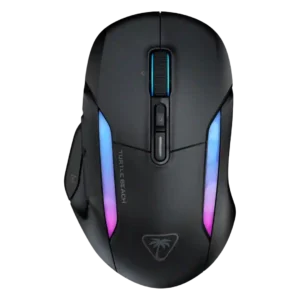
Turtle Beach Kone II Air
4.3
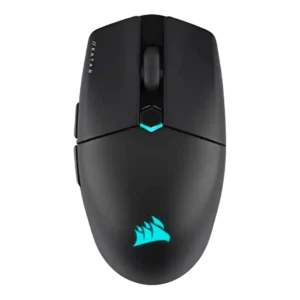
Corsair Katar Elite Wireless
4.0
MMO gaming suitability
Turtle Beach Kone II Air
4.6
MMO gaming suitability was strong, with reviewers praising the command count and customization for RPG/MMO-style ability access.
Corsair Katar Elite Wireless
2.3
MMO gaming suitability was weak in the only opinionated evidence, which found the six-button layout too basic for MMOs.
palm grip comfort
Turtle Beach Kone II Air
4.8
Palm grip comfort was praised strongly, with reviewers repeatedly saying the large Kone shape suits palm grip especially well.
Corsair Katar Elite Wireless
2.7
Palm grip comfort was the weakest grip category, with most reviewers warning that palm users lose support or should steer clear.
ergonomic design
Turtle Beach Kone II Air
4.8
Ergonomic design was a standout strength, repeatedly described as comfortable, supremely ergonomic, and well suited to larger hands.
Corsair Katar Elite Wireless
3.0
Ergonomic design was mixed because the ambidextrous-style body is inclusive but less sculpted and less supportive than ergonomic alternatives.
left and right click quality
Turtle Beach Kone II Air
5.0
Left and right clicks were strongly praised for feeling perfect, balanced, fast, and responsive.
Corsair Katar Elite Wireless
3.4
Left and right clicks were divisive: several reviewers liked their response, while others found them too light, mushy, imprecise, or loose.
cross-platform compatibility
Turtle Beach Kone II Air
2.8
Cross-platform compatibility was limited because full customization was described as Windows-only.
Corsair Katar Elite Wireless
4.4
Cross-platform compatibility had limited positive evidence tied to Bluetooth use with laptops and tablets.
scroll wheel quality
Turtle Beach Kone II Air
4.4
The scroll wheel was a major strength overall, with praise for smooth/free-spin usefulness and satisfying feel, balanced by a few complaints about loud clicks or excess play.
Corsair Katar Elite Wireless
2.9
The scroll wheel was the most repeated control complaint, with reviewers citing weak tactility, stiffness, muddiness, or inconsistent scrolling despite some positive texture notes.
durability over time
Turtle Beach Kone II Air
4.4
Durability over time was positive but limited, with reviewers noting months of sturdy use and reliable scroll wheel behavior.
Corsair Katar Elite Wireless
3.0
Durability over time raised concerns around the top shell, smudging, and wear despite some confidence in the side texture.
FPS gaming suitability
Turtle Beach Kone II Air
3.4
FPS gaming suitability was mixed: some reviewers found shooters fine or enjoyable, while others said the size, weight, and performance ceiling hurt faster competitive play.
Corsair Katar Elite Wireless
4.6
FPS gaming suitability was one of the strongest use cases, with reviewers repeatedly praising speed, flicking, precision, and shooter performance.
cable flexibility
Turtle Beach Kone II Air
4.4
Cable flexibility was praised in most evidence, especially for lightweight, flexible charging or wired use, though one reviewer questioned durability and length.
Corsair Katar Elite Wireless
3.2
Cable flexibility was acceptable rather than premium, with one review noting modest pushback and another disliking the basic cable.
weight
Turtle Beach Kone II Air
3.1
Weight was the most divisive trait: some reviewers accepted or liked the planted feel, while many found 110g heavy, bulky, or less versatile.
Corsair Katar Elite Wireless
4.4
Weight was one of the clearest strengths, repeatedly praised as light, agile, and easy to move, though a few reviewers found it dense or too light for control.
onboard memory
Turtle Beach Kone II Air
4.5
Onboard memory was praised in one review for saving settings directly to the mouse for use on other computers.
Corsair Katar Elite Wireless
3.3
Onboard memory was useful for carrying settings, but multiple reviewers criticized the single-profile limit.
profile switching
Turtle Beach Kone II Air
4.6
Profile switching was praised for five profiles and work/game setups, especially for users who move between games or devices.
Corsair Katar Elite Wireless
3.4
Profile switching is strong in software but limited by the mouse storing only one onboard profile for game-specific changes.
polling rate
Turtle Beach Kone II Air
2.5
Polling rate drew criticism: multiple reviewers noted the 1000Hz ceiling or inconsistency as a weak point versus higher-end competitive mice.
Corsair Katar Elite Wireless
3.6
The 2,000Hz polling rate was valued for competitive specs, but several reviewers said the real-world difference would be hard to notice.
lift-off distance
Turtle Beach Kone II Air
3.0
Lift-off distance customization was mixed because the software offered calibration, but one reviewer disliked that it did not clearly show the resulting distance.
Corsair Katar Elite Wireless
4.0
Lift height earned positive mention for helping rapid movements after setup and calibration.
shape comfort
Turtle Beach Kone II Air
4.5
Shape comfort was one of the strongest themes for medium-to-large hands, though smaller-hand reviewers sometimes found the shape too large to feel natural.
Corsair Katar Elite Wireless
3.6
Shape comfort was highly subjective: small-hand and claw/fingertip users often liked it, while others found the shape odd, aggressive, or hard to settle into.
side button quality
Turtle Beach Kone II Air
4.5
Side buttons were usually praised for placement and reachability, although a few reviewers found some Easy-Shift combinations awkward or dependent on hand size.
Corsair Katar Elite Wireless
3.6
Side buttons were praised for placement and definition in some reviews, but others disliked their resistance or had game-registration problems.
motion consistency
Turtle Beach Kone II Air
3.0
Motion consistency was mixed due to one reviewer noticing minor low-speed tracking jitter despite otherwise strong performance.
Corsair Katar Elite Wireless
3.8
Motion felt fast and consistent in gaming reviews, but one creative-focused review reported jumpy or slipping behavior during precision work.
balance and weight distribution
Turtle Beach Kone II Air
4.0
Weight distribution was mixed-positive, with praise for balance and low center of gravity but one reviewer finding the rear-heavy feel unbalanced.
Corsair Katar Elite Wireless
4.8
Balance and weight distribution were praised, especially for lifting and low-sensitivity play.
RGB features
Turtle Beach Kone II Air
4.3
RGB features were generally liked for sharp, bold, or gorgeous lighting, though a few reviewers wanted more flair or noticed choppy transitions.
Corsair Katar Elite Wireless
3.5
RGB was mixed: reviewers liked its minimal execution and sync options, but some called it boring, unnecessary, or hidden under the palm.
surface compatibility
Turtle Beach Kone II Air
4.5
Surface compatibility had limited but positive evidence from one reviewer who found the sensor tracked easily across different surfaces.
Corsair Katar Elite Wireless
3.8
Surface compatibility was mixed: the mouse worked well across pads and some surfaces, but bare desks could sound scratchy or grating.
grip texture
Turtle Beach Kone II Air
3.9
Grip texture was mixed: the shape and optional tape helped, but several reviewers found the smooth plastic slippery, polarizing, or less grippy than expected.
Corsair Katar Elite Wireless
4.6
Grip texture was consistently praised for side traction and control without needing grip tape.
long-session comfort
Turtle Beach Kone II Air
4.7
Long-session comfort was strongly positive for larger hands, with reviewers reporting no strain, secure grip, and hours of comfortable use, though one noticed fatigue.
Corsair Katar Elite Wireless
4.0
Long-session comfort was positive for gaming and work in several reviews, but some reported early fatigue or faster finger tiredness outside the ideal grip.
build quality
Turtle Beach Kone II Air
4.6
Build quality was consistently praised as sturdy, solid, flex-free, and improved versus older Roccat/Turtle Beach hardware.
Corsair Katar Elite Wireless
4.0
Build quality was mostly solid to excellent, with a few caveats about minor creaks or not feeling especially premium.
programmable buttons
Turtle Beach Kone II Air
4.9
Programmable buttons were praised for expanding commands and making the mouse versatile for work, FPS, MMO, and macro-heavy use.
Corsair Katar Elite Wireless
4.4
Programmable buttons were considered useful, especially through iCUE, though the simple six-button layout limits advanced layouts.
charging convenience
Turtle Beach Kone II Air
4.6
Charging convenience was praised for flexible cables, easy wired charging, and the ability to keep playing while charging.
Corsair Katar Elite Wireless
4.2
Charging convenience was positive because the rechargeable battery, USB-C cable, and wired fallback reduced battery anxiety.
premium feel
Turtle Beach Kone II Air
4.2
Premium feel was mostly positive, with praise for a more premium chassis and premium mouse feel, but one review preferred the older Kone XP Air's feel.
Corsair Katar Elite Wireless
3.7
Premium feel was mixed, with textured sides and lightweight build earning praise while thin or canny plastic hurt the impression.
button customization
Turtle Beach Kone II Air
4.6
Button customization was consistently praised, especially Easy-Shift and profile-based control, though one review wanted more useful default secondary functions.
Corsair Katar Elite Wireless
4.1
Button customization was a strength through iCUE remapping, but one reviewer ran into a frustrating side-button setup problem in Valorant.
DPI range
Turtle Beach Kone II Air
4.6
DPI range was viewed positively because reviewers found the 26K ceiling and fine adjustment easy to tailor, even if extreme DPI was impractical for some.
Corsair Katar Elite Wireless
4.2
The DPI range was seen as strong and highly adjustable, but not every reviewer found the highest settings or comparative DPI feel equally useful.
portability
Turtle Beach Kone II Air
3.8
Portability was mixed: dongle storage, Bluetooth, and profiles helped, but size and an unsecured dongle slot reduced confidence.
Corsair Katar Elite Wireless
4.2
Portability was praised for compact size, low weight, and dongle storage, though one review criticized the fragile dongle cover.
value for money
Turtle Beach Kone II Air
3.7
Value for money was mixed: reviewers liked the feature set and pricing versus some rivals, but several found it pricey, best on sale, or less compelling than the wired model.
Corsair Katar Elite Wireless
4.1
Value for money split reviewers: many praised the price-to-performance ratio, while others felt $80 was high for a basic or narrow-purpose mouse.
glide smoothness
Turtle Beach Kone II Air
5.0
Glide smoothness was consistently praised, with reviewers describing smooth, responsive, fluid, and amazing glide on mousepads and other surfaces.
Corsair Katar Elite Wireless
4.6
Glide smoothness was a consistent highlight, with many reviewers calling movement smooth, airy, effortless, or low-friction.
battery life
Turtle Beach Kone II Air
4.7
Battery life was heavily praised across reviews, often lasting a week or more, though one reviewer measured less than the advertised 130 hours.
Corsair Katar Elite Wireless
4.3
Battery life was usually considered good to impressive, though some reviewers noted it trails certain competitors or drops in 2.4GHz/RGB use.
claw grip comfort
Turtle Beach Kone II Air
4.5
Claw grip comfort was positive for medium-to-large hands, with reviewers able to claw it easily despite the large shell.
Corsair Katar Elite Wireless
4.1
Claw grip comfort was generally positive, especially for small-to-medium hands, though one review found the rear grip lacking.
click latency
Turtle Beach Kone II Air
4.5
Click latency evidence was positive in one review, where the optical switches were described as quick and responsive during play.
Corsair Katar Elite Wireless
4.8
Quickstrike click response was praised as instant in the one review that directly judged click latency.
switch durability
Turtle Beach Kone II Air
4.5
Switch durability received positive but limited evidence, with one reviewer saying the mouse felt built to last.
Corsair Katar Elite Wireless
4.2
Switch durability received limited but positive evidence, with one reviewer expecting the advertised click lifespan to be realistic.
software usability
Turtle Beach Kone II Air
4.6
Software usability was a major strength: SWARM II was repeatedly called clean, intuitive, easy, powerful, and much improved.
Corsair Katar Elite Wireless
4.3
Software usability was generally strong because iCUE is powerful and detailed, though a few reviewers noted a learning curve or unintuitive UI.
connection stability
Turtle Beach Kone II Air
4.9
Connection stability was one of the clearest strengths, with reviewers reporting no hitches, no input delay, flawless switching, and no letdowns.
Corsair Katar Elite Wireless
4.7
Connection stability was strongly positive, with reviewers reporting stable use and no hiccups or slowdowns.
button responsiveness
Turtle Beach Kone II Air
4.6
Button responsiveness was widely praised, with reviewers calling clicks quick, responsive, purposeful, soft, and fast enough for gaming.
Corsair Katar Elite Wireless
4.3
Button responsiveness was mostly praised as easy, fast, and satisfying, with one creative-work review saying the buttons felt less sturdy and precise.
2.4GHz connectivity
Turtle Beach Kone II Air
4.9
2.4GHz connectivity was praised as the preferred low-latency, high-performance wireless mode for gaming.
Corsair Katar Elite Wireless
4.7
2.4GHz connectivity was praised as fast, reliable, and stable for gaming.
fingertip grip comfort
Turtle Beach Kone II Air
3.9
Fingertip grip comfort was more context-dependent: one reviewer found it maneuverable, while another experienced fatigue with a fingertip/claw hybrid.
Corsair Katar Elite Wireless
4.1
Fingertip grip comfort was broadly positive for small hands and compact control, but not universal across all hand sizes.
materials quality
Turtle Beach Kone II Air
3.2
Materials quality was mixed in limited evidence, with one reviewer saying the plastic finish drew divided reactions.
Corsair Katar Elite Wireless
3.0
Materials quality was a recurring caveat because the shell or coating often showed fingerprints, smudges, or thin-plastic feel.
macro support
Turtle Beach Kone II Air
4.5
Macro support was viewed positively because SWARM II made macro creation or recording accessible, with built-in and custom macro options.
Corsair Katar Elite Wireless
4.3
Macro support was viewed positively, with iCUE offering game-specific macros, app launchers, text actions, and detailed mapping options.
wireless latency
Turtle Beach Kone II Air
4.0
Wireless latency was mixed: some reviewers praised low-latency or lag-free use, while one measured noticeable latency and wavering during quick movement.
Corsair Katar Elite Wireless
4.2
Wireless latency was praised over 2.4GHz, while Bluetooth was treated as useful but not the best gaming mode.
wireless performance
Turtle Beach Kone II Air
4.8
Wireless performance was strongly positive overall, with reviewers reporting reliable wireless behavior and favorite-mouse-level performance, though size limited gaming appeal for one.
Corsair Katar Elite Wireless
4.6
Wireless performance was a major strength, with reviewers reporting stable, no-compromise, low-lag operation over Slipstream.
Accuracy and tracking precision
Turtle Beach Kone II Air
4.5
Reviewers generally found tracking accurate and precise, with praise for smooth tracking and pinpoint control, though one noted only modest accuracy and another reported minor jitter.
Corsair Katar Elite Wireless
4.4
Reviewers generally found tracking precise for FPS aiming and flicking, with caveats from creative-work and DPI-comparison testing where fine control felt harder.
sensor performance
Turtle Beach Kone II Air
4.7
The Owl-Eye sensor was usually praised as excellent, upgraded, and top-tier for most use, though comments focused more on comfort than esports-grade speed.
Corsair Katar Elite Wireless
4.6
The Marksman sensor drew broad praise for flawless, responsive tracking, though one reviewer found very high DPI less ideal and another wanted better creative-work control.
Bluetooth support
Turtle Beach Kone II Air
4.0
Bluetooth support was useful for versatility and long battery life, but reviewers warned it is not the best mode for competitive performance.
Corsair Katar Elite Wireless
4.1
Bluetooth support was valued for work, tablets, laptops, and longer runtime, with a gaming-latency caveat.
ecosystem integration
Turtle Beach Kone II Air
4.5
Ecosystem integration was praised in one review for syncing effects across Roccat/Turtle Beach devices.
Corsair Katar Elite Wireless
4.5
Ecosystem integration was positive for users with Corsair gear, especially iCUE synchronization and multi-device setup.
switch feel
Turtle Beach Kone II Air
4.2
Switch feel was mostly positive for tactile, clicky, snappy presses, though some reviewers found the feel mushier or fatiguing in frantic moments.
Corsair Katar Elite Wireless
4.2
Switch feel was usually satisfying and responsive, though one review called the primary click soft and undefined.
software stability
Turtle Beach Kone II Air
5.0
Software stability had limited but strong evidence from one reviewer who reported no crashes or issues.
Corsair Katar Elite Wireless
5.0
Software stability had limited but excellent evidence, with one reviewer reporting no lag, bugs, or crashes.
acceleration control
Turtle Beach Kone II Air
4.5
Acceleration control was praised in one review through the mouse's balanced handling, which helped acceleration and stopping feel controlled.
Corsair Katar Elite WirelessNo score yet
click noise
Turtle Beach Kone II Air
3.2
Click noise was mixed-low in one review because the clicks were described as hollow sounding.
Corsair Katar Elite WirelessNo score yet
debounce customization
Turtle Beach Kone II Air
4.8
Debounce customization was praised in one review because SWARM II explained debounce and related settings clearly.
Corsair Katar Elite WirelessNo score yet
handedness options
Turtle Beach Kone II AirNo score yet
Corsair Katar Elite Wireless
3.1
Handedness options were mixed: the shape can feel ambidextrous, but side-button placement and some reviewer comments limit true left-handed appeal.
MOBA gaming suitability
Turtle Beach Kone II AirNo score yet
Corsair Katar Elite Wireless
3.3
MOBA gaming suitability was mixed: one review thought the mouse too basic, while another considered it suited for MOBAs.
tilt gesture controls
Turtle Beach Kone II Air
4.5
Tilt gesture controls received positive limited evidence because the 4D wheel tilt added another layer of control for navigation.
Corsair Katar Elite WirelessNo score yet