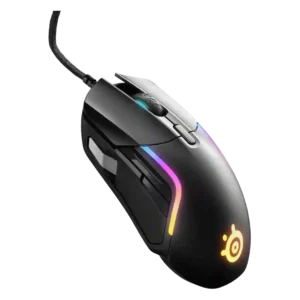

Compare SteelSeries Rival 5 vs ASUS ROG Strix Impact III Wireless

P1 SteelSeries Rival 5
P2 ASUS ROG Strix Impact III Wireless

Comparison Takeaways

SteelSeries Rival 5

Where It Has the Edge

  • palm grip comfort is 4.3 vs 3.1. Palm grip comfort is generally good for many users, especially larger or relaxed palm grips, but at least...
  • long-session comfort is 4.6 vs 3.7. Long-session comfort is supported by reviewers who used it comfortably for long stretches or several hours.
  • RGB features is 4.6 vs 3.8. RGB features are a clear strength, with bright 10-zone lighting, many colors and extensive per-zone customization repeatedly praised.
  • ergonomic design is 4.5 vs 3.8. Ergonomic design is generally praised as right-handed, comfortable and supportive, though not universal for every hand size.

ASUS ROG Strix Impact III Wireless

Where It Has the Edge

  • weight tuning is 4.1 vs 1.5. Weight tuning is a useful advantage because AA and AAA battery choices change the weight and battery-life tradeoff.
  • onboard memory is 4.4 vs 3.0. Onboard memory is supported and useful for saving calibrated settings and profiles directly to the mouse.
  • side button quality is 4.1 vs 3.1. Side buttons are usable and generally clear, but the left-only placement limits full ambidextrous use.
  • handedness options is 3.7 vs 2.8. The body shape is symmetrical, but side buttons on the left make it functionally better for right-handed users.
Average score
Product 1: SteelSeries Rival 5
4.2
Product 2: ASUS ROG Strix Impact III...
4.3
2.4GHz connectivity
Product 1: SteelSeries Rival 5
No score yet
Product 2: ASUS ROG Strix Impact III...
4.5

Reviewers consistently report working 2.4GHz wireless through the ROG Omni receiver, with SpeedNova called out as the performance-focused mode.

acceleration control
Product 1: SteelSeries Rival 5
4.4

Acceleration settings are configurable in SteelSeries software, and reviewers also noted no unwanted hardware acceleration in testing.

Product 2: ASUS ROG Strix Impact III...
4.5

Acceleration support is strong on paper, with multiple reviews citing the 50g acceleration rating alongside the high-end sensor specs.

Accuracy and tracking precision
Product 1: SteelSeries Rival 5
4.7

Reviewers consistently describe tracking as accurate and precise, with smooth aiming and little sign of drift, dragging or missed cursor control.

Product 2: ASUS ROG Strix Impact III...
4.7

Reviewers agree the mouse tracks accurately and translates movement precisely, especially for quick aiming and fast cursor control.

balance and weight distribution
Product 1: SteelSeries Rival 5
4.5

Weight distribution has limited but positive support, with reviewers describing the mouse as balanced and light without feeling insubstantial.

Product 2: ASUS ROG Strix Impact III...
4.0

Only one review directly discussed balance, finding the AA setup normal while noting balance depends on battery choice.

battery life
Product 1: SteelSeries Rival 5
No score yet
Product 2: ASUS ROG Strix Impact III...
4.6

Battery life is a major strength, with reviewers citing 450-hour 2.4GHz claims and real-world use showing little or no drain.

Bluetooth support
Product 1: SteelSeries Rival 5
No score yet
Product 2: ASUS ROG Strix Impact III...
4.5

Bluetooth is consistently supported as the battery-saving wireless mode and a practical alternative to the 2.4GHz receiver.

build quality
Product 1: SteelSeries Rival 5
4.3

Build quality is strong, with many reviewers reporting sturdy construction, little flex, no rattling and a durable-feeling shell.

Product 2: ASUS ROG Strix Impact III...
4.7

Build quality is praised across reviews, with sturdy construction, tight fitment, and little wobble despite the removable shell.

button customization
Product 1: SteelSeries Rival 5
4.4

Button customization is strong through SteelSeries software, with remapping, shortcuts and templates, though physical side-button usability varies.

Product 2: ASUS ROG Strix Impact III...
4.5

Button customization is well supported through Armoury Crate and onboard controls, including remapping, functions, and profiles.

button responsiveness
Product 1: SteelSeries Rival 5
4.6

Button responsiveness is strong overall, with reviewers reporting consistent clicks, no missed inputs, and little pre- or post-travel.

Product 2: ASUS ROG Strix Impact III...
4.5

Button response is described as crisp, accurate, and dependable, with reviewers highlighting clear actuation and reliable click registration.

cable flexibility
Product 1: SteelSeries Rival 5
3.7

Cable flexibility is mixed: several reviewers liked the mesh or braided cable, while others found it stiff, lumpy or not competitive.

Product 2: ASUS ROG Strix Impact III...
No score yet
charging convenience
Product 1: SteelSeries Rival 5
No score yet
Product 2: ASUS ROG Strix Impact III...
4.0

Power convenience is mixed: AA/AAA batteries are easy to replace, but some reviewers disliked the lack of a rechargeable internal battery.

claw grip comfort
Product 1: SteelSeries Rival 5
4.4

Claw grip comfort is well supported, with reviewers saying claw users should be comfortable and that the mouse suits claw grips.

Product 2: ASUS ROG Strix Impact III...
4.2

Claw grip is generally a good fit, especially for smaller hands and users who prefer the mouse’s compact, low profile shape.

click latency
Product 1: SteelSeries Rival 5
4.3

Latency evidence is mostly positive, with negligible lag or no noticeable delay, but one technical reviewer found it behind some optical-switch competitors.

Product 2: ASUS ROG Strix Impact III...
4.8

Click latency is considered excellent thanks to minimal pre-travel, tight button tensioning, and wireless responsiveness close to wired.

click noise
Product 1: SteelSeries Rival 5
4.4

Click noise is relatively controlled, with reviewers describing clicks as not too loud, fairly quiet or pleasant in volume.

Product 2: ASUS ROG Strix Impact III...
4.1

Click noise is moderate to quiet depending on the reviewer; it is audible but not usually described as loud.

connection stability
Product 1: SteelSeries Rival 5
No score yet
Product 2: ASUS ROG Strix Impact III...
4.7

Connection stability is a strong point, with reviewers reporting no signal breaks and reliable 2.4GHz radio communication.

cross-platform compatibility
Product 1: SteelSeries Rival 5
4.3

Cross-platform compatibility is supported by Windows and Mac software mentions, plus one review noting Xbox compatibility.

Product 2: ASUS ROG Strix Impact III...
4.2

Cross-device use is supported by onboard memory, Bluetooth device switching, and replaceable or multi-device ROG receiver support.

DPI range
Product 1: SteelSeries Rival 5
4.6

The CPI/DPI range is broad, typically cited up to 18,000, with reviewers noting enough headroom for high-resolution displays and fast settings.

Product 2: ASUS ROG Strix Impact III...
4.8

DPI range is a standout specification, with reviewers repeatedly citing the 100-to-36,000 DPI sensor range.

durability over time
Product 1: SteelSeries Rival 5
4.6

Durability over time has positive support from the high switch durability rating and sturdy build comments, though long-term field wear is not deeply tested.

Product 2: ASUS ROG Strix Impact III...
4.4

Long-term durability is supported by hotswappable switches, durable click ratings, and reviewers valuing the ability to replace worn parts.

ecosystem integration
Product 1: SteelSeries Rival 5
4.2

Ecosystem integration is useful for SteelSeries users through device syncing, PrismSync and centralized lighting/software controls.

Product 2: ASUS ROG Strix Impact III...
4.2

ASUS ecosystem integration is strong through Aura Sync, Armoury Crate, and ROG Omni receiver pairing with compatible peripherals.

ergonomic design
Product 1: SteelSeries Rival 5
4.5

Ergonomic design is generally praised as right-handed, comfortable and supportive, though not universal for every hand size.

Product 2: ASUS ROG Strix Impact III...
3.8

Ergonomics are good for smaller hands and lightweight use, but larger hands or extended sessions can expose limited support.

fingertip grip comfort
Product 1: SteelSeries Rival 5
4.2

Fingertip grip comfort is more conditional: it can work, especially with larger hands, but some reviewers suggest smaller fingertip users may struggle.

Product 2: ASUS ROG Strix Impact III...
4.3

Fingertip grip is one of the best-supported grips, with reviewers repeatedly calling it comfortable and well matched to the compact body.

FPS gaming suitability
Product 1: SteelSeries Rival 5
4.3

FPS suitability is mixed-positive: tracking and speed are strong, but side-button placement, weight or cable can limit pure FPS specialists.

Product 2: ASUS ROG Strix Impact III...
4.6

FPS suitability is strong because reviewers connect the accurate sensor, low latency, light weight, and fast clicks to shooters.

glide smoothness
Product 1: SteelSeries Rival 5
4.5

Glide smoothness is a strength, with reviewers repeatedly saying the mouse glides smoothly, easily or without resistance.

Product 2: ASUS ROG Strix Impact III...
4.4

Glide is consistently smooth on pads and desks, with PTFE/Teflon feet getting positive comments.

grip texture
Product 1: SteelSeries Rival 5
4.2

Grip texture is positive overall, with matte or slightly rough surfaces helping control, though one reviewer noted skin oil buildup.

Product 2: ASUS ROG Strix Impact III...
4.2

Grip texture is useful despite no rubber panels, with textured sides and surfaces helping prevent slipping.

handedness options
Product 1: SteelSeries Rival 5
2.8

Handedness options are limited because the Rival 5 is repeatedly described as right-handed or intended for righties.

Product 2: ASUS ROG Strix Impact III...
3.7

The body shape is symmetrical, but side buttons on the left make it functionally better for right-handed users.

left and right click quality
Product 1: SteelSeries Rival 5
4.5

Left and right click quality is well supported by reports of responsive main clicks with no stickiness, double-clicking or missed inputs.

Product 2: ASUS ROG Strix Impact III...
4.5

Left and right clicks are well regarded for PBT caps, crisp feel, minimal travel, and precise actuation.

lift-off distance
Product 1: SteelSeries Rival 5
4.4

Lift-off and tilt tracking are generally well regarded, though reviewers note the lack of lift-off distance adjustment in software.

Product 2: ASUS ROG Strix Impact III...
4.5

Lift-off distance is adjustable in Armoury Crate or through shortcuts, and reviewers note it can be calibrated.

long-session comfort
Product 1: SteelSeries Rival 5
4.6

Long-session comfort is supported by reviewers who used it comfortably for long stretches or several hours.

Product 2: ASUS ROG Strix Impact III...
3.7

Long-session comfort is mixed: the mouse is easy for daily use and small hands, but larger hands may feel cramped.

macro support
Product 1: SteelSeries Rival 5
4.5

Macro support is well covered, with reviewers praising macro creation, assignment and reliable macro playback in SteelSeries GG or Engine.

Product 2: ASUS ROG Strix Impact III...
4.4

Macro support is present through Armoury Crate, which reviewers specifically mention alongside button mapping and profiles.

materials quality
Product 1: SteelSeries Rival 5
4.1

Materials quality is solid for the price, centered on matte ABS or soft-touch plastic, though not always described as truly premium.

Product 2: ASUS ROG Strix Impact III...
4.5

Materials quality is praised, including PBT main buttons, practical matte plastic, textured sides, and sturdy lightweight construction.

MMO gaming suitability
Product 1: SteelSeries Rival 5
4.1

MMO suitability is moderate: the extra buttons help, but several reviewers still prefer a dedicated MMO mouse for heavy MMO play.

Product 2: ASUS ROG Strix Impact III...
No score yet
MOBA gaming suitability
Product 1: SteelSeries Rival 5
4.3

MOBA suitability is positive for players who want extra thumb commands, with reviewers mapping abilities or citing League and Dota use.

Product 2: ASUS ROG Strix Impact III...
No score yet
motion consistency
Product 1: SteelSeries Rival 5
4.7

Motion consistency is praised across reviews, with smooth, predictable tracking and little evidence of jitter, drifting or unwanted cursor movement.

Product 2: ASUS ROG Strix Impact III...
4.7

Motion consistency is excellent in the evidence, with reviewers reporting no jitter, no disruption, and no lag or stutter.

onboard memory
Product 1: SteelSeries Rival 5
3.0

Onboard memory is limited: reviews mention one saved profile or saved DPI/polling settings, but RGB and broader settings often require software.

Product 2: ASUS ROG Strix Impact III...
4.4

Onboard memory is supported and useful for saving calibrated settings and profiles directly to the mouse.

palm grip comfort
Product 1: SteelSeries Rival 5
4.3

Palm grip comfort is generally good for many users, especially larger or relaxed palm grips, but at least one reviewer reported palm pinching.

Product 2: ASUS ROG Strix Impact III...
3.1

Palm grip support is limited, generally working only for very small hands because the shell is compact and flat.

polling rate
Product 1: SteelSeries Rival 5
4.1

Polling-rate control is available and can reach 1000 Hz in the software, though one reviewer noted the polling rate trails some competitors.

Product 2: ASUS ROG Strix Impact III...
4.2

Polling rate is strong for the price, with 1000Hz 2.4GHz support noted, though Bluetooth can be lower in one reviewer’s testing.

portability
Product 1: SteelSeries Rival 5
No score yet
Product 2: ASUS ROG Strix Impact III...
4.3

Portability is strong thanks to the compact body, receiver storage, battery operation, and travel-friendly wireless design.

premium feel
Product 1: SteelSeries Rival 5
4.4

Premium feel is mostly positive for the price, though a few reviewers distinguish its plastic build from more premium-feeling mice.

Product 2: ASUS ROG Strix Impact III...
4.4

Premium feel is present mainly in build and fit, though the product is still positioned as an affordable ROG model.

profile switching
Product 1: SteelSeries Rival 5
4.3

Profile switching is useful for game-specific layouts, CPI presets and disabling unused stages, with several reviewers creating or switching profiles.

Product 2: ASUS ROG Strix Impact III...
4.3

Profile switching is well supported through onboard memory, Armoury Crate, and mouse-button shortcuts.

programmable buttons
Product 1: SteelSeries Rival 5
4.5

Programmable buttons are a major feature, with the nine-button layout repeatedly praised for multi-genre use and extra commands.

Product 2: ASUS ROG Strix Impact III...
4.2

Programmable buttons are present, especially the side buttons and configurable controls through software.

RGB features
Product 1: SteelSeries Rival 5
4.6

RGB features are a clear strength, with bright 10-zone lighting, many colors and extensive per-zone customization repeatedly praised.

Product 2: ASUS ROG Strix Impact III...
3.8

RGB is modest: mostly scroll-wheel lighting, useful for DPI or battery indication rather than flashy lighting.

scroll wheel quality
Product 1: SteelSeries Rival 5
4.0

The scroll wheel is generally satisfying and tactile, but reviewers note its fixed middle resistance is not ideal for everyone.

Product 2: ASUS ROG Strix Impact III...
4.4

Scroll wheel quality is positive overall, with clear notches, resistance, quiet operation, and precise control mentioned.

sensor performance
Product 1: SteelSeries Rival 5
4.6

The TrueMove Air sensor is one of the strongest points, repeatedly described as accurate, strong, and effective for gaming at this price.

Product 2: ASUS ROG Strix Impact III...
4.8

Sensor performance is one of the mouse’s strongest areas, with the ROG AimPoint sensor praised for accuracy and high specs.

shape comfort
Product 1: SteelSeries Rival 5
4.1

Shape comfort is mostly positive but hand-dependent, with several reviewers finding it comfortable while others cite fit, size or palm-position issues.

Product 2: ASUS ROG Strix Impact III...
3.6

Shape comfort is polarizing: compact and familiar for some, but too flat or sloped for others.

side button quality
Product 1: SteelSeries Rival 5
3.1

Side button quality is the most divisive area: some reviewers liked the paddle or toggle, while many found the silver/front buttons awkward or hard to reach.

Product 2: ASUS ROG Strix Impact III...
4.1

Side buttons are usable and generally clear, but the left-only placement limits full ambidextrous use.

skate durability
Product 1: SteelSeries Rival 5
2.5

Skate durability has weak support; one review noted no spare mouse feet, which reduces confidence in replacement or long-term skate support.

Product 2: ASUS ROG Strix Impact III...
3.3

Skate durability is only moderately supported; glide is smooth, but reviews mention faster wear without a pad and no spare feet.

software stability
Product 1: SteelSeries Rival 5
4.1

Software stability is mostly acceptable, with light resource use and reliable macro playback, but some lighting/profile save behavior drew criticism.

Product 2: ASUS ROG Strix Impact III...
No score yet
software usability
Product 1: SteelSeries Rival 5
4.4

Software usability is mostly positive, with GG or Engine described as easy, intuitive and powerful, though a few reviewers found it cluttered.

Product 2: ASUS ROG Strix Impact III...
4.3

Software usability is generally positive, with Armoury Crate offering clear controls for buttons, DPI, lighting, calibration, and power.

surface compatibility
Product 1: SteelSeries Rival 5
4.7

Surface compatibility has limited but positive evidence, with reviewers noting good grip or skating across every surface they tried.

Product 2: ASUS ROG Strix Impact III...
4.1

Surface compatibility is good across pads and desk surfaces, though glass is a clear exception.

switch durability
Product 1: SteelSeries Rival 5
4.7

Switch durability scores highly because many reviews cite IP54 Golden Micro switches rated for 80 million clicks.

Product 2: ASUS ROG Strix Impact III...
4.5

Switch durability is strong, with 50M to 70M click ratings and easy replacement through Push-Fit sockets.

switch feel
Product 1: SteelSeries Rival 5
4.6

Switch feel is a strength: reviewers repeatedly call the clicks crisp, tactile, responsive and appropriately weighted.

Product 2: ASUS ROG Strix Impact III...
4.4

Switch feel is praised as clear, tactile, crisp, and adjustable if users install compatible switches.

value for money
Product 1: SteelSeries Rival 5
4.3

Value for money is a major consensus strength, with many reviews calling the $60 mouse affordable, well-priced or a strong value.

Product 2: ASUS ROG Strix Impact III...
4.4

Value is a recurring strength, with reviewers repeatedly describing the mouse as affordable or a great deal for its specs.

water and dust resistance
Product 1: SteelSeries Rival 5
4.4

Water and dust resistance is supported through repeated references to IP54-rated switches rather than full-body water resistance.

Product 2: ASUS ROG Strix Impact III...
No score yet
weight
Product 1: SteelSeries Rival 5
4.0

At roughly 85g, the Rival 5 is seen as light or mid-weight for a feature-rich mouse, though not ultralight by competitive FPS standards.

Product 2: ASUS ROG Strix Impact III...
4.2

Weight is light overall, though the 57g marketing figure excludes the required battery and real use is closer to 68-72g.

weight tuning
Product 1: SteelSeries Rival 5
1.5

Weight tuning is a weakness because multiple reviewers explicitly note that the Rival 5 lacks tunable or custom weights.

Product 2: ASUS ROG Strix Impact III...
4.1

Weight tuning is a useful advantage because AA and AAA battery choices change the weight and battery-life tradeoff.

wireless latency
Product 1: SteelSeries Rival 5
No score yet
Product 2: ASUS ROG Strix Impact III...
4.6

Wireless latency is consistently praised, with several reviewers finding it close to wired and suitable for gaming.

wireless performance
Product 1: SteelSeries Rival 5
No score yet
Product 2: ASUS ROG Strix Impact III...
4.6

Wireless performance is a core strength, with stable signals, low-latency SpeedNova, and no delay issues reported.