- Better: overall gaming mouse benchmark The Logitech G502 is described as the reviewer’s gold standard for gaming mice.
- More expensive: value The Rival 5 is described as a cheaper contender against the Logitech G502.
SteelSeries Rival 5 Review
Bottom Line
Choose the Rival 5 for precise tracking, vivid RGB, strong value, and multi-genre button flexibility. Skip it if you need wireless, tunable weights, a soft cable, or side buttons that fit small hands easily.
Best for right-handed gamers who want one wired mouse for shooters, MOBAs, MMOs, productivity shortcuts, RGB customization, and strong sensor performance without moving into a premium price tier.
Not for buyers who need wireless connectivity, tunable weights, very small-mouse ergonomics, a dedicated MMO keypad, or side buttons that are effortless to reach with small hands.
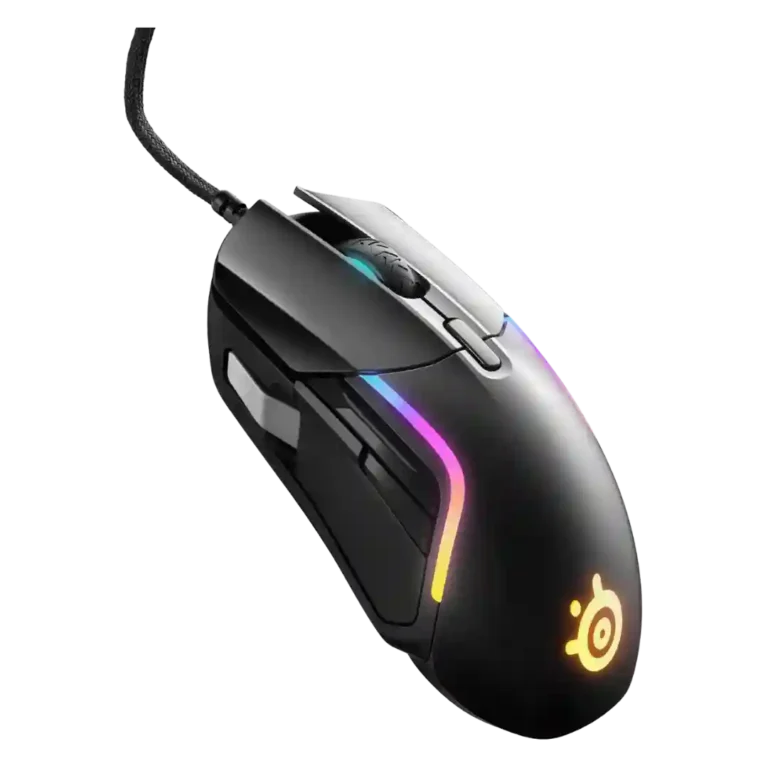
The SteelSeries Rival 5 earns broad praise as a feature-rich wired gaming mouse with excellent tracking, strong value, vivid RGB, and generally comfortable shaping. Reviewers repeatedly liked the TrueMove Air sensor, smooth glide, crisp switches, SteelSeries software, and the ability to remap buttons or macros for different genres. The tradeoff is that its ambitious side-button layout does not fit everyone: the front silver button and upper toggle are useful to some, but awkward, crowded, or too far forward to others. The cable also splits reviewers, ranging from low-drag praise to stiff-cable criticism. Overall sentiment is favorable, but the Rival 5 is strongest as a versatile all-rounder rather than a perfect specialist FPS or MMO mouse.
Compared in Reviews
Products reviewers directly compared with this model, grouped into quick takeaways.
g502
- Worse: weight The reviewer says the Rival 5 is lighter than a g502 while still being a bigger ergonomic mouse.
- Alternative: comfort, style, and price The Rival 5 is presented as a comfortable, slick alternative to the G502 that is easier on the wallet.
Rival 600
- Better: overall execution The reviewer says the Rival 5’s shape is good but that it is not nearly as good as the Rival 600.
- Better: overall quality and weights The reviewer calls the Rival 600 slightly better overall, largely due to tunable weights.
Feature Scorecards
Summary
46 reviewed features- Very positive 4.5-5.0 54% 25 features
- Positive 3.5-4.4 30% 14 features
- Neutral 2.5-3.4 13% 6 features
- Negative 1.5-2.4 2% 1 feature
- Very negative below 1.5 0% 0 features
Pros
-
Durability over time was praised through switch durability language and expectations that the switches would last rigorous use.
-
Surface compatibility had limited but very positive evidence, with reviewers saying the Rival 5 gripped or skated well across surfaces.
-
Switch durability had limited but strongly positive evidence, focused on the high durability rating compared with many mice.
-
Button customization was a strength, with reviewers praising remapping, media controls, and broad function assignment through software.
-
Motion consistency received strong praise, with reviewers reporting smooth, predictable movement and little to no dragging, drifting, or missed tracking.
-
Ergonomic design was praised for thumb support, rounded edges, and a comfortable grip profile.
-
Macro support was praised where tested, with reviewers finding macro creation intuitive, comfortable, or reliable even for longer macros.
-
Reviewers consistently found the Rival 5 precise and accurate in gaming and general use, with repeated praise for controlled aiming and tracking.
-
Cross-platform compatibility had limited positive evidence, including Xbox support and software working across macOS and Windows.
-
Long-session comfort was positive where discussed, with reviewers noting comfortable extended use and fewer pressure issues.
-
Premium feel was praised in limited but strong evidence, with reviewers saying the mouse looked or felt more expensive than expected.
-
The TrueMove Air sensor was one of the most consistently praised parts, described as strong, accurate, responsive, and problem-free across reviews.
-
Build quality was a clear strength, with reviewers repeatedly describing the mouse as sturdy, solid, and free from flex or rattling.
-
Button responsiveness was strongly positive, with reviewers reporting tactile clicks, no repeated clicks, and no meaningful double-click or travel problems.
-
Shape comfort was mostly positive, with reviewers praising the hand fit and general comfort, though size and edge geometry did not suit everyone.
-
Glide smoothness was strongly positive, with reviewers repeatedly reporting smooth, low-friction movement on mouse pads and surfaces.
-
Switch feel was broadly praised as crisp, deliberate, snappy, and satisfying, with only minor force-preference caveats.
-
RGB features were widely praised for rich zones and customization, though some reviewers found the lighting distracting, too bright, or partially hidden during use.
-
Software usability was a major strength overall, especially for SteelSeries GG/Engine customization, though a few reviewers found the layout cluttered.
-
Click noise was viewed positively, with reviewers describing the switches or pressure points as quiet or pleasant rather than distracting.
-
Acceleration-related controls were praised as unusually advanced and useful for fine-tuning, especially through SteelSeries software.
-
Left and right clicks were praised for a deep, tactile, well-weighted feel with good actuation force.
-
Profile switching evidence was positive but limited, centered on easy game-specific switching and automatic settings changes.
-
Balance and weight distribution had limited but positive evidence, with one reviewer calling the mouse well balanced for its feature set.
-
Value for money was the strongest consensus point: most reviewers found the Rival 5 well priced or feature-rich, with only a few dissenting value judgments.
-
Lift-off behavior was generally praised as effective or near-perfect, with a minority caveat that medium or non-adjustable lift-off could bother some users.
-
Programmable buttons were generally valued for multi-genre play, though some reviewers felt awkward placement reduced how many were truly usable.
-
The wide DPI/CPI range was viewed as useful and flexible, although several reviewers noted the highest settings were more than they personally needed.
-
Click latency was mostly seen as fine or negligible, though one test-oriented reviewer said it lagged behind some competitors.
-
Ecosystem integration was positive but conditional, with reviewers valuing lighting sync and brand-wide software most when already using SteelSeries gear.
-
Most reviewers liked the 85g weight as light or balanced for the feature set, while a few wished it were lighter or disagreed with the marketing emphasis.
-
MMO suitability was generally positive for a multi-genre mouse, but reviewers still saw dedicated MMO mice as better for heavy hotkey users.
-
Claw grip comfort was mostly positive for suitable hand sizes, but at least one reviewer with smaller hands found it too big to claw comfortably.
-
FPS suitability was mixed: tracking and speed were praised, but several reviewers said side-button reach or layout made it less ideal for dedicated FPS use.
-
Grip texture was generally helpful for stability, although one reviewer preferred a competitor’s more textured side grips.
-
MOBA suitability was moderately positive because side buttons could map abilities, though the learning curve and limited usable buttons were caveats.
-
Scroll wheel feedback was mixed, with some finding it satisfying and tactile while others disliked the middle-of-the-road resistance for games or documents.
-
Cable flexibility was highly mixed: some praised low drag or flexibility, while many criticized stiffness, non-detachability, or non-paracord feel.
-
Fingertip grip comfort was split, with one reviewer finding it excellent and another warning the mouse was too large for fingertip users.
Cons
-
Polling-rate feedback was limited and mixed: one reviewer valued the adjustable feedback, while another treated the polling rate as a comparative weakness.
-
Palm grip comfort was mixed: one reviewer strongly favored it, while others reported palm pinching or desk contact.
-
Side-button quality was the most divisive area: some liked the paddle or natural placement, while many struggled with the front/silver button or crowded layout.
-
Materials quality was mixed because the plastic shell was expected and serviceable, but reviewers did not always find it premium.
-
Onboard memory was a recurring weakness because RGB or broader profiles often required software, though one reviewer found saved DPI and polling adequate for events.
-
Portability had limited negative evidence because software-dependent settings could become a hassle when carrying the mouse to tournaments or other systems.
-
Weight tuning scored poorly because reviewers repeatedly noted the lack of tunable or customizable weights as a tradeoff versus some competitors.
Compared With Category Average
Compared with other Gaming Mouse, this product is above average in RGB features, value for money, software usability, below average in onboard memory, portability, side button quality.
Summary
8 compared features- Above average 0.4+ pts higher 63% 5 features
- Same as average within 0.3 pts 0% 0 features
- Below average 0.4+ pts lower 38% 3 features
| Attribute | This product | Category average | Difference |
|---|---|---|---|
| onboard memory | 2.7 | 3.9 | -1.3 |
| RGB features | 4.6 | 3.6 | +1.0 |
| portability | 2.5 | 3.8 | -1.3 |
| value for money | 4.5 | 3.7 | +0.7 |
| side button quality | 3.0 | 3.8 | -0.7 |
| software usability | 4.6 | 3.9 | +0.7 |
| click noise | 4.5 | 3.4 | +1.1 |
| durability over time | 5.0 | 4.0 | +1.0 |
FAQ
Is the SteelSeries Rival 5 good for FPS games?
Yes, many reviewers praised its fast, accurate tracking in shooters. However, several said the front or upper side buttons can be awkward during intense FPS play.
Are the side buttons useful?
They are useful for some reviewers, especially for shortcuts, media controls, and multi-genre mappings. Others found the silver/front button too far forward or the toggle hard to use quickly.
How good is the sensor?
The TrueMove Air sensor received very strong praise for accurate, smooth, responsive tracking with little evidence of jitter, drifting, or delay.
Is the Rival 5 comfortable for long sessions?
Most reviewers found the shape comfortable, especially for larger hands or users who like ergonomic mice. Palm and fingertip comfort was more mixed depending on hand size and grip style.
Does the Rival 5 have good software?
SteelSeries GG/Engine was usually described as easy, intuitive, and powerful for DPI, RGB, profiles, macros, and button mapping. A few reviewers found the interface cluttered.
What are the biggest drawbacks?
The recurring drawbacks are uneven side-button accessibility, mixed cable feel, limited onboard memory for RGB/profile behavior, no wireless option, and no tunable weights.
Consider This Instead
If you want better weight tuning
Choose Razer Viper V3 HyperSpeed. It scores 4.8 vs 2.2 for weight tuning, with a 4.0 overall score.
If you want better side button quality
Choose Razer DeathAdder V3 HyperSpeed. It scores 4.7 vs 3.0 for side button quality, with a 4.1 overall score.
If you want better onboard memory
Choose Razer Naga V2 Pro. It scores 5.0 vs 2.7 for onboard memory, with a 4.4 overall score.
If you want better portability
Choose Logitech G PRO X Superlight 2 DEX. It scores 5.0 vs 2.5 for portability, with a 4.0 overall score.
Overall Top Gaming Mouse Alternatives
Choose the ROG Harpe II Ace for ultralight FPS play, precise tracking, smooth glide, and web-based tuning. Skip it if you need palm-grip support, MMO buttons, onboard profiles, or long...
Pros: acceleration control, wireless latency
Cons: onboard memory, MMO gaming suitability

Best for MMO/MOBA control, swappable panels, strong wireless performance, and long battery life. Skip it if you want a light FPS mouse, low price, or no Synapse quirks.
Pros: sensor performance, click latency
Cons: software stability, Bluetooth support
Choose the Aerox 3 Wireless Gen 2 if you want a light, fast wireless FPS mouse with strong software and battery life. Skip it if you dislike honeycomb shells, need...
Pros: click latency, motion consistency
Cons: palm grip comfort, fingertip grip comfort
Choose the Kone II if you want a large, ergonomic mouse with deep customization and strong sensor performance. Skip it if you have small hands, need an ambidextrous mouse, or...
Pros: click latency, motion consistency
Cons: handedness options, portability