2.4GHz connectivity
P1
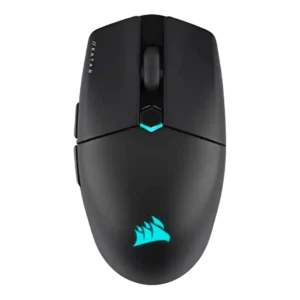
Product 1: Corsair Katar Elite Wireless
4.3
2.4GHz Slipstream connectivity is the main gaming connection and is consistently associated with stable, low-latency performance.
P2
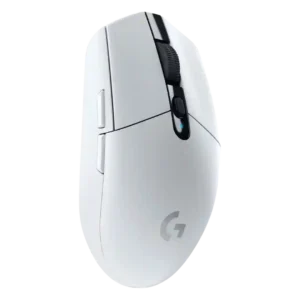
Product 2: Logitech G305 Lightspeed
4.5
Reviewers consistently describe the G305 as a Lightspeed 2.4GHz dongle mouse, with strong low-latency performance but no Bluetooth fallback.
acceleration control
P1
Product 1: Corsair Katar Elite Wireless
4.4
Acceleration specs are repeatedly cited at 50G, reinforcing that the sensor has plenty of headroom for fast movements.
P2
Product 2: Logitech G305 Lightspeed
4.6
The HERO sensor is repeatedly credited with zero smoothing or acceleration behavior and strong high-speed tracking.
Accuracy and tracking precision
P1
Product 1: Corsair Katar Elite Wireless
4.4
Reviewers repeatedly describe the sensor and tracking as precise, especially for flicks and FPS aiming, though one creative-work review found fine-control harder because the mouse felt too light.
P2
Product 2: Logitech G305 Lightspeed
4.6
Accuracy is a core strength, with reviewers praising responsive tracking, exact motion, and precise FPS performance.
balance and weight distribution
P1
Product 1: Corsair Katar Elite Wireless
4.6
Only a couple of reviews address balance directly, but both describe the mouse as well balanced with its built-in battery.
P2
Product 2: Logitech G305 Lightspeed
2.4
Balance is a recurring weakness because the AA battery pushes weight toward the rear of the mouse.
battery life
P1
Product 1: Corsair Katar Elite Wireless
4.1
Battery life is broadly good, usually cited at up to 110 hours over Bluetooth and around 60 hours over 2.4GHz, though competitors can last longer.
P2
Product 2: Logitech G305 Lightspeed
4.7
Battery life is one of the strongest points: reviewers repeatedly cite roughly 250 hours on one AA and, in some cases, months of use.
Bluetooth support
P1
Product 1: Corsair Katar Elite Wireless
4.1
Bluetooth support is useful for travel, laptops, tablets, and battery saving, but reviewers recommend 2.4GHz for gaming performance.
P2
Product 2: Logitech G305 Lightspeed
1.6
Bluetooth support is a clear limitation because the G305 relies on its USB dongle and does not offer Bluetooth pairing.
build quality
P1
Product 1: Corsair Katar Elite Wireless
4.0
Build quality is mostly solid for the price and weight, but reviewers differ on creaks, standard feel, and whether it feels special.
P2
Product 2: Logitech G305 Lightspeed
4.5
Build quality is broadly praised, with reviewers calling the shell sturdy, well constructed, tight, and free of major creaks or wobble.
button customization
P1
Product 1: Corsair Katar Elite Wireless
4.3
Button customization is strong through iCUE, with reviewers noting remapping controls, key assignments, and adjustable settings.
P2
Product 2: Logitech G305 Lightspeed
4.2
Button customization is strong for a six-button mouse, with software remapping, DPI functions, and game or app profiles noted across reviews.
button responsiveness
P1
Product 1: Corsair Katar Elite Wireless
3.6
Button responsiveness is mixed: some reviewers praise responsive zero-gap clicks, while others found the main buttons too easy to trigger or too soft.
P2
Product 2: Logitech G305 Lightspeed
4.1
Button responsiveness is mostly positive thanks to light, tactile clicks, though one long-term reviewer reported click failure after heavy use.
charging convenience
P1
Product 1: Corsair Katar Elite Wireless
4.2
Charging convenience is good thanks to USB-C, wired play while charging, and a rechargeable battery, though some reviewers still mention periodic recharging.
P2
Product 2: Logitech G305 Lightspeed
2.1
Charging convenience is weak because the mouse uses a replaceable AA battery, has no wired mode, and is not rechargeable.
claw grip comfort
P1
Product 1: Corsair Katar Elite Wireless
4.0
Claw grip comfort is generally strong, with the shape repeatedly described as aimed at claw users, though not every reviewer loved the rear support.
P2
Product 2: Logitech G305 Lightspeed
4.1
Claw grip comfort is generally good, especially for small to medium hands, while larger hands may need claw or fingertip grip instead of palm.
click latency
P1
Product 1: Corsair Katar Elite Wireless
4.5
Click latency evidence is positive overall, with reviewers praising fast actuation, zero-gap design, and instant-feeling clicks.
P2
Product 2: Logitech G305 Lightspeed
4.5
Click latency is a major strength, with reviewers repeatedly describing 1ms response or wired-like responsiveness.
connection stability
P1
Product 1: Corsair Katar Elite Wireless
4.5
Connection stability is a strength, with reviewers reporting stable, reliable connections and no hiccups or noticeable lags.
P2
Product 2: Logitech G305 Lightspeed
4.7
Connection stability is very strong, with multiple reviewers reporting no dropouts, freezes, lags, or cutouts during testing.
cross-platform compatibility
P1
Product 1: Corsair Katar Elite Wireless
4.3
Cross-platform compatibility is supported by one review noting PC or Mac connectivity through wireless, Bluetooth, or wired modes.
P2
Product 2: Logitech G305 Lightspeed
3.6
Cross-platform support is mixed: one review lists Windows, Mac, Chrome OS, and Android, but another notes the lack of G Hub on Linux.
DPI range
P1
Product 1: Corsair Katar Elite Wireless
4.5
The DPI range is broad, commonly cited at 26,000 DPI with configurable stages, giving plenty of sensitivity headroom even if most reviewers did not need the maximum.
P2
Product 2: Logitech G305 Lightspeed
3.9
The 12,000 DPI ceiling is seen as sufficient for most users, though some reviewers note it is lower than newer high-end mice.
durability over time
P1
Product 1: Corsair Katar Elite Wireless
2.5
Durability over time is only directly criticized in one review, which worried that the thin dongle-cover plate could break easily.
P2
Product 2: Logitech G305 Lightspeed
3.0
Durability evidence is mixed: one long-term review found only cosmetic wear, while another reported a failed click after a little over two years.
ecosystem integration
P1
Product 1: Corsair Katar Elite Wireless
4.3
Ecosystem integration is strong for Corsair users, with iCUE, multipoint dongle pairing, RGB synchronization, and broader Corsair-device integration.
P2
Product 2: Logitech G305 Lightspeed
4.3
Logitech ecosystem integration is a plus through G-Shift and keyboard compatibility, but it matters mainly to users already in Logitech’s ecosystem.
ergonomic design
P1
Product 1: Corsair Katar Elite Wireless
3.7
Ergonomic design is intentionally compact and ambidextrous-leaning, but reviewers note this inclusiveness sacrifices some hand-filling comfort.
P2
Product 2: Logitech G305 Lightspeed
2.6
Ergonomics are one of the more divisive areas, with some reviewers finding limited support and others finding the simple shell acceptable.
fingertip grip comfort
P1
Product 1: Corsair Katar Elite Wireless
4.1
Fingertip grip comfort is one of the mouse's strongest ergonomic themes, especially for small hands and users who prefer compact control.
P2
Product 2: Logitech G305 Lightspeed
4.1
Fingertip grip support is good, especially for small-to-medium hands and users who want to avoid a full palm grip.
FPS gaming suitability
P1
Product 1: Corsair Katar Elite Wireless
4.5
FPS suitability is strong, with reviewers repeatedly praising fast swiping, flick shots, precision aiming, and competitive Overwatch or shooter use.
P2
Product 2: Logitech G305 Lightspeed
4.4
FPS suitability is strong because reviewers cite fast sensor tracking, low latency, and good performance in shooters.
glide smoothness
P1
Product 1: Corsair Katar Elite Wireless
4.4
Glide smoothness is a major strength, with PTFE feet and low weight repeatedly producing smooth, effortless movement.
P2
Product 2: Logitech G305 Lightspeed
3.9
Glide is generally good on mouse pads and hard surfaces, though some reviewers criticize the stock feet or friction versus newer mice.
grip texture
P1
Product 1: Corsair Katar Elite Wireless
4.2
Grip texture is generally praised on the sides, though the smooth top finish attracts fingerprints and can look greasy.
P2
Product 2: Logitech G305 Lightspeed
3.3
Grip texture is mixed: some like the side texturing or finish, while others criticize the lack of rubberized texture or sweat-prone coating.
handedness options
P1
Product 1: Corsair Katar Elite Wireless
3.4
Handedness support is mixed: the body is often described as ambidextrous or nearly so, but side-button placement still favors right-handed use.
P2
Product 2: Logitech G305 Lightspeed
3.2
Handedness is mixed: the body is symmetrical or ambidextrous, but the left-side thumb buttons make full left-handed use limited.
left and right click quality
P1
Product 1: Corsair Katar Elite Wireless
3.0
Left and right click quality is divided, with some reviewers praising satisfying main clicks while others found them soft, undefined, loose, or less precise.
P2
Product 2: Logitech G305 Lightspeed
4.6
Main click quality is praised for springy, satisfying feedback and immediate bounce-back.
long-session comfort
P1
Product 1: Corsair Katar Elite Wireless
3.9
Long-session comfort is mixed: several reviewers found it comfortable for hours, but some reported initial fatigue or faster tiring for non-ideal grips.
P2
Product 2: Logitech G305 Lightspeed
3.0
Long-session comfort depends heavily on hand size and grip; light clicks help fatigue, but larger hands and marathon sessions can become uncomfortable.
macro support
P1
Product 1: Corsair Katar Elite Wireless
4.3
Macro support is well supported in iCUE, with several reviews noting game-specific macros, key assignments, and app-launch actions.
P2
Product 2: Logitech G305 Lightspeed
4.3
Macro support is available through Logitech software, including assigning macros to buttons in G Hub or LGS.
materials quality
P1
Product 1: Corsair Katar Elite Wireless
3.1
Materials quality is mixed, with textured sections liked but the smooth or thin plastic top criticized for fingerprints, shine, or a less premium feel.
P2
Product 2: Logitech G305 Lightspeed
4.6
Materials quality is praised where reviewed, especially the smooth, high-quality plastic construction at the price.
MMO gaming suitability
P1
Product 1: Corsair Katar Elite Wireless
2.0
MMO suitability is weak in the only direct review, which found the six-button design too basic for MMO play.
P2
Product 2: Logitech G305 Lightspeed
4.0
MMO suitability has limited but positive support from broad genre testing including World of Warcraft; the six-button layout remains modest for MMO-heavy play.
MOBA gaming suitability
P1
Product 1: Corsair Katar Elite Wireless
3.2
MOBA suitability is mixed, with one review saying the button count felt too basic while another grouped the lightweight design with MOBAs.
P2
Product 2: Logitech G305 Lightspeed
4.0
MOBA suitability is supported by the light mechanical clicks and cited suitability for repeated clicking in games like League of Legends.
motion consistency
P1
Product 1: Corsair Katar Elite Wireless
4.1
Motion consistency is generally strong, with reviewers reporting steady tracking, no shakes, and only one note about DPI feel being a little off compared with other mice.
P2
Product 2: Logitech G305 Lightspeed
4.7
Motion consistency is strong, with reviewers reporting smooth acceleration, accurate stops, and no practical performance gap versus pricier mice.
onboard memory
P1
Product 1: Corsair Katar Elite Wireless
3.5
Onboard memory is useful but limited; reviewers repeatedly note it can store settings, yet commonly only one active profile fits on the mouse.
P2
Product 2: Logitech G305 Lightspeed
4.1
Onboard memory is a useful plus for storing settings, though profile capacity is not as flexible as some users may want.
palm grip comfort
P1
Product 1: Corsair Katar Elite Wireless
2.5
Palm grip comfort is weak overall; most reviewers say the small, tapered rear lacks support for palm users, despite a few finding it usable.
P2
Product 2: Logitech G305 Lightspeed
3.3
Palm grip comfort is mixed: some reviewers can palm it comfortably, but several find the low, compact shell poor for larger hands.
polling rate
P1
Product 1: Corsair Katar Elite Wireless
4.2
Most reviewers highlight the 2,000Hz polling headline as a performance advantage, while a few note the practical difference may be hard to feel or connection-mode dependent.
P2
Product 2: Logitech G305 Lightspeed
4.3
Polling rate is competitive for the price at up to 1,000Hz, though some reviewers note newer mice now offer higher rates.
portability
P1
Product 1: Corsair Katar Elite Wireless
4.3
Portability is a clear plus, helped by the compact build, low weight, dongle storage, laptop friendliness, and travel use.
P2
Product 2: Logitech G305 Lightspeed
4.4
Portability is a major strength thanks to the small wireless body, internal dongle storage, and laptop-bag friendliness.
premium feel
P1
Product 1: Corsair Katar Elite Wireless
2.6
Premium feel is weakly supported and negative in the one direct review, which described the light plastic as less premium than expected.
P2
Product 2: Logitech G305 Lightspeed
4.2
Premium feel is good for the price, with a sturdy, smooth, substantive plastic shell, but the design remains plain rather than luxurious.
profile switching
P1
Product 1: Corsair Katar Elite Wireless
3.9
Profile switching is mixed because iCUE can manage many profiles and DPI stages, but the mouse itself has limited onboard profile capacity.
P2
Product 2: Logitech G305 Lightspeed
4.1
Profile switching is useful through Logitech software, with game-specific profiles and onboard profiles noted, though one reviewer wanted more onboard profiles.
programmable buttons
P1
Product 1: Corsair Katar Elite Wireless
4.3
Programmable-button support is strong for a simple six-button mouse, with most reviewers confirming all or nearly all buttons can be programmed.
P2
Product 2: Logitech G305 Lightspeed
4.2
Programmable buttons are consistently noted, with the G305 offering a simple six-button layout rather than an MMO-style button cluster.
RGB features
P1
Product 1: Corsair Katar Elite Wireless
3.6
RGB is present and customizable but generally modest, often described as minimal, logo-focused, or not very useful during actual use.
P2
Product 2: Logitech G305 Lightspeed
2.2
RGB features are intentionally minimal or absent, which some reviewers accept for battery and cost savings while others see as a missing feature.
scroll wheel quality
P1
Product 1: Corsair Katar Elite Wireless
2.9
Scroll wheel quality is the most consistent hardware complaint, with reviewers citing stiffness, weak tactility, muddy turns, or insufficient grip despite some positive texture notes.
P2
Product 2: Logitech G305 Lightspeed
4.3
Scroll wheel quality is mostly positive, with reviewers calling it tactile, smooth, snappy, or consistent, although noise appears in one review.
sensor performance
P1
Product 1: Corsair Katar Elite Wireless
4.5
The Marksman optical sensor is consistently treated as a strength, with high DPI specs and flawless or precise tracking in most gaming tests.
P2
Product 2: Logitech G305 Lightspeed
4.5
Sensor performance is one of the strongest consensus positives, with the HERO sensor praised for accuracy, efficiency, and gaming reliability.
shape comfort
P1
Product 1: Corsair Katar Elite Wireless
3.6
Shape comfort is highly grip-dependent: some reviewers found the small tapered shape comfortable, while others found it peculiar or too specialized.
P2
Product 2: Logitech G305 Lightspeed
4.0
Shape comfort is divisive: many like the simple egg-like shell, but several reviewers say the small flat body is awkward for large hands.
side button quality
P1
Product 1: Corsair Katar Elite Wireless
3.4
Side button quality is mixed: some reviews liked their clicky feel and separation, while others reported extra force or even game-registration issues.
P2
Product 2: Logitech G305 Lightspeed
3.3
Side button quality is mixed because placement is convenient for right-handed users, but some reviewers dislike travel, swappability, or mushiness.
skate durability
P1Product 1: Corsair Katar Elite Wireless
No score yet
P2
Product 2: Logitech G305 Lightspeed
4.5
Skate durability receives positive evidence where discussed, especially PTFE durability and high travel ratings, though glide feel varies by reviewer.
software stability
P1
Product 1: Corsair Katar Elite Wireless
4.6
Only one review directly addressed software stability, but it reported harmonious iCUE behavior without lag, bugs, or crashes.
P2
Product 2: Logitech G305 Lightspeed
4.2
Software stability is mostly acceptable in the available evidence, with Logitech software described as straightforward and improved from earlier complaints.
software usability
P1
Product 1: Corsair Katar Elite Wireless
4.1
Software usability is generally positive because iCUE is powerful and detailed, though some reviewers mention a learning curve or less intuitive layout.
P2
Product 2: Logitech G305 Lightspeed
4.2
Software usability is generally strong, with reviewers calling G Hub or Logitech software easy to use for DPI, button, profile, and macro setup.
surface compatibility
P1
Product 1: Corsair Katar Elite Wireless
4.0
Surface compatibility is mostly good on pads and tested surfaces, but some reviewers warn the feet can sound or feel less ideal on bare desks.
P2
Product 2: Logitech G305 Lightspeed
3.9
Surface compatibility is mostly good across pads, desks, fabric, and other surfaces, but glass is the repeated weak point.
switch durability
P1
Product 1: Corsair Katar Elite Wireless
4.3
Switch durability is supported by repeated 60-million-click claims for the Omron switches, though this is primarily spec-based rather than long-term wear testing.
P2
Product 2: Logitech G305 Lightspeed
3.6
Switch durability is mixed: rated click counts are cited, but one long-term reviewer reports a failed click after a little over two years.
switch feel
P1
Product 1: Corsair Katar Elite Wireless
4.5
Switch feel is mostly positive, with Omron switches described as satisfying and good-feeling across multiple reviews.
P2
Product 2: Logitech G305 Lightspeed
4.0
Switch feel is mostly positive for crisp, tactile clicks, though one reviewer found the switches dull and another warned the light clicks can cause accidental presses.
value for money
P1
Product 1: Corsair Katar Elite Wireless
4.1
Value is split by outlet: many reviews call it competitive or affordable for a wireless lightweight mouse, while a few argue it is expensive for its basic design.
P2
Product 2: Logitech G305 Lightspeed
4.4
Value is a major consensus strength because reviewers repeatedly say the G305 delivers strong wireless gaming performance at a budget price.
weight
P1
Product 1: Corsair Katar Elite Wireless
4.4
The 69g-class weight is one of the clearest strengths, repeatedly described as very light, agile, and easy to move.
P2
Product 2: Logitech G305 Lightspeed
3.6
Weight is debated: many call 96-101g light for wireless, while FPS-focused reviewers consider it heavy for its compact size.
wireless latency
P1
Product 1: Corsair Katar Elite Wireless
4.3
Wireless latency is strong over 2.4GHz Slipstream, with several reviewers seeing no latency, though Bluetooth is repeatedly treated as the slower option.
P2
Product 2: Logitech G305 Lightspeed
4.7
Wireless latency is a standout strength, with reviewers repeatedly describing 1ms or wired-indistinguishable performance.
wireless performance
P1
Product 1: Corsair Katar Elite Wireless
4.5
Wireless performance is consistently strong in Slipstream mode, with reviewers reporting no major compromises, negligible differences, and solid gaming behavior.
P2
Product 2: Logitech G305 Lightspeed
4.6
Wireless performance is one of the strongest categories, with reviewers reporting wired-like feel, no lag, and reliable gaming responsiveness.