Access logs
P1
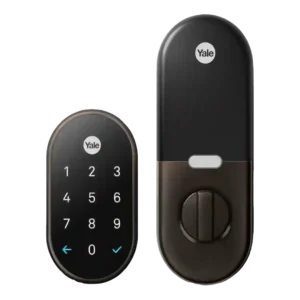
Product 1: Google Nest x Yale Smart...
4.4
Reviewers consistently liked the event history and activity timeline, which showed lock use, code use, and who came or went.
P2
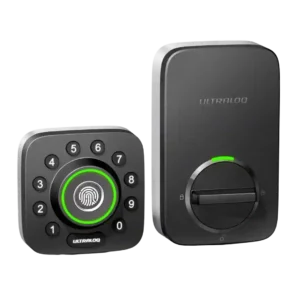
Product 2: ULTRALOQ U-Bolt Pro Smart Lock
4.5
Access logs were consistently available and useful, showing who entered, when, and by what method across app, fingerprint, code, manual, and auto events.
App
P1
Product 1: Google Nest x Yale Smart...
4.3
The Nest app was usually praised as simple and capable, though one review reported early crashes and hangs during setup and control.
P2
Product 2: ULTRALOQ U-Bolt Pro Smart Lock
4.2
The app enabled setup, locking, users, logs, notifications, and settings; reviews were mostly positive, but some criticized the UI, hiccups, or lost connections.
Auto-lock
P1
Product 1: Google Nest x Yale Smart...
4.3
Auto-lock was a reliable strength, especially with Home/Away Assist or configurable delay options, but it does not auto-unlock.
P2
Product 2: ULTRALOQ U-Bolt Pro Smart Lock
4.4
Auto-lock was widely supported and configurable, but several reviewers warned that the default behavior can surprise or briefly lock users out during setup.
Backset compatibility
P1
Product 1: Google Nest x Yale Smart...
4.0
Door backset and latch fit matter: the lock can fit standard setups, but reviewers stress checking measurements and alignment first.
P2
Product 2: ULTRALOQ U-Bolt Pro Smart Lock
4.2
Backset support was documented for 2-3/8-inch and 2-3/4-inch setups, though one reviewer hit confusing stamped markings during adjustment.
Battery
P1
Product 1: Google Nest x Yale Smart...
4.2
Battery coverage was strong, with AA batteries lasting around a year or longer and 9V emergency power available when depleted.
P2
Product 2: ULTRALOQ U-Bolt Pro Smart Lock
4.2
Battery feedback was mostly positive thanks to AA cells, low-battery alerts, and emergency USB power, but several reviewers noted variable real-world life.
Bluetooth
P1
Product 1: Google Nest x Yale Smart...
1.9
Bluetooth-style proximity unlocking was a weakness because reviewers noted the lock lacks approach-based or Bluetooth auto-unlock behavior.
P2
Product 2: ULTRALOQ U-Bolt Pro Smart Lock
4.3
Bluetooth was consistently useful for pairing, local control, and bridge operation, with reviewers noting app pairing or onboard Bluetooth support.
Build quality and durability
P1
Product 1: Google Nest x Yale Smart...
4.3
Build quality was generally strong, with reviewers calling the hardware sturdy, sleek, solid, stylish, and high quality.
P2
Product 2: ULTRALOQ U-Bolt Pro Smart Lock
4.4
Build impressions were mostly strong, with metal/heavy-duty comments and solid feel, but one reviewer described the unit as light plastic with a loud shaky action.
Camera and doorbell performance
P1
Product 1: Google Nest x Yale Smart...
3.0
Nest camera and doorbell ties were useful inside the Nest app, but reviewers wanted tighter Hello/video-feed integration.
P2Product 2: ULTRALOQ U-Bolt Pro Smart Lock
No score yetDoor-sense
P1
Product 1: Google Nest x Yale Smart...
1.8
Door-sense evidence was negative: reviewers wanted a door sensor and noted auto-lock could throw the bolt while the door was open.
P2
Product 2: ULTRALOQ U-Bolt Pro Smart Lock
4.6
Door-sense evidence was strong for the Wi-Fi version, with reviewers using the included sensor for open/closed status and to prevent locking while ajar.
Door compatibility (deadbolt fit)
P1
Product 1: Google Nest x Yale Smart...
3.7
Deadbolt fit was mostly standard-door friendly, but several reviewers had to adjust frames, holes, or strike plates for smooth operation.
P2
Product 2: ULTRALOQ U-Bolt Pro Smart Lock
4.4
The lock generally fit standard deadbolt doors and common left/right orientations, with reviewers citing standard door thickness or existing deadbolt prep as the main compatibility path.
Existing hardware reuse
P1
Product 1: Google Nest x Yale Smart...
3.7
The lock reuses the door conceptually as a deadbolt replacement and can preserve the doorknob, but it replaces the existing deadbolt hardware.
P2
Product 2: ULTRALOQ U-Bolt Pro Smart Lock
4.5
Reviewers were able to use existing deadbolt prep or old lock locations, with no wiring or drilling required in the cleanest installs.
Feature additions via updates
P1
Product 1: Google Nest x Yale Smart...
3.4
Feature-update evidence was mixed but promising, with Google Assistant and Nest integrations described as arriving or promised through software.
P2Product 2: ULTRALOQ U-Bolt Pro Smart Lock
No score yetFingerprint
P1Product 1: Google Nest x Yale Smart...
No score yet
P2
Product 2: ULTRALOQ U-Bolt Pro Smart Lock
4.7
Fingerprint entry was the strongest consensus feature, with nearly every reviewer reporting fast, reliable, or flawless scans, except for angle sensitivity in one review.
Geofencing
P1
Product 1: Google Nest x Yale Smart...
2.8
Geofencing worked for Home/Away auto-lock, but reviewers criticized the absence of GPS or proximity auto-unlock.
P2
Product 2: ULTRALOQ U-Bolt Pro Smart Lock
4.1
Geofencing and auto-unlock were split: several reviewers found it useful or improved, while others said it required distance thresholds, setup nuance, or failed outright.
Guest Codes and Access
P1
Product 1: Google Nest x Yale Smart...
4.2
Guest codes were a major strength, with expiring, scheduled, or temporary codes praised, though one test saw frequent keycode-generation errors.
P2
Product 2: ULTRALOQ U-Bolt Pro Smart Lock
4.6
Guest and temporary access was a clear strength for cleaners, dog sitters, rentals, Airbnb, and visitors, often with time/date limits or eKeys.
Hub requirement
P1
Product 1: Google Nest x Yale Smart...
3.9
A Nest Connect or Nest Guard is central to the experience; reviewers accepted it but consistently flagged it as a required extra hub.
P2
Product 2: ULTRALOQ U-Bolt Pro Smart Lock
4.0
Hub requirements varied by version: built-in Wi-Fi models avoided an extra bridge, while older or bridge-bundle versions needed a nearby adapter.
Installation and Setup
P1
Product 1: Google Nest x Yale Smart...
4.0
Installation was usually straightforward with app or voice guidance, but several reviewers needed alignment, frame, or setup troubleshooting.
P2
Product 2: ULTRALOQ U-Bolt Pro Smart Lock
4.4
Most reviewers found installation straightforward, often under 30 minutes, but the older bridge-era review reported a difficult tailpiece/screw-tightness process and one review had hub pairing restarts.
Jam detection
P1
Product 1: Google Nest x Yale Smart...
3.9
Jam or installation detection appeared useful when the bolt got stuck, though evidence was mostly tied to setup and alignment issues.
P2
Product 2: ULTRALOQ U-Bolt Pro Smart Lock
3.4
Only one review gave direct jam-related evidence, noting an error message that can indicate a jam when the lock orientation is wrong.
Key override reliability
P1
Product 1: Google Nest x Yale Smart...
1.7
Key override reliability was weak because the lock has no physical key; reviewers relied instead on keypad access or 9V emergency power.
P2
Product 2: ULTRALOQ U-Bolt Pro Smart Lock
4.5
Nearly every reviewer valued the physical key backup, especially for dead batteries, lockout mode, or emergency entry.
Keypad
P1
Product 1: Google Nest x Yale Smart...
3.9
The keypad was convenient and glove-friendly, but some reviewers disliked the required checkmark step or found touch feedback inconsistent.
P2
Product 2: ULTRALOQ U-Bolt Pro Smart Lock
4.5
The keypad was generally praised for anti-peep entry and tactile/physical buttons, although one reviewer found the circular layout slower than a normal keypad.
Keyway quality
P1
Product 1: Google Nest x Yale Smart...
1.7
Keyway quality scored poorly because there is no traditional keyway or physical key path to evaluate.
P2
Product 2: ULTRALOQ U-Bolt Pro Smart Lock
4.4
The hidden keyway was appreciated as a concealed backup, and one locksmith-style review specifically identified the conventional keyway as Schlage-style.
Lock/unlock speed
P1Product 1: Google Nest x Yale Smart...
No score yet
P2
Product 2: ULTRALOQ U-Bolt Pro Smart Lock
4.8
Unlocking was repeatedly described as instant or quick, especially fingerprint entry, with several reviewers calling it one of the faster locks they tested.
Locking motor
P1
Product 1: Google Nest x Yale Smart...
4.1
The locking motor was smooth and quiet, with chimes or audible confirmation and one review calling it among the quietest locks tested.
P2
Product 2: ULTRALOQ U-Bolt Pro Smart Lock
3.6
Motor feedback was mixed: PCMag and Brian Unbox found smooth or quiet operation, while others called the action loud, shaky, or sensitive to installation strain.
Locking reliability
P1
Product 1: Google Nest x Yale Smart...
4.3
Locking reliability was one of the strongest themes, with multiple reviewers reporting dependable locking and unlocking once installed correctly.
P2
Product 2: ULTRALOQ U-Bolt Pro Smart Lock
4.6
Reliability was a major strength in most hands-on tests, especially fingerprint/keyless operation, though older setup bugs and alignment-related concerns appeared in a minority of reviews.
Notifications
P1
Product 1: Google Nest x Yale Smart...
4.4
Notifications were strong, with reviewers receiving alerts for lock events, battery status, offline status, and failed lock behavior.
P2
Product 2: ULTRALOQ U-Bolt Pro Smart Lock
4.4
Notifications were useful for low battery, remote events, and entry alerts, though one reviewer disliked needing per-user notification rules.
Physical attack resistance
P1
Product 1: Google Nest x Yale Smart...
4.2
Physical resistance evidence was positive, from ANSI Grade 2 mentions, sturdy construction, and stronger strike-plate screw installation.
P2
Product 2: ULTRALOQ U-Bolt Pro Smart Lock
4.2
Physical security evidence was mixed by version/source: some cited ANSI Grade 1 strength, while other reviews called it unrated or Grade 2/3-like.
Pick/drill resistance (if rated)
P1
Product 1: Google Nest x Yale Smart...
4.0
Pick resistance was supported by the keyless design and fingerprint-resistant touchscreen, but drill resistance was not directly evaluated.
P2Product 2: ULTRALOQ U-Bolt Pro Smart Lock
No score yetRemote access
P1
Product 1: Google Nest x Yale Smart...
4.4
Remote access was a core advantage through the app once Nest Connect or Nest Guard enabled internet connectivity.
P2
Product 2: ULTRALOQ U-Bolt Pro Smart Lock
4.5
Remote access was widely valued for locking, unlocking, monitoring, and guest entry from away, but one review noted Bluetooth-only use loses smartphone control.
Security features (encryption)
P1
Product 1: Google Nest x Yale Smart...
4.1
Security features centered on privacy mode, keypad disabling, passcode limits, tamper or wrong-code alerts, and Grade 2 hardware rather than encryption details.
P2
Product 2: ULTRALOQ U-Bolt Pro Smart Lock
4.5
Security features included AES/dynamic-key encryption, lockout mode, and anti-peep/randomized keypad entry, with one review highlighting dual-layer encryption.
Smart-home integration (Alexa, Google, Siri, HomeKit, Matter, Thread)
P1
Product 1: Google Nest x Yale Smart...
3.1
Smart-home integration was the main tradeoff: it works best in Nest, but Alexa, HomeKit, SmartThings, IFTTT, and Z-Wave support were limited or absent.
P2
Product 2: ULTRALOQ U-Bolt Pro Smart Lock
4.2
Smart-home support was broad for Alexa, Google Assistant, IFTTT, SmartThings, and routines, but lack of HomeKit and Amazon Key limited some ecosystems.
Tamper detection sensitivity
P1
Product 1: Google Nest x Yale Smart...
4.0
Tamper detection had direct evidence from CNET, which noted alerts for tampering and repeated incorrect password attempts.
P2Product 2: ULTRALOQ U-Bolt Pro Smart Lock
No score yetTouchscreen
P1
Product 1: Google Nest x Yale Smart...
4.1
The touchscreen looked premium and lit up clearly, but some reviewers found it resistive, fiddly, or lacking button feedback.
P2Product 2: ULTRALOQ U-Bolt Pro Smart Lock
No score yetTwo-factor authentication availability
P1Product 1: Google Nest x Yale Smart...
No score yet
P2
Product 2: ULTRALOQ U-Bolt Pro Smart Lock
2.0
Two-factor authentication was a weakness because the Reviewed transcript explicitly says the Ultraloq app lacks two-factor authentication.
User access management
P1
Product 1: Google Nest x Yale Smart...
4.2
User access management was generally strong with scheduled, expiring, and revocable codes, though one review hit app errors during sharing.
P2
Product 2: ULTRALOQ U-Bolt Pro Smart Lock
4.6
User management was broad and flexible, covering admins, normal users, temporary users, fingerprints, passcodes, app access, and schedules.
Value and Price
P1
Product 1: Google Nest x Yale Smart...
3.4
Value depended heavily on the Nest ecosystem: reviewers saw the lock as pricey but worthwhile for Nest users who prize reliability.
P2
Product 2: ULTRALOQ U-Bolt Pro Smart Lock
4.4
Value was usually favorable because reviewers saw strong feature density for the price, although some noted it was expensive or dependent on sale/bridge configuration.
Voice control
P1
Product 1: Google Nest x Yale Smart...
2.6
Voice control was mixed across review timing: some reviews found no assistant support, while later evidence described Google Assistant lock-only support.
P2
Product 2: ULTRALOQ U-Bolt Pro Smart Lock
4.5
Voice control worked through Alexa or Google in several reviews, usually with a voice code for unlocking, but HomeKit/Siri support was absent.
Warranty and support
P1
Product 1: Google Nest x Yale Smart...
4.2
Warranty and support evidence was positive but sparse, with warranty coverage and Nest Pro installation support mentioned.
P2
Product 2: ULTRALOQ U-Bolt Pro Smart Lock
4.2
Support evidence was limited to one review that summarized user feedback as generally responsive with replacement parts when needed.
Weather resistance
P1
Product 1: Google Nest x Yale Smart...
4.7
Weather resistance was supported by wide temperature ratings, glove use, and reviewers contrasting it with conventional locks freezing.
P2
Product 2: ULTRALOQ U-Bolt Pro Smart Lock
4.5
Weather resistance was supported by IP65 or dust/water claims across reviews, with some reviewers expecting it to handle outdoor exposure and temperature swings.
Wi-Fi
P1
Product 1: Google Nest x Yale Smart...
3.5
Wi-Fi was indirect through Nest Connect or Nest Guard, and reviewers sometimes reported distance or connection caveats.
P2
Product 2: ULTRALOQ U-Bolt Pro Smart Lock
4.2
Wi-Fi was a major convenience when built in or paired through a bridge, but 2.4GHz-only setup and mesh/dual-band issues were the clearest repeated drawback.