Access logs
P1
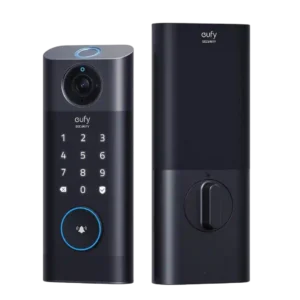
Product 1: eufy Video Smart Lock S330
4.4
Reviewers who discussed logs found useful entry history, including how the lock opened and which fingerprint was used, with one transcript explicitly describing an activity log.
P2
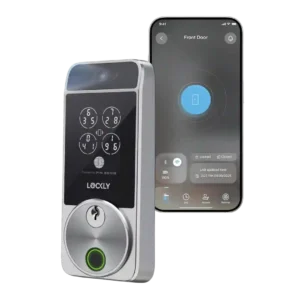
Product 2: Lockly Visage Zeno Series Smart...
4.2
The app exposes activity history and lock logs, and reviewers also mention real-time activity monitoring for seeing who used the door.
Alarm/siren loudness (if included)
P1
Product 1: eufy Video Smart Lock S330
4.2
The included chime can get loud enough for household alerts across rooms or floors, though reviewers discussed chime volume rather than a separate siren.
P2Product 2: Lockly Visage Zeno Series Smart...
No score yetApp
P1
Product 1: eufy Video Smart Lock S330
4.3
The app was generally praised as smooth, clean, user-friendly, and feature-rich, with live video, settings, and remote controls accessible from the phone.
P2
Product 2: Lockly Visage Zeno Series Smart...
3.8
The redesigned Lockly Home app is feature-rich and improved through updates, but reviewers also report beta-like polish issues, hidden settings, and occasional reliability annoyances.
Auto-lock
P1
Product 1: eufy Video Smart Lock S330
4.4
Auto-lock was repeatedly seen as a useful peace-of-mind feature, with timing and schedule controls, although one reviewer warned it may lock when the door is open.
P2
Product 2: Lockly Visage Zeno Series Smart...
3.9
Auto-lock is configurable and can work well, but one reviewer warns it depends on a very smooth deadbolt path and may fail or beep if the door binds.
Auto-relock after failed attempts
P1
Product 1: eufy Video Smart Lock S330
4.2
Wrong-try protection and passcode lockout were clearly supported, giving the lock a configurable response after repeated failed attempts.
P2Product 2: Lockly Visage Zeno Series Smart...
No score yetBackset compatibility
P1
Product 1: eufy Video Smart Lock S330
4.6
Backset support is well documented for common 2 3/8-inch and 2 3/4-inch sizes.
P2
Product 2: Lockly Visage Zeno Series Smart...
4.5
The installation walkthrough shows support for the common 2-3/8-inch and 2-3/4-inch backset positions.
Battery
P1
Product 1: eufy Video Smart Lock S330
4.2
Battery feedback was strongly positive overall, with multiple reviewers citing several months of use, USB-C charging, and only occasional recharges.
P2
Product 2: Lockly Visage Zeno Series Smart...
3.9
Reviewers liked the rechargeable battery packs and spare battery, but battery life varied widely with always-on face scanning and default settings.
Bluetooth
P1
Product 1: eufy Video Smart Lock S330
4.0
Bluetooth is present through the included bridge, which PCMag says contains both Wi-Fi and Bluetooth radios.
P2
Product 2: Lockly Visage Zeno Series Smart...
3.5
Bluetooth is built in and can be responsive for Apple Home, though setup timing and Bluetooth 4.2 range drew criticism.
Build quality and durability
P1
Product 1: eufy Video Smart Lock S330
4.4
Build quality was consistently described as sturdy, metal, heavy-duty, or durable, although the hardware is also physically large.
P2
Product 2: Lockly Visage Zeno Series Smart...
4.5
Build quality is strong overall, with reviewers citing zinc alloy construction, sturdy metal, and a premium-feeling exterior.
Camera and doorbell performance
P1
Product 1: eufy Video Smart Lock S330
4.2
Camera and doorbell performance were usually praised for 2K clarity and useful detection, but a few reviews reported missed, delayed, or weaker night events.
P2
Product 2: Lockly Visage Zeno Series Smart...
2.5
The Visage is not a true camera doorbell; reviewers liked avoiding video management but repeatedly noted the lack of video surveillance or package/doorbell functionality.
Door-sense
P1
Product 1: eufy Video Smart Lock S330
3.1
Door-sense style features are mixed: one review praised leaving detection, while another said auto-lock did not know whether the door was open or closed.
P2
Product 2: Lockly Visage Zeno Series Smart...
3.1
Door-sense works and can be accurate, but reviewers disliked the visible wired external sensor and called the implementation awkward or unattractive.
Door compatibility (deadbolt fit)
P1
Product 1: eufy Video Smart Lock S330
3.3
Deadbolt fit is the biggest installation caveat: it replaces a standard deadbolt but can be sensitive to strike-plate depth, alignment, and size constraints.
P2
Product 2: Lockly Visage Zeno Series Smart...
3.3
Door fit is mixed: the lock can install like a standard deadbolt, but it fully replaces the deadbolt and needs smooth alignment to motorize reliably.
Existing hardware reuse
P1
Product 1: eufy Video Smart Lock S330
4.2
SafeWise explicitly noted that the existing deadbolt can be reused if the Eufy deadbolt does not fit flush.
P2
Product 2: Lockly Visage Zeno Series Smart...
2.4
The Visage is not a retrofit lock; reviewers describe it as a full lock replacement rather than a device that reuses the existing deadbolt.
Facial recognition
P1Product 1: eufy Video Smart Lock S330
No score yet
P2
Product 2: Lockly Visage Zeno Series Smart...
4.7
Facial recognition is the standout: reviewers repeatedly found it fast, accurate, and resistant to photo-style spoofing, including in darkness or with sunglasses.
Feature additions via updates
P1
Product 1: eufy Video Smart Lock S330
4.0
At least one long-term reviewer observed a useful live-view unlocking feature added after the original review.
P2
Product 2: Lockly Visage Zeno Series Smart...
3.5
Review evidence mentions app updates, including a promised Bluetooth fix, but feature-addition evidence is limited to software polish rather than major new capabilities.
Fingerprint
P1
Product 1: eufy Video Smart Lock S330
4.3
Fingerprint performance was split: several reviewers called it fast and accurate, while PCWorld had repeated recognition problems.
P2
Product 2: Lockly Visage Zeno Series Smart...
4.2
Fingerprint access is generally fast and accurate, though a few reviewers found the scanner placement awkward or hit-and-miss.
Geofencing
P1
Product 1: eufy Video Smart Lock S330
2.0
Geofencing or phone-proximity unlock was not available in the reviewed app experience; one reviewer specifically wished for it.
P2
Product 2: Lockly Visage Zeno Series Smart...
4.0
Arrival-based unlocking is possible through smart-home automation, but reviewers frame facial recognition as the more direct and secure hands-free method.
Guest Codes and Access
P1
Product 1: eufy Video Smart Lock S330
4.4
Guest access is a strength, with temporary passcodes, schedules, and easy programming mentioned across reviews.
P2
Product 2: Lockly Visage Zeno Series Smart...
4.4
Guest access is strong, with support for custom PINs, eKeys, one-time codes, time-based codes, and temporary or expiring access.
Hub requirement
P1
Product 1: eufy Video Smart Lock S330
3.9
The bridge/chime is central to the system: reviewers described it as included, useful for indoor chimes and storage, and in one case mandatory.
P2
Product 2: Lockly Visage Zeno Series Smart...
4.7
Reviewers appreciated that built-in Wi-Fi and Apple Home support eliminate a separate hub, with Apple-focused power-saving options available.
Installation and Setup
P1
Product 1: eufy Video Smart Lock S330
4.2
Installation was mostly manageable and often easy, but several reviewers noted alignment, strike-plate depth, or two-handed handling challenges.
P2
Product 2: Lockly Visage Zeno Series Smart...
3.9
Installation is mostly manageable, but reviewers repeatedly mention setup friction from cabling, sensors, app timing, or door alignment.
Jam detection
P1
Product 1: eufy Video Smart Lock S330
2.6
Jam detection can be frustrating when calibration or strike-plate depth is off, with one reviewer saying the app kept showing jammed despite a secure bolt.
P2
Product 2: Lockly Visage Zeno Series Smart...
3.6
Jam-related handling is present through jam notifications and beeping when the lock gives up, but evidence is more about detection/alerts than detailed recovery.
Key override reliability
P1
Product 1: eufy Video Smart Lock S330
4.2
Key backup is well covered: reviewers repeatedly noted the hidden or included physical key option for emergencies.
P2
Product 2: Lockly Visage Zeno Series Smart...
4.4
Physical key backup is reliable in the reviews, with users describing the included keys as easy or smooth to use.
Keypad
P1
Product 1: eufy Video Smart Lock S330
4.0
The keypad generally worked well and supports PIN entry, though one review found the touchscreen sometimes needed extra wake-up taps.
P2
Product 2: Lockly Visage Zeno Series Smart...
4.4
PIN Genie keypad security is well liked because it shuffles digits, but reviewers note it can slow code entry.
Lock/unlock speed
P1
Product 1: eufy Video Smart Lock S330
4.7
Lock and unlock speed was strong in favorable tests, especially through fingerprint access, with instant or very quick operation reported.
P2
Product 2: Lockly Visage Zeno Series Smart...
4.8
Unlocking is consistently described as fast, with face, fingerprint, touchpad, and app/Apple actions often completing instantly or within seconds.
Locking motor
P1
Product 1: eufy Video Smart Lock S330
2.7
The motor can be sensitive to deadbolt alignment; one review warned it may fail to lock if the motor struggles.
P2
Product 2: Lockly Visage Zeno Series Smart...
4.2
The motor is quieter than an older Lockly in one review, though it is still audible during locking and unlocking.
Locking reliability
P1
Product 1: eufy Video Smart Lock S330
4.0
Locking reliability ranged from flawless or year-long solid use to sensitivity when alignment was imperfect or one-touch locking failed.
P2
Product 2: Lockly Visage Zeno Series Smart...
4.7
Locking reliability is a strength across reviews, with repeated reports of flawless or trouble-free daily use, aside from separate Wi-Fi-access caveats.
Notifications
P1
Product 1: eufy Video Smart Lock S330
4.3
Notifications were generally fast and useful for activity, motion, lock/unlock events, and thumbnails, though one review noted delayed motion recording.
P2
Product 2: Lockly Visage Zeno Series Smart...
4.0
Notifications are robust for lock status, jammed states, and activity, though at least one reviewer found duplicate notifications excessive.
Physical attack resistance
P1
Product 1: eufy Video Smart Lock S330
3.7
Physical resistance was not attack-tested, but the lock offers extra screws for added security and reviewers described sturdy hardware.
P2
Product 2: Lockly Visage Zeno Series Smart...
3.5
Physical attack resistance is only lightly supported: one reviewer says it meets ANSI Level 2 requirements but is not formally ANSI/BHMA certified.
Remote access
P1
Product 1: eufy Video Smart Lock S330
4.4
Remote access was a clear strength, with reviewers locking or unlocking from the app, even away from home.
P2
Product 2: Lockly Visage Zeno Series Smart...
3.9
Remote access is useful through Wi-Fi and the app, but one reviewer had several occasions where Wi-Fi access was unavailable.
Security features (encryption)
P1
Product 1: eufy Video Smart Lock S330
4.1
Security features include scramble passcodes, wrong-try protection, and an encryption message, while one review also mentioned broader Eufy privacy concerns.
P2
Product 2: Lockly Visage Zeno Series Smart...
4.4
Security evidence is strong for PIN Genie, encrypted facial data, anti-photo spoofing, and reviewer-cited encryption protections.
Smart-home integration (Alexa, Google, Siri, HomeKit, Matter, Thread)
P1
Product 1: eufy Video Smart Lock S330
3.4
Alexa and Google support were consistently reported, while reviewers also consistently noted missing HomeKit, IFTTT, and Matter support.
P2
Product 2: Lockly Visage Zeno Series Smart...
4.4
Smart-home support is broad for Apple Home/Home Key, Alexa, Google, and Siri, but reviewers disagree or note gaps around IFTTT, Matter, and Thread.
Touchscreen
P1
Product 1: eufy Video Smart Lock S330
3.8
Touchscreen and touchpad feedback was mixed, ranging from PCMag's responsive touchpad to PCWorld's wake-up issues.
P2
Product 2: Lockly Visage Zeno Series Smart...
4.2
The touchscreen/keypad is central to PIN Genie and Apple Home Key use, with reviewers describing it as sharp and multifunctional.
User access management
P1
Product 1: eufy Video Smart Lock S330
4.4
User access management is strong, with high user/fingerprint limits, individual codes, and easy additional-user enrollment.
P2
Product 2: Lockly Visage Zeno Series Smart...
4.5
User management is robust, covering users, PINs, fingerprints, facial scans, digital keys, and access rules.
Value and Price
P1
Product 1: eufy Video Smart Lock S330
4.1
Reviewers generally found the price reasonable for the all-in-one lock, doorbell, camera, local storage, and no-fee value, while still calling it pricey.
P2
Product 2: Lockly Visage Zeno Series Smart...
3.7
Value is context-dependent: reviewers call it expensive, but several still find the feature set worth the high price.
Voice control
P1
Product 1: eufy Video Smart Lock S330
4.2
Voice control works through Alexa and Google according to multiple reviews, but Apple ecosystem support is absent.
P2
Product 2: Lockly Visage Zeno Series Smart...
4.5
Voice control is well supported through Alexa, Google, and Siri, with reviewers reporting snappy or prompt command response.
Warranty and support
P1Product 1: eufy Video Smart Lock S330
No score yet
P2
Product 2: Lockly Visage Zeno Series Smart...
4.5
Warranty and support evidence includes two years on electronics, lifetime tech support, and installation support references.
Weather resistance
P1
Product 1: eufy Video Smart Lock S330
4.6
Weather resistance is supported by an IP65 waterproof rating and operating-temperature claims in the reviewed materials.
P2
Product 2: Lockly Visage Zeno Series Smart...
4.5
Weather resistance is supported by IPX5 waterproofing and a rain mode that disables the keypad to avoid bad-weather false triggers.
Wi-Fi
P1
Product 1: eufy Video Smart Lock S330
3.9
Wi-Fi works through the bridge and supports remote use, but reviewers noted 2.4GHz-only setup and dependence on the bridge/chime connection.
P2
Product 2: Lockly Visage Zeno Series Smart...
3.7
Wi-Fi is built in and removes hub friction, but it is 2.4GHz-only and at least one reviewer experienced spotty Wi-Fi access.