- Better: magnetic switch features Tom's Guide noted the Corsair K70 Max offers magnetic switches with adjustable actuation and dual-function keys that the Scope II lacks.
- More expensive: price PC Gamer highlighted that the Scope II costs less than the Corsair K70 Max while still feeling enthusiast-grade.
- Worse: typing and gaming experience PC Gamer said the Scope II beat the Corsair K70 Max in overall typing and gaming feel despite lacking adjustable actuation.
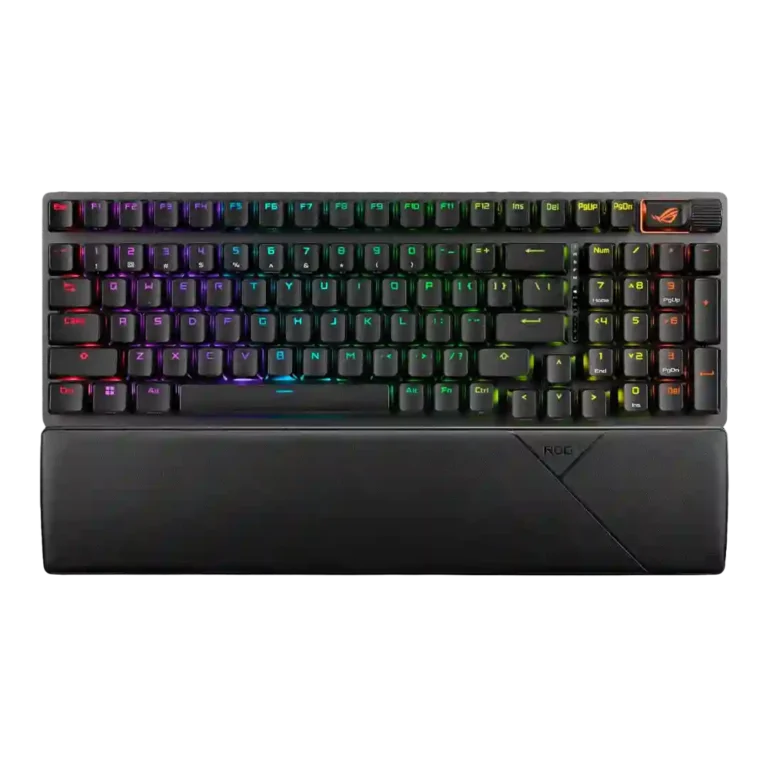
ASUS ROG Strix Scope II 96 Wireless Review
Bottom Line
Choose it if you want a wireless 96% gaming keyboard with smooth quiet switches, strong battery life, and a numpad. Skip it if you need analog-style features, a simpler layout, or cleaner software.
Best for gamers and productivity users who want wireless performance, a numpad, long battery life, and a smooth, damped mechanical feel without building a custom board.
Not for buyers who want a small 75% board, full-size navigation spacing, analog or rapid-trigger features, or software that feels lightweight and trouble-free.
The ASUS ROG Strix Scope II 96 Wireless earns its strongest praise for the basics that matter most: smooth NX Snow switches, sturdy construction, damped acoustics, dependable 2.4GHz wireless, and standout battery life. Reviewers repeatedly liked that it keeps a numpad while saving desk space, and many found the typing and gaming feel unusually refined for a mainstream gaming keyboard. The tradeoff is that the 96% layout compresses navigation and arrow-key muscle memory, so some users found it cramped or awkward. Armoury Crate is another recurring caveat, with complaints about bloat, updates, slow response, and detection issues. It is a premium board with enthusiast feel, but not the right match for buyers who prioritize adjustable actuation, analog-style features, or ultra-simple software.
Compared in Reviews
Products reviewers directly compared with this model, grouped into quick takeaways.
- Alternative: smaller layout Pokde.Net framed the ROG Azoth as the obvious smaller alternative, though it lacked the NX Snow switches at the time.
Razer BlackWidow V4 75%
- Alternative: layout preference Tom's Guide suggested the Razer BlackWidow V4 75% for buyers who want a smaller 75% gaming keyboard instead.
- Alternative: price-range recommendation PCMag still favored the Razer BlackWidow V4 75% in this price range, while calling the Scope II an excellent full-size option.
Feature Scorecards
Pros
-
Latency evidence was very strong in 2.4GHz mode, with reviewers citing sub-millisecond claims, no perceivable lag, and strong wireless gaming results.
-
Battery life was one of the strongest positives, with repeated references to 1,500-hour claims, 80-90 hours with RGB, and strong real-world endurance.
-
Typing feel was one of the best-supported positives, with reviewers calling it pleasant, smooth, stable, and in some cases exceptional.
-
Per-key lighting control had limited but direct support from one review that described near-endless per-key lighting customization.
-
Sound dampening was one of the clearest strengths, with foam, silicone, switch pads, and dampening layers repeatedly cited.
-
Wireless performance was strongly praised for stability, SpeedNova/SuperNova performance, low delay, and reliable gaming use.
-
Connectivity was a major strength, with wired, Bluetooth, 2.4GHz, RF dongle, and multi-device workflows repeatedly supported.
-
Build quality was a major positive, with reviewers repeatedly describing the keyboard as solid, premium, sturdy, and well made.
-
Hot-swappable switch support was widely supported in reviews and treated as a major enthusiast-friendly advantage.
-
Gaming performance was strongly positive, especially for wireless play, quick keystrokes, FPS use, and general responsive gameplay.
-
Frame rigidity was strong, supported by comments about a sturdy frame, stable desk feel, and minimal or no flex.
-
Durability support was limited but positive, focused on durable PBT caps and a build reviewers expected to withstand years of use.
-
Reviewers consistently praised the NX Snow switch feel as smooth, light, and refined, with some noting Storm as the clickier alternative.
-
Key stability was a strength, with reduced wobble, improved stems, and stable typing repeatedly tied to the keycap and switch design.
-
Acoustics were a standout strength, with repeated praise for thocky, deep, non-hollow, quiet, or refined sound.
-
Onboard memory support was clear in multiple reviews, with five or six saved profiles described depending on the source.
-
Key response was widely described as quick and reliable for gaming, with responsive presses and low accidental-key concerns in several tests.
-
Stabilizer quality was consistently praised for reducing friction, rattle, wobble, and larger-key noise, though one reviewer disliked the stabilizer design.
-
Actuation evidence was mostly consistent around the 1.8mm actuation point and smooth, repeatable keystrokes, though adjustable actuation was absent.
-
Polling and rollover evidence was positive, with 1,000Hz reporting, NKRO support, and multi-key detection repeatedly mentioned.
-
Customization options were broad, covering key remaps, RGB settings, macros, multiwheel behavior, and hot-swap friendliness.
-
Extra gaming features centered on Xbox Game Bar, recording, mic mute, stealth mode, and F-key capture shortcuts.
-
Volume control was consistently supported through the wheel or roller and generally treated as a useful physical control.
-
Keycap quality was generally strong, especially where PBT doubleshot caps appeared, though regional ABS versions were treated more cautiously.
-
Macro customization was supported through Armoury Crate, on-the-fly macro recording, wheel programming, and shortcut assignment.
-
Materials quality was positive overall, with aluminum, hard plastic, PBT, foam, and silicone layers mentioned, though some reviewers noted plastic chassis tradeoffs.
-
Review evidence identifies NX Snow and NX Storm options, giving buyers a linear or clickier switch path depending on preference.
-
RGB customization was broadly supported through Armoury Crate, Aura Sync, brightness controls, effects, and color customization.
-
Noise level was generally quiet for a mechanical keyboard, though a few reviewers wanted either more silence or a more satisfying click.
-
Ergonomics were helped by tilt options, rubber feet, wrist support, and stable desk placement across several reviews.
-
Ease of switch replacement had limited but direct support from included tools and a puller that can remove switches.
-
Media controls were mostly useful through the wheel and multifunction button, though one reviewer found the controls sacrificed by the compact layout.
-
Value for money was mostly positive for an enthusiast-grade wireless board, though reviewers still called it premium or expensive.
-
Typing comfort was generally strong, with comfort during long work sessions and wrist support offset by some layout-related work complaints.
-
Size and form factor were praised for keeping the numpad in a compact body, but some reviewers felt it sat awkwardly between full-size and smaller layouts.
-
Wrist rest quality was mostly positive thanks to magnetic attachment and comfort, though stiffness or personal ergonomic preference limited some reviews.
-
Compatibility evidence was mixed-positive: reviewers praised multi-device, Omni Receiver, and cross-device use, while one noted no official macOS software support.
-
Profile management was positive where onboard or user profiles were described, but one review noted only one programmable layer.
-
RGB lighting quality was mixed: some reviewers liked the shine-through and overall look, while one major review found the lighting dim.
-
Desk space efficiency was mostly positive, especially for mouse room, though some reviewers felt the 96% layout did not save enough space.
-
Layout options centered on the 96% layout: reviewers liked the full-key compactness, but some had a learning curve around navigation keys.
-
Cable quality was generally good where described, with detachable USB-C and braided cable evidence, though one review noted a recessed USB-C port caveat.
-
Backlight brightness was mixed, with direct criticism of dim RGB alongside other reviews describing useful brightness controls and strong lighting.
-
Reliability was mixed: the keyboard itself was described as reliable, but software detection problems were a repeated reliability caveat.
-
Portability was mixed: some reviewers liked the compact body or backpack fit, while others said it was still not truly portable.
Cons
-
Key spacing was mixed: some reviewers adjusted, while others found the compact layout cramped or awkward for delete, arrows, and muscle memory.
-
Only one review gave direct legend-visibility evidence, noting that some keys could be hard to read without higher backlight levels.
-
Software quality was the most repeated weakness, with Armoury Crate described as overwhelming, slow, cumbersome, buggy, or bloated.
-
Reviewers treated rapid-trigger or adjustable-actuation support as a weakness, pointing to magnetic-switch competitors for that use case.
Compared With Category Average
Compared with other Gaming Keyboard, this product is above average in wrist rest quality, wireless performance, hot-swappable switches, below average in rapid trigger support.
| Attribute | This product | Category average | Difference |
|---|---|---|---|
| wrist rest quality | 4.2 | 2.7 | +1.5 |
| wireless performance | 4.7 | 3.2 | +1.4 |
| rapid trigger support | 1.9 | 3.5 | -1.5 |
| hot-swappable switches | 4.6 | 3.2 | +1.4 |
| battery life | 4.7 | 3.9 | +0.8 |
| connectivity | 4.6 | 3.9 | +0.7 |
| ease of switch replacement | 4.3 | 3.4 | +0.9 |
| switch options | 4.3 | 3.5 | +0.8 |
FAQ
Is the ASUS ROG Strix Scope II 96 Wireless good for gaming?
Yes. Reviewers repeatedly describe responsive keys, low latency, reliable 2.4GHz wireless, and strong FPS or general gaming performance.
How is the battery life?
Battery life is one of the strongest points. Reviews cite the 1,500-hour RGB-off claim, 80-90 hours with lighting in some cases, and strong real-world endurance over weeks of use.
Does the 96% layout feel cramped?
It depends. Several reviewers liked keeping the numpad in a smaller footprint, but others found the delete key, arrows, and compact spacing awkward or hard to relearn.
Is it quiet?
For a mechanical gaming keyboard, it is generally quiet and well damped. Reviewers praised foam, switch pads, stabilizers, and the NX Snow switches, though one reviewer still found it not silent enough for calls.
Can the switches be replaced?
Yes, the relevant 96 Wireless reviews repeatedly describe hot-swappable switches and included tools or pullers, making it friendly to switch replacement.
Is Armoury Crate good?
The software is useful for RGB, remaps, macros, profiles, and the multifunction wheel, but reviewer sentiment is mixed to negative because of bloat, updates, slow response, and detection issues.
Does it support rapid trigger or analog input?
The reviewed evidence does not show analog input support, and reviewers point to magnetic-switch competitors for adjustable actuation or rapid-trigger-style needs.
Consider This Instead
If you want better rapid trigger support
Choose Keychron Q3 HE 8K. It scores 5.0 vs 1.9 for rapid trigger support, with a 4.5 overall score.
If you want better software quality
Choose Keychron Q3 HE. It scores 4.6 vs 3.1 for software quality, with a 4.4 overall score.
If you want better key spacing
Choose Corsair K65 PRO Mini. It scores 4.7 vs 3.2 for key spacing, with a 4.1 overall score.
If you want better backlight brightness
Choose Alienware Pro Wireless Gaming Keyboard. It scores 4.9 vs 3.9 for backlight brightness, with a 4.1 overall score.
Overall Top Gaming Keyboard Alternatives
Best for 8K polling, magnetic-switch gaming control, premium build, and deep web customization. Skip it if you need broad switch compatibility, USB passthrough, a wrist rest, or a portable keyboard.
Pros: latency, polling rate
Cons: portability, switch options
Good if you want a premium full-size Hall Effect keyboard with smooth switches, strong gaming controls, and quiet acoustics. Skip it if you need a portable, budget, or broadly switch-compatible...
Pros: key stability, frame rigidity
Cons: portability, switch options

Best for a premium, quiet Hall Effect TKL with strong wireless, software, and gaming features. Skip it if price, switch flexibility, USB passthrough, or an included wrist rest matter most.
Pros: rapid trigger support, typing feel
Cons: switch options, portability
Best for a premium 96% metal keyboard with Hall Effect tuning, strong wireless, and excellent typing feel. Skip it for travel, bargain pricing, or maximum esports specs.
Pros: build quality, frame rigidity
Cons: portability, switch options