
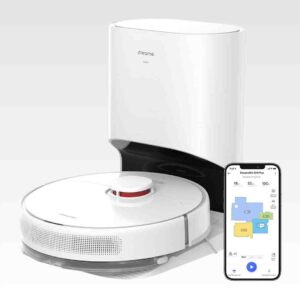
Review: Dreametech D10 plus Robot Vacuum and Mop
Updated: 2 months ago
4.2
Based on methodology below
148
Insights analyzed
45
Grouped by key features
8
From expert reviews
Scores below reflect consolidated expert coverage across these features.
Bottom Line
Choose the Dreame D10 Plus for a budget self-empty robot with strong hard-floor pickup and fast mapping. Skip it if you need reliable cord and clutter avoidance or expect deep carpet cleaning and scrub-level mopping.
Best for
Busy households with mostly hard floors and reasonably tidy rooms who want hands-off daily maintenance, room-by-room scheduling, and an auto-empty dock without flagship pricing.
Not for
Homes with lots of cords, toys, or tight docking space, or anyone expecting true obstacle recognition, deep carpet extraction, or scrub-style mopping.
Verdict
Across these reviews, the D10 Plus stands out for strong debris pickup on hard floors and solid everyday carpet cleaning for the money, paired with LiDAR mapping that enables room and zone scheduling and orderly coverage. The self-empty dock cuts down on hands-on bin emptying and keeps dust contained, but the station is bulky and the emptying burst is loud. The biggest tradeoff is intelligence: cord and clutter avoidance is inconsistent and some testers reported frequent rescues or docking misses unless floors were prepped. Its mop is a simple damp-pad wipe that helps with maintenance but will not scrub out stains, and it adds ongoing pad, filter, and bag upkeep.
Pros
-
5.0based on 2 reviewsHair Pickup — Carpets: 5.0, based on 2 reviewsHair pickup is excellent, with multiple tests reporting near-total removal on carpet when suction is appropriately set.
-
4.9based on 1 reviewCarpet — High-Pile Pickup: 4.9, based on 1 reviewHigh-pile performance can be very strong in controlled tests, including pet-hair pickup, but real-world clutter and fine dust can still require higher suction and occasional manual help.
-
4.8based on 1 reviewAirflow blowback: 4.8, based on 1 reviewIn at least one particulate test during auto-emptying, the system did not noticeably increase airborne dust, suggesting good sealing and containment.
-
4.8based on 1 reviewEmptying and Mess Control: 4.8, based on 1 reviewAuto-emptying generally leaves the onboard bin nearly clean and reduces mess versus manual dumping, though moving the robot can let some debris fall from internal cavities.
-
4.7based on 2 reviewsStair Cleaning: 4.7, based on 2 reviewsCliff and anti-drop sensors worked reliably in testing, with reviewers comfortable letting it clean near stair edges.
-
4.6based on 7 reviewsPrice and Value: 4.6, based on 7 reviewsRepeatedly framed as a standout value under about $400, with some reviewers calling its feature set and performance closer to pricier models.
-
4.6based on 2 reviewsPet-Ready Features: 4.6, based on 2 reviewsReviews consistently report strong pet-hair pickup and the convenience of self-emptying for fur, though keeping cords and clutter off the floor helps prevent interruptions.
-
4.6based on 1 reviewClogging and debris prevention: 4.6, based on 1 reviewAuto-emptying was generally effective at clearing dense debris, and one review credits a DualBoost-style airflow design with reducing clogs during emptying.
-
4.5based on 4 reviewsEase of use: 4.5, based on 4 reviewsWith schedules, room targeting, and auto-emptying, day-to-day use can be largely hands-off, but it works best when floors are prepped and mopping is treated as a light maintenance feature.
-
4.5based on 2 reviewsFiltration / Dust Containment: 4.5, based on 2 reviewsBagged self-emptying and filters help keep dust contained; one review notes an E12 HEPA filter and another highlights cleaner, more sanitary emptying versus manual dumping.
-
4.5based on 2 reviewsInnovation compared to competitors: 4.5, based on 2 reviewsFor its price tier, reviewers highlight a rare combination of LiDAR mapping, auto-emptying, and granular app control; the main missing innovation versus flagships is consistent AI object recognition (except in the D10s Plus variant review).
-
4.5based on 1 reviewOverall opinion: 4.5, based on 1 reviewOverall sentiment is strongly positive, emphasizing reliability, mapping, and self-empty convenience, with most reservations centered on basic mopping and clutter handling.
-
4.5based on 1 reviewStreaking / Residue: 4.5, based on 1 reviewOn sealed hard floors, mopping is reported to leave minimal streaks or water marks at moderate water settings; heavier wet settings can leave faint marks similar to a normal mop.
-
4.5based on 5 reviewsBattery and Charging: 4.5, based on 5 reviewsBattery life is frequently praised, with quoted runtimes around 150 to 180 minutes on lower power and the ability to recharge and resume. Recharging can take roughly 4.5 to 6 hours, and max power drains the battery much faster.
-
4.5based on 4 reviewsHard Floor — Fine Dust Pickup: 4.5, based on 4 reviewsHard-floor pickup is consistently excellent, often near complete removal in lab tests. Very low suction modes may leave some fine dust, but Standard or Turbo typically finishes the job.
-
4.5based on 4 reviewsHard Floor — Large Debris Intake: 4.5, based on 4 reviewsLarge debris pickup on hard floors is strong overall, though a single side brush can occasionally flick particles and may benefit from a second pass or higher power for complete cleanup.
-
4.5based on 2 reviewsChild lock: 4.5, based on 2 reviewsChild lock and do-not-disturb style settings are available via the app to prevent accidental starts and noisy auto-emptying at night.
-
4.4based on 7 reviewsBin and Bag: 4.4, based on 7 reviewsThe onboard bin is small (around 400mL in several specs) but the dock’s sealed bag (commonly 2.5L; one D10s Plus review cites 4L) enables weeks of hands-off emptying. A few notes mention debris can spill if the robot is carried between rooms.
-
4.4based on 7 reviewsDocking and Auto-Empty Reliability (Robot): 4.4, based on 7 reviewsWhen the robot successfully returns home, emptying is highly reliable and clears even dense debris; however, in cluttered environments some reviewers saw missed docks or mid-run stranding that prevents auto-emptying until rescued.
-
4.4based on 8 reviewsAI, Smart, App and Automation: 4.4, based on 8 reviewsThe Mi Home or Dreame app suite provides robust mapping edits, no-go and no-mop zones, schedules, and per-room power and water settings. Usability is generally strong, but some reviewers note menus can feel busy and Wi‑Fi is 2.4GHz only.
-
4.4based on 5 reviewsSuction and Airflow: 4.4, based on 5 reviewsMost testers describe suction as strong for the price (often cited at 4,000Pa, with one related D10s Plus review noting 5,000Pa). Standard mode handles everyday debris well; fine dust in carpet can require Turbo.
-
4.4based on 2 reviewsControls and UI: 4.4, based on 2 reviewsPhysical buttons are simple for start, home, and spot cleaning, backed by app controls. Several reviewers mention helpful (if sometimes unnecessary) voice prompts.
-
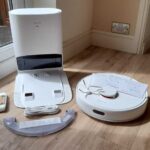
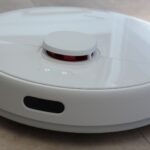
4.4based on 1 reviewAesthetic design and finish: 4.4, based on 1 reviewThe white, minimal design is generally seen as sleek and less visually intrusive than darker robots, though the large dock is still prominent.
-
4.4based on 1 reviewCord management: 4.4, based on 1 reviewThe dock’s cable routing and coil holder help tidy excess cord slack behind the base, improving placement neatness.
-
4.3based on 8 reviewsMap and Path Efficiency (Robot Vacuums): 4.3, based on 8 reviewsLiDAR mapping is fast and accurate, enabling tidy, efficient cleaning paths and strong room segmentation. Multi-map and changing door or dock positions can occasionally disrupt schedules or docking.
-
4.3based on 2 reviewsCarpet — Low-Pile Pickup: 4.3, based on 2 reviewsLow-pile carpet results are generally good, with most debris removed in tests; occasional misses on fine dust or sugary or kitty-litter style particles were noted.
-
4.3based on 1 reviewComparative performance: 4.3, based on 1 reviewIn a multi-robot budget comparison, it scored near the top for cleaning while delivering the best value per dollar, though a Roborock competitor led overall.
-
4.3based on 1 reviewFilter-change indicator: 4.3, based on 1 reviewThe app can track accessory life, including filter and brush runtime, helping prompt cleaning or replacement.
-
4.2based on 1 reviewFloor Drying Time: 4.2, based on 1 reviewModerate water flow dries quickly for maintenance cleaning, while the highest water setting takes longer to dry.
-
4.2based on 2 reviewsAssembly and Setup: 4.2, based on 2 reviewsPhysical setup is quick (attach side brush, insert bag, charge), but optimal placement of the dock and app pairing take more attention, especially for mapping multiple floors.
-
4.2based on 2 reviewsLow-profile design: 4.2, based on 2 reviewsAt roughly 3.8 inches tall, it fits under many sofas and cabinets, improving under-furniture reach for routine cleaning.
-
3.9based on 5 reviewsNoise level: 3.9, based on 5 reviewsOn lower modes it is generally quiet and unobtrusive, while Turbo is noticeably louder. Several tests put cleaning around the high 40s to mid 60s dB depending on mode.
-
3.6based on 2 reviewsCarpet — Medium-Pile Pickup: 3.6, based on 2 reviewsCarpet performance is solid for maintenance cleaning but can struggle with fine flour-like dust without higher suction. One comparative test placed it near the top for budget robots, though it is not a deep-clean replacement for an upright.
-
3.6based on 7 reviewsWater tank: 3.6, based on 7 reviewsThe water tank is small (often 145mL; one related model cites a larger tank), with adjustable water flow. Large hard-floor areas may require refills.
-
3.5based on 5 reviewsMaintenance requirements: 3.5, based on 5 reviewsRoutine upkeep includes swapping dock bags every few weeks, cleaning filters and sensors periodically, clearing hair from brushes, and rinsing or air-drying the mop pad after use.
-
3.5based on 5 reviewsStuck resistance: 3.5, based on 5 reviewsExperiences vary: some testers saw frequent snags on cords or tight spots, while others reported only occasional hang-ups. Threshold and transition handling is decent but not unlimited.
-
3.5based on 6 reviewsOngoing ownership costs (bags, filters, batteries): 3.5, based on 6 reviewsExpect recurring costs for dock bags plus periodic filter and mop-pad replacements, though one reviewer estimates bag costs can be relatively low annually depending on use.
-
3.5based on 7 reviewsMopping performance: 3.5, based on 7 reviewsMopping is a basic cloth pad wipe: helpful for light maintenance and freshening hard floors, but not effective on dried-on grime or deep stains, and it requires manual pad care.
Cons
-
3.4based on 4 reviewsDock noise: 3.4, based on 4 reviewsAuto-emptying is loud but brief (a few seconds), commonly reported around the low 60 dB range and often compared to a quick jet-like burst.
-
3.4based on 1 reviewSurface safety with attachments: 3.4, based on 1 reviewBecause mopping is a wet-pad drag system, reviewers recommend using no-mop zones and removing the module for carpets; one cautions porous flooring near the dock if the wet pad is left attached.
-
3.3based on 6 reviewsObstacle Avoidance (Robot): 3.3, based on 6 reviewsMost D10 Plus reviews describe basic bumper-based avoidance that can hit cords and small objects, so no-go zones and tidier floors help. A separate D10s Plus review highlights AI camera avoidance that performs much better with clutter.
-
3.1based on 2 reviewsPrivacy controls: 3.1, based on 2 reviewsControl typically runs through the Mi Home or Dreame app, and one reviewer notes account and profile creation can feel intrusive. A related D10s Plus review describes an onboard camera for remote monitoring, which may raise additional privacy considerations.
-
2.9based on 4 reviewsHair‑Wrap / Tangle Resistance: 2.9, based on 4 reviewsThe stock brush can wrap long hair, requiring periodic clearing with the included cutter tool. Some reviewers note optional brush upgrades can greatly reduce tangling.
-
2.8based on 2 reviewsStorage footprint and upright-stand stability: 2.8, based on 2 reviewsThe self-empty base is sizeable and needs generous clearance for consistent docking, making placement harder in small homes or tight corners.
FAQ
How often do I need to replace the dock dust bag?
Most reviews point to roughly 4–6 weeks or about 45 days per bag in typical use, but it varies with floor area, pets, and how often you run it. One related D10s Plus review cites a larger bag lasting closer to two months.
Can it vacuum and mop at the same time?
It can vacuum and run its mop pad together on hard floors, but the mop is a simple damp cloth system. For mixed homes, reviewers recommend using no-mop zones or removing the mop module so you do not drag a wet pad onto carpet.
How well does it handle pet hair and long hair?
Hair pickup is generally excellent, including on carpet, but several testers found long hair can wrap on the main brush. The included cleaning tool helps, and some reviews note optional brush upgrades can reduce tangling.
Is it noisy?
Cleaning is usually quiet on lower modes and louder on Turbo. Auto-emptying is the loudest moment, but it typically lasts only a few seconds and is often reported around the low 60 dB range.
Will it get stuck on cords or clutter?
Many D10 Plus reviews describe basic bumper-based avoidance, so cords, small objects, and tight spaces can still cause hang-ups unless floors are prepped and no-go zones are set. A separate D10s Plus review highlights AI camera avoidance that performs better with clutter.
Reviews we analyzed
Video Reviews
Article Reviews
Protoolreviews
Best Robotic Vacuums
#1
4.5
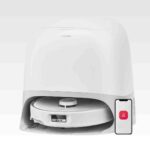
Choose the Roborock Qrevo Curv for a low-touch vacuum+mop that cleans edges/corners well and clears thresholds better than most. Skip if you have...
Pros: Hard Floor — Fine Dust Pickup, Hard Floor — Large Debris Intake, Hair Pickup — Hard Floors, Battery & Charging, Docking & Auto-Empty...
Cons: None
#2
4.4
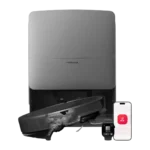
Choose it for standout suction, threshold climbing, and low-babysitting navigation. Skip it if top-tier mopping consistency or a lower price matters more.
Pros: Controls and UI, Versatility, Heating element, Overall cleaning convenience, Large debris handling, Hard Floor — Large Debris Intake, Under-Furniture Pickup
Cons: Dock noise, Streaking / Residue, Storage footprint and upright-stand stability
#3
4.4
Choose it for exceptional vacuuming, obstacle avoidance, and true hands-off mop swapping. Skip it if you want longer battery life, a smaller dock,...
Pros: Hair‑Wrap / Tangle Resistance, Adaptive chassis lift, Innovation compared to competitors, Hard Floor — Fine Dust Pickup, Suction and Airflow, Pet-Ready Features, Tool-change...
Cons: Dirty water sensor, Suitability for small spaces, Storage footprint and upright-stand stability, Streaking / Residue, Battery and Charging, Runtime
#4
4.3
Choose Saros 10 if you want a slim, premium robot that vacuums hard, climbs thresholds, and runs a truly hands-off dock. Skip it...
Pros: Pet-Ready Features, Low-profile design, Suction & Airflow, Mop lifting system, Aesthetic design & finish, Hair‑Wrap / Tangle Resistance, Adaptive chassis lift
Cons: Streaking / Residue, Stuck resistance