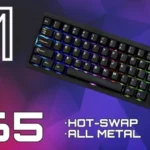
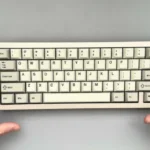
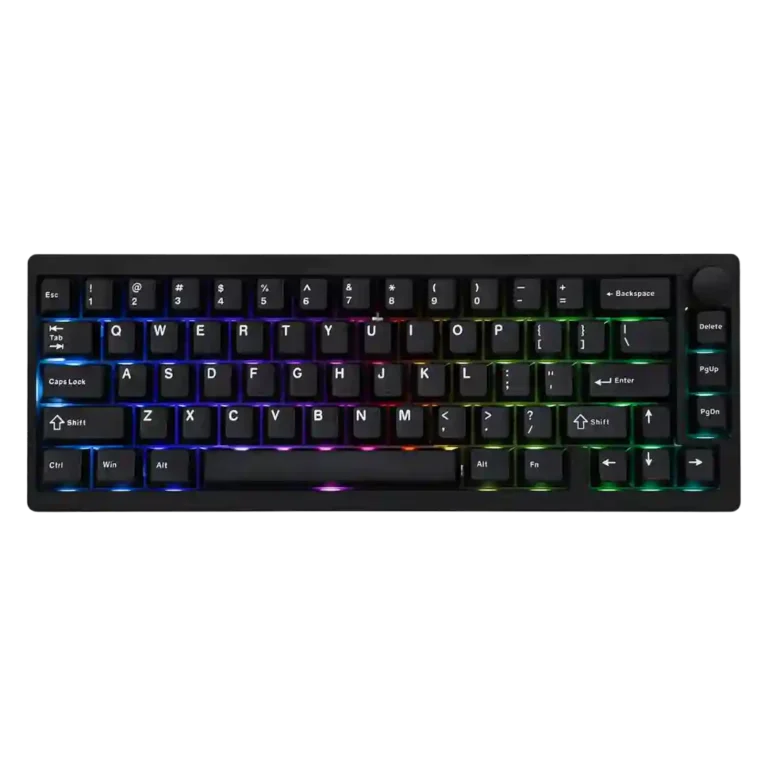
Epomaker P65

Epomaker P65 Gaming Keyboard Review

Brand: Epomaker
Released: February 1, 2025
Updated: 1 hour ago
4.4
Overall review score Expert score: 4.5 Customer score: 4.1
293
Review evidence points
51
Scored features
23
Total reviews
10 expert / 13 customer

Bottom Line

Choose the P65 for premium aluminum construction, excellent thocky typing, flexible wireless modes and deep VIA customization at a strong price. Skip it for travel, adjustable ergonomics, silent offices or Hall Effect gaming features.

Best for

Best for desk-based typists, keyboard enthusiasts and casual gamers who want a compact aluminum board with rich sound, hot-swap flexibility and extensive VIA control.

Not for

Not ideal for frequent travelers, quiet shared offices, users who need adjustable feet, or competitive players seeking Hall Effect switches, rapid trigger and adjustable actuation.

Verdict

The Epomaker P65 delivers the kind of dense aluminum construction, refined acoustics and smooth gasket-mounted typing that once required a much larger custom-keyboard budget. Reviewers repeatedly praise its sturdy chassis, PBT keycaps, responsive linear switches, tri-mode connectivity, hot-swap sockets and programmable metal knob. It is also a capable casual-gaming board at 1,000Hz, but competitive players will miss adjustable actuation and rapid trigger. The biggest everyday compromises are its 1.3kg weight, fixed six-degree angle and limited stock switch selection. VIA offers excellent remapping, macros and lighting control, although loading the required JSON definition is effortless for some users and frustrating for others. Isolated reports of dongle failure, scratched caps and faulty wiring also suggest imperfect quality control, but the broad consensus remains strongly positive for desk-based typing and general gaming.

Feature Scorecards

Summary

51 reviewed features
  • Very positive 4.5-5.0 53% 27 features
  • Positive 3.5-4.4 29% 15 features
  • Neutral 2.5-3.4 12% 6 features
  • Negative 1.5-2.4 6% 3 features
  • Very negative below 1.5 0% 0 features

Pros

  • 5.0
    based on 12 reviews
    acoustics: 5.0, based on 12 reviews
    Reviewers consistently praise the rich, thocky or creamy sound, with the aluminum case, gasket mount and foam producing a refined profile without metallic ping.
  • 5.0
    based on 10 reviews
    materials quality: 5.0, based on 10 reviews
    CNC aluminum, PBT caps, a polycarbonate plate and layered internal materials create a premium construction uncommon at this price.
  • 5.0
    based on 10 reviews
    typing feel: 5.0, based on 10 reviews
    Typing is consistently described as smooth, cushioned and satisfying, with several reviewers achieving strong speed and accuracy.
  • 5.0
    based on 7 reviews
    volume control: 5.0, based on 7 reviews
    The metal knob is a standout convenience, offering smooth adjustment, tactile steps and a press-to-mute function.
  • 5.0
    based on 6 reviews
    frame rigidity: 5.0, based on 6 reviews
    The dense aluminum shell has almost no flex and stays firmly planted during typing or gaming.
  • 5.0
    based on 5 reviews
    sound dampening: 5.0, based on 5 reviews
    Five internal dampening layers and gasket mounting effectively suppress resonance, hollowness and metallic ping while preserving a full sound.
  • 5.0
    based on 1 review
    key spacing: 5.0, based on 1 review
    The key spacing feels consistent and comfortable, helping reduce typing errors despite the compact layout.
  • 5.0
    based on 1 review
    onboard memory: 5.0, based on 1 review
    Customized layouts remain stored on the keyboard, so remaps continue working without VIA running.
  • 4.9
    based on 17 reviews
    build quality: 4.9, based on 17 reviews
    The heavy CNC-aluminum chassis is the product’s clearest strength, repeatedly described as tank-like, premium and far more substantial than typical plastic boards.
  • 4.9
    based on 13 reviews
    value for money: 4.9, based on 13 reviews
    At roughly $120 and often less on sale, the P65 is widely considered exceptional value for a prebuilt aluminum keyboard.
  • 4.9
    based on 9 reviews
    connectivity: 4.9, based on 9 reviews
    Bluetooth, 2.4GHz wireless and wired USB-C provide flexible everyday use, with convenient external mode switching and dongle storage.
  • 4.9
    based on 7 reviews
    hot-swappable switches: 4.9, based on 7 reviews
    The PCB accepts 3-pin and 5-pin mechanical switches, giving owners broad replacement and tuning flexibility without soldering.
  • 4.9
    based on 5 reviews
    size and form factor: 4.9, based on 5 reviews
    The compact 65% chassis balances desk efficiency with arrow keys and a knob, though users must accept missing dedicated keys.
  • 4.9
    based on 4 reviews
    desk space efficiency: 4.9, based on 4 reviews
    The 65% layout frees substantial mouse room while retaining arrow keys and a control knob.
  • 4.9
    based on 4 reviews
    macro customization: 4.9, based on 4 reviews
    VIA supports recording and assigning macros, giving the compact layout useful programmable depth.
  • 4.8
    based on 6 reviews
    media controls: 4.8, based on 6 reviews
    The metal rotary knob provides smooth volume adjustment, mute control and programmable functions with satisfying tactile feedback.
  • 4.8
    based on 5 reviews
    RGB customization: 4.8, based on 5 reviews
    VIA offers adjustable colors, patterns and brightness, with enough control for either subtle static lighting or brighter effects.
  • 4.8
    based on 3 reviews
    durability: 4.8, based on 3 reviews
    The aluminum case, thick PBT keycaps and rated switches suggest strong long-term durability, with reviewers expecting the chassis to last for years.
  • 4.8
    based on 3 reviews
    key responsiveness: 4.8, based on 3 reviews
    The light linear switches feel snappy and promptly register commands, with no lag noticed in normal gaming.
  • 4.7
    based on 10 reviews
    design aesthetics: 4.7, based on 10 reviews
    The understated black or retro khaki styling wins praise for looking clean, refined and office-friendly rather than aggressively gamer-focused.
  • 4.6
    based on 5 reviews
    typing comfort: 4.6, based on 5 reviews
    The gasket-mounted plate softens bottom-out and supports long work sessions, though the fixed angle may still bother some users.
  • 4.6
    based on 4 reviews
    actuation consistency: 4.6, based on 4 reviews
    Typing feels steady and predictable, with smooth linear travel that avoids unwanted inputs and helps maintain accuracy.
  • 4.5
    based on 8 reviews
    customization options: 4.5, based on 8 reviews
    QMK/VIA support enables extensive remapping, lighting changes, macros and knob reassignment, making the board highly adaptable once configured.
  • 4.5
    based on 7 reviews
    gaming performance: 4.5, based on 7 reviews
    The 1,000Hz mechanical design performs well for casual and even ranked gaming, but serious competitive players may prefer Hall Effect alternatives.
  • 4.5
    based on 7 reviews
    switch feel: 4.5, based on 7 reviews
    Both Zebra and Wisteria linears are smooth and responsive, with Zebra feeling lighter and Wisteria slightly heavier. Stock choice is limited to linear options.
  • 4.5
    based on 6 reviews
    stabilizer quality: 4.5, based on 6 reviews
    Factory-lubed stabilizers are mostly quiet and rattle-free, though a few reviewers found them merely average or heard minor spacebar ting.
  • 4.5
    based on 1 review
    profile management: 4.5, based on 1 review
    VIA layouts can be saved to onboard memory, allowing customized keymaps to persist without background software.
  • 4.4
    based on 20 reviews
    overall satisfaction: 4.4, based on 20 reviews
    Most reviewers strongly recommend the P65 for its premium feel, sound and value, though a small number report setup issues, damaged parts or component failures.
  • 4.4
    based on 7 reviews
    keycap quality: 4.4, based on 7 reviews
    Thick double-shot PBT keycaps feel textured, durable and premium, although isolated units arrived scratched and one reviewer noticed inconsistent legend printing.
  • 4.4
    based on 5 reviews
    latency: 4.4, based on 5 reviews
    Wired and 2.4GHz response is consistently described as fast enough for gaming, with no perceptible input lag in practical tests.
  • 4.4
    based on 5 reviews
    polling rate: 4.4, based on 5 reviews
    The 1,000Hz wired and 2.4GHz polling rate is viewed as fully adequate for mainstream gaming, even if it trails 8K esports-focused boards.
  • 4.4
    based on 4 reviews
    ease of switch replacement: 4.4, based on 4 reviews
    Hot-swap sockets make replacing or experimenting with switches far easier than soldered boards, though delicate pins can require careful alignment.
  • 4.2
    based on 3 reviews
    per-key lighting control: 4.2, based on 3 reviews
    South-facing per-key LEDs can be configured through VIA, though the visible glow depends heavily on switch and keycap choice.
  • 4.1
    based on 8 reviews
    wireless performance: 4.1, based on 8 reviews
    Bluetooth and 2.4GHz are generally reliable, but one customer reported a failed dongle, so confidence is high rather than flawless.
  • 4.1
    based on 7 reviews
    RGB lighting quality: 4.1, based on 7 reviews
    The RGB is usually described as tasteful and even, but brightness and diffuser quality receive mixed comments.
  • 4.0
    based on 2 reviews
    legend visibility: 4.0, based on 2 reviews
    Legends are generally clear and readable, but one reviewer noticed inconsistent stroke thickness and Mac-specific symbols are absent.
  • 4.0
    based on 1 review
    extra gaming features: 4.0, based on 1 review
    N-key rollover supports simultaneous inputs, but the board omits enthusiast gaming extras such as adjustable actuation and Hall Effect controls.
  • 3.9
    based on 7 reviews
    battery life: 3.9, based on 7 reviews
    Battery life ranges from several days with RGB enabled to much longer with lighting off. Most found it acceptable, though one reviewer wanted at least a full week.
  • 3.8
    based on 6 reviews
    software quality: 3.8, based on 6 reviews
    VIA itself is powerful and clean, but onboarding varies sharply: some reviewers loaded the JSON file in under a minute, while others struggled with recognition and vague instructions.
  • 3.7
    based on 3 reviews
    cable quality: 3.7, based on 3 reviews
    The included braided USB-C cable is usually praised as unusually solid and attractive, though one customer reported faulty wiring.
  • 3.6
    based on 4 reviews
    backlight brightness: 3.6, based on 4 reviews
    Lighting impressions vary: some reviewers found it bright and attractive, while others said the south-facing glow is muted behind the non-shine-through caps.
  • 3.5
    based on 2 reviews
    compatibility: 3.5, based on 2 reviews
    Windows and macOS both work, but Mac users do not get dedicated keycaps or an easy hardware layout toggle.

Cons

  • 3.3
    based on 5 reviews
    noise level: 3.3, based on 5 reviews
    The sound is appealing but not truly quiet. Several reviewers warn that its pronounced thock or clack may be distracting in shared workspaces.
  • 3.3
    based on 3 reviews
    key stability: 3.3, based on 3 reviews
    Most keys feel controlled, but a few users noticed wobble or slight misalignment on longer navigation and modifier keys.
  • 3.1
    based on 4 reviews
    switch options: 3.1, based on 4 reviews
    Buyers can choose Zebra or Wisteria linears, but there are no stock tactile, clicky or silent choices; hot-swap support partly offsets that limitation.
  • 3.0
    based on 2 reviews
    layout options: 3.0, based on 2 reviews
    The compact 65% layout saves room but removes the function row, numpad and some dedicated keys, requiring shortcuts or remapping.
  • 2.9
    based on 6 reviews
    portability: 2.9, based on 6 reviews
    The compact footprint fits bags more easily than larger layouts, but the 1.3kg aluminum body makes it a poor choice for frequent travel.
  • 2.6
    based on 4 reviews
    ergonomics: 2.6, based on 4 reviews
    The fixed six-degree angle and tall front edge divide opinion. Typing can still be comfortable, but users who want adjustable feet may need a wrist rest or another board.
  • 2.4
    based on 5 reviews
    reliability: 2.4, based on 5 reviews
    Most reviewers experienced stable operation, but isolated reports of a failed 2.4GHz dongle, scratched caps and intermittent wiring create some quality-control concern.
  • 2.0
    based on 2 reviews
    analog input support: 2.0, based on 2 reviews
    The P65 is a conventional mechanical board rather than a Hall Effect model, so it lacks adjustable analog-style actuation for competitive play.
  • 2.0
    based on 2 reviews
    rapid trigger support: 2.0, based on 2 reviews
    Rapid trigger is not included, making the P65 less suitable for players specifically seeking Hall Effect responsiveness.

Compared With Category Average

Compared with other Gaming Keyboards, this product is above average in hot-swappable switches, value for money, volume control, below average in rapid trigger support, analog input support, reliability.

Summary

8 compared features
  • Above average 0.4+ pts higher 63% 5 features
  • Same as average within 0.3 pts 0% 0 features
  • Below average 0.4+ pts lower 38% 3 features
Attribute This product Category average Difference
rapid trigger support 2.0 3.7 -1.7
hot-swappable switches 4.9 3.4 +1.4
value for money 4.9 3.7 +1.2
volume control 5.0 3.8 +1.2
analog input support 2.0 3.3 -1.3
reliability 2.4 3.6 -1.2
connectivity 4.9 3.8 +1.1
media controls 4.8 3.7 +1.2

FAQ

Is the Epomaker P65 good for gaming?

Yes for casual and mainstream gaming: reviewers found the 1,000Hz wired and 2.4GHz modes responsive with no noticeable lag. Competitive players may prefer a Hall Effect board with rapid trigger and adjustable actuation.

Is the Epomaker P65 quiet?

Not especially. Its dampening removes metallic ping and creates a pleasing thock, but several reviewers still found it loud enough to be distracting in shared offices.

Can the switches be replaced?

Yes. The hot-swappable PCB supports both 3-pin and 5-pin mechanical switches without soldering, although the small pins should be aligned carefully.

Does it work with Mac and Windows?

It works with both Windows and macOS, but there is no dedicated hardware layout toggle or included Mac-specific keycaps. VIA can be used to remap keys.

How difficult is VIA setup?

Experiences vary. Some reviewers loaded the required JSON definition in under a minute, while others needed multiple attempts or could not get VIA to recognize the keyboard.

Is it portable?

The 65% footprint is compact, but the approximately 1.3kg aluminum chassis is heavy. It is better suited to a permanent desk than frequent commuting.

Sample Expert Reviews We Analyzed

These are a few of the reviews included in our analysis.

Video Reviews

Article Reviews

Compared in Reviews

Products reviewers directly compared with this model, grouped into quick takeaways.

AL65

  • Worse: gasket mounting The P65 is judged to have a significantly better gasket implementation than the AL65.

Asus ROG Falchion Ace HFX

  • Worse: competitive gaming features The Asus is a stronger competitive-gaming choice with Hall Effect switches and adjustable actuation, but costs more.

Keychron Q65 Max

  • More expensive: price The P65 costs substantially less than the Keychron Q65 Max while retaining an aluminum build.

Consider This Instead

If you want better rapid trigger support

Choose Keychron Q1 HE. It scores 4.9 vs 2.0 for rapid trigger support, with a 4.2 overall score.
Compare

If you want better key stability

Choose Keychron K2 HE. It scores 4.9 vs 3.3 for key stability, with a 4.2 overall score.

Compare

If you want better layout options

Choose Corsair Makr Pro 75. It scores 4.9 vs 3.0 for layout options, with a 4.1 overall score.

Compare

If you want better noise level

Choose Corsair K65 Plus. It scores 4.6 vs 3.3 for noise level, with a 4.2 overall score.

Compare

Top Gaming Keyboards to Consider

#1 Keychron Q5 HE
4.5

Good if you want a premium 96% Hall Effect keyboard for work and gaming with excellent build, sound, and customization. Skip it if you need cheaper esports-first speed, 8,000Hz polling,...

Pros: cable quality, typing comfort

Cons: portability, switch options
#2 Keychron Q6 HE
4.4

Good if you want a premium full-size Hall Effect keyboard with smooth switches, quiet sound, and deep customization. Skip it if you need a portable, budget-friendly board or broad switch...

Pros: key stability, frame rigidity

Cons: portability, switch options
#3 Epomaker G84 HE
4.4

Good if you want a compact Hall Effect keyboard with smooth typing, strong gaming response, bright RGB, and good value. Skip it if you need polished software, quiet heavy presses,...

Pros: desk space efficiency, layout options

Cons: compatibility

#4 Keychron Q3 HE
4.3

Good if you want a premium, quiet TKL Hall Effect keyboard for typing and gaming. Skip it if price, portability, 8,000Hz polling, or broad switch choice matters most.

Pros: build quality, extra gaming features

Cons: switch options, hot-swappable switches