If you want better typing feel
Choose Keychron K2 HE. It scores 4.8 vs 4.2 for typing feel, with a 4.4 overall score.
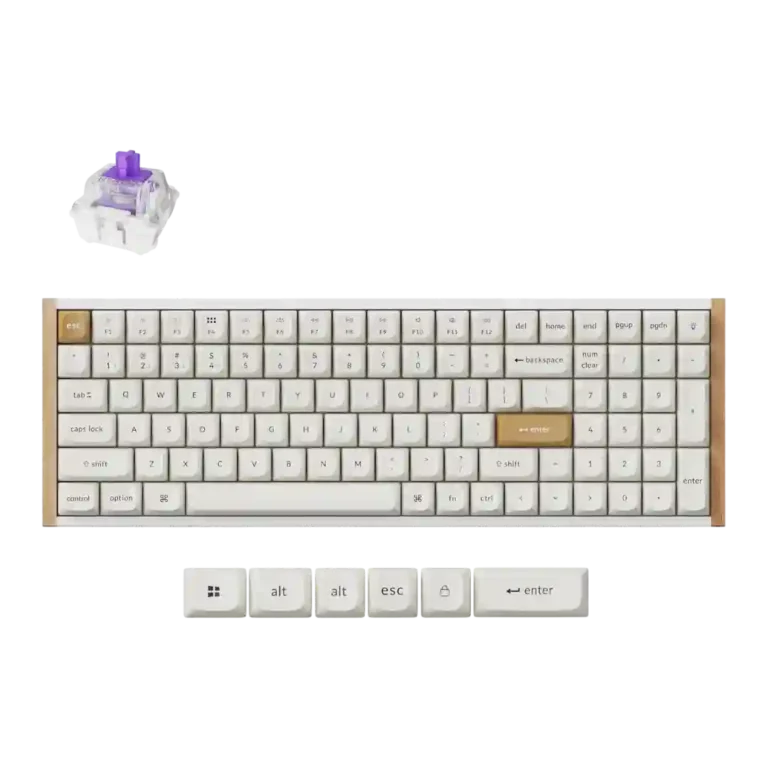
Choose the Keychron K4 HE for Hall Effect gaming power, premium feel, flexible wireless use, and easy customization. Skip it if you need spacious keys, bright shine-through RGB, 8,000Hz polling, or broad mechanical switch compatibility.
Best for gamers and productivity users who want Hall Effect controls, a numpad, wireless flexibility, and deep web-based customization in a compact near-full-size board. It especially suits users who value rapid trigger, analog-style input, and a premium-looking desk setup.
Not for users who want a spacious full-size layout, tactile switch variety, traditional mechanical switch compatibility, bright shine-through lighting on the Special Edition, or dedicated media and volume hardware.
Reviewers largely frame the Keychron K4 HE as a rare blend of near-full-size productivity and magnetic-switch gaming power. Its best-reviewed traits are the responsive Hall Effect switches, Rapid Trigger and analog-style controls, premium-feeling build, strong acoustics, and easy web-based customization. The main tradeoff is that the dense 96% layout preserves a numpad and desk space but can feel cramped, especially around the arrow and numpad cluster. Special Edition RGB is also subdued or dim, switch choice is limited to compatible magnetic switches, and several reviewers disliked wired-only software access or the short cable. Overall evidence supports a high-value gaming/work hybrid with enthusiast features, not a universally comfortable typing board.
Compared with other Gaming Keyboards, this product is above average in analog input support, rapid trigger support, value for money, near average in keycap quality, extra gaming features, below average in per-key lighting control, stabilizer quality, volume control.
| Attribute | This product | Category average | Difference |
|---|---|---|---|
| per-key lighting control | 2.0 | 4.1 | -2.1 |
| analog input support | 4.6 | 3.1 | +1.5 |
| rapid trigger support | 4.8 | 3.5 | +1.3 |
| stabilizer quality | 2.5 | 3.9 | -1.4 |
| volume control | 2.5 | 3.9 | -1.4 |
| media controls | 2.5 | 3.8 | -1.3 |
| key spacing | 2.8 | 3.9 | -1.2 |
| value for money | 4.6 | 3.7 | +1.0 |
Choose Keychron K2 HE. It scores 4.8 vs 4.2 for typing feel, with a 4.4 overall score.
Choose ASUS ROG Strix Scope II 96 Wireless. It scores 5.0 vs 2.0 for per-key lighting control, with a 4.2 overall score.
Choose Logitech G915 X Lightspeed. It scores 4.8 vs 2.5 for stabilizer quality, with a 4.1 overall score.
Choose Alienware Pro Wireless Gaming Keyboard. It scores 4.6 vs 2.6 for switch options, with a 4.4 overall score.
Products reviewers directly compared with this model, grouped into quick takeaways.
Yes. Reviewers repeatedly praised its responsive Hall Effect switches, Rapid Trigger, analog-style input, and extra gaming features, especially for shooters and racing-style controls.
Typing comfort is mixed. Several reviewers loved the feel and layout, but others found the magnetic switches unusual, the 96% spacing cramped, or their typing speed lower than normal.
Most reviewers found Keychron Launcher easy, intuitive, and convenient because it is web-based. The main caveat is that customization generally requires a wired connection, and multiple reviewers disliked the short cable.
RGB quality depends on the version and expectations. Reviewers praised the lighting in some cases, but the Special Edition was often described as subdued, harder to see, or limited by non-shine-through legends.
The switches are hot-swappable, but reviewers stressed that compatibility is narrow. They noted that the board cannot use traditional mechanical switches and is limited to specific magnetic switch types.
Yes, reviewers liked that it keeps the numpad while saving space. The tradeoff is that keys around the arrows and numpad can feel cramped or require a learning period.
Reviewers strongly agreed that it offers impressive value for its Hall Effect features, build, wireless support, and customization depth. The value case weakens mainly for buyers who require 8,000Hz polling or broader switch choices.
These are a few of the reviews included in our analysis.


Good if you want a premium 96% Hall Effect keyboard for work and gaming with excellent build, sound, and customization. Skip it if you need cheaper esports-first speed, 8,000Hz polling,...
Pros: cable quality, typing comfort
Cons: portability, switch options

Good if you want a premium, quiet TKL Hall Effect keyboard for typing and gaming. Skip it if price, portability, 8,000Hz polling, or broad switch choice matters most.
Pros: build quality, extra gaming features
Cons: switch options, hot-swappable switches

Good if you want a premium full-size Hall Effect keyboard with smooth switches, quiet sound, and deep customization. Skip it if you need a portable, budget-friendly board or broad switch...
Pros: key stability, frame rigidity
Cons: portability, switch options

Good if you want esports speed, analog tuning, and deep customization. Skip it if typing comfort, quiet office use, or included extras matter more.
Pros: polling rate, RGB customization
Cons: key stability, typing comfort