
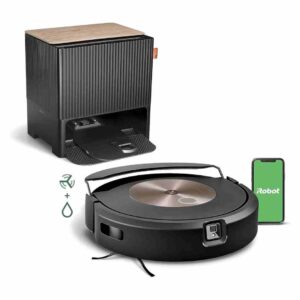
Review: Roomba Combo j9+ Robot Vacuum & Mop
Updated: 2 months ago
4.2
Based on methodology below
185
Insights analyzed
47
Grouped by key features
11
From expert reviews
Scores below reflect consolidated expert coverage across these features.
Bottom Line
Choose the Combo j9+ if you want top-tier obstacle avoidance and a carpet-safe vacuum+mop with an auto-fill dock; Skip it if you need a self-washing mop dock or the very strongest deep-scrub value versus premium rivals.
Best for
Homes with kids, pets, and clutter where obstacle avoidance matters, especially if you want one robot that can vacuum and mop without wetting rugs and you value an auto-empty, auto-fill dock for low-touch routines.
Not for
Shoppers who want a fully hands-off mop system (pad washing/drying) or who prioritize the absolute strongest deep-scrub and fine-particle performance per dollar versus other premium hybrid robots.
Verdict
The Roomba Combo j9+ is a premium 2-in-1 built around two real strengths: excellent camera-based obstacle avoidance (especially for cords, toys, and pet accidents) and a retracting mop arm that keeps carpets genuinely dry while vacuuming and mopping in one run. Vacuum pickup is consistently strong, and the auto-empty/auto-fill dock makes day-to-day ownership feel hands-off. The tradeoff is maintenance and price: you still wash or swap mop pads yourself, and some testers find its mopping power and overall self-maintenance a step behind the very best high-end hybrid competitors. If you value reliability in cluttered homes and carpet-safe mopping more than maximum scrubbing automation, it’s an easy fit.
Pros
-
4.7based on 4 reviewsMop lifting system: 4.7, based on 4 reviewsThe retracting mop mechanism is a defining strength, reliably keeping carpets dry by fully lifting/stowing the pad on top of the robot. It enables true vacuum-and-mop-in-one-run behavior without worrying about damp rugs.
-
4.7based on 4 reviewsPet-Ready Features: 4.7, based on 4 reviewsPet households benefit from strong poop/pet-waste avoidance, plus reliable hair pickup on hard floors and rugs. Multiple reviews highlight the pet waste guarantee as a key confidence booster in cluttered homes.
-
4.7based on 3 reviewsAssembly and Setup: 4.7, based on 3 reviewsSetup is typically quick and well-guided through the app, with packaging and quick-start materials helping. Initial mapping can take multiple runs, and a few users report early hiccups aligning the robot on the dock or connecting to Wi-Fi.
-
4.7based on 1 reviewCrevice / Groove Pickup (Hard Floors): 4.7, based on 1 reviewCrevice and groove pickup is repeatedly called out as improved versus older Roombas, aided by stronger suction and the dual rubber rollers. It performs well on seams and along transitions in testing.
-
4.6based on 11 reviewsDocking and Auto-Empty Reliability (Robot): 4.6, based on 11 reviewsAuto-empty docking is consistently reliable, with the robot returning to empty and resume without much user intervention. Bagged disposal keeps the process clean, and many users report weeks of hands-free vacuuming before needing to swap the bag.
-
4.6based on 3 reviewsBin and Bag: 4.6, based on 3 reviewsThe bagged dock system is praised for cleanliness and low-touch disposal, typically lasting weeks to around two months depending on shedding and home size. Internal bin is small but rarely needs manual emptying thanks to frequent auto-empty cycles.
-
4.6based on 3 reviewsEase of use: 4.6, based on 3 reviewsDay-to-day use is strongly praised once maps are set: scheduling, recharge-and-resume, hands-free emptying, and reliable obstacle avoidance reduce babysitting. Early learning runs can require a bit of attention, but it becomes largely set-and-forget.
-
4.6based on 10 reviewsObstacle Avoidance (Robot): 4.6, based on 10 reviewsObstacle avoidance is a defining strength: the camera-based system reliably dodges cords, toys, shoes, and pet waste in most tests, and often outperforms rival bots in clutter. It’s not flawless, but it dramatically reduces stuck events and accidental messes versus non-vision robots.
-
4.6based on 2 reviewsHard Floor — Fine Dust Pickup: 4.6, based on 2 reviewsFine dust pickup on hard floors is consistently reported as excellent, including flour/sand-style tests in some reviews. Multiple passes can further improve results, especially on carpet fine-particle stress tests.
-
4.6based on 1 reviewFilter-change indicator: 4.6, based on 1 reviewApp-based maintenance reminders for filters help keep performance consistent, with clear prompts on when to replace. Filters still require planned replenishment since they aren’t washable.
-
4.6based on 2 reviewsInnovation compared to competitors: 4.6, based on 2 reviewsThe combo design is seen as meaningfully innovative: the fully retracting mop arm reduces carpet-wetting risk, and the auto-fill dock adds true hands-free mopping convenience. It’s less novel on pad washing, where competitors often do more.
-
4.5based on 9 reviewsWater tank: 4.5, based on 9 reviewsAuto-fill dock is a major convenience, with many citing weeks of mopping before refills in average use. A few find the reservoir awkward to handle/refill, but the concept and day-to-day automation score highly.
-
4.5based on 3 reviewsBattery and Charging: 4.5, based on 3 reviewsBattery performance is generally strong for large-area runs, often finishing typical floors without intervention and returning to recharge as needed. Charging can feel slow for some users, but recharge-and-resume behavior is reliable in most accounts.
-
4.5based on 2 reviewsAutomatic shutoff for obstructions: 4.5, based on 2 reviewsThe robot is described as responsive to obstructions, stopping or rerouting around people/pets and common objects. It’s not perfect in every edge case, but it tends to avoid creating bigger messes when something blocks its path.
-
4.5based on 1 reviewFiltration / Dust Containment: 4.5, based on 1 reviewDust containment is generally solid, helped by a sealed, bagged dock and replaceable filters. Filters are not washable and need periodic replacement, but most reviewers report clean handling with minimal dust mess.
-
4.5based on 9 reviewsSuction and Airflow: 4.5, based on 9 reviewsAcross reviews, suction is a standout: strong pickup on hard floors and carpet, with smart boost behavior and fewer repeat passes than older Roombas. A few testers still rate raw power a step behind the most aggressive premium competitors, but most call it top-tier for daily debris.
-
4.5based on 8 reviewsAI, Smart, App and Automation: 4.5, based on 8 reviewsApp and automation are feature-rich: schedules, zones, room-specific routines, dirt-prioritization, and voice assistant support are widely praised. Common nitpicks include occasional connectivity hiccups, confusing menu choices, and missing real-time map progress in some experiences.
-
4.5based on 2 reviewsHair Pickup — Hard Floors: 4.5, based on 2 reviewsHard-floor hair pickup is a consistent strength, especially for pets and long human hair. A few mention the occasional hair clump, but overall results are strong with minimal leftover hairballs.
-
4.4based on 2 reviewsUnder-Furniture Pickup: 4.4, based on 2 reviewsUnder-furniture reach is good thanks to the low profile and persistent navigation, with multiple reviewers noting it cleans under beds, desks, and tables. Very low clearances still depend on your furniture height.
-
4.3based on 3 reviewsAesthetic design and finish: 4.3, based on 3 reviewsDesign is frequently praised: the dock’s wood-look top and furniture-like footprint blend into living spaces better than many rivals. A minority dislike the faux-wood finish or find the dock less attractive in person.
-
4.3based on 3 reviewsCarpet — Low-Pile Pickup: 4.3, based on 3 reviewsLow-pile carpet pickup is generally very good, handling daily hair and debris well. Some users still notice occasional leftover strands on rugs and may choose extra passes for a more thorough finish.
-
4.3based on 3 reviewsControls and UI: 4.3, based on 3 reviewsControls are straightforward: the app handles most functions, with a simple on-robot button for start/pause and basic status lights. Some reviewers wish for richer in-app live tracking and clearer guidance in the manual/owner docs.
-
4.3based on 4 reviewsRuntime: 4.3, based on 4 reviewsRuntime is generally strong for a premium robot, commonly around two hours in everyday use, with recharge-and-resume covering larger spaces. Expect longer total job times when both vacuuming and mopping, or when using max power/two-pass settings.
-
4.3based on 2 reviewsHair‑Wrap / Tangle Resistance: 4.3, based on 2 reviewsDual rubber rollers reduce tangling compared with bristle rollers, and several reviewers report noticeably less hair wrap. Some periodic hair removal is still needed, especially in heavy-shedding homes.
-
4.3based on 1 reviewLow-profile design: 4.3, based on 1 reviewThe low-profile body helps it fit under more furniture than bulkier rivals, improving coverage in real homes. Dock size is still substantial, but the robot’s height is generally a plus.
-
4.3based on 2 reviewsComparative performance: 4.3, based on 2 reviewsComparisons usually place the j9+/Combo j9+ among the best for vacuuming and obstacle avoidance, with advantages over older Roombas. Several reviewers note that top hybrid competitors can outperform it in deep scrubbing or self-maintenance features.
-
4.2based on 10 reviewsMap and Path Efficiency (Robot Vacuums): 4.2, based on 10 reviewsMapping and pathing are generally systematic and thorough, with efficient row cleaning once the home is learned. Initial mapping is sometimes slow or clumsy compared to LiDAR bots, and a few tests note slightly longer overall run times than some competitors.
-
4.2based on 5 reviewsHard Floor — Large Debris Intake: 4.2, based on 5 reviewsLarge debris pickup is strong overall, though a few note the side brush can flick bigger bits around before they’re captured. In most homes it handles cereal, kibble, and tracked-in debris well, with occasional stragglers in corners.
-
4.2based on 2 reviewsHair Pickup — Carpets: 4.2, based on 2 reviewsCarpet hair pickup is strong in many reports, though a few users still see stray hairs on low-pile rugs and may prefer an extra pass for perfection. Overall it’s above average for daily maintenance.
-
4.2based on 5 reviewsArea Rug Handling: 4.2, based on 5 reviewsRug handling is usually good, especially because the retracting mop prevents wet pads from dragging onto carpets. Still, the mop arm can occasionally catch on rug edges/corners, and very thick or tricky rugs may need keep-out or no-mop zoning.
-
4.2based on 9 reviewsMopping performance: 4.2, based on 9 reviewsMopping is generally effective for routine upkeep, with smart back-and-forth scrubbing helping on stains. It can struggle with sticky messes and heavy grime compared with spinning/vibrating pad competitors, and edges/corners remain challenging.
-
4.2based on 6 reviewsDried-On Stain Removal: 4.2, based on 6 reviewsFor dried-on stains, SmartScrub/back-and-forth motions improve results and can remove many common spots like dried juice, litter prints, and tracked-in dirt. Very sticky food or heavy buildup may still require manual spot work or a pad change afterward.
-
4.1based on 2 reviewsAirflow blowback: 4.1, based on 2 reviewsBlowback and scattering are usually controlled, with some reviewers noting it avoids flinging small particles. However, the side brush can flick larger debris around, and a few tests report scattered grains on hard floors.
-
4.1based on 2 reviewsPrivacy controls: 4.1, based on 2 reviewsPrivacy controls are a recurring discussion point because the robot uses a camera for navigation and obstacle recognition. Reviews note opt-in options and iRobot’s stated controls/encryption, but some users may still prefer a non-camera approach depending on comfort.
-
4.0based on 1 reviewBuild quality and durability: 4.0, based on 1 reviewBuild quality is generally described as solid with removable, serviceable parts. Some mention cosmetic scuffing during early mapping runs from gentle bumping, but no widespread structural issues are reported in these reviews.
-
4.0based on 3 reviewsStreaking / Residue: 4.0, based on 3 reviewsResidue and streaking are usually minor, but some reviewers notice occasional streaks or sticky patches after messy tests like jam/jelly. Regular pad washing and appropriate water/solution settings help reduce visible streaking.
-
3.9based on 5 reviewsStuck resistance: 3.9, based on 5 reviewsStuck events are infrequent once maps and keep-out zones are tuned, but the robot can still snag on bath mats, high-pile rugs, tight gaps, or situations where the mop arm can’t retract cleanly. Overall, it improves after the first few runs.
-
3.8based on 4 reviewsNoise level: 3.8, based on 4 reviewsNoise is a mixed bag: in-room vacuuming is often described as noticeable but tolerable, while auto-emptying can be loud for some. A few reviewers found the empty cycle quieter than other robots, but others measured/mentioned it as disruptive.
-
3.7based on 2 reviewsOngoing ownership costs (bags, filters, batteries): 3.7, based on 2 reviewsOngoing costs are a real factor: bags, filters, brushes, and occasional pads add recurring spend. The upside is the bagged system is clean and parts are widely available, but budget-minded buyers should plan for replenishment.
-
3.6based on 9 reviewsMaintenance requirements: 3.6, based on 9 reviewsMaintenance is moderate: the bagged dock reduces daily hassle, but mop pads still require manual washing/swapping and parts like filters/brushes need periodic attention. Several reviewers call the pad-care step the main ongoing chore.
-
3.6based on 3 reviewsDock noise: 3.6, based on 3 reviewsDock emptying volume is inconsistent across reviewers: some describe it as very loud, while others find it comparatively quieter and less high-pitched than older Roombas. Either way, the empty cycle is brief and can be scheduled around quiet hours.
-
3.6based on 2 reviewsCarpet — Medium-Pile Pickup: 3.6, based on 2 reviews
-
3.6based on 2 reviewsSupport and Reliability: 3.6, based on 2 reviewsReliability feedback is mostly positive over weeks of use, but a few reviews mention glitches (unfinished jobs, mode misbehavior) and at least one report of a defective unit that required replacement. Keeping receipts for early runs is commonly advised.
-
3.5based on 9 reviewsPrice and Value: 3.5, based on 9 reviewsValue is polarizing: most agree performance and automation are premium, but the MSRP feels steep and many recommend waiting for sales. Those upgrading from older Roombas or prioritizing obstacle avoidance are more likely to feel it’s worth the spend.
-
3.5based on 2 reviewsEdge and Baseboard Cleaning (Hard Floors): 3.5, based on 2 reviewsEdge cleaning is good for a round robot but not flawless: it follows baseboards well in open areas yet can leave debris along edges and misses some grime in tight perimeter spots, especially during mopping.
Cons
-
3.3based on 2 reviewsCarpet — High-Pile Pickup: 3.3, based on 2 reviewsHigh-pile/shag carpets are a weak spot for the vacuum-only model in one review, with quick tangling/stalling in long fibers. For homes with lots of high-pile, expectations should be tempered or zones configured to avoid problem rugs.
-
3.1based on 2 reviewsCorner Cleaning (Robot): 3.1, based on 2 reviewsCorner cleaning is a known limitation: as a round robot with a single side brush, it can miss tight corners or smear debris in corner flour-style tests. Edges and open perimeters are better than sharp corners.
FAQ
Does it really keep carpets dry while mopping?
Yes. Multiple reviews highlight the retracting mop arm that fully lifts/stows the pad on top of the robot when it detects carpet or rugs, which is more carpet-safe than small-lift systems.
How much maintenance does it still need?
Expect periodic bag and filter replacements, brush checks, and—most notably—manual washing or swapping of mop pads. The dock empties the bin and refills water, but it doesn’t wash the mop pad for you.
Is it good for pet hair?
Generally yes. Reviews report strong hair pickup on hard floors and rugs, reduced tangling from rubber rollers, and strong obstacle avoidance (including pet waste detection) that reduces messy incidents.
How well does it mop sticky messes?
It’s strong for routine upkeep and many dried-on spots with SmartScrub-style back-and-forth motion, but several reviewers say very sticky spills (like jam/jelly) and heavy grime can still leave residue or need a manual follow-up.
Should I wait for a sale?
Many reviews call the MSRP high and recommend buying during discounts if possible, especially if you’re cross-shopping premium hybrids that offer stronger mopping automation at similar pricing.
Reviews we analyzed
Video Reviews
Article Reviews
Best Robotic Vacuums
#1
4.5
Choose the Roborock Qrevo Curv for a low-touch vacuum+mop that cleans edges/corners well and clears thresholds better than most. Skip if you have...
Pros: Hard Floor — Fine Dust Pickup, Hard Floor — Large Debris Intake, Hair Pickup — Hard Floors, Battery & Charging, Docking & Auto-Empty...
Cons: None
#2
4.4
Choose it for standout suction, threshold climbing, and low-babysitting navigation. Skip it if top-tier mopping consistency or a lower price matters more.
Pros: Controls and UI, Versatility, Heating element, Overall cleaning convenience, Large debris handling, Hard Floor — Large Debris Intake, Under-Furniture Pickup
Cons: Dock noise, Streaking / Residue, Storage footprint and upright-stand stability
#3
4.4
Choose it for exceptional vacuuming, obstacle avoidance, and true hands-off mop swapping. Skip it if you want longer battery life, a smaller dock,...
Pros: Hair‑Wrap / Tangle Resistance, Adaptive chassis lift, Innovation compared to competitors, Hard Floor — Fine Dust Pickup, Suction and Airflow, Pet-Ready Features, Tool-change...
Cons: Dirty water sensor, Suitability for small spaces, Storage footprint and upright-stand stability, Streaking / Residue, Battery and Charging, Runtime
#4
4.3
Choose Saros 10 if you want a slim, premium robot that vacuums hard, climbs thresholds, and runs a truly hands-off dock. Skip it...
Pros: Pet-Ready Features, Low-profile design, Suction & Airflow, Mop lifting system, Aesthetic design & finish, Hair‑Wrap / Tangle Resistance, Adaptive chassis lift
Cons: Streaking / Residue, Stuck resistance