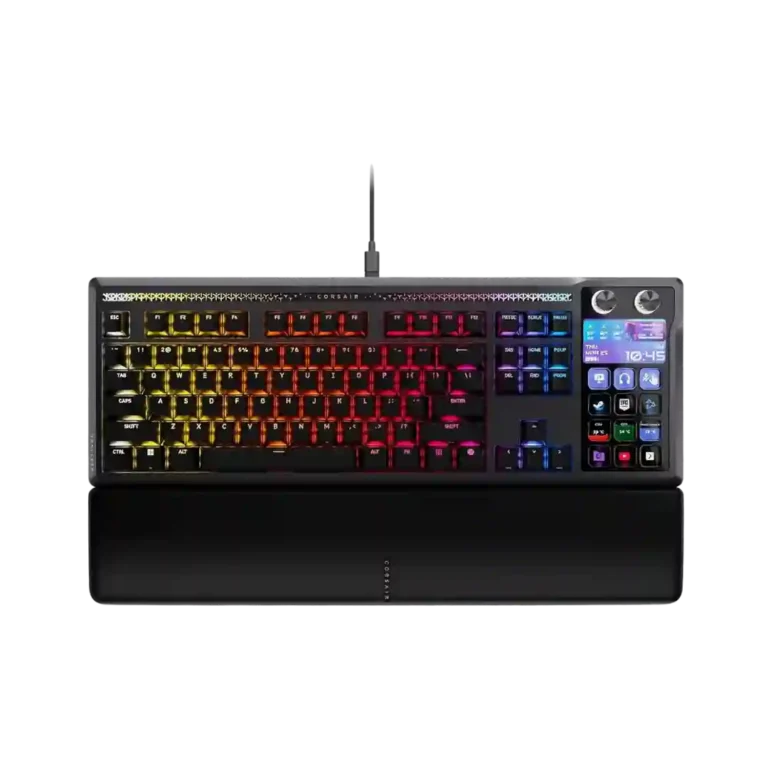
Choose it if you will truly use Stream Deck macros, dials, profiles, and premium typing every day. Skip it if price, desk space, software bugs, or reliability reports worry you.
Best for
Best for streamers, creators, sim players, and productivity-heavy users who want Stream Deck controls, profiles, audio dials, and shortcuts built into one premium desk keyboard.
Not for
Not for buyers who mainly want a compact competitive FPS board, a physical numpad, wireless portability, or a simple plug-and-play keyboard with low software risk.
Verdict
The Corsair Galleon 100 SD is a highly specialized premium keyboard whose best moments come from putting a real Stream Deck, dials, profiles, and app shortcuts directly beside a strong mechanical typing experience. Reviewers consistently like the sturdy build, smooth switches, thocky sound, RGB presentation, hot-swap support, and deep macro control. The tradeoff is equally clear: it is expensive, wide, wired, and tied to a split Web Hub plus Stream Deck software setup that can be buggy. Customer reports of defective units, bricking, freezing, and key issues keep reliability from matching the hardware promise.
Compared in Reviews
Products reviewers directly compared with this model, grouped into quick takeaways.
Corsair's Makr Pro line
Cheaper: gaming valueTechRadar says the Galleon costs about $100 more than Corsair's Makr Pro line if gaming is the only goal.
Keychron Q1 Pro
Compared: build heftWindows Central says the Galleon is not as heavy as some DIY-style boards but still feels reassuringly well built.
Steelseries KB
Better: reliabilityA customer returned to a prior Steelseries keyboard after the Galleon's Stream Deck kept failing.
Customization is exceptionally broad, spanning Stream Deck actions, widgets, profiles, RGB, plugins, and key assignments. Positive owners often describe it as endless or unmatched.
ease of switch replacement: 4.8, based on 1 review
Switch replacement is described as quick and easy thanks to hot-swap functionality. This makes the keyboard friendlier to buyers who want to tune the typing feel later.
Macro customization is the star feature, with Stream Deck keys, profiles, pages, plugins, and multi-actions offering a huge amount of control. Streamers, creators, sim players, and productivity users get the most out of it.
Hot-swap support is a well-liked enthusiast feature, with compatibility for 3-pin and 5-pin mechanical switches. Reviewers appreciate being able to change the feel without soldering.
Stabilizers are praised by the reviewers who discuss them, with tuned PCB-mount stabilizers and no loose or rattly feel. This supports the keyboard's strong typing reputation.
Build quality is broadly praised, especially the aluminum construction, cohesive integration, and premium feel. Customer experiences are split by a few defect reports, but the physical chassis itself is usually considered strong.
The MLX Pulse switches are widely described as smooth, satisfying, and premium, with several reviewers calling out their pre-lubed feel. A few buyers simply say the keys feel wonderful or smooth to press.
The keyboard's sound is a standout positive, often described as deep, thocky, clean, or pleasant. Owners who like mechanical keyboard sound tend to be very happy with it.
Materials come across as premium, with aluminum, PBT caps, and a sturdy overall finish getting frequent praise. The hardware generally looks and feels high-end.
A handful of owners give broad praise even when they do not call out one specific feature. Positive short reviews describe it as a great or favorite keyboard, while one says the hardware is held back by software.
Profiles and pages are a major strength once configured, including app-specific setups and hardware-mode fallbacks. Setup takes some time, but reviewers like the flexibility.
Key stability is generally positive where discussed, with firm keycaps and limited stem wobble. The better-tuned examples feel stable rather than loose or rattly.
Extra gaming features include SOCD/FlashTap, game mode, profiles, and Stream Deck controls for complex games. They are useful, but the lack of Hall-effect features keeps it from being a pure competitive-gaming specialist.
The 8,000Hz polling rate is repeatedly treated as a premium gaming feature, especially for competitive play. Several reviewers note that most people may not feel the difference, but it supports the keyboard's high-end positioning.
Typing comfort is strong, with reviewers praising the cushioned/gasket feel, light keys, and reduced fatigue. The board works well for long typing sessions despite its gaming focus.
Typing feel is one of the strongest areas, with reviewers describing it as smooth, soft, thocky, and satisfying. Even some critical owners say the keyboard itself feels good apart from software or reliability problems.
Noise is generally controlled rather than silent. Reviewers say it avoids metallic ping and is not overly loud, while still sounding like a mechanical keyboard.
Per-key RGB is available and appreciated as part of the premium feature set. Reviewers mention it mainly as a customization strength rather than a central buying reason.
RGB lighting is generally vivid and eye-catching, especially with the mood bar and integrated Stream Deck screens. A few note diffusion or style quirks, but the visual impact is a strength.
Sound dampening is consistently appreciated, with several reviewers noting the multi-layer damping and echo-free feel. It helps the board sound fuller and less pingy than older gaming keyboards.
The dual dials are frequently praised for volume and audio control, especially for streamers and multitaskers. Owners like being able to manage separate audio sources directly from the keyboard.
Media controls are convenient through the Stream Deck, dials, and hardware shortcuts. Reviewers call out Spotify, playback, audio controls, and quick-access shortcuts as everyday benefits.
Most reviewers like the textured PBT keycaps, shine-through legends, and durable feel. A few criticize the caps as the weaker part of the package or not premium enough for the price.
The design is usually viewed as premium, sleek, and visually distinctive, especially with the screen, RGB, and integrated Stream Deck. A few reviewers dislike the top light bar or dial styling.
Onboard memory helps the keyboard retain settings and offer useful hardware modes without the full Stream Deck app running. It makes the board more usable on secondary or managed computers.
Gaming impressions are positive for casual, sim, strategy, and control-heavy games, helped by profiles, SOCD, and Stream Deck shortcuts. Competitive FPS players may prefer smaller or Hall-effect boards.
Brightness controls are available for the keyboard and display, and the LCD/lighting elements are considered clear enough in normal rooms. The control is useful, though not a major focus.
The included magnetic wrist rest is usually seen as comfortable, cushioned, and a welcome premium accessory. A minority find it too high, chalky, or not comfortable enough for their hands.
The Stream Deck numpad mode can cover calculator-style number entry, and one reviewer says it is ready without extra setup. It is useful as a fallback, not a full replacement for a physical numpad.
Reviewers like the low-latency promise of 8,000Hz polling and shorter hand travel to the Stream Deck controls. One reviewer did notice input delay on the Stream Deck side during rapid use.
Cable feedback is generally positive when reviewers mention the included braided or decent USB-C cables. The drawback is cable clutter when passthrough is used.
Ergonomics are context-dependent. Some users like having controls closer to their hands, while others find the Stream Deck angle or keyboard legs less comfortable for visibility and reach.
Lighting customization can be deep, with Web Hub controls, effects, themes, and aesthetic changes. Customer complaints focus on software failures that leave them stuck with default colors or unable to save lighting changes.
Opinions split on desk space: the integrated Stream Deck can reduce separate-device clutter, but the keyboard itself is wide. It saves room only if it replaces a standalone deck you would otherwise keep nearby.
Main key legends and Stream Deck icons are often readable and bright, but viewing angle matters. Some reviewers and owners find the Stream Deck labels harder to see from a normal seated angle.
Connectivity is mostly wired and functional, with some reviewers liking the stability and single-cable operation for basic use. Customer defect reports about failed connections and recognition problems are the caution.
USB-C passthrough is useful in theory but divisive in practice. Reviewers like the idea, yet several complain about extra cables, USB 2.0 limits, recessed ports, or poor implementation.
This is a large, desk-dominating keyboard despite the TKL-like main cluster. Reviewers like the all-in-one concept, but many warn that it is wide, heavy, and not for small setups.
Out of the box, the switch choice is limited to the MLX Pulse linear switch. Hot-swap support softens that limitation because buyers can install compatible mechanical switches later.
Software is the most repeated pain point. Reviewers like parts of Web Hub and Stream Deck, but many complain about two-app setup, bugs, iCUE separation, recognition failures, and firmware trouble.
The layout is one of the biggest tradeoffs: the Stream Deck replaces the numpad and can mimic it, but not everyone likes that compromise. Heavy numpad users are the most likely to be frustrated.
Value depends almost entirely on whether you will use the Stream Deck deeply. Reviewers see the price as high but defensible for the right workflow, while several customers say software and defects make it hard to justify.
The main switches are praised for smooth, even actuation, but customer defect reports are the big caution. Some owners describe shift, caps lock, stuck-key, or cross-key activation problems.
Compatibility is mixed: the keyboard can work across several devices, but Web Hub, iCUE separation, and managed-machine limitations create friction. Corsair ecosystem users may find the split especially annoying.
Durability feedback is mixed because the core keyboard can feel well built while some owners report weak feet or easy breakage. One owner praises the build, but another warns about fragile stand legs.
Portability is weak. Reviewers describe the keyboard as heavy, wired, and better suited to a permanent desk or sim rig than travel or quick device switching.
Rapid Trigger is one of the clearest missing gaming features. Reviewers say the mechanical switch design is good for feel, but the lack of Hall-effect-style rapid trigger limits top competitive appeal.
Response-time praise appears in one short owner review, but several customers report serious key response defects such as chatter, non-responding Stream Deck keys, and unintended paired key presses.
The keyboard does not deliver analog switch behavior, and multiple reviewers call that out as a limitation. This matters most for buyers who expect adjustable actuation or analog-style gaming controls.
Reliability is sharply mixed. Some reviewers had no issues, but customer reviews include freezes, bricking, defective units, stuck keys, failed recognition, and connection failures.
Compared With Category Average
Compared with other Gaming Keyboards, this product is above average in hot-swappable switches, below average in key responsiveness, reliability, durability.
Summary
8 compared features
Above average0.4+ pts higher13%
1 feature
Same as averagewithin 0.3 pts0%
0 features
Below average0.4+ pts lower88%
7 features
Attribute
This product
Category average
Difference
key responsiveness
2.1
4.6
-2.5
reliability
1.9
3.7
-1.8
durability
2.4
4.4
-2.0
actuation consistency
2.4
4.3
-1.8
rapid trigger support
2.2
3.8
-1.6
hot-swappable switches
4.7
3.4
+1.3
compatibility
2.4
3.8
-1.4
analog input support
2.0
3.4
-1.4
FAQ
Is the Corsair Galleon 100 SD good for gaming?
Yes for many games, especially sims, strategy, MMOs, and shortcut-heavy setups. Competitive FPS players may prefer a smaller Hall-effect board with rapid trigger.
Does it replace a Stream Deck?
For many users, yes. It has 12 Stream Deck keys, dials, profiles, plugins, and hardware modes, though heavy Stream Deck XL users may still want more keys.
Is the software easy to live with?
The Stream Deck app is widely liked, but Web Hub and the two-app setup draw repeated complaints. Some customers report recognition, firmware, and configuration failures.
Does it have a real numpad?
No. The Stream Deck area can act as a numpad or calculator-style number pad, but reviewers say it is not the same as a physical numpad.
How does it sound and feel?
Most reviewers praise the smooth MLX Pulse switches, dampened thocky sound, stable feel, and comfortable typing experience.
Is it worth the price?
It is easiest to justify if you would otherwise buy both a premium keyboard and a Stream Deck. If the Stream Deck features will go unused, the price looks much harder to defend.
Sample Expert Reviews We Analyzed
These are a few of the reviews included in our analysis.

Good if you want a premium 96% Hall Effect keyboard for work and gaming with excellent build, sound, and customization. Skip it if you need cheaper esports-first speed, 8,000Hz polling,...
Good if you want a premium full-size Hall Effect keyboard with smooth switches, quiet sound, and deep customization. Skip it if you need a portable, budget-friendly board or broad switch...
Good if you want a compact Hall Effect keyboard with smooth typing, strong gaming response, bright RGB, and good value. Skip it if you need polished software, quiet heavy presses,...
Good if you want a premium, quiet TKL Hall Effect keyboard for typing and gaming. Skip it if price, portability, 8,000Hz polling, or broad switch choice matters most.