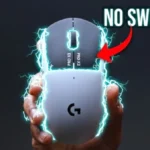
Logitech G Pro X2 Superstrike Review
Bottom Line
Choose the Logitech G Pro X2 Superstrike for customizable, faster-feeling clicks and pro wireless performance. Skip it if you need Bluetooth, many buttons, or a better value.
Best for competitive FPS and click-heavy players who already like Logitech’s G Pro/Superlight shape and want tunable low-latency clicks, strong wireless performance, and flagship sensor specs.
Not for buyers who need Bluetooth, a dedicated DPI button, lots of side buttons, true left-handed controls, or the best price-to-features value.
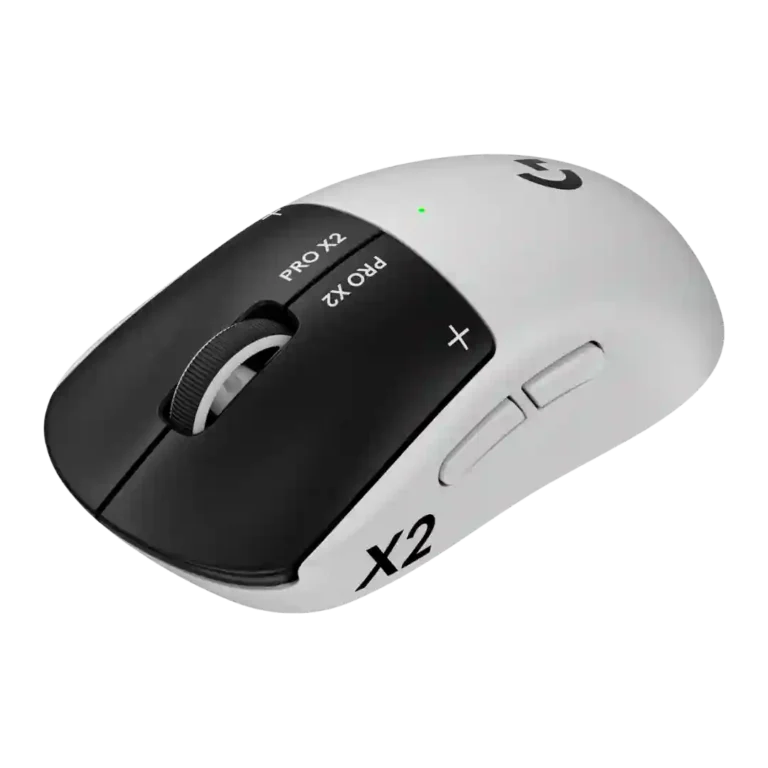
The Logitech G Pro X2 Superstrike earns its excitement by making click behavior feel genuinely new. Across reviews, the HITS system delivers adjustable actuation, rapid trigger, quiet haptic feedback, and a faster, more connected shooting feel. The rest of the mouse is also strong: the Hero 2 sensor, 8K wireless polling, light 61g body, sturdy build, and long battery life all match a flagship competitive mouse. The tradeoff is that the premium price buys a very specific advantage, not a do-everything feature set. There is no Bluetooth, no dedicated DPI button, limited extra buttons, mixed stock-skate feedback, and some front-heavy balance complaints. It is best understood as a serious FPS-focused mouse for players who will tune and benefit from the clicks, rather than a universal upgrade for every gamer.
Reviewer Consensus
The strongest agreement across the reviews is that the Superstrike is not just another spec bump. The HITS click system changes how the main left and right buttons feel and respond, with reviewers repeatedly highlighting adjustable actuation, rapid trigger, and haptic feedback as the real reason to consider it. Many describe the clicks as faster, snappier, quieter, and surprisingly satisfying after a short adjustment period. The Hero 2 sensor, high DPI range, 8K wireless polling, stable Lightspeed connection, and low 61g weight give it the expected flagship foundation, but the click system is what separates it from the Superlight-style mice it builds on.
There is also broad agreement that the mouse is tuned for competitive play more than general versatility. FPS players, esports-minded buyers, and people who value shaving time from the click itself are the most likely to appreciate it. Reviewers also liked the familiar shape, premium build, long battery life, and G Hub customization options. At the same time, several reviews pushed back against the idea that it automatically makes anyone better. Shape preference, aim, timing, and the game itself still matter, and a few reviewers found the gains more subtle than transformative.
The biggest buying tradeoff is price versus specialization. The Superstrike is expensive, lacks Bluetooth, has no dedicated DPI button, and offers a modest button layout that will not satisfy MMO or productivity-heavy users who want lots of inputs. Feedback on the stock skates and weight balance is mixed, with several reviewers noting front-heavy feel or slower-than-ideal feet. Buyers most likely to be satisfied are competitive shooter players who already like the G Pro/Superlight shape and want a mouse built around customizable, low-latency clicks rather than extra buttons or broad device compatibility.
Scored Features
Pros
-
The DPI range is consistently described as very high, typically 100 to 44,000 DPI. Reviewers treat it as a flagship spec even when noting that most players will use much lower settings.
-
Wireless latency is excellent. Reviews cite low-latency 2.4GHz/Lightspeed operation, 8K wireless polling, zero perceived latency, and extremely low measured response.
-
The sensor specification is repeatedly tied to 88G acceleration and, in one review, zero smoothing, acceleration, or filtering. Reviewers frame this as part of the pro-grade tracking package rather than the main innovation.
-
Motion consistency is supported by flawless tracking, no dropouts, stable movement plots, and consistent sensor behavior across swipes and micro-adjustments.
-
Wireless performance is strong. Reviews point to sturdy wireless connectivity, stable Lightspeed use, no interruption, and high polling over wireless.
-
Polling rate is a flagship spec. Reviews repeatedly cite 8,000Hz wireless operation, with some noting wired mode is capped at 1,000Hz or that many players may still choose lower polling for battery or compatibility.
-
Button customization is one of the defining strengths. Reviews emphasize adjustable actuation, haptic feedback strength, rapid trigger behavior, independent left/right tuning, remapping, and G Hub configuration.
-
Build quality is praised across reviews, with comments about a solid shell, premium construction, durable-feeling chassis, and sturdy lightweight design. The few criticisms focus more on balance, skates, or controls than core construction.
-
Connection stability is a clear strength. Reviews report no drop-outs, lag-free Lightspeed performance, stable wireless use, and no interruption during play or testing.
-
Tracking and aiming precision are repeatedly praised. Reviewers report flawless sensor behavior, pixel-perfect tracking, stable movement across speeds, and sharper practical aiming, though one reviewer preferred a smaller mouse for accuracy because of shape.
-
Click latency is the mouse's headline advantage. Reviews cite Logitech's up-to-30ms claim, lower reaction-time results, very low measured click latency, and the practical feel of faster shots.
-
Click noise is generally praised for being quiet or virtually silent. Reviewers describe the haptic clicks as muted, less audible than standard switches, and pleasant for shared rooms, even if some users may miss a sharper click.
-
FPS suitability is one of the strongest use cases. Reviews repeatedly tie the low-latency clicks, rapid trigger, 8K wireless, and precise tracking to shooters like Counter-Strike, Valorant, Call of Duty, and Battlefield.
-
Sensor performance is highly praised. The Hero 2 sensor is described as precise, proven, exceptional, and capable of flawless tracking, with high DPI and polling specs backing it up.
-
Button responsiveness is the central performance win. Reviewers describe snappier clicks, faster response, lower measured or perceived latency, and quicker click behavior, though some stress that it will not replace skill.
-
Reviewers consistently describe the mouse as relying on Logitech's low-latency dongle or Lightspeed wireless path rather than broad multi-device wireless. The connection is treated as gaming-focused and stable, with no Bluetooth fallback.
-
Left and right click quality is strongly praised because the HITS buttons feel tactile, tunable, and unusually satisfying once powered. A few reviewers still prefer older mechanical clicks or note the sensation takes adjustment.
-
Charging convenience is strong, especially for users in Logitech's ecosystem. Reviews mention long intervals between charges, USB-C top-ups, PowerPlay compatibility, and wireless charging during use.
-
Switch feel is a major strength after adjustment. Reviewers describe the haptic clicks as fantastic, tactile, convincing, clean, and customizable, while still noting they feel different from traditional switches.
-
Battery life is generally viewed as strong. Multiple reviews cite roughly 80 to 95 hours or multi-day use, while noting that higher haptics, higher polling, or heavy clicking can reduce runtime.
-
PowerPlay compatibility is repeatedly mentioned as a convenience advantage. The mouse can work with Logitech's charging mat or puck system, though this depends on staying inside Logitech's ecosystem.
-
Materials quality is praised through references to high-quality plastics, smooth durable chassis feel, satin or matte texture, and premium lightweight construction.
-
MOBA suitability is positive when the game rewards fast clicks. Reviews cite MOBAs or click-heavy RTS play as places where rapid trigger and light actuation can still feel useful.
-
Portability is helped by onboard dongle storage and a travel-ready lightweight shell. Reviewers specifically call out the stored receiver and suitability for players moving between setups.
-
Long-session comfort is generally positive. Reviews cite comfortable extended use, long gaming sessions, and reduced fatigue, though comfort still depends on grip style and shape preference.
-
Premium feel is strong, with reviews describing the mouse as premium, well-made, high-performing, and advanced. The same evidence also reinforces that the premium price is a major consideration.
-
Weight is generally good at about 59 to 61 grams. Reviewers treat it as lightweight for a mouse with new internal tech, though some ultralight enthusiasts would prefer something lighter.
-
Ergonomic design is mostly positive because the Superlight-style shell is familiar and comfortable. Criticism centers on size for smaller hands, lack of left-side symmetry in the buttons, or shape preferences.
-
Surface compatibility is generally good for tracking, with reviewers mentioning cloth, glass, fabric, and hard plastic surfaces. The stock skates are more divisive across surfaces than the sensor itself.
-
Scroll wheel quality is mostly good but not unanimous. Some reviewers call it solid, precise, phenomenal, or marvelous, while others report looseness, mushiness, or release issues.
-
Ecosystem integration is a strength for Logitech users. Reviews connect the mouse to G Hub tuning, Lightspeed wireless, PowerPlay charging, sensitivity matching, and profile or settings sharing.
-
Profile switching is available but not always hardware-direct. Reviews mention dual profiles, per-game profiles, G Hub profile controls, and workarounds for DPI/profile switching because there is no dedicated DPI button.
-
Grip texture is mixed-to-good. Several reviewers praise the matte texture or optional grip tape, while others find the shell a bit slick without tape.
-
Palm grip comfort is mixed-to-positive. Some reviewers say the palm is well supported or fits perfectly, while another says palm is not ideal because of the low, slim shape.
-
Macro support is available through G Hub, with several reviews mentioning recorded macros or assignable functions. The main limitation is the relatively low button count.
-
Claw grip feedback is mostly positive because the shape and optional grip tape can support it, although one reviewer used more claw because the G502X thumb rest was gone rather than because the shape was ideal.
-
Software usability is mostly positive, with G Hub described as clear, straightforward, easy to navigate, and useful for HITS tuning. The main criticisms are lack of web configuration and general G Hub dislike.
-
Programmable buttons are supported through remapping, macros, and assignments. The main limitation is that the mouse has few physical buttons compared with more feature-rich gaming mice.
-
Shape comfort is familiar and generally safe, especially for users who already like the G Pro/Superlight shell. Reviews still flag size, boxiness, and personal shape preference as important caveats.
-
Switch durability is promising but not proven. Reviewers note the lack of traditional switches and theoretical reduction in mechanical wear, but Logitech's lack of click-rate figures leaves long-term certainty open.
-
Glide smoothness is mixed. Some reviewers report effortless or butter-smooth gliding, while several mouse-focused reviewers criticize the stock skates as slower, not smooth enough, or better on glass than cloth.
-
Lift-off distance is configurable but not deeply praised. Reviews mention lift-off settings in G Hub, though one notes the lack of precise measurement and others treat it as part of broader sensitivity controls.
-
Onboard memory is inconsistent across reviews. Some say up to five onboard profiles or internal memory are supported, while another reports that settings did not save to the mouse without G Hub running.
-
Side button quality is mixed. Some reviewers find the side buttons tactile and usable, while others call them traditional, mushy, or underdeveloped next to the new main clicks.
-
Software stability is mixed. Some reviewers had no hitches or called the setup flawless, while others found settings behavior or G Hub dependence frustrating.
-
Fingertip grip comfort is mixed. Some reviews include fingertip or hybrid grips in the supported range, while others say pure fingertip users or small-mouse fans may prefer another shape.
Cons
-
Firmware reliability is mixed and lightly evidenced. Reviews report a smooth firmware update or no hitches, but also mention wake-from-sleep DPI delay or settings behavior that needs software running.
-
Cross-platform support is mixed. G Hub support for Windows and macOS is cited, but the mouse lacks Bluetooth hot-swapping and one review notes Linux users are left out.
-
Value for money is the biggest tradeoff. Reviewers often accept the premium because the tech is genuinely new, but many still call the price high or say casual players can get strong mice for less.
-
Durability over time is uncertain. Reviewers like the solid build and the no-physical-switch concept, but several explicitly note that long-term HITS durability or quality control cannot yet be proven.
-
Balance is one of the clearest mixed points. Several reviewers call out front-heavy weight distribution from the new haptic hardware, while only a few treat the familiar 61g weight as easy enough to adapt to.
-
MMO suitability is weak-to-mixed. One review says the mouse can handle World of Warcraft, but several point to the low button count as a drawback for RPG/MMO-style players who need many inputs.
-
Weight tuning is limited. Reviews mention small configuration weight changes from pucks or covers, but there is no real adjustable-weight system like traditional weight tuning.
-
Skate durability and stock skate quality are mixed-to-weak. Some reviews like the longevity angle, but several criticize the feet for slowing, flattening, or needing replacement.
-
Handedness options are limited. The shell is symmetrical, but the side buttons are left-side only, so left-handed users do not get a true ambidextrous control layout.
-
Bluetooth support is consistently absent. Reviews that mention it treat the omission as expected for a competitive mouse or disappointing at the price, but no review indicates Bluetooth is available.
-
RGB features are essentially absent. Reviewers repeatedly note no RGB lighting, usually framing it as a clean design or a battery-life benefit rather than a customization feature.
Compared With Category Average
Compared with other Gaming Mouse, this product is above average in click noise, dock compatibility, below average in Bluetooth support, RGB features, balance and weight distribution.
| Attribute | This product | Category average | Difference |
|---|---|---|---|
| Bluetooth support | 1.0 | 3.3 | -2.3 |
| RGB features | 1.0 | 3.2 | -2.2 |
| balance and weight distribution | 2.9 | 4.1 | -1.2 |
| click noise | 4.6 | 3.5 | +1.1 |
| dock compatibility | 4.5 | 3.5 | +0.9 |
| durability over time | 3.2 | 4.2 | -1.0 |
| skate durability | 2.7 | 3.6 | -0.9 |
| glide smoothness | 3.7 | 4.4 | -0.7 |
FAQ
Is the Logitech G Pro X2 Superstrike worth buying?
It is worth considering if you play competitive shooters or click-heavy games and will use the adjustable HITS clicks. Casual players may get less benefit for the premium price.
What is the main advantage of the Superstrike?
The main advantage is the HITS click system, which lets you adjust actuation, rapid trigger behavior, and haptic feedback for faster-feeling, more customizable left and right clicks.
What is the biggest drawback?
The biggest drawback is specialization for the price. Reviews point to no Bluetooth, no dedicated DPI button, limited extra buttons, mixed skate feedback, and some front-heavy balance.
Is it good for FPS games?
Yes. Reviews most consistently recommend it for FPS and esports-style play because the low-latency clicks, 8K wireless polling, and Hero 2 sensor all support fast aiming and shooting.
Does the Superstrike have Bluetooth?
No. Reviews that mention connectivity say it uses the included dongle, 2.4GHz Lightspeed wireless, or wired USB, with Bluetooth omitted.
How good is the battery life?
Battery life is generally praised, with reviews citing roughly 80 to 95 hours depending on haptics, polling rate, and click activity. PowerPlay compatibility can reduce charging interruptions.
Is it good for MMO games or productivity?
It can work for general use, but the low button count makes it less ideal for MMO players or productivity users who want many programmable inputs.
Expert Reviews We Analyzed
Video Reviews
Article Reviews
Consider This Instead
If you want better Bluetooth support
Choose Razer Basilisk V3 Pro 35K. It scores 5.0 vs 1.0 for Bluetooth support, with a 4.5 overall score.
If you want better RGB features
Choose Razer Cobra Pro. It scores 4.6 vs 1.0 for RGB features, with a 4.0 overall score.
If you want better balance and weight distribution
Choose Turtle Beach Burst II Air. It scores 5.0 vs 2.9 for balance and weight distribution, with a 4.1 overall score.
If you want better handedness options
Choose Logitech G Pro 2 Lightspeed. It scores 4.8 vs 2.5 for handedness options, with a 4.1 overall score.
Overall Top Gaming Mouse Alternatives
Best for a 47g, high-performance 8K wireless mouse with excellent shape, skates, clicks, and web controls. Skip it if stiff side buttons, shorter high-polling battery life, or app/cable quirks would...
Pros: Accuracy and tracking precision, sensor performance
Cons: cable flexibility
Choose it if you want a comfortable, feature-rich wireless mouse for mixed gaming and productivity. Skip it if you need ultralight FPS speed, left-handed support, or better value than discounted...
Pros: programmable buttons, Bluetooth support
Cons: handedness options, firmware reliability
Good if you want ergonomic wireless gaming with hot-swappable batteries and strong tuning. Skip it if price, dock clutter, or short 8K battery life matters most.
Pros: switch durability, DPI range
Cons: grip texture, portability
Choose it if you want a compact, comfortable work-and-play mouse with strong wireless options and battery life. Skip it if you want true ultra-portability, quieter clicks, or better value.
Pros: switch durability, wireless performance
Cons: click noise, RGB features