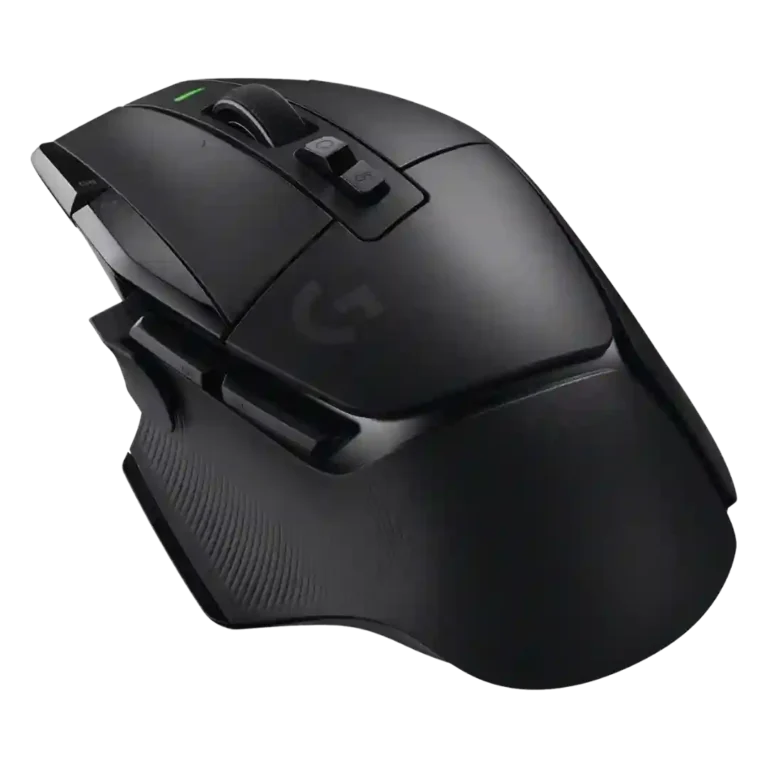
Logitech G502 X Lightspeed

Logitech G502 X Lightspeed Review

Updated: 14 hours ago
4.0
Based on methodology below
217
Insights analyzed
54
Grouped by key features
10
From expert reviews
Scores below reflect consolidated expert coverage across these features.

Bottom Line

Choose the Logitech G502 X Lightspeed for long battery life, strong wireless response, and many buttons. Skip it if you want an ultralight FPS mouse or dislike mixed G Hub and scroll-wheel feedback.

Best for

Best for right-handed gamers who want long battery life, strong wireless performance, onboard profiles, and many programmable controls for MMO, productivity, or mixed work-and-play use.

Not for

Not for buyers who prioritize ultralight FPS performance, Bluetooth support, left-handed use, or a flawless scroll wheel and software experience.

Verdict

The Logitech G502 X Lightspeed comes across as a feature-rich wireless gaming mouse built around comfort, battery life, reliable Lightspeed response, and a large programmable-button layout. The strongest praise centers on its Hero sensor, long 140-hour battery claims, USB-C charging, onboard profiles, and utility for users who want more mouse-side controls for games or productivity. The tradeoff is that this is not a minimalist ultralight mouse. Several reviewers found it heavy by modern standards, and side-button reach can be awkward depending on hand size or grip. The scroll wheel and G Hub software also split opinion, with useful free-scroll features offset by complaints about feel, sound, or software behavior.

What Reviewers Agree On

The clearest strengths are battery life, wireless performance, sensor behavior, and button depth. Multiple reviewers cite 140-hour battery expectations or testing, and the wireless connection is repeatedly described as responsive, stable, or comparable to wired use. The Hero 25K sensor also receives positive support through comments about exact tracking, 1:1 movement, no jitter, and no smoothing or acceleration. The large control layout is another recurring theme: reviewers consistently mention 11 to 13 programmable controls, onboard profiles, DPI adjustment, and the ability to map extra commands to the mouse.

Comfort is generally positive, especially for users with larger hands, palm grip habits, or a preference for thumb rests. Several reviews describe the shape as comfortable, grippy, and suitable for extended use. Still, the same design creates the biggest fit-related tradeoff. Some reviewers had trouble reaching the G-Shift or side controls, and one found the extra top buttons easy to fat-finger during FPS play. Weight is another repeated caveat: the mouse is lighter than prior versions in some comparisons, but it remains heavy beside newer ultralight gaming mice.

The most divisive areas are the scroll wheel, software, materials, and value. Some reviewers love the hyperfast or free-scrolling wheel for productivity, while others dislike the ratcheted feel, looseness, or sound. G Hub enables profiles, DPI changes, macros, and syncing, but it also produced access or recognition problems in several reviews. Buyers most likely to be satisfied are those who value long battery life, many programmable controls, and a comfortable right-handed shape more than ultra-low weight or perfectly polished software.

Scored Features

Pros

  • 4.8
    based on 4 reviews
    acceleration control: 4.8, based on 4 reviews
    Sensor-focused comments consistently point to clean movement handling, with reviewers calling out zero acceleration, no jitter, and no unwanted filtering or smoothing.
  • 4.8
    based on 2 reviews
    connection stability: 4.8, based on 2 reviews
    Connection stability is strong where directly discussed, with reviews reporting no lag, no dropped connections, and no issues with the 2.4GHz connection.
  • 4.7
    based on 3 reviews
    Accuracy and tracking precision: 4.7, based on 3 reviews
    Tracking precision is treated as a strength: reviewers cite exact hand tracking, 1:1 tracking, and submicron movement tracking.
  • 4.7
    based on 8 reviews
    battery life: 4.7, based on 8 reviews
    Battery life is one of the clearest strengths, with multiple reviews citing 140-hour expectations or testing and another review still calling battery life solid.
  • 4.7
    based on 1 review
    motion consistency: 4.7, based on 1 review
    Motion consistency is supported by direct testing that found no jittering or phantom movements.
  • 4.7
    based on 4 reviews
    onboard memory: 4.7, based on 4 reviews
    Onboard memory is consistently supported by repeated mentions of five onboard profiles and settings saved to onboard profiles.
  • 4.6
    based on 6 reviews
    wireless performance: 4.6, based on 6 reviews
    Wireless performance is consistently strong, with reviews citing excellent wireless behavior, instant response, fast connectivity, and Logitech wireless confidence.
  • 4.6
    based on 2 reviews
    macro support: 4.6, based on 2 reviews
    Macro support is clearly present through G Hub, with reviews describing program-specific macros and assigning macros to customizable buttons.
  • 4.6
    based on 8 reviews
    programmable buttons: 4.6, based on 8 reviews
    Programmable button support is one of the most repeated strengths, with reviews citing 11 to 13 programmable controls and many extra buttons.
  • 4.6
    based on 6 reviews
    charging convenience: 4.6, based on 6 reviews
    Charging convenience scores well because reviewers repeatedly highlight USB-C charging, included USB-C cabling, and easy charging between sessions.
  • 4.6
    based on 7 reviews
    sensor performance: 4.6, based on 7 reviews
    Sensor performance is consistently positive through Hero 25K references, strong tracking, and zero smoothing or acceleration claims.
  • 4.6
    based on 3 reviews
    wireless latency: 4.6, based on 3 reviews
    Wireless latency is strong where tested or discussed, with reviewers reporting no spikes, low-latency Lightspeed, and wired-like response.
  • 4.5
    based on 6 reviews
    click latency: 4.5, based on 6 reviews
    Click latency is scored highly from repeated claims of instant click registration, faster response rate, optical actuation, and reduced click latency.
  • 4.5
    based on 6 reviews
    button customization: 4.5, based on 6 reviews
    Customization is well supported through remappable buttons, swappable or repositionable controls, DPI adjustment, and G Hub assignment options.
  • 4.5
    based on 4 reviews
    button responsiveness: 4.5, based on 4 reviews
    Button responsiveness is generally positive, with reviewers reporting reliable buttons, responsive clicks, and satisfying response during use.
  • 4.5
    based on 3 reviews
    switch durability: 4.5, based on 3 reviews
    Switch durability is supported by optical-mechanical switch design claims, reduced wear, double-click prevention, and wear-and-tear resilience.
  • 4.5
    based on 2 reviews
    2.4GHz connectivity: 4.5, based on 2 reviews
    The reviews that mention the receiver describe 2.4GHz operation through the included wireless dongle and report solid PC connection behavior.
  • 4.5
    based on 6 reviews
    DPI range: 4.5, based on 6 reviews
    DPI support is consistently strong, with reviews citing on-the-fly DPI adjustment and maximum ranges around 25,600 DPI.
  • 4.5
    based on 4 reviews
    MMO gaming suitability: 4.5, based on 4 reviews
    MMO suitability is one of the better-supported use cases because several reviews highlight many buttons and MMO-focused control flexibility.
  • 4.4
    based on 4 reviews
    grip texture: 4.4, based on 4 reviews
    Grip texture is a strength where mentioned, with reviewers noting textured rubber grips, grippy side lines, and rubberized thumb areas.
  • 4.4
    based on 5 reviews
    portability: 4.4, based on 5 reviews
    Portability is helped by onboard dongle storage, magnetic storage covers, and reviews that call the mouse a good portable option.
  • 4.4
    based on 3 reviews
    long-session comfort: 4.4, based on 3 reviews
    Long-session comfort is strong, with reviewers citing no hand fatigue, little hand adjustment, and comfortable hold during longer use.
  • 4.4
    based on 5 reviews
    ecosystem integration: 4.4, based on 5 reviews
    Ecosystem integration is a recurring advantage through shared Lightspeed receivers, Logitech keyboard pairing, and syncable lighting or audio profiles.
  • 4.4
    based on 4 reviews
    profile switching: 4.4, based on 4 reviews
    Profile switching is a strength, with reviews describing easy switching, five profile support, and built-in profiles.
  • 4.3
    based on 1 review
    durability over time: 4.3, based on 1 review
    Durability evidence is positive but not extensive, with one review reporting no drop-test damage and switch design intended to reduce mechanical wear.
  • 4.3
    based on 1 review
    MOBA gaming suitability: 4.3, based on 1 review
    MOBA suitability has limited direct support, but one review says MOBA players should have no trouble because the extra buttons remain unobtrusive.
  • 4.2
    based on 5 reviews
    ergonomic design: 4.2, based on 5 reviews
    The ergonomic design is generally praised through references to thumb support, ergonomic contours, and grip-style adaptability.
  • 4.2
    based on 1 review
    claw grip comfort: 4.2, based on 1 review
    Claw grip has limited but direct support from one review that found claw use felt good.
  • 4.2
    based on 1 review
    fingertip grip comfort: 4.2, based on 1 review
    Fingertip comfort has limited direct evidence, but the available review says fingertip grip felt good.
  • 4.2
    based on 5 reviews
    dock compatibility: 4.2, based on 5 reviews
    Charging-mat and PowerPlay evidence supports dock-style compatibility, with multiple reviews mentioning PowerPlay or wireless charging mat support.
  • 4.2
    based on 5 reviews
    palm grip comfort: 4.2, based on 5 reviews
    Palm grip comfort is generally positive because reviewers repeatedly associate the shape with palm grip comfort, though reach issues remain for some hands.
  • 4.2
    based on 8 reviews
    shape comfort: 4.2, based on 8 reviews
    Shape comfort is broadly positive, especially for larger hands and thumb-rest users, though a few comparisons and reach issues keep it from being perfect.
  • 4.2
    based on 6 reviews
    switch feel: 4.2, based on 6 reviews
    Switch feel is mostly positive for crispness and responsiveness, though one review found the clicks not especially tactile.
  • 4.1
    based on 5 reviews
    glide smoothness: 4.1, based on 5 reviews
    Glide is mostly positive, with reviewers citing PTFE feet, smooth movement on mats, and slick desk movement, though one review called stock skates merely fine.
  • 4.1
    based on 2 reviews
    left and right click quality: 4.1, based on 2 reviews
    Main click quality is mixed: reviews praised easy rapid clicking and reduced pre-travel, while broader click impressions included some premium-feel reservations.
  • 4.0
    based on 4 reviews
    build quality: 4.0, based on 4 reviews
    Build impressions are split: one review found loose-feeling construction, while others reported robust build quality, no drop-test damage, and sturdy assembly.
  • 3.8
    based on 2 reviews
    surface compatibility: 3.8, based on 2 reviews
    Surface compatibility is modestly positive, with reviewers reporting acceptable or smooth movement on desks and mouse mats.
  • 3.7
    based on 1 review
    cable flexibility: 3.7, based on 1 review
    Cable flexibility has limited evidence, but the one direct review describes the included rubber cable as soft and supple.
  • 3.7
    based on 1 review
    polling rate: 3.7, based on 1 review
    Polling-rate evidence is limited and mixed: 1000Hz is considered enough by one reviewer, but also behind newer higher-polling competitors.
  • 3.6
    based on 6 reviews
    FPS gaming suitability: 3.6, based on 6 reviews
    FPS suitability is divided: several reviewers enjoyed aim control and low latency, while others found the weight and extra buttons less ideal for FPS players.
  • 3.5
    based on 10 reviews
    scroll wheel quality: 3.5, based on 10 reviews
    Scroll wheel quality is highly polarized: reviewers praise free-scroll usefulness and hyperfast scrolling, but several criticize ratcheted feel, sound, or looseness.
  • 3.5
    based on 5 reviews
    materials quality: 3.5, based on 5 reviews
    Materials quality is mixed: soft-touch plastic and low fingerprinting are praised, while glossy areas and untextured smooth plastic draw criticism.

Cons

  • 3.3
    based on 5 reviews
    software usability: 3.3, based on 5 reviews
    Software usability is mixed: G Hub offers DPI, macros, and profiles, but several reviewers could not access it, could not customize fully, or called it bad.
  • 3.3
    based on 3 reviews
    premium feel: 3.3, based on 3 reviews
    Premium feel is mixed: some reviewers mention stylish finish, but others criticize plastic feel, glossy wear, and high-end expectations not fully met.
  • 3.2
    based on 8 reviews
    value for money: 3.2, based on 8 reviews
    Value is mixed and price-sensitive: some reviews found acceptable sale pricing, while others called MSRP pricey or a worse deal against newer rivals.
  • 3.1
    based on 6 reviews
    side button quality: 3.1, based on 6 reviews
    Side button quality is mixed because reviewers like the modular sniper button but repeatedly mention reach problems and accidental fat-fingering.
  • 3.1
    based on 2 reviews
    click noise: 3.1, based on 2 reviews
    Click noise is mixed: one review criticized cheap, echoey click sound, while another described the switches as producing a satisfying click sound.
  • 3.1
    based on 2 reviews
    cross-platform compatibility: 3.1, based on 2 reviews
    Cross-platform or multi-machine use is mixed: onboard profiles help across machines, but one review reported a MacBook Air detection failure.
  • 3.1
    based on 4 reviews
    RGB features: 3.1, based on 4 reviews
    RGB is a mixed feature because it exists mainly on the Plus variant, costs extra, and can reduce battery life or add weight.
  • 3.1
    based on 7 reviews
    weight: 3.1, based on 7 reviews
    Weight is a recurring caveat: reviewers note reductions from older versions, but also repeatedly call it heavy or not especially light by current standards.
  • 2.5
    based on 1 review
    handedness options: 2.5, based on 1 review
    Handedness options are weak because the direct evidence describes the mouse as made for right-handed users.
  • 2.2
    based on 2 reviews
    software stability: 2.2, based on 2 reviews
    Software stability is a weakness in the evidence, with reviews describing G Hub behavior going haywire or the mouse not being recognized.
  • 1.5
    based on 1 review
    weight tuning: 1.5, based on 1 review
    Weight tuning is weak because the direct evidence says this version lacks additional weights.
  • 1.0
    based on 1 review
    Bluetooth support: 1.0, based on 1 review
    The only direct Bluetooth evidence says the mouse does not include Bluetooth connectivity, so this scores as a missing feature rather than a strength.

FAQ

Is the Logitech G502 X Lightspeed worth buying?

It is worth considering if you want long battery life, strong wireless response, and many programmable buttons. Reviews are more cautious at full MSRP because weight, software, and scroll-wheel feel are recurring tradeoffs.

Who is the Logitech G502 X Lightspeed best for?

It fits right-handed users who like a larger ergonomic shape, a thumb rest, onboard profiles, and lots of mouse-side controls. Several reviews point to MMO, productivity, and mixed gaming use as strong fits.

What is the main drawback of the G502 X Lightspeed?

The most repeated drawbacks are its heavier weight, mixed scroll-wheel feel, occasional side-button reach issues, and uneven G Hub software experience.

Is it good for FPS gaming?

It can perform well in FPS games thanks to strong sensor tracking and low-latency wireless response. However, some reviewers felt its weight and extra buttons make it less ideal for competitive FPS players who prefer ultralight mice.

How good is the battery life?

Battery life is one of the best-supported strengths. Multiple reviews cite Logitech’s 140-hour rating or testing that came close to that range.

Does the Logitech G502 X Lightspeed have Bluetooth?

The supplied reviews directly state that it does not have Bluetooth connectivity. It relies on Logitech’s Lightspeed 2.4GHz wireless connection.

Is the scroll wheel good?

It depends on what you value. Reviewers praised the hyperfast and free-scrolling modes for productivity, but several criticized the ratcheted feel, sound, or looseness.

Reviews we analyzed

Video Reviews

Article Reviews

Best Alternatives

#1
4.4
Choose the Model D3 for flexible wireless gaming, comfort, and precise control. Skip it if the high price or shorter high-polling battery life...
Pros: Accuracy and tracking precision, switch durability, FPS gaming suitability, charging convenience, sensor performance, click latency, wireless latency
Cons: none
#2
4.4
Choose the Harpe II Ace for ultralight FPS control, 8K wireless, and easy web setup. Skip it if you need many buttons or...
Pros: polling rate, weight, wireless performance, DPI range, switch durability, sensor performance, motion consistency
Cons: onboard memory, MMO gaming suitability, software stability, profile switching
#3
4.4
Choose the Razer Basilisk V3 Pro 35K for ergonomic comfort, precise tracking, and feature-rich wireless control. Skip it if you want an ultralight...
Pros: motion consistency, sensor performance, DPI range, build quality, macro support, click latency, acceleration control
Cons: handedness options, value for money, weight, fingertip grip comfort
#4
4.4
Choose it if you want a compact, comfortable work-and-play mouse with strong wireless options and battery life. Skip it if you want true...
Pros: switch durability, wireless performance, wireless latency, ecosystem integration, glide smoothness, Accuracy and tracking precision, DPI range
Cons: click noise, RGB features