If you want better connection stability
Choose SteelSeries Rival 3 Gen 2 Wired. It scores 5.0 vs 2.0 for connection stability, with a 4.1 overall score.
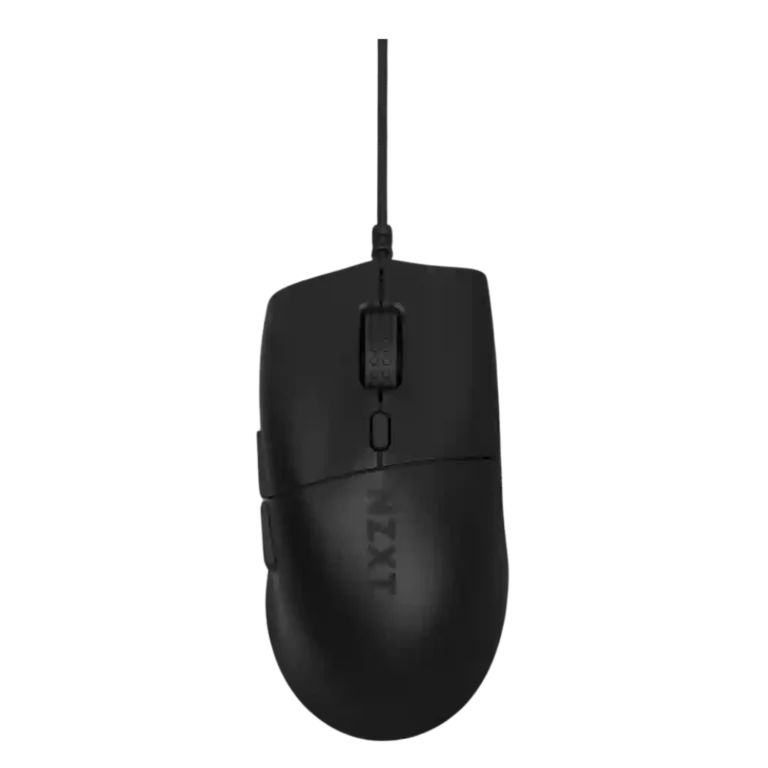
Choose the NZXT Lift 2 Ergo if you want a light, ergonomic wired mouse with strong sensor specs for little money. Skip it if you need wireless, RGB, left-hand support, or guaranteed smooth glide on soft pads.
Best for budget-conscious right-handed gamers with medium-to-large hands who want a light wired mouse with strong FPS performance, palm or claw comfort, and useful software customization.
Not for left-handed users, fingertip grippers, RGB fans, wireless-only buyers, or players using soft pads who are sensitive to scratchiness or frame drag.
Across reviews, the NZXT Lift 2 Ergo lands as a value-first wired gaming mouse with unusually strong performance specs for its price. Reviewers repeatedly praised the light 60-61g body, comfortable right-handed ergonomic shape, flexible paracord cable, fast sensor behavior, high polling capability, and strong FPS feel. The tradeoff is that its simplicity cuts both ways: the lack of wireless and RGB makes it clean and affordable, but also less versatile and less informative for profile changes. Comfort is strongest for palm, claw, and medium-to-large right-handed users, while fingertip users and left-handed users are poor fits. The main functional concern is glide consistency on softer pads, where multiple reviewers noticed frame drag or scratchiness.
Compared with other Gaming Mice, this product is above average in value for money, click noise, cable flexibility, near average in scroll wheel quality, long-session comfort, below average in connection stability, fingertip grip comfort, cross-platform compatibility.
| Attribute | This product | Category average | Difference |
|---|---|---|---|
| connection stability | 2.0 | 4.5 | -2.5 |
| fingertip grip comfort | 1.5 | 3.7 | -2.2 |
| cross-platform compatibility | 2.0 | 4.0 | -2.0 |
| surface compatibility | 2.5 | 4.3 | -1.8 |
| value for money | 4.8 | 3.7 | +1.0 |
| click noise | 4.5 | 3.4 | +1.1 |
| cable flexibility | 4.5 | 3.6 | +0.9 |
| RGB features | 2.8 | 3.6 | -0.9 |
Choose SteelSeries Rival 3 Gen 2 Wired. It scores 5.0 vs 2.0 for connection stability, with a 4.1 overall score.
Choose SteelSeries Rival 5. It scores 4.8 vs 2.0 for cross-platform compatibility, with a 4.2 overall score.
Choose ASUS ROG Strix Impact III Wireless. It scores 4.8 vs 1.5 for fingertip grip comfort, with a 4.2 overall score.
Choose Razer DeathAdder V3. It scores 5.0 vs 2.5 for surface compatibility, with a 4.4 overall score.
Products reviewers directly compared with this model, grouped into quick takeaways.
Yes, reviewers broadly praised its right-handed ergonomic shape, especially for palm grip, claw grip, and medium-to-large hands. Fingertip grip was the weak fit in the reviewed evidence.
Yes. Reviewers praised its fast sensor behavior, high polling capability, smooth movement, and shot accuracy in FPS-style use.
No. Reviewers repeatedly treated the wired-only design as the main versatility tradeoff, even though several liked the cable itself.
The paracord cable was widely praised as flexible, smooth, low-drag, and easy to ignore during use. One reviewer still preferred wireless mice overall.
Reviewers were split. Some found the no-RGB design clean and simple, while others called it dull or frustrating because it gives no visual profile feedback.
The clearest issues are no wireless, no left-handed version for the Ergo shape, limited profile feedback, one disconnecting report on reboot, and frame drag or scratchiness on some soft mousepads.
These are a few of the reviews included in our analysis.

Choose the ROG Harpe II Ace for ultralight FPS play, precise tracking, smooth glide, and web-based tuning. Skip it if you need palm-grip support, MMO buttons, onboard profiles, or long...
Pros: acceleration control, wireless latency
Cons: onboard memory, MMO gaming suitability

Choose it if you want a premium MMO/productivity mouse with 12 adjustable side buttons, strong battery life, and Stream Deck integration. Skip it if you need an ultralight FPS mouse,...
Pros: click latency, macro support
Cons: firmware reliability, tilt gesture controls

Best for ultra-light, competition-focused speed, precise tracking, stable wireless, and long battery life. Skip it if you need quieter clicks, left-handed support, Bluetooth, more buttons, or better value for casual...
Pros: balance and weight distribution, build quality
Cons: dock compatibility, Bluetooth support

Best for precise wireless tracking, smooth glide, strong battery life, and unusually good 8K value. Skip it if you need polished software, quiet snappy clicks, true left-handed controls, or gentle...
Pros: Accuracy and tracking precision, click latency
Cons: software stability, profile switching