Review: Wyze Auto-Lock Bolt v2 Smart Lock
Updated: 1 month ago
4.2
Based on methodology below
143
Insights analyzed
34
Grouped by key features
8
From expert reviews
Scores below reflect consolidated expert coverage across these features.
Bottom Line
Choose Wyze Lock Bolt v2 for remote control plus fingerprint entry at a budget price. Skip it if you need door-ajar sensing or wide ecosystems like HomeKit or Matter.
Best for
Budget-focused homeowners or renters who want remote locking, PINs, and fingerprint access without buying a separate hub. Great for families who need lots of users and temporary or one-time codes.
Not for
Anyone who needs HomeKit, Matter, or Thread support, or deep third-party platforms beyond Alexa and Google. Also not ideal if you rely on a door-ajar sensor to prevent auto-locking when the door is not fully shut.
Verdict
Wyze Lock Bolt v2 packs features that usually sit in higher-priced locks: away-from-home control without extra hardware, detailed access history, flexible codes, and a fingerprint reader that is typically quick while keeping biometrics stored locally. The tradeoff is ecosystem breadth and sensing: it centers on the Wyze app with Alexa and Google support, and at least one hands-on review notes no dedicated door-ajar sensor to make auto-lock truly context-aware. Battery life is commonly cited around eight months on eight AAs, but USB-C emergency power and a physical key reduce lockout risk. For standard residential doors, the overall value is compelling.
Pros
-
5.0based on 2 reviewsHub requirement: 5.0, based on 2 reviewsMultiple reviews explicitly emphasize no hub is required for Wi-Fi remote control, improving simplicity and total cost.
-
4.7based on 7 reviewsValue and Price: 4.7, based on 7 reviewsAcross reviews, the standout theme is value: a sub-$100 price for Wi-Fi remote control, keypad, and fingerprint access is repeatedly framed as best-in-class for budget buyers.
-
4.7based on 1 reviewLock/unlock speed: 4.7, based on 1 reviewLock and unlock speed is consistently described as quick across fingerprint, keypad, and app control, including claims of roughly half-second fingerprint entry.
-
4.6based on 7 reviewsWi-Fi: 4.6, based on 7 reviewsBuilt-in Wi-Fi (commonly described as 2.4GHz) is praised as the biggest upgrade, enabling true remote monitoring and control without helper devices.
-
4.6based on 4 reviewsUser access management: 4.6, based on 4 reviewsUser management is generally described as straightforward, with options for permanent, recurring, temporary, and limited-access roles.
-
4.6based on 7 reviewsRemote access: 4.6, based on 7 reviewsRemote access is consistently described as responsive for locking/unlocking and checking status from anywhere through the Wyze app.
-
4.6based on 7 reviewsGuest Codes and Access: 4.6, based on 7 reviewsGuest access is a strong point: reviews cite up to 50 codes, plus one-time and scheduled codes that can expire automatically for visitors and contractors.
-
4.6based on 2 reviewsBackset compatibility: 4.6, based on 2 reviewsBackset compatibility appears solid: multiple install demos note the latch can be adjusted to fit common door prep measurements.
-
4.6based on 1 reviewLocking reliability: 4.6, based on 1 reviewLocking reliability is broadly positive in hands-on use, with users describing consistent locking and unlocking via multiple methods.
-
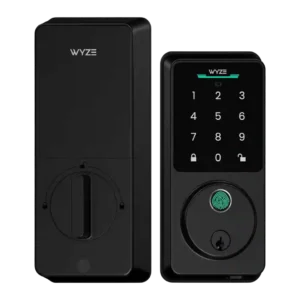
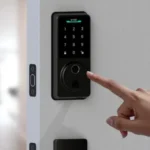
4.5based on 8 reviewsFingerprint: 4.5, based on 8 reviewsFingerprint access is commonly described as very fast and improving over time, though at least one hands-on review notes occasional missed scans rather than perfection.
-
4.5based on 8 reviewsKeypad: 4.5, based on 8 reviewsThe keypad is described as illuminated and responsive, with anti-peep entry supported so users can add extra digits before or after the real PIN.
-
4.4based on 3 reviewsAccess logs: 4.4, based on 3 reviewsAccess logs are repeatedly described as detailed, showing who locked/unlocked and which method was used, supporting accountability and household tracking.
-
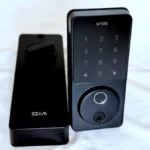
4.4based on 7 reviewsTouchscreen: 4.4, based on 7 reviewsThe tempered-glass touch surface is framed as a meaningful design upgrade, improving visibility and modernizing the exterior compared with the earlier version.
-
4.4based on 1 reviewGeofencing: 4.4, based on 1 reviewGeofencing-style automations are highlighted in app demos, including routines that lock when leaving and unlock when arriving, positioned as a standout convenience feature.
-
4.4based on 4 reviewsNotifications: 4.4, based on 4 reviewsReviews mention activity and security notifications, including alerts tied to failed attempts or tamper events, with no consistent complaints about delivery.
-
4.3based on 5 reviewsInstallation and Setup: 4.3, based on 5 reviewsInstallation is generally portrayed as quick DIY with included hardware, though one review notes minor tool-fit friction and occasional setup retries during onboarding or calibration.
-
4.3based on 6 reviewsFinish durability: 4.3, based on 6 reviewsFinish durability is positioned around tempered glass with anti-glare and smudge or scratch resistance, with multiple sources framing the new exterior as more resilient and modern-looking.
-
4.2based on 3 reviewsApp: 4.2, based on 3 reviewsThe app is described as feature-rich for access sharing, logs, and automations, but one hands-on review notes clunky device selection and occasional onboarding or calibration retries.
-
4.2based on 4 reviewsSecurity features (encryption): 4.2, based on 4 reviewsSecurity posture is framed around local biometric storage and standard app-based control; reviews emphasize fingerprints staying on-device rather than in the cloud, but do not deeply audit encryption specifics.
-
4.2based on 1 reviewExisting hardware reuse: 4.2, based on 1 reviewReviews and demos suggest standard deadbolt installation with typical door prep, including the ability to reuse common existing door hardware components like strike plates.
-
4.2based on 2 reviewsTamper detection sensitivity: 4.2, based on 2 reviewsTamper and failed-attempt alerts are referenced, including alarm triggers and app notifications, though sensitivity tuning and real-world false positives are not deeply tested.
-
4.1based on 6 reviewsAuto-lock: 4.1, based on 6 reviewsAuto-lock is described as configurable with delays and schedules, but practical intelligence may be limited because at least one hands-on review says there is no door-ajar sensor. Auto-unlock is presented primarily via arrive-home automations (location-based routines), which depend on phone location permissions and user setup rather than a dedicated proximity sensor.
-
4.1based on 3 reviewsBuild quality and durability: 4.1, based on 3 reviewsBuild quality is described as improved versus the older version, with tempered glass, gaskets, and a lower-profile design helping it feel more premium than its price suggests.
-
4.1based on 2 reviewsLocking motor: 4.1, based on 2 reviewsThe locking motor is generally described as quiet, and operation sounds or chimes are referenced as adjustable in app settings.
-
4.0based on 7 reviewsKey override reliability: 4.0, based on 7 reviewsThe addition of a mechanical key is repeatedly framed as an important reliability upgrade for emergencies and battery-related scenarios.
-
4.0based on 3 reviewsJam detection: 4.0, based on 3 reviewsJam-related protection is mentioned via jam alarms or warnings, and calibration behavior is described as retracting and extending to avoid binding during normal use.
-
4.0based on 2 reviewsAlarm/siren loudness (if included): 4.0, based on 2 reviewsAn alarm is mentioned for failed attempts and jam events, and some demos show volume controls, but loudness itself is not rigorously evaluated in the reviews.
-
3.9based on 8 reviewsBattery: 3.9, based on 8 reviewsBattery life is commonly described around eight months using eight AA batteries; USB-C emergency power and a physical key are emphasized as backup access paths, while at least one reviewer dislikes the non-rechargeable approach.
-
3.8based on 1 reviewPhysical attack resistance: 3.8, based on 1 reviewPhysical security is generally positioned as solid for typical homes, with BHMA or ANSI Grade 2 level claims cited in multiple sources, but not presented as top-tier Grade 1 hardware.
-
3.7based on 5 reviewsWeather resistance: 3.7, based on 5 reviewsIP53 weather resistance is frequently mentioned as adequate for typical residential use, though one review calls it less impressive than some competitors.
-
3.6based on 7 reviewsSmart-home integration (Alexa, Google, Siri, HomeKit, Matter, Thread): 3.6, based on 7 reviewsSmart-home integration is largely limited to Alexa and Google (including routines), with multiple sources explicitly noting no HomeKit or Matter support at launch.
-
3.6based on 6 reviewsVoice control: 3.6, based on 6 reviewsVoice control is described in the context of Alexa and Google routines for locking, while unlocking by voice is typically restricted for security.
Cons
-
2.4based on 2 reviewsDoor-sense: 2.4, based on 2 reviewsEvidence is mixed: one hands-on review explicitly says there is no integrated door-ajar sensor, while other writeups imply door-detected behavior; overall, door-sense is not consistently validated.
FAQ
Does the Wyze Lock Bolt v2 require a hub for remote access?
No. Multiple reviews describe built-in Wi-Fi enabling remote lock and unlock in the Wyze app without a hub.
How many users, PIN codes, and fingerprints can it store?
Several reviews cite up to 50 users, up to 50 PIN codes, and up to 50 fingerprints, plus support for one-time or scheduled codes.
Is fingerprint data stored in the cloud?
Reviews repeatedly state biometric data is stored locally on the lock, not uploaded to the cloud.
Does it support HomeKit or Matter?
Multiple sources say it works with Alexa and Google, but does not support HomeKit or Matter at launch.
What happens if the batteries die?
Reviews mention a physical key backup and an emergency USB-C power port so you can temporarily power the lock and enter with a code, then replace the batteries.
Does it have a door-ajar sensor for smarter auto-lock?
At least one hands-on review says there is no integrated door-ajar sensor, meaning timed auto-lock can engage even if the door is not fully shut.
What is this summary based on?
All scoring and summaries are based only on the provided reviews.json transcripts.
Reviews we analyzed
Video Reviews

Article Reviews
Best Smart Locks
#1
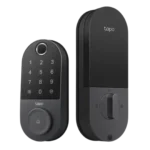
4.3
Choose the Tapo DL110 for fast fingerprint entry and solid Wi-Fi remote control at a budget price. Skip it if your door/strike alignment...
Pros: Value and Price, Lock/unlock speed, Keyway quality, Hub requirement, Battery, User access management, Key override reliability
Cons: Geofencing
#2
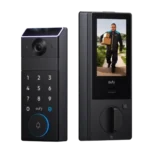
4.2
Choose the FamiLock S3 Max if you want a single lock + doorbell with an indoor screen and fast palm unlock; Skip it...
Pros: Physical attack resistance, Weather resistance, User access management, Build quality and durability, Guest Codes and Access, Lock/unlock speed, Locking motor
Cons: Value and Price
#3
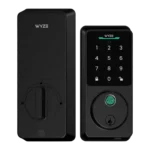
4.2
Choose Wyze Lock Bolt v2 for remote control plus fingerprint entry at a budget price. Skip it if you need door-ajar sensing or...
Pros: Hub requirement, Value and Price, Lock/unlock speed, Wi-Fi, User access management, Remote access, Backset compatibility
Cons: Door-sense
#4
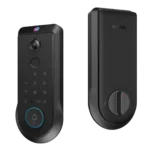
4.2
Choose the Lockin Veno Pro if you want touchless palm access and a built-in video doorbell in one device. Skip it if you...
Pros: Door-sense, Key override reliability, Auto-lock, Weather resistance, Voice control, Keyway quality, Lock/unlock speed
Cons: Geofencing