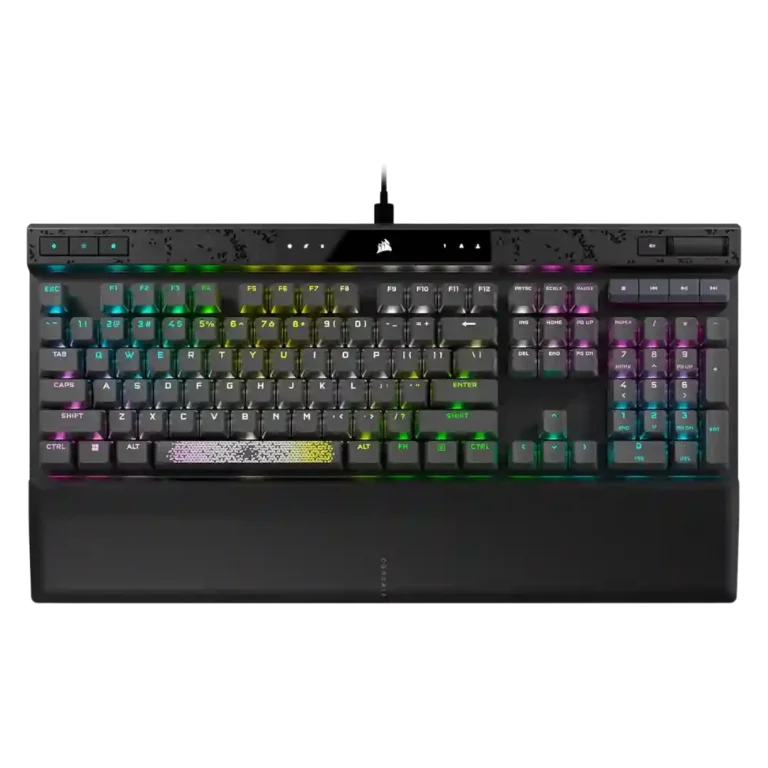
Corsair K70 MAX

Corsair K70 MAX Review

Brand: Corsair
Updated: 5 days ago
3.9
Consolidated expert score
257
Review insights
50
Scored features
18
Expert reviews

Bottom Line

Choose the Corsair K70 MAX if you want deep actuation tuning, fast wired gaming, and premium controls. Skip it if loud typing, desk space, or the $200-plus price matter most.

Best for

Best for competitive or tweak-heavy PC gamers who will use per-key actuation, dual actions, high polling, profiles, and media controls. It also suits Corsair ecosystem users who want extensive iCUE lighting and control.

Not for

Not for buyers who primarily want a quiet typing keyboard, wireless use, a compact layout, or maximum value. Several reviewers also suggest casual users may not benefit enough from the advanced actuation features.

Verdict

The Corsair K70 MAX earns its strongest praise for per-key adjustable magnetic switches, dual actuation, fast polling, rich RGB control, and a sturdy full-size build. Reviewers often liked the smooth linear switch feel, dedicated media controls, onboard profiles, and plush wrist rest. The tradeoff is that this is a large, wired-only, expensive keyboard whose acoustics divide reviewers: sound dampening helps, but several still call the typing loud, rattly, or weaker than competing premium boards. Its value depends on whether the buyer will actually use the deep actuation and profile customization rather than simply wanting a comfortable everyday keyboard.

Reviewer Consensus

Strong agreement: Reviewers most consistently agree that the adjustable magnetic switches and deep customization are the K70 MAX’s standout strengths.

Mixed opinions: Typing feel and acoustics are context-dependent, with some reviewers praising improved dampening while others found it loud, rattly, or clunky.

Common concern: The most repeated caveats are the high price, full-size wired-only footprint, and noise that remains noticeable despite sound dampening.

Evidence coverage
  • 18 expert reviews
  • 31 of 50 scored features show reviewer agreement
  • 16 scored features have limited or less conclusive evidence
  • 3 scored features show reviewer disagreement or mixed evidence
  1. Limited review data
  2. Mixed evidence
  3. Moderate consensus
  4. Strong consensus

Compared in Reviews

Products reviewers directly compared with this model, grouped into quick takeaways.

  • Better: price and feature overlap Trusted Reviews warned that the Apex Pro undercuts the K70 Max while offering many of the same features.
  • Worse: software, aesthetics, and overall design GeekaWhat felt Corsair surpassed SteelSeries alternatives through aesthetics, software, and overall approach.
  • More expensive: price and value Reviewed saw the SteelSeries Apex Pro as offering similar value for less money, minus media controls.

Wooting Two HE

  • Worse: wrist rest and media controls PCWorld favored the K70 Max value against Wooting because Wooting lacks a wrist rest and media controls.
  • Worse: magnetic switch preference and dual actuation The reviewer preferred the K70 Max RGB over the Wooting Two HE, especially because its switches add dual actuation.

Feature Scorecards

Pros

  • 4.8
    based on 3 reviews
    frame rigidity: 4.8, based on 3 reviews
    Frame rigidity was a strength, supported by comments about no deck flex, an aluminum frame, and a board that could not be twisted or flexed easily.
  • 4.8
    based on 12 reviews
    actuation consistency: 4.8, based on 12 reviews
    Adjustable actuation is the product’s clearest consensus strength, with reviewers repeatedly noting per-key control from roughly 0.4mm to 3.6mm and fine software increments.
  • 4.8
    based on 4 reviews
    customization options: 4.8, based on 4 reviews
    Customization options were the central strength, spanning actuation, lighting, profiles, key assignments, and per-key adjustments.
  • 4.8
    based on 1 review
    reliability: 4.8, based on 1 review
    Reliability was supported mainly by contactless Hall-effect switch comments and claims of ultra-reliable sensing or robust switch life.
  • 4.8
    based on 6 reviews
    onboard memory: 4.8, based on 6 reviews
    Onboard memory was a strong feature, with multiple reviewers citing 8MB storage and up to 50 profiles or lighting effects.
  • 4.7
    based on 8 reviews
    profile management: 4.7, based on 8 reviews
    Profile management was a strength, with repeated references to 50 onboard profiles, hardware profiles, and profile switching.
  • 4.7
    based on 4 reviews
    per-key lighting control: 4.7, based on 4 reviews
    Per-key lighting and per-key adjustability were well supported, with reviewers describing individual key coloring and per-key actuation control.
  • 4.7
    based on 5 reviews
    key responsiveness: 4.7, based on 5 reviews
    Responsiveness was a major strength, with reviewers tying the fast feel to low actuation settings, instant registration, high polling, and rapid gaming response.
  • 4.7
    based on 12 reviews
    extra gaming features: 4.7, based on 12 reviews
    Extra gaming features are strong, led by dual actuation, tournament mode, high polling, anti-ghosting, and advanced per-key control.
  • 4.7
    based on 11 reviews
    polling rate: 4.7, based on 11 reviews
    The 8,000Hz polling rate was repeatedly cited as a premium gaming feature, although some reviewers said most users may not perceive the difference.
  • 4.7
    based on 4 reviews
    RGB customization: 4.7, based on 4 reviews
    RGB customization was a repeated strength, including per-key control, profiles, layered lighting, and extensive iCUE effects.
  • 4.6
    based on 7 reviews
    build quality: 4.6, based on 7 reviews
    Build quality was broadly strong, with many reviewers calling the board solid, robust, premium, or rock solid; one review was more reserved about plastic areas.
  • 4.6
    based on 2 reviews
    macro customization: 4.6, based on 2 reviews
    Macro customization was strong, with reviewers noting remapping, macros, two actions per key, and tournament mode disabling custom macros.
  • 4.5
    based on 6 reviews
    volume control: 4.5, based on 6 reviews
    Volume control was consistently positive, with several reviews calling out the volume wheel or scroller as dedicated and useful.
  • 4.5
    based on 4 reviews
    latency: 4.5, based on 4 reviews
    Latency evidence was positive overall, especially where reviewers linked AXON, 8,000Hz polling, and actuation tuning to lower-lag or faster input behavior.
  • 4.5
    based on 10 reviews
    keycap quality: 4.5, based on 10 reviews
    Keycap quality was consistently strong, with reviewers highlighting thick PBT double-shot construction, durability, and a standard layout, with only texture or legend nitpicks.
  • 4.5
    based on 6 reviews
    media controls: 4.5, based on 6 reviews
    Media controls were consistently praised as dedicated, handy, and plentiful, though some reviewers disliked the feel of certain buttons.
  • 4.5
    based on 9 reviews
    switch feel: 4.5, based on 9 reviews
    Reviewers generally liked the MGX magnetic switch feel for its smooth, fast linear action, though some found the overall typing character more rattly or clanky than premium mechanical alternatives.
  • 4.5
    based on 2 reviews
    ergonomics: 4.5, based on 2 reviews
    Ergonomics were helped by height adjustment, rubber feet, and the wrist rest, although the large chassis remains a consideration.
  • 4.4
    based on 10 reviews
    wrist rest quality: 4.4, based on 10 reviews
    Wrist rest quality was mostly praised as plush, soft, magnetic, and comfortable, with one Tom’s Hardware reviewer finding it unpleasant.
  • 4.4
    based on 3 reviews
    durability: 4.4, based on 3 reviews
    Durability evidence was positive, especially around robust PBT keycaps, tough construction, and long switch-life or abuse-resistance claims.
  • 4.3
    based on 5 reviews
    cable quality: 4.3, based on 5 reviews
    Cable quality was generally positive, with reviewers noting removable, braided, standard USB-C, or good-quality USB-C cables, though one noticed port wobble.
  • 4.3
    based on 3 reviews
    typing comfort: 4.3, based on 3 reviews
    Typing comfort was generally good with the wrist rest and smooth switches, but long typing sessions and noise created caveats for some reviewers.
  • 4.3
    based on 2 reviews
    key spacing: 4.3, based on 2 reviews
    Key spacing evidence is modest but positive, based on standard full-size layout and standard key layout comments.
  • 4.3
    based on 7 reviews
    materials quality: 4.3, based on 7 reviews
    Materials quality was mostly premium thanks to aluminum or anodized top plates and PBT keycaps, though at least one reviewer criticized the plastic bottom at the price.
  • 4.3
    based on 7 reviews
    RGB lighting quality: 4.3, based on 7 reviews
    RGB lighting quality was generally positive for brightness, crisp shine-through, and vibrancy, though one reviewer found the RGB disappointing for the price.
  • 4.3
    based on 2 reviews
    backlight brightness: 4.3, based on 2 reviews
    Backlight brightness was praised where mentioned, with reviewers calling the lighting bright or fairly bright, though not always class-leading.
  • 4.2
    based on 2 reviews
    compatibility: 4.2, based on 2 reviews
    Compatibility was positive where mentioned, especially macOS support in iCUE and support for standard/custom keycaps or cables.
  • 4.2
    based on 5 reviews
    gaming performance: 4.2, based on 5 reviews
    Gaming performance was mostly praised for speed, customization, and control depth, though one reviewer said the board did not make them more confident in-game.
  • 3.9
    based on 7 reviews
    typing feel: 3.9, based on 7 reviews
    Typing feel split reviewers: several praised smoothness and comfort, while others found it merely decent, clunky, or fatiguing over long sessions.
  • 3.9
    based on 9 reviews
    sound dampening: 3.9, based on 9 reviews
    Sound dampening was widely present and often appreciated, but reviewers disagreed on whether the dual layers were enough to make the keyboard truly quiet.
  • 3.9
    based on 6 reviews
    rapid trigger support: 3.9, based on 6 reviews
    Rapid Trigger support was viewed as useful but unevenly available in launch reviews, with several noting it was promised or coming by update rather than fully present at review time.
  • 3.9
    based on 3 reviews
    connectivity: 3.9, based on 3 reviews
    Connectivity is serviceable but limited: reviewers describe wired-only USB-C and a reliable wired connection, while noting no wireless option.
  • 3.9
    based on 2 reviews
    key stability: 3.9, based on 2 reviews
    Key stability is mixed: the heavy body stays planted well, but PCMag noted some key wobble during testing.
  • 3.8
    based on 9 reviews
    software quality: 3.8, based on 9 reviews
    Software quality is mixed: many liked iCUE’s power and usability, but several found it complex, easier-to-use than before, buggy, or in need of simplification.
  • 3.5
    based on 3 reviews
    legend visibility: 3.5, based on 3 reviews
    Legend visibility was mixed: some praised durable legends, while others found PBT shine-through or smaller secondary legends dim or hard to read without lighting.
  • 3.5
    based on 1 review
    layout options: 3.5, based on 1 review
    Layout options are limited in the evidence because reviewers consistently describe a full-size or 100% K70 layout rather than multiple size variants.

Cons

  • 3.4
    based on 15 reviews
    value for money: 3.4, based on 15 reviews
    Value for money is mixed: many liked the premium features, but repeated $200-$230 price comments and cheaper competitors made value conditional.
  • 3.3
    based on 9 reviews
    acoustics: 3.3, based on 9 reviews
    Acoustics were divisive: some reviewers praised improved dampening and sound, while others called the board rattly, clanky, or terrible sounding.
  • 3.3
    based on 4 reviews
    size and form factor: 3.3, based on 4 reviews
    Size and form factor skew large: reviewers repeatedly called it full-size, full-sized-plus, or a large-footprint board.
  • 3.2
    based on 2 reviews
    ease of switch replacement: 3.2, based on 2 reviews
    Ease of switch replacement is mixed for the same reason: serviceability was praised in one review, but mainstream 3- or 5-pin switches were said not to fit.
  • 2.8
    based on 1 review
    switch options: 2.8, based on 1 review
    Switch choice is narrow: reviewers consistently described the MGX switches as linear magnetic switches, with customization coming from actuation tuning rather than alternate tactile or clicky switch options.
  • 2.8
    based on 3 reviews
    hot-swappable switches: 2.8, based on 3 reviews
    Hot-swappable switch support is conflicted and constrained: one review called it hot-swappable, another said sockets do not accept typical switches, and PCWorld said no hot-swap sockets.
  • 2.7
    based on 9 reviews
    noise level: 2.7, based on 9 reviews
    Noise level was a common concern, with many reviewers calling it loud or not quiet despite foam, while a few found it acceptable or office-friendly.
  • 2.6
    based on 2 reviews
    analog input support: 2.6, based on 2 reviews
    Analog-style support is limited in the review evidence: reviewers discuss dual actuation and one reviewer says it lacks some Wooting-style magnetic features such as analogue movement.
  • 2.6
    based on 4 reviews
    stabilizer quality: 2.6, based on 4 reviews
    Stabilizer quality was a recurring weakness, especially spacebar rattle, bone-dry stabilizers, or uneven larger-key sound, even when other stabilizers were acceptable.
  • 2.4
    based on 2 reviews
    desk space efficiency: 2.4, based on 2 reviews
    Desk space efficiency is weak because several reviewers noted the full-size body, top chin, and wrist rest make it take up significant desk space.
  • 2.2
    based on 1 review
    portability: 2.2, based on 1 review
    Portability is weak because reviewers describe a heavy, full-size board meant to sit on a desk rather than travel.
  • 1.3
    based on 2 reviews
    wireless performance: 1.3, based on 2 reviews
    Wireless performance is poor by omission because reviewers explicitly said it lacks wireless capability or a wireless connection option.
  • 1.0
    based on 1 review
    passthrough features: 1.0, based on 1 review
    Passthrough features are weak because one review explicitly says there are no USB pass-through ports.

Compared With Category Average

Compared with other Gaming Keyboard, this product is above average in wrist rest quality, reliability, below average in wireless performance, desk space efficiency, stabilizer quality.

Attribute This product Category average Difference
wireless performance 1.3 3.3 -2.1
wrist rest quality 4.4 2.7 +1.7
desk space efficiency 2.4 4.1 -1.7
stabilizer quality 2.6 3.9 -1.4
noise level 2.7 3.9 -1.1
portability 2.2 3.4 -1.2
reliability 4.8 3.7 +1.1
size and form factor 3.3 4.2 -0.9

FAQ

What is the main advantage of the Corsair K70 MAX?

The main advantage is per-key adjustable magnetic actuation, letting users tune how far each key must travel before it registers and assign dual actions to a single press.

Is the Corsair K70 MAX good for competitive gaming?

Yes. Reviewers repeatedly cite fast actuation, 8,000Hz polling, tournament mode, onboard profiles, and dual-actuation features as strong gaming-focused advantages.

Is the K70 MAX quiet?

Not consistently. Reviews agree Corsair added sound dampening, but several still describe the keyboard as loud, rattly, clanky, or not ideal for offices and heavy typing.

Does the Corsair K70 MAX work wirelessly?

No. Reviewers describe it as a wired-only keyboard and call the lack of wireless capability a downside for more casual users.

Is the wrist rest good?

Most reviewers praised the magnetic memory foam wrist rest as soft, plush, and comfortable, although one reviewer found it unpleasant to use.

Is the K70 MAX worth the price?

It can be worth it for users who will use the actuation tuning, profiles, RGB, and gaming features. Reviewers were more skeptical for casual users or buyers focused mostly on typing comfort.

Consider This Instead

If you want better wireless performance

Choose Keychron Q3 HE 8K. It scores 5.0 vs 1.3 for wireless performance, with a 4.5 overall score.

Compare

If you want better desk space efficiency

Choose Lemokey P1 HE. It scores 4.8 vs 2.4 for desk space efficiency, with a 4.2 overall score.

Compare

If you want better noise level

Choose Epomaker RT100. It scores 4.8 vs 2.7 for noise level, with a 4.0 overall score.

Compare

Overall Top Gaming Keyboard Alternatives

#1 Keychron Q3 HE 8K
4.5
5 reviews

Best for 8K polling, magnetic-switch gaming control, premium build, and deep web customization. Skip it if you need broad switch compatibility, USB passthrough, a wrist rest, or a portable keyboard.

Pros: latency, polling rate

Cons: portability, switch options

#2 Keychron Q6 HE
4.4
6 reviews

Good if you want a premium full-size Hall Effect keyboard with smooth switches, strong gaming controls, and quiet acoustics. Skip it if you need a portable, budget, or broadly switch-compatible...

Pros: key stability, frame rigidity

Cons: portability, switch options

#3 Keychron Q3 HE
4.4
8 reviews

Best for a premium, quiet Hall Effect TKL with strong wireless, software, and gaming features. Skip it if price, switch flexibility, USB passthrough, or an included wrist rest matter most.

Pros: rapid trigger support, typing feel

Cons: switch options, portability

#4 Keychron Q5 HE
4.4
10 reviews

Best for a premium 96% metal keyboard with Hall Effect tuning, strong wireless, and excellent typing feel. Skip it for travel, bargain pricing, or maximum esports specs.

Pros: build quality, frame rigidity

Cons: portability, switch options