Corsair Scimitar RGB Elite Wired

Corsair Scimitar RGB Elite Wired Review

Brand: Corsair
Updated: 13 hours ago
4.1
Based on methodology below
286
Insights analyzed
48
Grouped by key features
19
From expert reviews
Scores below reflect consolidated expert coverage across these features.

Bottom Line

Choose the Corsair Scimitar RGB Elite if you want a palm-friendly MMO/MOBA mouse with deep macro control. Skip it if you need a light FPS-focused shape or a plug-and-play experience without iCUE.

Best for

Best for right-handed MMO, MOBA, strategy, or productivity users who want many thumb-accessible commands and are willing to configure iCUE profiles and macros. It especially suits palm-grip users with medium to large hands.

Not for

Not for left-handed users, buyers with very small hands, or FPS-first players who prioritize low weight, fingertip grip, and fast lift-and-flick movement. It is also not ideal for anyone who wants a simple plug-and-play mouse without software setup.

Verdict

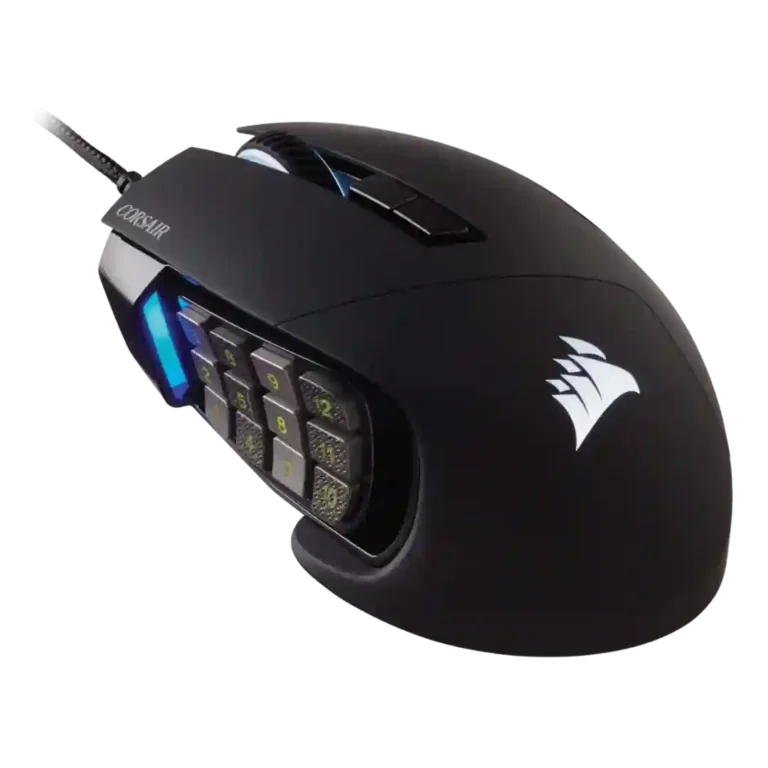
The Corsair Scimitar RGB Elite is strongest when its 12-button side keypad is central to the way you play. Reviewers repeatedly praised its macro depth, adjustable keypad, comfortable palm-oriented shape, strong sensor performance, and useful RGB/profile controls. The tradeoff is specialization: the same wide body, heavy weight, and dense side-button cluster that help in MMO and MOBA play make it less ideal for fast FPS movement, fingertip grip, left-handed use, or buyers who dislike software setup. iCUE is powerful, but reviewers split on whether it feels simple or frustrating. Overall, the mouse makes the most sense for players who will actively map abilities, shortcuts, and profiles rather than treating it like a general-purpose gaming mouse.

What Reviewers Agree On

Across the reviews, the Corsair Scimitar RGB Elite comes through as a purpose-built MMO/MOBA mouse rather than a broadly neutral gaming mouse. Its biggest shared strength is the side keypad: reviewers repeatedly highlighted the 12 side buttons, 17 total programmable buttons, macro support, and the adjustable Key Slider that lets the keypad move forward or backward. Several reviewers also praised the textured rows because they help the thumb locate buttons by feel, though others still found the cluster small, crowded, or prone to mistakes until muscle memory develops. The sensor story was also consistently favorable, with repeated mentions of high DPI, accurate tracking, smooth movement, and responsive behavior.

Comfort feedback was mostly positive, but with clear boundaries. Reviewers often liked the palm-grip shape, wide body, ring or pinky rest, rubberized texture, and long-session comfort. At the same time, the mouse is large, right-handed, and heavy. That weight and shape made it less appealing for FPS-focused play, fingertip grip, smaller hands, or users who lift the mouse often. A few reviewers found it serviceable in shooters, but the stronger pattern was that it performs best when the extra buttons matter more than low weight or rapid flicking.

The other recurring tradeoff is setup and software. iCUE gives deep control over macros, profiles, DPI, RGB, and surface calibration, and some reviewers found it straightforward or stable. Others called it clunky, unintuitive, buggy, or a hassle. Buyers most likely to be satisfied are MMO, MOBA, strategy, or productivity users who want many assignable commands and are willing to spend time configuring them. Buyers who only need a lighter, simpler mouse may find the Scimitar's main advantage wasted.

Scored Features

Pros

  • 4.8
    based on 9 reviews
    programmable buttons: 4.8, based on 9 reviews
    Programmable-button coverage was very strong, with reviewers repeatedly citing 12 side buttons and 17 total programmable/customizable buttons.
  • 4.8
    based on 2 reviews
    button responsiveness: 4.8, based on 2 reviews
    Button responsiveness evidence was positive, with reviewers reporting instant ability triggers and responsive mechanical side buttons.
  • 4.7
    based on 6 reviews
    macro support: 4.7, based on 6 reviews
    Macro support was a major strength, with reviewers describing custom macros, full keybinds, shortcut assignments, and MMO ability mapping.
  • 4.7
    based on 3 reviews
    motion consistency: 4.7, based on 3 reviews
    Motion consistency was praised in technical testing, including no jitter, no angle snapping or skipping, and no concern about precision or consistency.
  • 4.7
    based on 5 reviews
    MOBA gaming suitability: 4.7, based on 5 reviews
    MOBA gaming suitability was also strong, with reviewers connecting the macro keypad and responsive sensor to Dota, League-style, or general MOBA use.
  • 4.7
    based on 4 reviews
    build quality: 4.7, based on 4 reviews
    Build quality was widely praised, with reviewers calling the mouse solid, stout, reinforced, sturdy, or finished to a high standard.
  • 4.7
    based on 2 reviews
    long-session comfort: 4.7, based on 2 reviews
    Long-session comfort was positive where discussed, with reviewers reporting comfortable long sessions or no hand aches during extended play.
  • 4.6
    based on 11 reviews
    MMO gaming suitability: 4.6, based on 11 reviews
    MMO gaming suitability was the product's clearest strength, with reviewers repeatedly describing it as excellent, easier, or highly recommended for MMO play.
  • 4.6
    based on 7 reviews
    Accuracy and tracking precision: 4.6, based on 7 reviews
    Reviewers consistently described tracking as accurate, precise, and smooth, with no major tracking complaints in the supporting reviews.
  • 4.6
    based on 15 reviews
    button customization: 4.6, based on 15 reviews
    Button customization was a core strength because the side keypad can slide forward or backward and button functions can be configured in software.
  • 4.6
    based on 8 reviews
    sensor performance: 4.6, based on 8 reviews
    The sensor was one of the mouse's strongest areas, with reviewers praising the PixArt sensor, upgraded sensor hardware, and responsive behavior.
  • 4.5
    based on 11 reviews
    DPI range: 4.5, based on 11 reviews
    Reviewers repeatedly cited the high DPI ceiling, usually 18,000 DPI on the Elite, as a major spec even when noting most players will use far lower settings.
  • 4.5
    based on 5 reviews
    polling rate: 4.5, based on 5 reviews
    Polling-rate evidence was consistently positive, with reviewers citing up to 1,000Hz operation and responsive reporting for gaming.
  • 4.5
    based on 3 reviews
    balance and weight distribution: 4.5, based on 3 reviews
    Balance was praised despite the mouse's size, with reviewers describing it as well balanced or immaculately balanced.
  • 4.5
    based on 6 reviews
    switch durability: 4.5, based on 6 reviews
    Switch durability was supported mainly by the Omron 50-million-click rating and mentions of upgraded switches, rather than long-term lab durability testing.
  • 4.4
    based on 11 reviews
    grip texture: 4.4, based on 11 reviews
    Grip texture was a strength, with repeated praise for rubberized rests, textured rows, and tactile surfaces that help grip and orientation.
  • 4.4
    based on 3 reviews
    premium feel: 4.4, based on 3 reviews
    Premium feel was supported by repeated praise for premium build, sturdy construction, and comfortable or high-quality physical feel.
  • 4.4
    based on 9 reviews
    palm grip comfort: 4.4, based on 9 reviews
    Palm grip comfort was one of the strongest comfort themes, with reviewers repeatedly saying the mouse naturally favors or excels in palm grip.
  • 4.4
    based on 2 reviews
    click latency: 4.4, based on 2 reviews
    Latency evidence was positive where tested, with reviewers noting no noticeable delay or no real difference compared with reference hardware.
  • 4.3
    based on 5 reviews
    profile switching: 4.3, based on 5 reviews
    Profile switching was supported by hardware profile buttons, iCUE profile controls, and reviewers noting different game or app profiles.
  • 4.3
    based on 3 reviews
    surface compatibility: 4.3, based on 3 reviews
    Surface compatibility was supported by iCUE surface calibration and testing on different pad types, with reviewers noting calibration or successful hard/soft pad tracking.
  • 4.3
    based on 10 reviews
    glide smoothness: 4.3, based on 10 reviews
    Glide smoothness was generally positive, with multiple reviewers describing smooth gliding, low resistance, or good feet, though one called the glides unremarkable.
  • 4.2
    based on 3 reviews
    switch feel: 4.2, based on 3 reviews
    Switch feel was generally positive, with reviewers describing satisfying, distinct, clicky, or nice-feeling clicks.
  • 4.2
    based on 9 reviews
    RGB features: 4.2, based on 9 reviews
    RGB features were consistently described as customizable, with four lighting zones, profile/DPI indicators, and iCUE lighting controls.
  • 4.2
    based on 6 reviews
    shape comfort: 4.2, based on 6 reviews
    Shape comfort was generally positive for the intended grip and hand sizes, though the wide, specialized body is not universally comfortable.
  • 4.2
    based on 9 reviews
    ergonomic design: 4.2, based on 9 reviews
    Ergonomic design was praised for the contoured body, ring/pinky rest, and comfort, though some reviewers noted limits for small hands or non-palm styles.
  • 4.2
    based on 1 review
    click noise: 4.2, based on 1 review
    Click noise evidence was limited but positive, with one technical reviewer saying the main clicks were quieter than other mice.
  • 4.2
    based on 1 review
    ecosystem integration: 4.2, based on 1 review
    Ecosystem integration was supported by iCUE syncing with other Corsair parts and Corsair-device lighting/profile control.
  • 4.2
    based on 4 reviews
    left and right click quality: 4.2, based on 4 reviews
    Left and right click quality was mostly positive, with light, solid, and smooth clicks, though one reviewer wanted a snappier and crisper feel.
  • 4.2
    based on 4 reviews
    materials quality: 4.2, based on 4 reviews
    Materials quality was mostly positive because reviewers liked the matte/soft-touch finish and premium materials, though some noted gloss or coating wear concerns.
  • 4.1
    based on 3 reviews
    lift-off distance: 4.1, based on 3 reviews
    Lift-off distance received generally positive or acceptable notes, including iCUE lift-height control and testing that found the behavior normal or impressive.
  • 4.0
    based on 7 reviews
    onboard memory: 4.0, based on 7 reviews
    Onboard memory was supported by repeated mentions of three onboard profiles or storage for settings and hardware playback.
  • 4.0
    based on 13 reviews
    value for money: 4.0, based on 13 reviews
    Value depended on use case: reviewers found it worth the price for MMO/MOBA or macro-heavy use, but less compelling for buyers who will not use the side keypad.
  • 4.0
    based on 11 reviews
    scroll wheel quality: 4.0, based on 11 reviews
    Scroll wheel quality was mixed: reviewers praised tactility, texture, and smooth steps, while others called it average or reported middle-button failure over time.
  • 4.0
    based on 2 reviews
    skate durability: 4.0, based on 2 reviews
    Skate durability had limited but useful evidence: one reviewer saw little wear after weeks, while a long-term owner noted the feet were worn but not through.
  • 4.0
    based on 1 review
    acceleration control: 4.0, based on 1 review
    The acceleration evidence was limited to one technical test, where the reviewer could not make a precise acceleration measurement but found the behavior within range.
  • 4.0
    based on 6 reviews
    claw grip comfort: 4.0, based on 6 reviews
    Claw grip comfort was mixed: some reviewers with suitable hands liked it, while others said the design mainly favors palm grip rather than claw.
  • 3.9
    based on 15 reviews
    side button quality: 3.9, based on 15 reviews
    Side button quality was mixed: reviewers liked the tactile/textured design and responsiveness, but several found the buttons small, crowded, or easier to mis-hit.
  • 3.9
    based on 12 reviews
    software usability: 3.9, based on 12 reviews
    Software usability was sharply mixed: iCUE was praised as powerful and easy by some reviewers but criticized as clunky, unintuitive, or a hassle by others.
  • 3.8
    based on 1 review
    portability: 3.8, based on 1 review
    Portability evidence was narrow and centered on settings portability: onboard profiles let users take personal settings to another PC.
  • 3.8
    based on 4 reviews
    durability over time: 3.8, based on 4 reviews
    Durability over time was mixed: switch ratings and multi-month or multi-year use were positive, but scroll-wheel and wear concerns appeared in long-term reviews.
  • 3.5
    based on 9 reviews
    cable flexibility: 3.5, based on 9 reviews
    Cable flexibility was mixed: some reviewers praised the braided cable as flexible, while others found it stiff, hard, or bungee-worthy.

Cons

  • 3.3
    based on 2 reviews
    software stability: 3.3, based on 2 reviews
    Software stability was mixed, with one reviewer calling iCUE stable while a long-term user described buggy behavior and crashes.
  • 3.1
    based on 3 reviews
    fingertip grip comfort: 3.1, based on 3 reviews
    Fingertip grip comfort was weak because reviewers associated fingertip use with fatigue, large-hand requirements, or poor fit for the mouse's size.
  • 2.8
    based on 4 reviews
    FPS gaming suitability: 2.8, based on 4 reviews
    FPS gaming suitability was mixed to negative: some reviewers found it serviceable, but many said weight, shape, and side buttons make it less ideal for shooters.
  • 2.7
    based on 9 reviews
    weight: 2.7, based on 9 reviews
    Weight was a common drawback: most reviewers described the mouse as heavy, bulky, or hefty, though one reviewer coming from a G502 found it a little light.
  • 2.4
    based on 2 reviews
    weight tuning: 2.4, based on 2 reviews
    Weight tuning was a weakness because reviewers explicitly wished for adjustable weights or a degree of weight customization.
  • 1.7
    based on 5 reviews
    handedness options: 1.7, based on 5 reviews
    Handedness was a clear limitation because reviewers consistently described the mouse as right-handed only and unsuitable for left-handed use.

FAQ

Is the Corsair Scimitar RGB Elite worth buying?

It is worth buying if you will use the side keypad, macros, and profiles for MMO, MOBA, strategy, or productivity work. Reviewers were less convinced about the value for buyers who only need a standard gaming mouse.

Who is this mouse best for?

It is best for right-handed palm-grip users who want 12 thumb buttons and 17 total programmable buttons. Reviewers most often connected it with MMO and MOBA play.

What is the main drawback?

The main drawback is specialization. The wide, heavy body and dense side-button grid help macro-heavy play but can feel bulky, crowded, or awkward outside that use case.

Is it good for FPS games?

It can work for occasional FPS play, and some reviewers found the tracking precise. However, most FPS-related comments pointed to weight, width, and grip limitations that make it less ideal than a lighter shooter-focused mouse.

Are the side buttons easy to use?

The textured rows and adjustable keypad help, but reviewers still said the side buttons take practice. Several found them small or crowded at first, especially when reaching the outer rows.

Do you need Corsair iCUE?

You need iCUE to get the most from the mouse, especially for macros, profiles, DPI, RGB, and surface calibration. Reviewers agreed it is powerful, but they were mixed on whether it feels easy or frustrating.

Is it comfortable for long sessions?

For the right hand size and grip, yes. Reviewers praised palm-grip comfort, the textured side rest, and long-session comfort, but fingertip users, small-hand users, and left-handed users are less likely to be satisfied.

Video Reviews

Article Reviews

Best Gaming Mouse Alternatives

#1 Glorious Model D3
4.4

Choose the Model D3 for flexible wireless gaming, comfort, and precise control. Skip it if the high price or shorter high-polling battery life matters more.

Pros: Accuracy and tracking precision, switch durability, FPS gaming suitability, charging convenience, sensor performance, click latency, wireless latency

Cons: none

#2 ASUS ROG Harpe II Ace
4.4

Choose the Harpe II Ace for ultralight FPS control, 8K wireless, and easy web setup. Skip it if you need many buttons or steady long battery life in...

Pros: polling rate, weight, wireless performance, DPI range, switch durability, sensor performance, motion consistency

Cons: onboard memory, MMO gaming suitability, software stability, profile switching

#3 Razer Basilisk V3 Pro 35K
4.4

Choose the Razer Basilisk V3 Pro 35K for ergonomic comfort, precise tracking, and feature-rich wireless control. Skip it if you want an ultralight FPS mouse or better value...

Pros: motion consistency, sensor performance, DPI range, build quality, macro support, click latency, acceleration control

Cons: handedness options, value for money, weight, fingertip grip comfort

#4 ASUS ROG Gladius III Wireless
4.4

Choose it for precise tracking, comfortable right-handed shape, and swappable switches. Skip it if you need ultralight weight, left-handed ergonomics, or cleaner software value.

Pros: click latency, durability over time, wireless latency, switch durability, Accuracy and tracking precision, 2.4GHz connectivity, sensor performance

Cons: software stability, handedness options, firmware reliability