- Alternative: budget wireless mouse value The reviewer suggests the Logitech G305 Lightspeed as a more compelling option at the same general price point.
- Similar: specs and price The Fuse is framed as comparable to the reviewer’s Logitech G305 in specs and price.
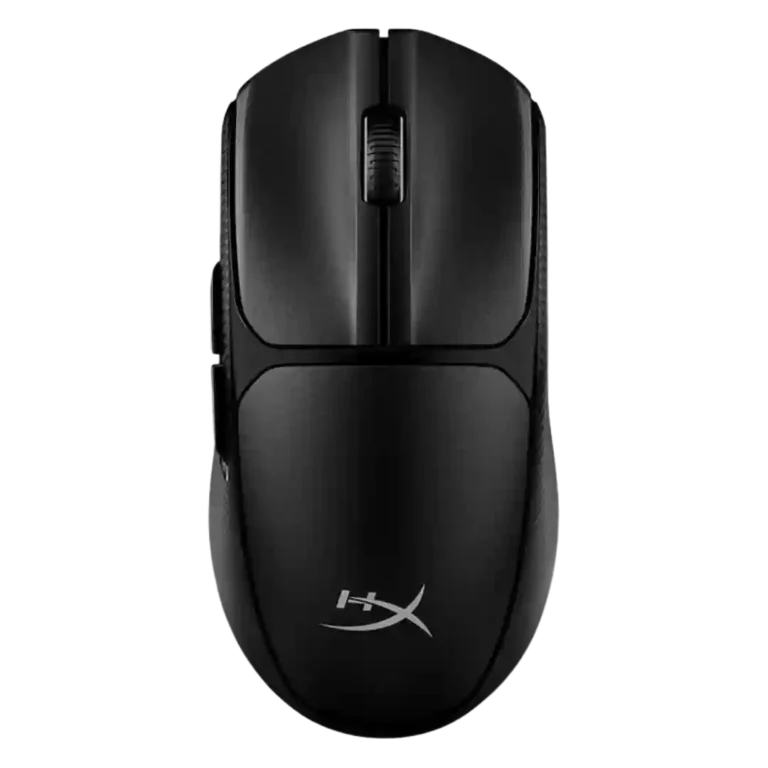
HyperX Pulsefire Fuse Review
Bottom Line
Choose the Pulsefire Fuse for affordable wireless gaming, light weight, long AAA battery life, and simple customization. Skip it if you have larger hands, need true ambidextrous side buttons, premium materials, or stronger RGB.
Best for budget-focused gamers who want 2.4GHz wireless responsiveness, Bluetooth flexibility, a light AAA-powered mouse, and basic remapping without chasing premium esports hardware.
Not for larger-handed users, left-handed gamers who rely on side buttons, or buyers who care most about premium materials, prominent RGB, ultra-smooth feet, or advanced software depth.
The HyperX Pulsefire Fuse lands as a capable budget wireless gaming mouse, but the evidence is not uniformly positive. Reviewers consistently credit its 2.4GHz wireless response, 75g weight, 12,000 DPI ceiling, replaceable AAA battery, and practical dongle storage. The tradeoff is feel: some reviewers found the shape comfortable, the clicks crisp, and the software approachable, while others criticized the low-profile body, cheap-feeling materials, small side buttons, minimal RGB, and uneven glide. Its strongest case is everyday and casual-to-mid competitive wireless use on a budget, while its weakest case is premium-feeling comfort for larger hands or left-handed users who depend on side buttons.
Compared in Reviews
Products reviewers directly compared with this model, grouped into quick takeaways.
HyperX Pulsefire Saga
- Older model: premium HyperX alternative The reviewer points buyers willing to pay more toward HyperX’s modular Pulsefire Saga line.
Logitech G Pro Wireless
- Better: premium refinement and build feel The Fuse is presented as solid for the price but less refined than premium Logitech and Razer options.
Scored Features
Pros
-
The strongest tracking evidence is positive, with precise tracking reported across fast FPS and broader game genres.
Evidence
Examples from reviews used for this score. Showing up to 3 quotes.
-
From:
Product Review: HyperX Pulsefire Fuse Wireless Gaming Mouse
tracking remains precise across different game genres
-
From:
HyperX Pulsefire Fuse Wireless Gaming Mouse Review
Tracking was consistent and precise across both fast-paced FPS titles
Quotes are examples; the score reflects all analyzed reviews for this feature.
-
From:
Product Review: HyperX Pulsefire Fuse Wireless Gaming Mouse
-
Latency evidence is positive in 2.4GHz mode, with wired-like response and no noticeable lag reported during gameplay.
Evidence
Examples from reviews used for this score. Showing up to 3 quotes.
-
From:
Product Review: HyperX Pulsefire Fuse Wireless Gaming Mouse
no noticeable jitter or lag during fast gameplay
-
From:
HyperX Pulsefire Fuse Wireless Gaming Mouse Review
latency was virtually indistinguishable from a wired connection during gaming
Quotes are examples; the score reflects all analyzed reviews for this feature.
-
From:
Product Review: HyperX Pulsefire Fuse Wireless Gaming Mouse
-
Motion consistency is positive where tested directly, with reviewers reporting consistent tracking and no noticeable jitter or lag.
Evidence
Examples from reviews used for this score. Showing up to 3 quotes.
-
From:
Product Review: HyperX Pulsefire Fuse Wireless Gaming Mouse
consistent and accurate, with no noticeable jitter or lag
-
From:
HyperX Pulsefire Fuse Wireless Gaming Mouse Review
Tracking was consistent and precise across both fast-paced FPS titles
Quotes are examples; the score reflects all analyzed reviews for this feature.
-
From:
Product Review: HyperX Pulsefire Fuse Wireless Gaming Mouse
-
Wireless latency is a clear 2.4GHz strength, with reviewers reporting wired-like feel and no noticeable input lag.
Evidence
Examples from reviews used for this score. Showing up to 3 quotes.
-
From:
Product Review: HyperX Pulsefire Fuse Wireless Gaming Mouse
no dropped signals or noticeable input lag in 2.4GHz mode
-
From:
HyperX Pulsefire Fuse Wireless Gaming Mouse Review
latency was virtually indistinguishable from a wired connection during gaming
Quotes are examples; the score reflects all analyzed reviews for this feature.
-
From:
Product Review: HyperX Pulsefire Fuse Wireless Gaming Mouse
-
FPS suitability is strong in the positive reviews, which describe precise tracking and responsive clicks in fast-paced shooters.
Evidence
Examples from reviews used for this score. Showing up to 3 quotes.
-
From:
Product Review: HyperX Pulsefire Fuse Wireless Gaming Mouse
responsiveness for both fast-paced shooters
-
From:
HyperX Pulsefire Fuse Wireless Gaming Mouse Review
Tracking was consistent and precise across both fast-paced FPS titles
Quotes are examples; the score reflects all analyzed reviews for this feature.
-
From:
Product Review: HyperX Pulsefire Fuse Wireless Gaming Mouse
-
Wireless performance is one of the most consistently positive areas, especially over the 2.4GHz dongle.
Evidence
Examples from reviews used for this score. Showing up to 3 quotes.
-
From:
Product Review: HyperX Pulsefire Fuse Wireless Gaming Mouse
comfort, reliable tracking, responsive buttons, and flexible wireless performance
-
From:
HyperX Pulsefire Fuse Wireless Gaming Mouse Review
experience felt responsive even in fast-paced competitive titles
-
From:
HyperX Pulsefire Fuse Unboxing and First Impressions
it's working pretty smoothly
Quotes are examples; the score reflects all analyzed reviews for this feature.
-
From:
Product Review: HyperX Pulsefire Fuse Wireless Gaming Mouse
-
2.4GHz performance was widely treated as reliable and responsive, with reviewers repeatedly noting dongle support and standard 1000Hz operation.
Evidence
Examples from reviews used for this score. Showing up to 3 quotes.
-
From:
Product Review: HyperX Pulsefire Fuse Wireless Gaming Mouse
switch between 2.4GHz and Bluetooth
-
From:
HyperX Pulsefire Fuse Wireless Gaming Mouse Review
When connected via the 2.4GHz dongle, latency was virtually indistinguishable
-
From:
HyperX Pulsefire Fuse Wireless Mouse review #tinoreviews #hyperx #mouse #gamingsetup #mousereview
USB dongle or Bluetooth
Quotes are examples; the score reflects all analyzed reviews for this feature.
-
From:
Product Review: HyperX Pulsefire Fuse Wireless Gaming Mouse
-
Portability is a recurring strength thanks to light weight, dongle storage, Bluetooth fallback, and easy bag travel.
Evidence
Examples from reviews used for this score. Showing up to 3 quotes.
-
From:
HyperX Pulsefire Fuse Unboxing and First Impressions
plop it in your bag and move it with you
-
From:
HyperX Pulsefire Fuse Wireless Gaming Mouse Review
dedicated USB dongle storage slot that adds convenience when travelling
-
From:
HyperX Pulsefire Fuse review: Merely adequate - Can Buy or Not
dongle is also kept here when not in use
Quotes are examples; the score reflects all analyzed reviews for this feature.
-
From:
HyperX Pulsefire Fuse Unboxing and First Impressions
-
Onboard memory is confirmed, allowing configurations to be saved directly to the mouse.
Evidence
Examples from reviews used for this score. Showing up to 3 quotes.
-
From:
HyperX Pulsefire Fuse Wireless Gaming Mouse Review
configurations can be saved directly to the mouse’s onboard memory
Quotes are examples; the score reflects all analyzed reviews for this feature.
-
From:
HyperX Pulsefire Fuse Wireless Gaming Mouse Review
-
Battery life is a consistent strength, with multiple reviewers citing up to 85 hours and practical multi-session or multi-week use.
Evidence
Examples from reviews used for this score. Showing up to 3 quotes.
-
From:
Product Review: HyperX Pulsefire Fuse Wireless Gaming Mouse
lasted multiple long gaming sessions without interruption
-
From:
HyperX Pulsefire Fuse Wireless Mouse review #tinoreviews #hyperx #mouse #gamingsetup #mousereview
up to 85 hour battery life
-
From:
HyperX Pulsefire Fuse Wireless Gaming Mouse Review
appears to be realistic based on testing
Quotes are examples; the score reflects all analyzed reviews for this feature.
-
From:
Product Review: HyperX Pulsefire Fuse Wireless Gaming Mouse
-
Switch feel is usually positive, with repeated descriptions of clicky, tactile, crisp, or satisfying feedback.
Evidence
Examples from reviews used for this score. Showing up to 3 quotes.
-
From:
Product Review: HyperX Pulsefire Fuse Wireless Gaming Mouse
feel crisp, tactile, and reliable
-
From:
HyperX Pulsefire Fuse Wireless Gaming Mouse Review
They feel click-y and tactile
-
From:
HyperX Pulsefire Fuse review: Merely adequate - Can Buy or Not
feel clicky and satisfying
Quotes are examples; the score reflects all analyzed reviews for this feature.
-
From:
Product Review: HyperX Pulsefire Fuse Wireless Gaming Mouse
-
Button response is generally positive, with several reviewers calling the clicks tactile, reliable, responsive, or satisfying.
Evidence
Examples from reviews used for this score. Showing up to 3 quotes.
-
From:
Product Review: HyperX Pulsefire Fuse Wireless Gaming Mouse
feel crisp, tactile, and reliable
-
From:
HyperX Pulsefire Fuse Wireless Gaming Mouse Review
They feel click-y and tactile, so they are ideal for gaming
-
From:
HyperX Pulsefire Fuse Unboxing and First Impressions
the mouse is very responsive
Quotes are examples; the score reflects all analyzed reviews for this feature.
-
From:
Product Review: HyperX Pulsefire Fuse Wireless Gaming Mouse
-
Connection stability is mostly positive, with stable multi-device use and smooth wireless operation reported.
Evidence
Examples from reviews used for this score. Showing up to 3 quotes.
-
From:
Product Review: HyperX Pulsefire Fuse Wireless Gaming Mouse
maintained a stable connection across various devices
-
From:
HyperX Pulsefire Fuse Wireless Gaming Mouse Review
the experience felt responsive even in fast-paced competitive titles
-
From:
HyperX Pulsefire Fuse Review: A Budget Gaming Mouse That Still Falls Short
wireless connectivity works without issue
Quotes are examples; the score reflects all analyzed reviews for this feature.
-
From:
Product Review: HyperX Pulsefire Fuse Wireless Gaming Mouse
-
Cross-platform use is supported by Bluetooth and multi-device positioning, with one review explicitly describing the mouse as multi-platform.
Evidence
Examples from reviews used for this score. Showing up to 3 quotes.
-
From:
Product Review: HyperX Pulsefire Fuse Wireless Gaming Mouse
designed for use across multiple platforms
-
From:
HyperX Pulsefire Fuse Wireless Gaming Mouse Review
Bluetooth connectivity adds versatility, making it easy to pair
Quotes are examples; the score reflects all analyzed reviews for this feature.
-
From:
Product Review: HyperX Pulsefire Fuse Wireless Gaming Mouse
-
Fingertip-oriented comfort is supported indirectly by hybrid fingertip/palm use and a neutral shape that supports different grip styles.
Evidence
Examples from reviews used for this score. Showing up to 3 quotes.
-
From:
Product Review: HyperX Pulsefire Fuse Wireless Gaming Mouse
support different grip styles comfortably
-
From:
HyperX Pulsefire Fuse Wireless Gaming Mouse Review
With a hybrid fingertip and palm grip
Quotes are examples; the score reflects all analyzed reviews for this feature.
-
From:
Product Review: HyperX Pulsefire Fuse Wireless Gaming Mouse
-
Main click quality is generally a strength, with repeated praise for tactile, reliable, satisfying left and right clicks.
Evidence
Examples from reviews used for this score. Showing up to 3 quotes.
-
From:
Product Review: HyperX Pulsefire Fuse Wireless Gaming Mouse
left and right clicks feel crisp, tactile, and reliable
-
From:
HyperX Pulsefire Fuse Wireless Gaming Mouse Review
They feel click-y and tactile
-
From:
HyperX Pulsefire Fuse review: Merely adequate - Can Buy or Not
feel clicky and satisfying
Quotes are examples; the score reflects all analyzed reviews for this feature.
-
From:
Product Review: HyperX Pulsefire Fuse Wireless Gaming Mouse
-
Bluetooth adds useful device flexibility, though one review found its latency unsuitable for fast-paced games.
Evidence
Examples from reviews used for this score. Showing up to 3 quotes.
-
From:
Product Review: HyperX Pulsefire Fuse Wireless Gaming Mouse
switch between 2.4GHz and Bluetooth
-
From:
HyperX Pulsefire Fuse Wireless Mouse review #tinoreviews #hyperx #mouse #gamingsetup #mousereview
USB dongle or Bluetooth
-
From:
HyperX Pulsefire Fuse Unboxing and First Impressions
this does also support Bluetooth, which is pretty nice
Quotes are examples; the score reflects all analyzed reviews for this feature.
-
From:
Product Review: HyperX Pulsefire Fuse Wireless Gaming Mouse
-
Weight is a consistent advantage, with reviewers repeatedly identifying the 75g AAA configuration as light or relatively lightweight.
Evidence
Examples from reviews used for this score. Showing up to 3 quotes.
-
From:
Product Review: HyperX Pulsefire Fuse Wireless Gaming Mouse
At 75 grams, including the AAA battery
-
From:
HyperX Pulsefire Fuse Unboxing and First Impressions
apart from the very lightweight, much lighter than what I have right here
-
From:
HyperX Pulsefire Fuse review: Merely adequate - Can Buy or Not
mouse weighs around 75g, which is relatively lightweight
Quotes are examples; the score reflects all analyzed reviews for this feature.
-
From:
Product Review: HyperX Pulsefire Fuse Wireless Gaming Mouse
-
Weight balance is lightly covered: one review noted a rear battery bias without handling harm, while another called the mouse well-balanced.
Evidence
Examples from reviews used for this score. Showing up to 3 quotes.
-
From:
Product Review: HyperX Pulsefire Fuse Wireless Gaming Mouse
well-balanced, comfortable, and easy to use
-
From:
HyperX Pulsefire Fuse Wireless Gaming Mouse Review
creating a slight back-weight bias, it did not negatively affect handling
Quotes are examples; the score reflects all analyzed reviews for this feature.
-
From:
Product Review: HyperX Pulsefire Fuse Wireless Gaming Mouse
-
HyperX ecosystem integration is supported by NGENUITY lighting sync with compatible HyperX peripherals.
Evidence
Examples from reviews used for this score. Showing up to 3 quotes.
-
From:
HyperX Pulsefire Fuse Wireless Gaming Mouse Review
sync lighting effects with other compatible HyperX peripherals
Quotes are examples; the score reflects all analyzed reviews for this feature.
-
From:
HyperX Pulsefire Fuse Wireless Gaming Mouse Review
-
Macro support is confirmed through NGENUITY, which can record and trigger macros.
Evidence
Examples from reviews used for this score. Showing up to 3 quotes.
-
From:
HyperX Pulsefire Fuse Wireless Gaming Mouse Review
ability to record and trigger macros
Quotes are examples; the score reflects all analyzed reviews for this feature.
-
From:
HyperX Pulsefire Fuse Wireless Gaming Mouse Review
-
Palm comfort is supported by a hybrid fingertip-and-palm experience, but broader comfort evidence shows hand-size sensitivity.
Evidence
Examples from reviews used for this score. Showing up to 3 quotes.
-
From:
HyperX Pulsefire Fuse Wireless Gaming Mouse Review
With a hybrid fingertip and palm grip
Quotes are examples; the score reflects all analyzed reviews for this feature.
-
From:
HyperX Pulsefire Fuse Wireless Gaming Mouse Review
-
The 12,000 DPI ceiling is consistently documented and usually treated as enough, though one reviewer considered it too sensitive for most users.
Evidence
Examples from reviews used for this score. Showing up to 3 quotes.
-
From:
Product Review: HyperX Pulsefire Fuse Wireless Gaming Mouse
supports DPI settings up to 12,000
-
From:
HyperX Pulsefire Fuse Unboxing and First Impressions
it is up to 12,000 DPI
-
From:
HyperX Pulsefire Fuse Wireless Mouse review #tinoreviews #hyperx #mouse #gamingsetup #mousereview
make the DPI up to 12,000
Quotes are examples; the score reflects all analyzed reviews for this feature.
-
From:
Product Review: HyperX Pulsefire Fuse Wireless Gaming Mouse
-
Programmable controls are supported through remappable buttons, side-button mapping, and scroll-wheel assignment.
Evidence
Examples from reviews used for this score. Showing up to 3 quotes.
-
From:
HyperX Pulsefire Fuse Wireless Mouse review #tinoreviews #hyperx #mouse #gamingsetup #mousereview
map the side buttons right here
-
From:
Product Review: HyperX Pulsefire Fuse Wireless Gaming Mouse
assign buttons to personal preferences
-
From:
HyperX Pulsefire Fuse Wireless Gaming Mouse Review
The buttons can be remapped
Quotes are examples; the score reflects all analyzed reviews for this feature.
-
From:
HyperX Pulsefire Fuse Wireless Mouse review #tinoreviews #hyperx #mouse #gamingsetup #mousereview
-
Sensor performance is generally solid for the category, led by positive PAW3311 tracking reports but tempered by one merely adequate verdict.
Evidence
Examples from reviews used for this score. Showing up to 3 quotes.
-
From:
Product Review: HyperX Pulsefire Fuse Wireless Gaming Mouse
Performance is solid thanks to the Pixart PAW3311 optical sensor
-
From:
HyperX Pulsefire Fuse Wireless Gaming Mouse Review
the sensor performed as expected
-
From:
HyperX Pulsefire Fuse review: Merely adequate - Can Buy or Not
The Pixart PAW3311 sensor in the HyperX Pulsefire Fuse goes up to 12,000 DPI
Quotes are examples; the score reflects all analyzed reviews for this feature.
-
From:
Product Review: HyperX Pulsefire Fuse Wireless Gaming Mouse
-
The replaceable AAA battery is usually framed as convenient because the cover opens easily and batteries can be swapped quickly.
Evidence
Examples from reviews used for this score. Showing up to 3 quotes.
-
From:
Product Review: HyperX Pulsefire Fuse Wireless Gaming Mouse
batteries can be quickly swapped without needing a cable
-
From:
HyperX Pulsefire Fuse Unboxing and First Impressions
so we can easily take out the battery
-
From:
HyperX Pulsefire Fuse Wireless Gaming Mouse Review
swapping in a fresh battery takes only seconds
Quotes are examples; the score reflects all analyzed reviews for this feature.
-
From:
Product Review: HyperX Pulsefire Fuse Wireless Gaming Mouse
-
Long-term durability evidence is limited to switch ratings, with Kailh switches cited at 20 million clicks.
Evidence
Examples from reviews used for this score. Showing up to 3 quotes.
-
From:
HyperX Pulsefire Fuse review: Merely adequate - Can Buy or Not
rated at 20 million clicks
-
From:
HyperX Pulsefire Fuse Wireless Gaming Mouse Review
Kailh switches rated for 20 million clicks
Quotes are examples; the score reflects all analyzed reviews for this feature.
-
From:
HyperX Pulsefire Fuse review: Merely adequate - Can Buy or Not
-
Switch durability is supported by Kailh 20-million-click ratings rather than long-term failure testing.
Evidence
Examples from reviews used for this score. Showing up to 3 quotes.
-
From:
HyperX Pulsefire Fuse review: Merely adequate - Can Buy or Not
rated at 20 million clicks
-
From:
HyperX Pulsefire Fuse Wireless Gaming Mouse Review
Kailh switches rated for 20 million clicks
Quotes are examples; the score reflects all analyzed reviews for this feature.
-
From:
HyperX Pulsefire Fuse review: Merely adequate - Can Buy or Not
-
Software stability is only lightly supported; one reviewer called the NGENUITY app solid while others focused on limited usefulness.
Evidence
Examples from reviews used for this score. Showing up to 3 quotes.
-
From:
HyperX Pulsefire Fuse Review: A Budget Gaming Mouse That Still Falls Short
the HyperX NGENUITY app is pretty solid
Quotes are examples; the score reflects all analyzed reviews for this feature.
-
From:
HyperX Pulsefire Fuse Review: A Budget Gaming Mouse That Still Falls Short
-
Value is polarizing: positive reviews call it excellent or strong value, while critical reviews say competitors are more compelling.
Evidence
Examples from reviews used for this score. Showing up to 3 quotes.
-
From:
HyperX Pulsefire Fuse Wireless Gaming Mouse Review
the Pulsefire Fuse offers excellent value
-
From:
Product Review: HyperX Pulsefire Fuse Wireless Gaming Mouse
offers strong value for its features
-
From:
HyperX Pulsefire Fuse Wireless Mouse review #tinoreviews #hyperx #mouse #gamingsetup #mousereview
a good budget friendly mouse
Quotes are examples; the score reflects all analyzed reviews for this feature.
-
From:
HyperX Pulsefire Fuse Wireless Gaming Mouse Review
-
Long-session comfort is highly dependent on hand size and fit, ranging from no fatigue to wrist friction and discomfort.
Evidence
Examples from reviews used for this score. Showing up to 3 quotes.
-
From:
Product Review: HyperX Pulsefire Fuse Wireless Gaming Mouse
without causing wrist fatigue during extended sessions
-
From:
HyperX Pulsefire Fuse Wireless Gaming Mouse Review
remained comfortable during longer gaming sessions without causing finger fatigue
-
From:
HyperX Pulsefire Fuse Review: A Budget Gaming Mouse That Still Falls Short
This wrist friction counteracts the mouse’s moderately light weight
Quotes are examples; the score reflects all analyzed reviews for this feature.
-
From:
Product Review: HyperX Pulsefire Fuse Wireless Gaming Mouse
-
Scroll wheel quality is split between smooth, tactile praise and criticism that the wheel is too small.
Evidence
Examples from reviews used for this score. Showing up to 3 quotes.
-
From:
Product Review: HyperX Pulsefire Fuse Wireless Gaming Mouse
scroll wheel is smooth, accurate, and well-aligned
-
From:
HyperX Pulsefire Fuse Wireless Mouse review #tinoreviews #hyperx #mouse #gamingsetup #mousereview
this scroll wheel feels really nice
-
From:
HyperX Pulsefire Fuse Review: A Budget Gaming Mouse That Still Falls Short
The scroll wheel is similarly small
Quotes are examples; the score reflects all analyzed reviews for this feature.
-
From:
Product Review: HyperX Pulsefire Fuse Wireless Gaming Mouse
-
Polling rate coverage is consistent at about 1000Hz, viewed as standard and acceptable rather than premium.
Evidence
Examples from reviews used for this score. Showing up to 3 quotes.
-
From:
HyperX Pulsefire Fuse Unboxing and First Impressions
pull rate so that's pretty good
-
From:
HyperX Pulsefire Fuse Wireless Mouse review #tinoreviews #hyperx #mouse #gamingsetup #mousereview
having a 1000 hertz polling
-
From:
HyperX Pulsefire Fuse review: Merely adequate - Can Buy or Not
standard polling rate up to 1,000Hz
Quotes are examples; the score reflects all analyzed reviews for this feature.
-
From:
HyperX Pulsefire Fuse Unboxing and First Impressions
-
Button customization is present through NGENUITY, but opinions range from straightforward remapping to too few options to justify the app.
Evidence
Examples from reviews used for this score. Showing up to 3 quotes.
-
From:
HyperX Pulsefire Fuse Wireless Mouse review #tinoreviews #hyperx #mouse #gamingsetup #mousereview
you can completely map these buttons
-
From:
Product Review: HyperX Pulsefire Fuse Wireless Gaming Mouse
assign buttons to personal preferences
-
From:
HyperX Pulsefire Fuse Wireless Gaming Mouse Review
five of which can be configured using the companion PC software
Quotes are examples; the score reflects all analyzed reviews for this feature.
-
From:
HyperX Pulsefire Fuse Wireless Mouse review #tinoreviews #hyperx #mouse #gamingsetup #mousereview
-
Software usability is divided between straightforward, beginner-friendly customization and complaints that the app is barely worth installing.
Evidence
Examples from reviews used for this score. Showing up to 3 quotes.
-
From:
Product Review: HyperX Pulsefire Fuse Wireless Gaming Mouse
intuitive and beginner-friendly while still offering enough depth
-
From:
HyperX Pulsefire Fuse Wireless Gaming Mouse Review
The customizations offered are straightforward
-
From:
HyperX Pulsefire Fuse Wireless Mouse review #tinoreviews #hyperx #mouse #gamingsetup #mousereview
customize a few things on here
Quotes are examples; the score reflects all analyzed reviews for this feature.
-
From:
Product Review: HyperX Pulsefire Fuse Wireless Gaming Mouse
-
Surface compatibility is mixed, with strong glass/all-surface evidence offset by one report of scraping and friction.
Evidence
Examples from reviews used for this score. Showing up to 3 quotes.
-
From:
HyperX Pulsefire Fuse review: Merely adequate - Can Buy or Not
works for all kinds of surface, including glass
-
From:
HyperX Pulsefire Fuse Wireless Gaming Mouse Review
five PTFE skates provide a smooth glide across most surfaces
-
From:
HyperX Pulsefire Fuse Review: A Budget Gaming Mouse That Still Falls Short
cause the mouse to scrape against surfaces
Quotes are examples; the score reflects all analyzed reviews for this feature.
-
From:
HyperX Pulsefire Fuse review: Merely adequate - Can Buy or Not
-
Ergonomic feedback is split: some found the mouse comfortable, while others said the low profile and small size hurt comfort.
Evidence
Examples from reviews used for this score. Showing up to 3 quotes.
-
From:
HyperX Pulsefire Fuse Wireless Mouse review #tinoreviews #hyperx #mouse #gamingsetup #mousereview
fits my hand perfectly
-
From:
Product Review: HyperX Pulsefire Fuse Wireless Gaming Mouse
this mouse keeps things simple while focusing on comfort
-
From:
HyperX Pulsefire Fuse Wireless Gaming Mouse Review
make it comfortable for extended use
Quotes are examples; the score reflects all analyzed reviews for this feature.
-
From:
HyperX Pulsefire Fuse Wireless Mouse review #tinoreviews #hyperx #mouse #gamingsetup #mousereview
-
Shape comfort is strongly reviewer-dependent, ranging from easy adaptation and a nice shape to too low-profile for larger hands.
Evidence
Examples from reviews used for this score. Showing up to 3 quotes.
-
From:
HyperX Pulsefire Fuse Wireless Mouse review #tinoreviews #hyperx #mouse #gamingsetup #mousereview
really nice shape to it
-
From:
Product Review: HyperX Pulsefire Fuse Wireless Gaming Mouse
neutral shape is versatile enough to support different grip styles comfortably
-
From:
HyperX Pulsefire Fuse Wireless Gaming Mouse Review
I found the mouse easy to adapt to
Quotes are examples; the score reflects all analyzed reviews for this feature.
-
From:
HyperX Pulsefire Fuse Wireless Mouse review #tinoreviews #hyperx #mouse #gamingsetup #mousereview
Cons
-
Click noise is mixed: one review warned the clicks are not quiet, while another said they are not overly loud.
Evidence
Examples from reviews used for this score. Showing up to 3 quotes.
-
From:
Product Review: HyperX Pulsefire Fuse Wireless Gaming Mouse
without being overly loud or stiff
-
From:
HyperX Pulsefire Fuse Wireless Gaming Mouse Review
they are not particularly quiet
Quotes are examples; the score reflects all analyzed reviews for this feature.
-
From:
Product Review: HyperX Pulsefire Fuse Wireless Gaming Mouse
-
Profile switching evidence is mostly about DPI profiles or DPI levels, not richer full-profile workflows.
Evidence
Examples from reviews used for this score. Showing up to 3 quotes.
-
From:
HyperX Pulsefire Fuse Wireless Gaming Mouse Review
configure up to five DPI levels
-
From:
HyperX Pulsefire Fuse Review: A Budget Gaming Mouse That Still Falls Short
DPI profiles that can be swapped between
Quotes are examples; the score reflects all analyzed reviews for this feature.
-
From:
HyperX Pulsefire Fuse Wireless Gaming Mouse Review
-
Grip texture is polarizing, praised for traction by some reviewers but criticized as rough or cheap by others.
Evidence
Examples from reviews used for this score. Showing up to 3 quotes.
-
From:
Product Review: HyperX Pulsefire Fuse Wireless Gaming Mouse
provide just the right amount of traction
-
From:
HyperX Pulsefire Fuse Wireless Mouse review #tinoreviews #hyperx #mouse #gamingsetup #mousereview
helps to keep that grip in your hand
-
From:
HyperX Pulsefire Fuse Wireless Gaming Mouse Review
add some surface friction
Quotes are examples; the score reflects all analyzed reviews for this feature.
-
From:
Product Review: HyperX Pulsefire Fuse Wireless Gaming Mouse
-
Glide quality is inconsistent: one review praised smooth PTFE movement, while others found the feet less smooth or friction-prone.
Evidence
Examples from reviews used for this score. Showing up to 3 quotes.
-
From:
HyperX Pulsefire Fuse Wireless Gaming Mouse Review
five PTFE skates provide a smooth glide across most surfaces
-
From:
HyperX Pulsefire Fuse Unboxing and First Impressions
it glides pretty nicely
-
From:
HyperX Pulsefire Fuse review: Merely adequate - Can Buy or Not
feet didn't seem super-smooth
Quotes are examples; the score reflects all analyzed reviews for this feature.
-
From:
HyperX Pulsefire Fuse Wireless Gaming Mouse Review
-
RGB is mixed to negative: it is customizable, but several reviewers found it minimal, unimpressive, or battery-draining.
Evidence
Examples from reviews used for this score. Showing up to 3 quotes.
-
From:
HyperX Pulsefire Fuse Wireless Mouse review #tinoreviews #hyperx #mouse #gamingsetup #mousereview
complete access to the lights
-
From:
Product Review: HyperX Pulsefire Fuse Wireless Gaming Mouse
set precise RGB lighting
-
From:
HyperX Pulsefire Fuse Wireless Gaming Mouse Review
RGB lighting supports multiple preset effects
Quotes are examples; the score reflects all analyzed reviews for this feature.
-
From:
HyperX Pulsefire Fuse Wireless Mouse review #tinoreviews #hyperx #mouse #gamingsetup #mousereview
-
Build quality is divisive: some reviewers found a solid shell or practical design, while others criticized cheap components and one sample’s wobble.
Evidence
Examples from reviews used for this score. Showing up to 3 quotes.
-
From:
HyperX Pulsefire Fuse Wireless Gaming Mouse Review
The shell shows no noticeable flex, seams are clean
-
From:
Product Review: HyperX Pulsefire Fuse Wireless Gaming Mouse
clean and practical design
-
From:
HyperX Pulsefire Fuse Unboxing and First Impressions
doesn't scream quality, I would say
Quotes are examples; the score reflects all analyzed reviews for this feature.
-
From:
HyperX Pulsefire Fuse Wireless Gaming Mouse Review
-
Handedness is one of the clearest split areas: the symmetrical shape helps, but left-side-only buttons make left-handed use weaker.
Evidence
Examples from reviews used for this score. Showing up to 3 quotes.
-
From:
Product Review: HyperX Pulsefire Fuse Wireless Gaming Mouse
works well for both left and right-handed users
-
From:
HyperX Pulsefire Fuse Wireless Gaming Mouse Review
making the mouse better suited to right-handed users
-
From:
HyperX Pulsefire Fuse Wireless Mouse review #tinoreviews #hyperx #mouse #gamingsetup #mousereview
going to be missing out on those buttons right there
Quotes are examples; the score reflects all analyzed reviews for this feature.
-
From:
Product Review: HyperX Pulsefire Fuse Wireless Gaming Mouse
-
Materials are mixed, with fingerprint-resistant matte coating on one side and rough or cheap-feeling plastic on the other.
Evidence
Examples from reviews used for this score. Showing up to 3 quotes.
-
From:
HyperX Pulsefire Fuse Wireless Gaming Mouse Review
The matte coating resists fingerprints well
-
From:
HyperX Pulsefire Fuse review: Merely adequate - Can Buy or Not
They feel rough and cheap
-
From:
HyperX Pulsefire Fuse Review: A Budget Gaming Mouse That Still Falls Short
glossy plastic that feels utterly cheap
Quotes are examples; the score reflects all analyzed reviews for this feature.
-
From:
HyperX Pulsefire Fuse Wireless Gaming Mouse Review
-
Premium feel is limited; several reviewers explicitly contrast it with higher-end mice or criticize cheap-feeling parts.
Evidence
Examples from reviews used for this score. Showing up to 3 quotes.
-
From:
HyperX Pulsefire Fuse Wireless Gaming Mouse Review
It doesn’t match the refinement of premium options
-
From:
HyperX Pulsefire Fuse Unboxing and First Impressions
doesn't scream quality, I would say
-
From:
HyperX Pulsefire Fuse Review: A Budget Gaming Mouse That Still Falls Short
glossy plastic that feels utterly cheap
Quotes are examples; the score reflects all analyzed reviews for this feature.
-
From:
HyperX Pulsefire Fuse Wireless Gaming Mouse Review
-
Claw grip evidence is negative and limited to one reviewer, who found the low-profile shape caused wrist drag even in claw grip.
Evidence
Examples from reviews used for this score. Showing up to 3 quotes.
-
From:
HyperX Pulsefire Fuse Review: A Budget Gaming Mouse That Still Falls Short
drag their wrist behind it, even using a claw grip
Quotes are examples; the score reflects all analyzed reviews for this feature.
-
From:
HyperX Pulsefire Fuse Review: A Budget Gaming Mouse That Still Falls Short
-
Skate durability evidence is limited and negative, with one reviewer reporting dust buildup around the skates.
Evidence
Examples from reviews used for this score. Showing up to 3 quotes.
-
From:
HyperX Pulsefire Fuse Review: A Budget Gaming Mouse That Still Falls Short
They’re also magnets for dust buildup
Quotes are examples; the score reflects all analyzed reviews for this feature.
-
From:
HyperX Pulsefire Fuse Review: A Budget Gaming Mouse That Still Falls Short
-
Side-button quality is the weakest control area, with one review calling them small, stiff, uncomfortable, and cheap-feeling.
Evidence
Examples from reviews used for this score. Showing up to 3 quotes.
-
From:
HyperX Pulsefire Fuse Review: A Budget Gaming Mouse That Still Falls Short
small, uncomfortably rounded, and made of glossy plastic
Quotes are examples; the score reflects all analyzed reviews for this feature.
-
From:
HyperX Pulsefire Fuse Review: A Budget Gaming Mouse That Still Falls Short
Compared With Category Average
Compared with other Gaming Mouse, this product is below average in side button quality, claw grip comfort, premium feel.
| Attribute | This product | Category average | Difference |
|---|---|---|---|
| side button quality | 1.5 | 3.8 | -2.3 |
| claw grip comfort | 2.0 | 4.1 | -2.1 |
| premium feel | 2.2 | 4.2 | -2.0 |
| materials quality | 2.5 | 4.1 | -1.6 |
| skate durability | 2.0 | 3.6 | -1.6 |
| build quality | 3.1 | 4.4 | -1.3 |
| glide smoothness | 3.1 | 4.4 | -1.3 |
| button customization | 3.6 | 4.4 | -0.8 |
FAQ
Is the HyperX Pulsefire Fuse good for gaming?
Yes for budget wireless gaming, especially over 2.4GHz, where reviewers reported responsive performance and no noticeable lag. It is less convincing for users who need premium comfort or high-end esports extras.
How long does the battery last?
Reviews repeatedly cite up to 85 hours from a single AAA battery. Hands-on comments also describe multi-week or multiple long-session use without serious battery concern.
Should I use Bluetooth or the 2.4GHz dongle?
Use the 2.4GHz dongle for gaming because reviewers found it more responsive. Bluetooth is useful for laptops, tablets, secondary systems, and productivity, but one review noticed latency in fast games.
Is it comfortable for large hands?
The evidence is mixed. Some reviewers found the neutral shape comfortable, but others said the low-profile body felt too small for medium and large hands.
Is it truly ambidextrous?
Only partly. Several reviews note the symmetrical shell, but side buttons appear only on the left side, which limits left-handed use.
How useful is the HyperX NGENUITY software?
It handles DPI levels, button remapping, macros, RGB, and onboard memory. Reviewers split on value: some called it straightforward or beginner-friendly, while another felt the options were too limited.
Does it feel premium?
Not consistently. Positive reviews mention solid build and practical design, but critical reviews call out cheap-feeling plastic, small side buttons, rough texture, minimal RGB, and less refinement than premium mice.
Expert Reviews We Analyzed
Video Reviews
Article Reviews
Consider This Instead
If you want better side button quality
Choose Razer DeathAdder V4 Pro. It scores 4.6 vs 1.5 for side button quality, with a 4.1 overall score.
If you want better premium feel
Choose Logitech G PRO X Superlight 2. It scores 4.8 vs 2.2 for premium feel, with a 4.2 overall score.
If you want better claw grip comfort
Choose Endgame Gear XM2we. It scores 4.7 vs 2.0 for claw grip comfort, with a 4.0 overall score.
If you want better materials quality
Choose ROG Harpe Ace Extreme. It scores 4.9 vs 2.5 for materials quality, with a 4.2 overall score.
Overall Top Gaming Mouse Alternatives
Best for a 47g, high-performance 8K wireless mouse with excellent shape, skates, clicks, and web controls. Skip it if stiff side buttons, shorter high-polling battery life, or app/cable quirks would...
Pros: Accuracy and tracking precision, sensor performance
Cons: cable flexibility
Choose it if you want a comfortable, feature-rich wireless mouse for mixed gaming and productivity. Skip it if you need ultralight FPS speed, left-handed support, or better value than discounted...
Pros: programmable buttons, Bluetooth support
Cons: handedness options, firmware reliability
Good if you want ergonomic wireless gaming with hot-swappable batteries and strong tuning. Skip it if price, dock clutter, or short 8K battery life matters most.
Pros: switch durability, DPI range
Cons: grip texture, portability
Choose it if you want a compact, comfortable work-and-play mouse with strong wireless options and battery life. Skip it if you want true ultra-portability, quieter clicks, or better value.
Pros: switch durability, wireless performance
Cons: click noise, RGB features