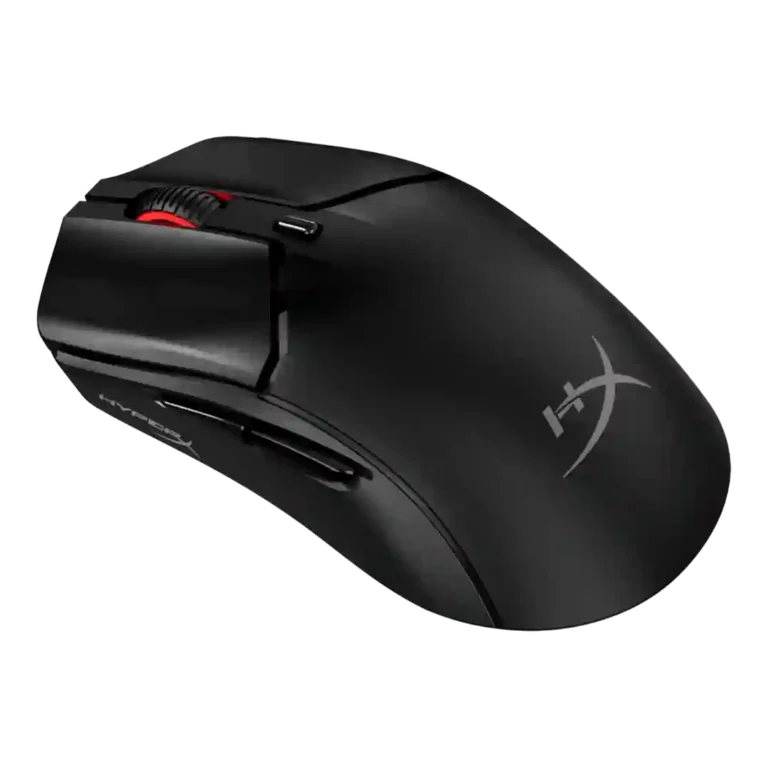
- Upgrade: smaller version of the full-size model The Mini is described as a shrunken take on the well-regarded Pulsefire Haste 2 with similar core tech.
HyperX Pulsefire Haste 2 Mini Review
Bottom Line
Choose it for a compact, portable wireless mouse with strong tracking, battery life, and small-hand comfort. Skip it if you need ultra-light weight, 8K polling, deep software, or palm-grip support.
Best for small-handed gamers or fingertip users who want a portable wireless mouse with 2.4GHz, Bluetooth, long battery life, and reliable tracking. It also suits casual gaming and work use where compact size matters more than elite polling rates.
Not for palm-grip users, larger hands, or competitive FPS players chasing ultra-light shells, 4K/8K polling, and very snappy main clicks. It is also not ideal for users who want deep software customization or macro-focused controls.
The HyperX Pulsefire Haste 2 Mini earns its strongest praise as a compact wireless gaming mouse for smaller hands, with reliable 2.4GHz performance, Bluetooth versatility, long battery life, smooth glide, and a capable 26K sensor. The tradeoff is that the small shell makes its 59-60g weight feel denser than the number suggests, and several reviewers found comfort highly dependent on hand size and grip. Software is functional but barebones, RGB is minimal, and the 1000Hz polling rate trails esports-focused rivals. Its best evidence points to a thoughtful travel-friendly mouse that performs well for mainstream gaming, while its weakest evidence centers on main-click feel, skate execution, and fit for larger hands.
Compared in Reviews
Products reviewers directly compared with this model, grouped into quick takeaways.
- Better: high polling rate upgrade path The DeathAdder V3 Hyperspeed is cited as pricier but upgradeable to an 8KHz polling rate.
Beast X
- Compared: size and perceived weight The reviewer says the Mini is smaller than the Beast X and feels weighty in that small shell.
Feature Scorecards
Summary
47 reviewed features- Very positive 4.5-5.0 15% 7 features
- Positive 3.5-4.4 66% 31 features
- Neutral 2.5-3.4 19% 9 features
- Negative 1.5-2.4 0% 0 features
- Very negative below 1.5 0% 0 features
Pros
-
Battery life was consistently praised, with multiple reviewers saying the claimed 100-hour endurance held up or required no recharge over weeks.
-
DPI range was a clear specification strength, with multiple reviewers citing the 26,000 DPI ceiling and available DPI settings.
-
The included cable was praised as light and malleable, reducing drag when charging or using the mouse wired.
-
Charging convenience was strong because the mouse can be used while charging and has a front USB-C setup.
-
Connection stability was a strength across reviews, with the 2.4GHz connection and general wireless use described as reliable.
-
Ergonomics were praised for small hands and secure grip, with shape details supporting comfort for the right users.
-
Switch durability had limited but positive evidence from the stated 100 million click rating.
-
Tracking was described as accurate and smooth by the most positive reviewers, though one review tied accuracy expectations to the modest polling ceiling.
-
Button responsiveness was generally good for basic use and side buttons, while heavy or inconsistent main clicks limited rapid-fire confidence for some reviewers.
-
Value was positive overall, with IGN calling it brilliant value and TechRadar noting a lower price than many rivals.
-
Wireless performance was broadly strong, with no drops, lag-free use, and reliable connection reports across reviews.
-
Build quality was mostly positive, with reviewers citing stiffness, sturdiness, and a solid shell despite some click and skate execution complaints elsewhere.
-
Reviewers found the 2.4GHz dongle connection useful and generally strong, with the best wireless feel coming from the dongle rather than Bluetooth.
-
Portability was a strong theme, helped by the small size, Bluetooth, dongle storage, and easy multi-device use.
-
Sensor performance was consistently strong where discussed, with reviewers citing the HyperX 26K sensor, IPS tracking, or simply calling the sensor great.
-
Bluetooth support was repeatedly seen as a practical strength for portability and multi-device use, though gaming performance was better over 2.4GHz.
-
Motion consistency was strong in positive testing, with no lagging or stuttering mentioned, though skate wobble created concerns on hard pads.
-
Premium feel was modest but positive where noted, helped by the dense build and subtle RGB touches.
-
Click sound was viewed positively by IGN, which described the main buttons as sharp and satisfying.
-
Materials were generally seen as decent for a lightweight mouse, with matte plastic and textured finish noted positively.
-
Lift-off distance customization is basic but present, with two selectable distances or a 1mm/2mm binary choice.
-
MMO suitability was only directly addressed once and was considered fine for casual, non-shooter use by small-handed players.
-
Fingertip comfort was one of the most context-dependent traits: small-hand reviewers liked it, while larger-hand reviewers found the grip forced or awkward.
-
Scroll wheel quality was mostly positive, though one reviewer had inconsistent scroll-button actuation.
-
Polling rate is adequate at 1000Hz for mainstream play but not positioned as esports-leading against 4KHz or 8KHz rivals.
-
Programmable button support is basic, with reassignment and custom switches present but not deep macro-level flexibility.
-
Ecosystem integration is limited but present through HyperX lighting sync across multiple HyperX devices.
-
Glide smoothness was a frequent positive, especially on PTFE feet, though two YouTube reviewers found the stock skates slower or too thick.
-
Grip texture was praised by IGN and TechRadar, but one reviewer said it became swampy in humid play.
-
Shape comfort is the central tradeoff: excellent for smaller hands and fingertip use, but too small or painful for some normal-to-large hands.
-
Wireless latency was acceptable over 2.4GHz but less ideal over Bluetooth or for users chasing higher polling-rate latency reduction.
-
Side button quality was mixed, from well-positioned or responsive to spongy or affected by post-travel.
-
RGB is understated and limited to the scroll-wheel ring, which reviewers saw as subtle rather than flashy.
-
Claw grip comfort was mixed: IGN found claw use comfortable, while another reviewer said the hump was not tall enough for claw support.
-
Long-session comfort depends strongly on hand size and grip, with one reviewer comfortable for hours and another reporting hand pain after about an hour.
-
Surface compatibility was mixed because glide worked well on hard surfaces for one reviewer but another reported wobble on hard pads.
-
The mouse is effectively right-hand shaped; the evidence supports a right-hand curve rather than broad handedness options.
-
Button customization exists through DPI settings, reassignment, and custom switches, but software limits kept it from feeling deeply configurable.
Cons
-
FPS suitability was mixed: tracking and glide worked well, but pro-level players may object to the 1KHz cap, weight, and click issues.
-
Balance impressions were split: one reviewer found it well balanced, while others felt the small shell made the weight feel dense or uneven.
-
Main click quality divided reviewers, ranging from crisp and satisfying to heavy, wobbly, or inconsistent depending on hand placement and unit.
-
Click latency was not measured directly, but one reviewer associated the heavier, less snappy clicks with weaker rapid-fire response.
-
Weight was the most repeated criticism from mouse-focused YouTube reviewers, who felt 59-60g was dense in such a small shell.
-
Software usability was repeatedly limited, with Ngenuity described as confusing or barebones compared with richer suites.
-
Palm grip comfort was a weakness because the compact shell left parts of the hand unsupported for multiple reviewers.
-
Firmware reliability was questioned by one reviewer who saw the DPI revert to 800 after idle time on one Windows 10 machine.
-
Software stability had a notable caveat from one reviewer who experienced a DPI reversion bug on one Windows 10 system.
Compared With Category Average
Compared with other Gaming Mouse, this product is above average in cable flexibility, Bluetooth support, below average in click latency, weight, software usability.
Summary
8 compared features- Above average 0.4+ pts higher 25% 2 features
- Same as average within 0.3 pts 0% 0 features
- Below average 0.4+ pts lower 75% 6 features
| Attribute | This product | Category average | Difference |
|---|---|---|---|
| click latency | 3.0 | 4.5 | -1.5 |
| weight | 2.9 | 4.1 | -1.2 |
| cable flexibility | 4.8 | 3.6 | +1.2 |
| Bluetooth support | 4.3 | 3.2 | +1.1 |
| software usability | 2.9 | 3.9 | -1.0 |
| palm grip comfort | 2.9 | 3.9 | -1.0 |
| left and right click quality | 3.2 | 4.2 | -1.0 |
| FPS gaming suitability | 3.3 | 4.2 | -0.9 |
FAQ
Is the HyperX Pulsefire Haste 2 Mini good for small hands?
Yes. Multiple reviews describe the shape as especially comfortable or well suited for smaller hands, though larger-hand reviewers found the compact shell awkward.
Does it work wirelessly and over Bluetooth?
Yes. Reviews confirm both 2.4GHz dongle wireless and Bluetooth support, with 2.4GHz favored for gaming and Bluetooth treated as useful for portability and general use.
How is the battery life?
Battery life is one of the clearest strengths. Reviewers repeatedly referenced the claimed 100-hour life and reported no need to recharge during extended testing.
Is it suitable for competitive FPS gaming?
It can handle FPS play, but reviews are mixed for competitive use. The 1KHz polling rate, dense weight, and some click-quality concerns make it less compelling for pro-level or ultra-light-focused players.
How good is the software?
Ngenuity covers basics like DPI, lift-off distance, RGB, and button reassignment, but reviewers called it limited, barebones, or somewhat confusing.
Does the mouse feel lightweight?
The listed weight is 59g, but several reviewers said that feels heavier or denser than expected because the shell is so small.
Consider This Instead
If you want better weight
Choose ASUS ROG Keris II Ace. It scores 5.0 vs 2.9 for weight, with a 4.2 overall score.
If you want better click latency
Choose LAMZU Maya X. It scores 5.0 vs 3.0 for click latency, with a 4.5 overall score.
If you want better left and right click quality
Choose Turtle Beach Kone II Air. It scores 5.0 vs 3.2 for left and right click quality, with a 4.3 overall score.
If you want better palm grip comfort
Choose Turtle Beach Burst II Pro. It scores 4.7 vs 2.9 for palm grip comfort, with a 4.3 overall score.
Overall Top Gaming Mouse Alternatives
Best for a 47g, high-performance 8K wireless mouse with excellent shape, skates, clicks, and web controls. Skip it if stiff side buttons, shorter high-polling battery life, or app/cable quirks would...
Pros: Accuracy and tracking precision, sensor performance
Cons: cable flexibility
Choose it if you want a comfortable, feature-rich wireless mouse for mixed gaming and productivity. Skip it if you need ultralight FPS speed, left-handed support, or better value than discounted...
Pros: programmable buttons, Bluetooth support
Cons: handedness options, firmware reliability
Good if you want an ultra-light esports mouse with 8K wireless, precise tracking, and web setup. Skip it if you need MMO buttons, onboard memory, large-hand palm support, or the...
Pros: polling rate, click latency
Cons: onboard memory, tilt gesture controls
Good if you want ergonomic wireless gaming with hot-swappable batteries and strong tuning. Skip it if price, dock clutter, or short 8K battery life matters most.
Pros: switch durability, DPI range
Cons: grip texture, portability