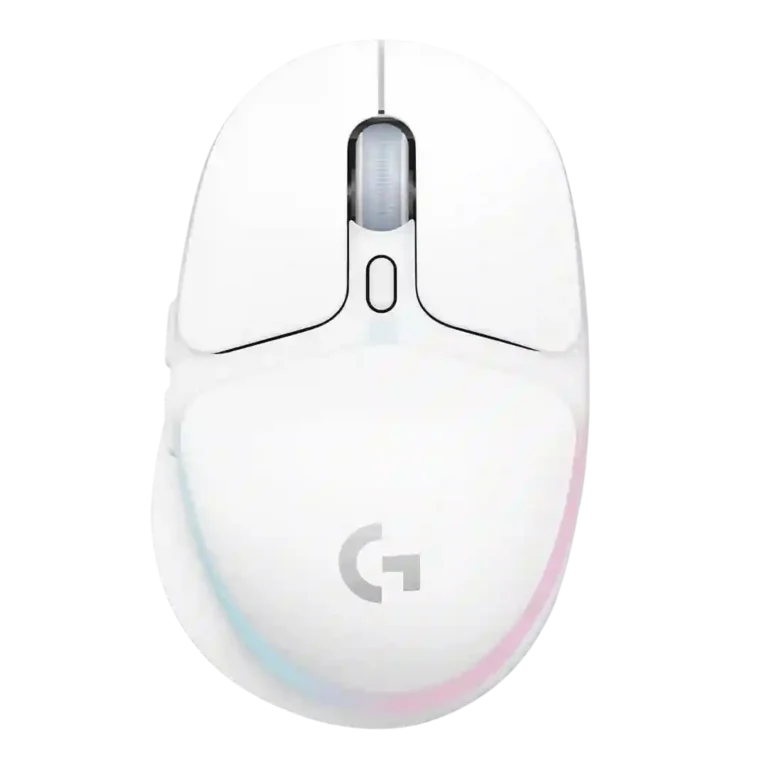
Logitech G705 Review
Bottom Line
Choose the Logitech G705 for small-hand comfort, reliable wireless, and soft RGB style. Skip it if you need top-tier sensor specs, many buttons, or stronger value.
Best for gamers with small hands who want a compact rechargeable wireless mouse with reliable Lightspeed, Bluetooth flexibility, RGB styling, and straightforward G Hub customization.
Not ideal for larger hands, serious MMO/MOBA players, or competitive buyers who prioritize the highest DPI, the lightest shell, the longest RGB-on battery life, or maximum value.
The Logitech G705 works best as a compact, style-forward wireless gaming mouse for users who want small-hand comfort, easy wireless switching, and G Hub customization more than elite specs. Across the reviews, its strongest points are the ergonomic shape, smooth glide, reliable Lightspeed performance, attractive RGB, and approachable software controls. The tradeoff is that its 8,200 DPI sensor, 40-hour RGB battery life, and six-button layout do not fully match the price for competitive or feature-heavy buyers. It can handle everyday gaming and many FPS sessions well, but larger hands, MMO/MOBA players, and value-focused shoppers have clearer reasons to hesitate.
What Reviewers Agree On
Reviewers consistently described the Logitech G705 as a compact wireless gaming mouse built around comfort, style, and accessibility for smaller hands. The rounded shape, thumb rest, smooth glide, and easy-to-reach buttons came up repeatedly as strengths, especially for users who struggle with larger gaming mice. Wireless performance was also a steady positive theme: Lightspeed was treated as the better gaming connection, while Bluetooth added useful flexibility for laptops, tablets, and mobile setups. G Hub support gives the mouse practical customization through programmable buttons, DPI settings, RGB controls, macros, and profiles.
The most repeated caveat is that the G705 feels more lifestyle-focused than performance-first. Reviewers often found the 100 to 8,200 DPI range good enough for normal use, but not as competitive as higher-end sensors. Battery life with RGB on was commonly described around 40 hours, which some reviewers found acceptable and others considered disappointing for the price. Fit was also not universal: the small shell helped smaller hands, but several average- or larger-hand reviewers found it too short, too awkward, or unsuitable for long palm-grip use. MMO and MOBA suitability was limited by the six-button layout.
The biggest buying tradeoff is price versus purpose. The G705 earned praise for looking distinctive, feeling comfortable, and delivering reliable wireless performance, but many reviews questioned whether those strengths justify the premium when cheaper mice offer higher specs or longer battery life. Buyers most likely to be satisfied are those who specifically want a smaller, attractive, rechargeable wireless mouse that blends gaming and everyday use, not those chasing the lightest shell, highest DPI, longest battery, or best competitive value.
Scored Features
Pros
-
Reviews that discussed the 2.4GHz or Lightspeed connection generally described it as the gaming-focused wireless option, with several noting reliable or fast dongle performance.
-
Wireless latency evidence was strong for Lightspeed or USB dongle use, with reviewers describing low latency, no lag, or faster response.
-
Wireless performance was broadly positive, especially over Lightspeed, with reviews emphasizing reliable, snappy, or flexible wireless operation.
-
Click noise evidence was limited but positive, with one review describing the scroll/click sound as quiet and not disruptive.
-
Button responsiveness was praised in multiple reviews, with comments about responsive clicks, light actuation, easy reach, and satisfying click feel.
-
Build quality was generally viewed positively, with reviewers describing solid construction, premium assembly, robust workmanship, or no obvious quality issues.
-
Macro support was repeatedly tied to G Hub assignments, macros, G-Shift, and system-command customization.
-
Left and right click quality was consistently positive where mentioned, with tactile, light, or satisfying main clicks.
-
The only direct click-speed evidence described clicks as precise and fast, supporting good practical click latency.
-
Button customization was well supported through G Hub, with reviews noting reprogrammable buttons, assignments, RGB adjustments, DPI tuning, and macro options.
-
Glide smoothness was consistently positive, with multiple reviews praising smooth movement, large skates, or easy gliding on mouse mats and surfaces.
-
Premium feel was usually positive, especially for the Aurora design, cohesive package, and high-end hand feel.
-
Switch feel was consistently praised as tactile, sharp, light, satisfying, or clicky.
-
Cross-platform evidence came from reviews mentioning device/app profiles, iPad use, and compatibility across Windows, macOS, iPadOS, and iOS.
-
Bluetooth support was widely confirmed and generally treated as useful for flexibility, though a few reviewers reported setup friction or preferred the dongle for gaming.
-
Charging convenience was supported by USB-C charging, the ability to keep using the mouse while charging, and one report of a sub-two-hour full charge.
-
Programmable-button evidence was broad and consistent, with the six-button layout repeatedly mentioned as reprogrammable or programmable.
-
Connection stability was broadly positive for Lightspeed and general wireless use, but Bluetooth setup was a recurring point of friction in some reviews.
-
Ecosystem integration was a clear theme through Aurora pairing, G Hub sync, shared receivers, device profiles, and Logitech device coordination.
-
Side button quality was positive where mentioned, with reviewers noting useful placement, a thumb ridge, and no obvious quality issues.
-
Surface compatibility was supported by reports of smooth movement across most surfaces or use on tabletops and mouse pads.
-
Lift-off distance had one direct positive mention alongside high polling rate as helping gaming and work performance.
-
Portability was a clear strength because of the compact size, wireless use, travel suitability, and multi-device usefulness.
-
Materials quality was generally positive, with matte plastic, solid shells, and high-end feel noted, though some reviews still emphasized plastic construction.
-
Onboard memory was confirmed in several reviews for saving settings or profiles on the mouse.
-
Ergonomic design was one of the strongest themes, especially for smaller hands, with praise for contours, curves, thumb rests, and compact comfort.
-
Grip texture was supported by matte or pleasant-to-touch surface comments that helped grip and comfort.
-
Software usability was generally positive for customization and G Hub controls, although some reviewers disliked needing G Hub or multiple Logitech apps.
-
RGB features were widely discussed and usually praised for Aurora styling, but some reviewers felt the lighting was limited, covered by the hand, or battery-costly.
-
Precision feedback was mostly positive, with reviewers describing accurate tracking, smooth response, or strong practical performance, though some noted the lower DPI ceiling limits top-tier precision.
-
Scroll wheel quality was generally positive but not perfect, with responsive scrolling and quiet operation offset by stiffer or firmer press comments.
-
The only direct acceleration evidence came from a specifications-focused review that listed max acceleration above 30g.
-
Firmware evidence was limited to G Hub support for checking or applying firmware updates.
-
Claw grip feedback was mostly positive for smaller hands, although several reviewers with larger or average hands found the mouse too small or awkward.
-
Profile switching was supported through G Hub profiles, onboard settings, and program-specific switching, though one review wished for more Bluetooth profiles.
-
Fingertip grip support was positive where tested, although some reviewers still found the shell unusually small.
-
Sensor performance was adequate-to-good in most reviews, with accurate tracking in practice but repeated caveats about the lower-end Lightsync sensor and 8,200 DPI ceiling.
-
Long-session comfort depended strongly on hand size: smaller-hand-focused reviews praised longer-session comfort, while some larger-hand reviewers reported discomfort or fit limits.
-
Polling-rate coverage repeatedly identified 1000Hz wireless or dongle polling as the gaming-relevant mode, while Bluetooth was noted as lower.
-
Shape comfort was highly hand-size-dependent: many praised the curves and smaller-hand fit, while others found it too small or hard to adapt to.
-
FPS suitability was mixed: practical FPS performance often worked well, but some reviewers noted sensor, weight, or competitive limitations.
-
Battery life was usually described as around 40 hours with RGB on; some reviewers considered that sufficient, while others saw it as a weakness next to longer-lasting alternatives.
-
Weight feedback was mixed because the mouse is light by general standards but sometimes felt heavy for its small shell or too light for control.
-
Durability-over-time evidence was mixed and limited: one review praised robust workmanship after prolonged use, while another raised concerns about dust and gaps.
-
DPI range evidence consistently cited a roughly 100 to 8,200 DPI range; reviewers found it adequate for most users but below higher-end gaming mice.
Cons
-
Motion consistency evidence was mixed, ranging from smooth flicking and controlled movement to one review noting polling-rate variation.
-
Palm grip comfort was mixed: some found it usable or best-suited, while others said the mouse was too short or palm grip was not ideal.
-
Weight balance feedback was mixed: one reviewer praised its stopping power for aim, while others felt the balance or lightness reduced control.
-
Value for money was one of the biggest tradeoffs: several reviewers saw the price as high for the performance, while a few considered sale pricing or compact features fair.
-
MOBA suitability was also limited by the six-button layout in some reviews, though one casual review reported no complaint in Dota 2.
-
Software stability evidence was limited and mixed, with one review objecting to the burden of multiple Logitech software packages.
-
MMO suitability was weak in the direct evidence because one review said the six-button layout was not best for MMOs.
-
Cable flexibility had limited evidence and was negative in the review that covered it, which called the included cable rigid for such a small mouse.
-
Handedness evidence was mostly negative, with reviews describing a right-handed shape and no left-handed version, despite one reviewer noting it could technically be used left-handed.
-
Weight tuning was explicitly poor in the one review that mentioned it, noting there is no adding or removing weights.
FAQ
Is the Logitech G705 worth buying?
It is worth considering if the small shape, Aurora styling, rechargeable wireless design, and G Hub customization matter more to you than raw specs. Several reviewers liked the comfort and wireless performance but questioned the price.
Who is the Logitech G705 best for?
It is best for smaller hands and users who want a compact mouse for gaming, work, and travel. Reviewers with larger hands often found the shell too short or awkward.
What is the main drawback of the Logitech G705?
The main drawback is value. Reviews repeatedly noted that the 8,200 DPI sensor, 40-hour RGB battery life, and six-button layout feel modest for the price.
Is the Logitech G705 good for FPS games?
It can work well for FPS games thanks to smooth glide, responsive clicks, and low-latency Lightspeed wireless. However, some reviewers said its sensor, weight, or compact shape make it less ideal for highly competitive play.
Is the Logitech G705 good for MMO or MOBA games?
It is not the strongest fit for MMO or MOBA players who want many buttons. Multiple reviews pointed to the six-button layout as the limiting factor.
How long does the Logitech G705 battery last?
Reviews repeatedly cite about 40 hours with RGB lighting on. Some found that enough for weekly use, while others considered it short compared with competing wireless mice.
Does the Logitech G705 support Bluetooth and Lightspeed?
Yes. Reviews confirm both Bluetooth and 2.4GHz Lightspeed-style dongle connectivity, with Lightspeed generally preferred for gaming because of lower latency.
Video Reviews
Article Reviews
Best Gaming Mouse Alternatives
Choose the Model D3 for flexible wireless gaming, comfort, and precise control. Skip it if the high price or shorter high-polling battery life matters more.
Pros: Accuracy and tracking precision, switch durability, FPS gaming suitability, charging convenience, sensor performance, click latency, wireless latency
Cons: none
Choose the Harpe II Ace for ultralight FPS control, 8K wireless, and easy web setup. Skip it if you need many buttons or steady long battery life in...
Pros: polling rate, weight, wireless performance, DPI range, switch durability, sensor performance, motion consistency
Cons: onboard memory, MMO gaming suitability, software stability, profile switching
Choose the Razer Basilisk V3 Pro 35K for ergonomic comfort, precise tracking, and feature-rich wireless control. Skip it if you want an ultralight FPS mouse or better value...
Pros: motion consistency, sensor performance, DPI range, build quality, macro support, click latency, acceleration control
Cons: handedness options, value for money, weight, fingertip grip comfort
Choose it for precise tracking, comfortable right-handed shape, and swappable switches. Skip it if you need ultralight weight, left-handed ergonomics, or cleaner software value.
Pros: click latency, durability over time, wireless latency, switch durability, Accuracy and tracking precision, 2.4GHz connectivity, sensor performance
Cons: software stability, handedness options, firmware reliability