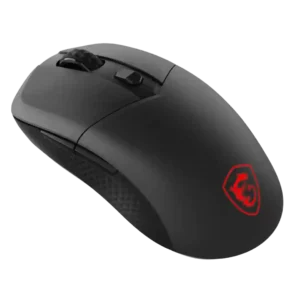
- Better: value WIRED concluded the standard Haste 2 was the stronger buy of the two HyperX models.
- Better: value Windows Central considered the standard Haste 2 the better value for most buyers.
- Better: value versus the standard model IGN found the Pro model harder to justify when the base Haste 2 offers much of the same experience for less.
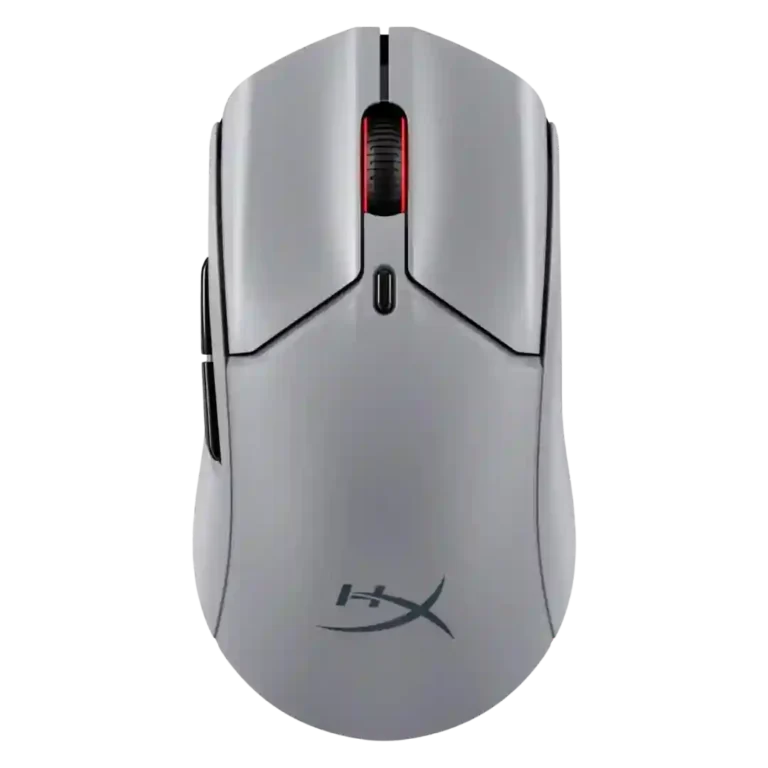
HyperX Pulsefire Haste 2 Pro Review
Bottom Line
Choose the HyperX Pulsefire Haste 2 Pro if you want a light wireless mouse with crisp optical clicks, 4K polling, and strong battery life. Skip it if the cheaper Haste 2, richer software, or a fuller palm shape matters more.
Best for competitive FPS players who want a 61g wireless mouse with precise tracking, crisp optical clicks, 2.4GHz/Bluetooth flexibility, and optional 4K polling. It also suits users who prefer smaller or lower-profile shapes over a large palm-filling hump.
Not for buyers who mainly want the best value, deep software customization, 8K polling, heavy RGB, or a fuller palm-grip shape. Larger-hand users and anyone satisfied with the standard Haste 2 may not gain enough from the Pro upgrade.
The HyperX Pulsefire Haste 2 Pro lands as a fast, well-built esports mouse with a clear performance focus. Reviewers repeatedly praise its 61g weight, accurate 26K sensor, crisp optical switches, stable wireless modes, and strong battery life at 1,000Hz. The main tradeoff is that its headline 4K polling is useful mostly for competitive players with high-refresh setups, while it cuts battery life and does not convince every reviewer as a paid upgrade. Comfort is also context-dependent: small hands, claw grip, and mixed grip styles fare well, but palm-grip and larger-hand users may want a fuller shape. Its software covers essentials, but lacks the deeper tweaks some rivals provide.
Compared in Reviews
Products reviewers directly compared with this model, grouped into quick takeaways.
- Worse: battery life Game Rant contrasted the Haste 2 Pro's 90-hour claim with the Logitech model's shorter typical battery life.
- Worse: connectivity modes TechRadar said the Haste 2 Pro's multiple connectivity modes give it an advantage over the Razer DeathAdder V3 HyperSpeed.
Feature Scorecards
Pros
-
Wireless latency is excellent in reviewer testing, with no noticeable latency and instant response repeatedly reported.
-
Connection stability is strong in reviewer use, with repeated notes of no lag, no connectivity problems, and no stuttering.
-
Click latency is a strength, with reviewers tying the optical switch design to instant reactions and reduced debounce delay.
-
FPS suitability is one of the clearest strengths, with reviewers testing shooters and praising tracking, speed, and 4K responsiveness.
-
The few reviews that discuss balance find the 61g body easy to maneuver and evenly distributed rather than merely light.
-
Switch durability is supported by optical-switch evidence, including fewer double-click risks and stated longevity.
-
Weight is a clear strength, with the 61g body repeatedly described as light, ultralight, and comfortable to move.
-
Switch feel is one of the most praised traits, with reviewers calling clicks tactile, crisp, bouncy, and satisfying.
-
Build quality is praised across reviews, with comments on a sturdy shell, rigid body, durable frame, and refined construction.
-
Motion consistency is very strong, with reviewers reporting stable, smooth tracking and accurate control during rapid or subtle movements.
-
Button responsiveness is rated highly thanks to snappy clicks, fast actuation, and a generally immediate feel in games.
-
The cable receives positive remarks for flexibility, slack, and low drag during wired play or charging.
-
Durability evidence centers on optical switches and sturdy construction, with reviewers expecting longer lifespan and fewer double-click issues.
-
Reviewers consistently confirm 2.4GHz wireless support, usually through a dongle or receiver, and describe switching or use as straightforward.
-
Materials are perceived as solid and refined rather than cheap, despite the mostly plastic construction.
-
Surface compatibility is positive across desk mats, mousepads, and hard surfaces, especially when paired with upgraded skates.
-
Sensor performance is consistently strong, with the 26K sensor praised for reliable, precise, responsive tracking.
-
Wireless performance is strong overall, with reviewers praising reliable 2.4GHz, Bluetooth, and wired mode flexibility.
-
Accuracy is a major strength: reviewers repeatedly describe tracking as smooth, stable, accurate, and precise in gaming and productivity use.
-
Bluetooth is repeatedly confirmed and positioned as a useful secondary mode for laptops, casual use, and work setups.
-
Charging is convenient through USB-C and wired-use support, with reviewers noting play-while-charging behavior and quick recharge practicality.
-
Onboard memory is supported in one review through DPI profiles stored directly on the mouse.
-
Click sound is generally liked, with reviewers describing the switches as satisfying, tactile, and good-sounding rather than dull or mushy.
-
Macro support is confirmed through NGENUITY, with reviewers specifically mentioning macro assignment and side-button use.
-
Claw grip comfort is specifically praised where discussed, especially because the lower profile and longer body feel natural for that grip.
-
Premium feel is supported by comments about density, construction, and price-worthy physical quality.
-
Glide is generally smooth, especially with upgraded or large PTFE/glass skates, though a few reviewers find the stock feet less effortless than rivals.
-
The DPI range is broadly supported by the HyperX 26K sensor and profile controls, though reviewers often consider the maximum excessive for normal use.
-
Main click quality is a strong point overall, with optical switches and primary buttons praised for feel, rebound, and low play despite one uneven-button complaint.
-
Dock compatibility is supported through the included round dock/hub setup that can extend the mouse connection path.
-
Battery life is widely praised at the 1,000Hz setting, though multiple reviews note the clear drop to about 30 hours in 4K mode.
-
Long-session comfort is helped by low weight and low strain, but some reviewers prefer a fuller hump or different shape for extended use.
-
Polling rate is a defining feature, but opinions are mixed: some praise 4K responsiveness while others see limited real-world benefit or measured shortfalls.
-
Ergonomics are mostly positive due to low weight and grip-friendly shaping, but several reviews warn the shape will not fit everyone.
-
Profile switching is available through DPI/profile controls in NGENUITY, though the software feature set remains fairly basic.
-
Fingertip comfort is inferred from broad grip-style support rather than directly isolated, so the evidence is positive but less specific.
-
Ecosystem integration is a modest plus, especially for users already in the HyperX or OMEN ecosystem.
-
Scroll wheel quality is mostly positive for firm notches and feedback, though one review finds the wheel small and harder to reach.
-
Grip texture is mostly positive thanks to the subtly textured shell and optional tape, but one review disliked the slick feel of the included tape.
-
Shape comfort is the most context-dependent comfort trait: small hands, claw grip, and some grip styles fare well, while larger hands and palm grip may not.
-
Lift-off distance is supported through software controls, usually limited to 1mm and 2mm settings.
-
Software usability is decent for DPI, macros, polling, RGB, and rebinding, but reviewers find it basic or less flexible than competitors.
-
Side button quality is mixed but mostly positive, with praise for feel and placement balanced by complaints about cheap-feeling plastic and narrowness.
-
Button customization is useful but not class-leading: reviewers confirm rebinding, macros, and button configuration, while noting some software limits.
-
Portability is helped by low weight and dongle storage, though one review misses a storage pouch.
-
Programmable buttons are present and useful for typical rebinding and macro tasks, but the mouse is still described as basic by one reviewer.
-
Value is split: the Pro is competitive against premium rivals, but several reviewers prefer the cheaper Haste 2 unless 4K polling matters.
-
MMO suitability is limited but supported by one reviewer using the scroll wheel and side buttons for Final Fantasy XIV actions.
-
Handedness support is limited: reviewers describe a right-handed symmetrical shape, with side buttons favoring right-handed users.
-
RGB is minimal and scroll-wheel focused; it can be customized, but reviewers consistently frame it as limited rather than flashy.
Cons
-
Cross-platform evidence is limited but present, with console compatibility praised and Windows-only NGENUITY software noted as a constraint.
-
Software stability has one clear issue: RGB control failed until a Windows Dynamic Lighting setting was changed.
-
Palm grip comfort is a weakness where directly discussed, because the lower palm hump makes palm gripping less natural for some users.
Compared With Category Average
Compared with other Gaming Mouse, this product is above average in Bluetooth support, cable flexibility, dock compatibility, below average in palm grip comfort, cross-platform compatibility.
| Attribute | This product | Category average | Difference |
|---|---|---|---|
| Bluetooth support | 4.5 | 3.2 | +1.3 |
| palm grip comfort | 2.7 | 3.9 | -1.2 |
| cable flexibility | 4.6 | 3.6 | +1.0 |
| dock compatibility | 4.4 | 3.3 | +1.1 |
| click noise | 4.5 | 3.6 | +0.9 |
| handedness options | 3.7 | 2.8 | +0.9 |
| weight | 4.6 | 4.1 | +0.5 |
| cross-platform compatibility | 3.4 | 4.0 | -0.6 |
FAQ
Is the HyperX Pulsefire Haste 2 Pro good for FPS games?
Yes. Multiple reviewers tested it in shooters and praised its accurate tracking, fast response, light weight, and 4K polling option for competitive play.
Does the 4K polling rate make a big difference?
It can make movement feel smoother for competitive players with high-refresh setups, but reviewers repeatedly say most users will be fine at 1,000Hz.
How long does the battery last?
Reviews consistently cite up to about 90 hours at 1,000Hz. Running 4K polling cuts that estimate to roughly 30 hours.
Is it comfortable for large hands?
Comfort is mixed for larger hands. Reviewers praise the light body and grip-friendly shape, but some say the low profile and smaller feel favor small hands or claw grip more than large palm grip.
Does it support both Bluetooth and 2.4GHz wireless?
Yes. Reviews confirm 2.4GHz wireless, Bluetooth, and wired USB-C use, with several reviewers reporting stable switching and no connection issues.
How good is the software customization?
NGENUITY covers essentials such as DPI, polling rate, lift-off distance, RGB, profiles, macros, and button rebinding, but reviewers note it lacks deeper advanced tweaks and richer assignment options.
Is it worth paying more than the standard Pulsefire Haste 2?
Only some reviewers think so. The Pro earns praise against premium rivals, but several reviewers say the cheaper Haste 2 is the better value unless the 4K wireless polling feature matters to you.
Consider This Instead
If you want better palm grip comfort
Choose Turtle Beach Kone II Air. It scores 4.8 vs 2.7 for palm grip comfort, with a 4.3 overall score.
If you want better software stability
Choose ASUS ROG Gladius III Wired. It scores 4.7 vs 3.0 for software stability, with a 4.2 overall score.
If you want better cross-platform compatibility
Choose ASUS ROG Harpe Ace Mini. It scores 4.7 vs 3.4 for cross-platform compatibility, with a 4.4 overall score.
If you want better programmable buttons
Choose Razer Basilisk V3 Pro 35K. It scores 5.0 vs 3.9 for programmable buttons, with a 4.5 overall score.
Overall Top Gaming Mouse Alternatives
Best for a 47g, high-performance 8K wireless mouse with excellent shape, skates, clicks, and web controls. Skip it if stiff side buttons, shorter high-polling battery life, or app/cable quirks would...
Pros: Accuracy and tracking precision, sensor performance
Cons: cable flexibility
Choose it if you want a comfortable, feature-rich wireless mouse for mixed gaming and productivity. Skip it if you need ultralight FPS speed, left-handed support, or better value than discounted...
Pros: programmable buttons, Bluetooth support
Cons: handedness options, firmware reliability
Good if you want an ultra-light esports mouse with 8K wireless, precise tracking, and web setup. Skip it if you need MMO buttons, onboard memory, large-hand palm support, or the...
Pros: polling rate, click latency
Cons: onboard memory, tilt gesture controls
Good if you want ergonomic wireless gaming with hot-swappable batteries and strong tuning. Skip it if price, dock clutter, or short 8K battery life matters most.
Pros: switch durability, DPI range
Cons: grip texture, portability