- More expensive: price and performance RTINGS says the HyperSpeed is significantly cheaper than the larger sibling while performing very well.
- Worse: overall reviewer preference PC Gamer says the HyperSpeed is better than the V3 Pro despite looking like the cheaper model.
- Worse: comfort and in-game accuracy GamesRadar found the cheaper HyperSpeed more comfortable and slightly more accurate than pricier predecessors.
Razer DeathAdder V3 HyperSpeed Review
Bottom Line
Choose it for a light, precise, right-handed wireless FPS mouse with excellent battery life. Skip it if you need Bluetooth, RGB, a flexible cable, or 8K polling included in the box.
Best for right-handed FPS and competitive players who want a light ergonomic mouse, precise tracking, long battery life, and strong value without paying for flagship extras. It especially suits small-to-medium hands and palm or claw grips.
Not for left-handed users, Bluetooth-first multi-device setups, RGB-focused builds, or players who want 8K polling included. Large-hand users and people sensitive to click noise, smooth coatings, or stiff charging cables should also be cautious.
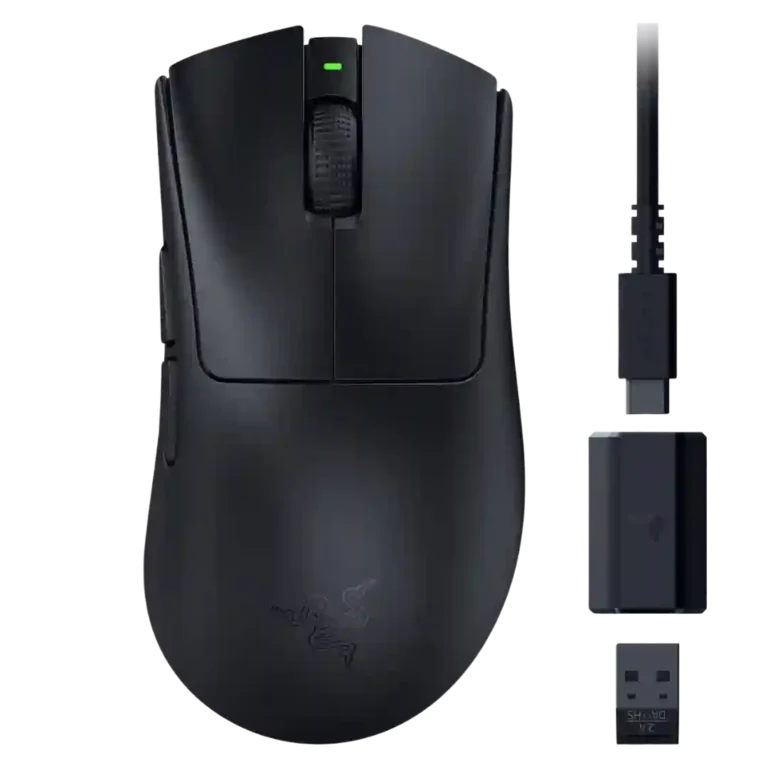
The Razer DeathAdder V3 HyperSpeed earns unusually strong reviewer support because it keeps the core DeathAdder strengths while becoming smaller, lighter, and cheaper than the Pro model. Reviewers consistently praise its accurate Focus X 26K sensor, low wireless latency, strong battery life, and comfortable right-handed ergonomic shape for small-to-medium hands. The main tradeoff is that Razer saves money by shipping only a 1,000Hz dongle, so 8,000Hz polling needs an extra purchase. The no-Bluetooth design, plain no-RGB look, stiff cable, and sometimes clammy smooth coating are also repeated caveats. Even so, the evidence points to a high-performing mainstream wireless gaming mouse rather than a stripped-down budget model.
Compared in Reviews
Products reviewers directly compared with this model, grouped into quick takeaways.
- Better: wired and wireless polling flexibility TechteamGB criticizes the HyperSpeed for not matching Glorious's split wired/wireless polling flexibility.
- Worse: price-range preference CGMagazine says it prefers the DeathAdder V3 HyperSpeed over both cited price-range rivals.
Feature Scorecards
Pros
-
Click latency is excellent in the reviews that measured or discussed it, with wireless latency described as extremely low or imperceptible.
-
Wireless latency is excellent in tests and subjective impressions, often described as very low, imperceptible, or competitive.
-
Weight is a standout strength, with most reviews emphasizing the roughly 53-55g shell as light, nimble, and easy to flick.
-
Connection stability is praised, with reviewers reporting consistent wireless connectivity and no meaningful lag or signal problems.
-
Left and right click quality is strong, with reviewers praising crisp, tactile, solid, and consistent primary clicks.
-
Accuracy is one of the strongest themes: reviewers repeatedly report precise tracking, headshot control, and reliable fast-flick performance.
-
Build quality is strongly praised, with reviewers repeatedly noting a solid shell, little or no flex, and premium-feeling construction.
-
Where discussed, weight balance is praised as unusually well controlled for a very light wireless mouse.
-
Motion consistency is strong, with reviewers describing smooth, consistent tracking and useful rotation compensation for angled grip styles.
-
Surface compatibility is positive where tested, with reviewers reporting good glide across several mousepads or surfaces.
-
Wireless performance is broadly excellent, with reviewers describing the HyperSpeed connection as low-latency, glitch-free, stable, and close to wired.
-
Premium feel is mostly positive despite the lower price, with reviewers calling out robust materials and a capable, high-quality package.
-
Battery life receives broad agreement: the 100-hour 1KHz claim is generally considered believable or excellent in real testing.
-
Switch durability is a strength on paper because reviewers cite optical switches and high click ratings.
-
FPS suitability is excellent thanks to low weight, accurate tracking, Dynamic Sensitivity, low latency, and easy flick control.
-
Reviewers consistently describe the included dongle and HyperSpeed link as a solid 2.4GHz wireless setup, with no major signal complaints.
-
Portability is helped by the very low weight, excellent battery life, and built-in dongle storage.
-
Button responsiveness is rated highly, especially for fast gaming inputs and snappy main clicks.
-
Materials quality is mostly praised for premium or grippy coating and solid plastics, with some concern over oil and sweat buildup.
-
Sensor performance is excellent for real gaming despite lower flagship specs, with reviewers rarely noticing any practical downgrade.
-
Value is one of the strongest consensus points: reviewers repeatedly describe the mouse as high-performing for its $100 class despite dongle caveats.
-
Switch feel is strongly praised for crisp, tactile, snappy, satisfying Gen-3 optical clicks.
-
The ergonomic right-handed design is a major strength, though hand size strongly affects the fit.
-
Glide smoothness is repeatedly praised because of the large PTFE feet and low weight, usually across pads and several surfaces.
-
Long-session comfort is generally positive, with reviewers citing comfortable gaming sessions, reduced wrist stress, and effortless multi-hour use.
-
Side button quality is mostly strong, with praise for access, spacing, size, and fast response, though one review found them mushier than the mains.
-
Button customization is good through Synapse, with reviewers mentioning rebinding, DPI controls, lift-off settings, and profile-related options.
-
Claw grip comfort is broadly positive, especially for small-to-medium hands that benefit from the reduced DeathAdder size.
-
Palm grip comfort is broadly good for small-to-medium hands, though some larger-hand reviewers prefer the bigger DeathAdder V3 Pro.
-
Profile switching is available through Synapse and onboard/profile controls, but the evidence suggests it is functional rather than exceptional.
-
Shape comfort is one of the most context-dependent traits: many love the smaller ergonomic shell, while some dislike the flares or smaller fit.
-
Dynamic Sensitivity is repeatedly highlighted as a meaningful acceleration-style tool for low-sensitivity FPS play, though a few reviewers found it niche or unnatural.
-
Scroll wheel quality is generally solid and tactile, but a few reviewers found it loud, low, tedious, or awkward for middle click use.
-
Software usability is capable and feature-rich, but Synapse remains a recurring tradeoff for users who dislike heavy peripheral software.
-
The 26K DPI range is viewed as more than sufficient for most gamers even though it is lower than Razer's flagship sensors.
-
Ecosystem integration is mostly about Razer accessories and Synapse support, especially HyperPolling compatibility across Razer mouse families.
-
Grip texture is mixed-positive: many like the smooth-touch coating, but sweaty hands, oils, and lack of grip tape are repeated caveats.
-
Charging convenience is helped by USB-C and long battery life, but the awkward cable makes charging while playing less pleasant.
-
Programmable buttons are supported, though reviewers sometimes debate the real count because Razer includes wheel and bottom-button functions.
-
Lift-off support is present through Synapse and Smart Tracking, but some reviewers note limited options or missing advanced lift-off controls.
-
MMO suitability is limited but supported by one reviewer using it comfortably in Final Fantasy XIV raids with useful side buttons.
-
Polling rate is capable but controversial: it is 1,000Hz out of the box and up to 8,000Hz only with a separately purchased dongle.
-
Macro support exists through Synapse and Hypershift-style customization, but it is not a central strength of the mouse.
Cons
-
Fingertip comfort is mixed: some reviewers say it can work for larger hands, while others discourage fingertip use because of the ergo shape.
-
Software stability is mixed: some praise newer Synapse reliability, while others call it erratic, heavy, or update-prone.
-
Onboard memory is limited, with reviewers specifically noting just one onboard profile or relying on Synapse for deeper settings.
-
Click noise is one of the few repeated comfort drawbacks, with several reviewers describing the clicks as loud or clacky.
-
Cable flexibility is a recurring compromise: reviewers describe the included cable as short, stiff, heavy, rubbery, or poor for wired play.
-
Handedness options are poor because the mouse is repeatedly described as right-handed only.
-
RGB features are minimal to absent; reviewers repeatedly note the no-RGB, understated design.
-
Bluetooth is a clear weakness because multiple reviewers note that the mouse relies on the 2.4GHz dongle and lacks Bluetooth versatility.
Compared With Category Average
Compared with other Gaming Mouse, this product is above average in value for money, weight, below average in Bluetooth support, RGB features, cable flexibility.
| Attribute | This product | Category average | Difference |
|---|---|---|---|
| Bluetooth support | 1.0 | 3.3 | -2.3 |
| RGB features | 1.5 | 3.1 | -1.7 |
| cable flexibility | 2.1 | 3.6 | -1.6 |
| onboard memory | 2.8 | 4.1 | -1.3 |
| handedness options | 1.5 | 2.8 | -1.3 |
| value for money | 4.6 | 3.7 | +0.8 |
| click noise | 2.4 | 3.6 | -1.2 |
| weight | 4.8 | 4.1 | +0.7 |
FAQ
Is the Razer DeathAdder V3 HyperSpeed good for FPS gaming?
Yes. Reviewers repeatedly praised its low weight, accurate sensor, low latency, and fast flick control for shooters and competitive play.
Does it support 8,000Hz polling out of the box?
No. It ships with 1,000Hz polling, and 8,000Hz requires Razer's separate HyperPolling dongle.
How is the battery life?
Battery life is one of its strongest points. Multiple reviewers found Razer's 100-hour claim at 1,000Hz believable or close to their testing experience.
Is it comfortable for large hands?
It can work, but the evidence is mixed. Several reviewers say the smaller shape is best for small-to-medium hands, while some larger-hand reviewers preferred the bigger DeathAdder V3 Pro.
Does it have Bluetooth or RGB?
No. Reviewers repeatedly note that it lacks Bluetooth and uses a low-key no-RGB design aside from a small status LED.
Is Synapse required?
Basic use works without deep setup, but reviewers used Synapse for DPI, polling, button remapping, Dynamic Sensitivity, rotation, lift-off, and profile-related settings.
What are the biggest drawbacks?
The most common drawbacks are the separate 8K dongle requirement, no Bluetooth, no RGB, a stiff or short charging cable, and a smooth coating that can show oils or feel clammy.
Consider This Instead
If you want better Bluetooth support
Choose Razer Basilisk V3 Pro 35K. It scores 5.0 vs 1.0 for Bluetooth support, with a 4.5 overall score.
If you want better handedness options
Choose Logitech G Pro 2 Lightspeed. It scores 4.8 vs 1.5 for handedness options, with a 4.1 overall score.
If you want better RGB features
Choose Razer Cobra Pro. It scores 4.6 vs 1.5 for RGB features, with a 4.0 overall score.
If you want better cable flexibility
Choose ASUS ROG Harpe Ace Mini. It scores 4.8 vs 2.1 for cable flexibility, with a 4.4 overall score.
Overall Top Gaming Mouse Alternatives
Best for a 47g, high-performance 8K wireless mouse with excellent shape, skates, clicks, and web controls. Skip it if stiff side buttons, shorter high-polling battery life, or app/cable quirks would...
Pros: Accuracy and tracking precision, sensor performance
Cons: cable flexibility
Choose it if you want a comfortable, feature-rich wireless mouse for mixed gaming and productivity. Skip it if you need ultralight FPS speed, left-handed support, or better value than discounted...
Pros: programmable buttons, Bluetooth support
Cons: handedness options, firmware reliability
Good if you want an ultra-light esports mouse with 8K wireless, precise tracking, and web setup. Skip it if you need MMO buttons, onboard memory, large-hand palm support, or the...
Pros: polling rate, click latency
Cons: onboard memory, tilt gesture controls
Good if you want ergonomic wireless gaming with hot-swappable batteries and strong tuning. Skip it if price, dock clutter, or short 8K battery life matters most.
Pros: switch durability, DPI range
Cons: grip texture, portability