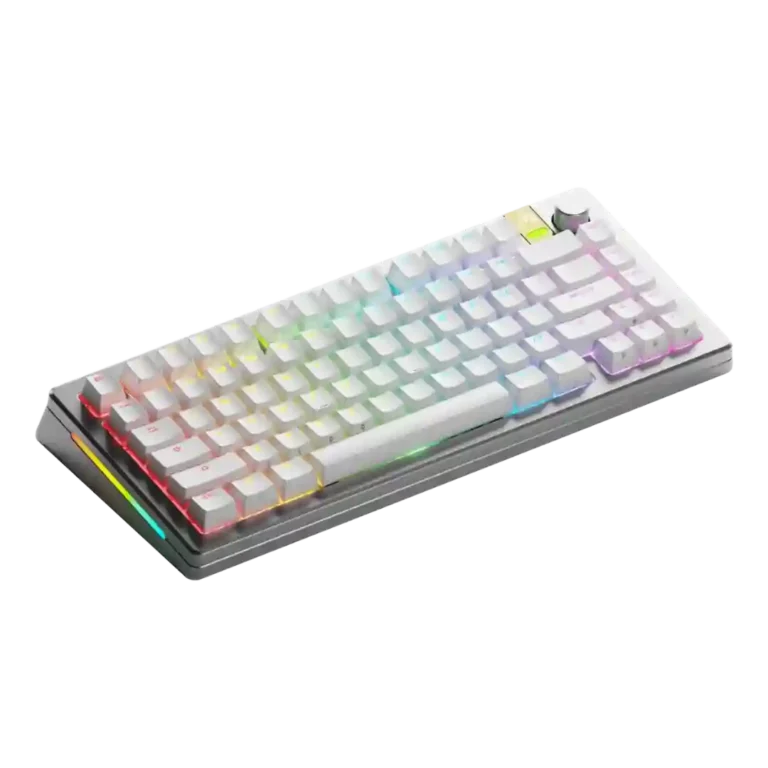
Choose the GMMK 3 Pro HE for premium customization, fast Hall effect gaming, and a heavy, polished build. Skip it if price, portability, software polish, or wrist-rest ergonomics matter most.
Best for
Best for gamers and keyboard enthusiasts who want a premium-feeling board they can configure deeply, tune for rapid-trigger gaming, and modify over time.
Not for
Not ideal for buyers who want a light, inexpensive, plug-and-play keyboard with fully polished software, adjustable typing angles, or a bundled wrist-rest experience.
Verdict
The Glorious GMMK 3 Pro HE is presented as a premium, enthusiast-friendly gaming keyboard whose biggest strength is breadth of customization: reviewers repeatedly praised Boardsmith, hot-swappable MX and Hall effect support, strong build quality, and fast rapid-trigger gaming. Typing feel was usually positive, especially with well-chosen switches, gaskets, and dampening, and several reviewers liked the RGB and wireless performance. The tradeoff is that the experience depends heavily on configuration. Some builds were heavy, pricey, or awkward to move, and reviewers reported software bugs, knob remapping limits, wobble or rattly sound on certain switch/plate combinations, and reliability concerns in isolated cases. Overall, the evidence points to a capable custom platform with standout gaming tech, but not a universally frictionless premium keyboard.
Customization options were the strongest consensus positive, with reviewers repeatedly calling the keyboard deeply, uniquely, or extremely customizable.
Build quality was one of the most consistent strengths, with reviewers calling the keyboard premium, sturdy, improved, heavy, and extremely well built.
Compatibility was strong overall because the HE board could accept MX and Hall effect switches, though one reviewer found some magnetic switches incompatible.
Connectivity was mostly positive, with decent options and no issues in one review, offset by unclear Bluetooth pairing and selector labeling in another.
Key stability was mixed: some reviewers found low wobble, while others noted Hall effect switch wobble or loose-feeling keys depending on configuration.
size and form factor: 3.3, 2 reviews, limited evidence
Size and form factor feedback was mixed: the 75% version was useful for some, while one reviewer disliked key placement.
Compared With Category Average
Compared with other Gaming Keyboards, this product is above average in switch options, analog input support, hot-swappable switches, near average in extra gaming features, battery life, below average in actuation consistency, desk space efficiency, durability.
Summary
49 compared features
Above average0.4+ pts higher
17(35%)
Same as averagewithin 0.3 pts
15(31%)
Below average0.4+ pts lower
17(35%)
Largest category differences
Attribute
This product
Category average
Difference
actuation consistency
2.3
4.2
-1.9
desk space efficiency
2.5
4.2
-1.7
durability
2.8
4.4
-1.6
reliability
2.1
3.6
-1.5
switch options
4.6
3.2
+1.4
analog input support
4.5
3.1
+1.4
stabilizer quality
2.5
3.9
-1.4
hot-swappable switches
4.6
3.4
+1.2
Consider This Instead
If you want better ergonomics
Choose ASUS ROG Azoth X. It scores 4.8 vs 2.9 for ergonomics, with a 4.1 overall score.
Compared: premium custom-mechanical positioningThe reviewer compared the Pro model with the Asus ROG Azoth as a premium bridge between custom and mainstream gaming keyboards.
Compared: entry-level positioningThe reviewer positioned the basic GMMK 3 against mainstream gaming keyboards including the Corsair K70 RGB Pro.
FAQ
Is the Glorious GMMK 3 Pro HE good for gaming?
Yes. Reviewers consistently praised Hall effect switches, Rapid Trigger, fast responsiveness, and gaming confidence, especially after tuning actuation settings.
How customizable is it?
Customization is the strongest consensus point. Reviewers highlighted Boardsmith, case colors, plates, gaskets, keycaps, cables, knobs, badges, MX switches, and Hall effect switches.
Does it feel premium?
Most reviewers said yes, especially on metal builds. They praised the aluminum chassis, heavy feel, strong construction, and premium materials.
What are the main downsides?
The most repeated concerns were price, heavy weight, software quirks, limited ergonomics, and configuration-dependent sound or wobble.
Is the software good?
Opinions were mixed. Some reviewers found Glorious Core easy or improved, while others reported crashes, bugs, barebones controls, or awkward layout.
How is the wireless experience?
Wireless impressions were mostly positive, with reviewers reporting no lag or connectivity issues. Battery life was acceptable to strong in some reviews, though one reviewer criticized the small battery capacity.
Are the keycaps and RGB good?
Keycap feel was generally praised, and RGB was often described as bright or attractive. Legend visibility depended on the chosen keycap set, with some sets lacking shine-through legends.
Sample Expert Reviews We Analyzed
These are a few of the reviews included in our analysis.
Good if you want a premium 96% Hall Effect keyboard for work and gaming with excellent build, sound, and customization. Skip it if you need cheaper esports-first speed, 8,000Hz polling,...
Good if you want a premium, quiet TKL Hall Effect keyboard for typing and gaming. Skip it if price, portability, 8,000Hz polling, or broad switch choice matters most.
Good if you want a premium full-size Hall Effect keyboard with smooth switches, quiet sound, and deep customization. Skip it if you need a portable, budget-friendly board or broad switch...