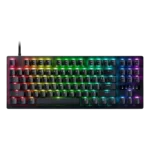
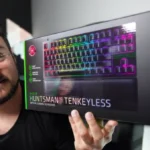
Razer Huntsman V2 TKL Review
Bottom Line
Choose it for fast, quiet gaming on a compact wired board with strong software. Skip it if you want better value, dedicated media controls, or cleaner stabilizers.
Competitive or enthusiast PC gamers who want a fast wired TKL with quiet linear-switch behavior, sturdy construction, and lots of software control will get the most from it.
Skip it if you prioritize value, dedicated media or volume controls, wireless use, or enthusiast-grade stabilizers and sound.
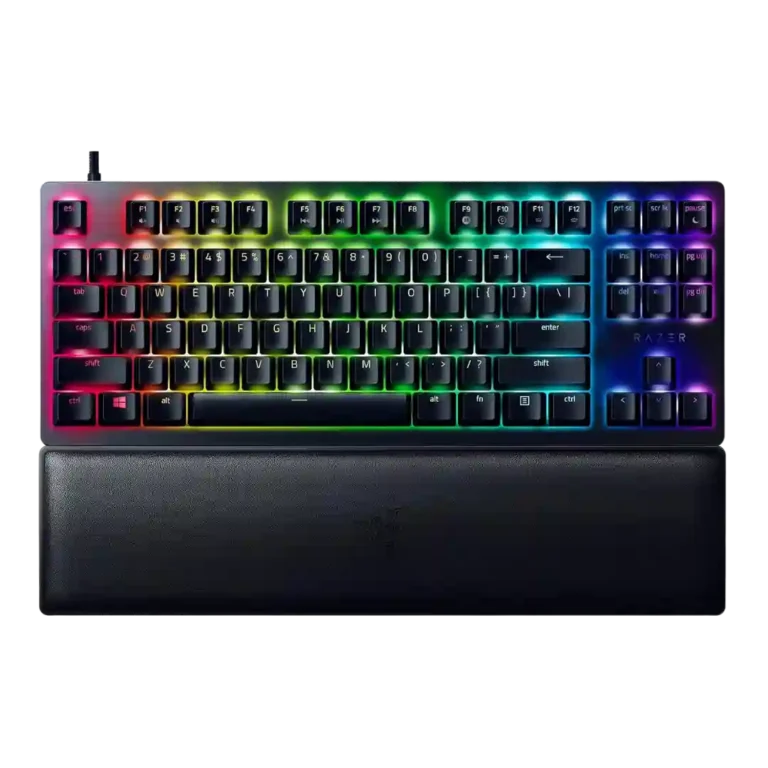
The Huntsman V2 TKL earns its keep as a fast, compact gaming keyboard with a sturdy frame, strong software, good keycaps, and notably quieter red-switch performance than older Huntsman boards. It also benefits from a comfortable included wrist rest and useful per-key lighting and profile tools. The tradeoff is that the flagship 8,000Hz polling feature is often described as hard to notice in real use, while stabilizer noise, missing dedicated media controls, and premium pricing keep it from feeling universally easy to recommend. For players who want a wired TKL focused on speed and software depth, it makes a convincing case.
Scored Features
Pros
-
The aluminum top plate is specifically credited with a very rigid chassis and no noticeable creaking or flexing.
-
Per-key lighting control is strongly supported, with multiple reviews noting individual-key customization and bespoke effects through Razer software.
-
Beyond lighting, the keyboard offers broad customization through programmable keys and adjustable performance settings.
-
Durability is treated positively where discussed, especially around the tough chassis and ability to withstand heavy use.
-
The tenkeyless form factor is widely viewed as compact and well judged, balancing smaller size with better usability than ultra-mini layouts.
-
Latency is a clear strength on paper and in perception, with multiple reviews citing 0.2ms-class response or near-zero input lag, even if not everyone found the gains dramatic.
-
Several reviewers specifically value the TKL layout for freeing mouse room and making the board easier to place efficiently on the desk.
-
RGB customization is extensive, with Synapse and Chroma giving users wide control over effects and color setups beyond basic presets.
-
Gaming performance is a recurring highlight, with reviewers describing the board as very good in-game, highly controllable, and especially suited to fast competitive play.
-
Build quality is a consistent strength, with reviews describing the board as high-quality, solidly built, and well-executed overall.
-
Ergonomics benefit from the compact layout and adjustable typing angle, with reviewers noting easier centering and comfortable preferred tilt positions.
-
Material choices are well regarded, with repeated mentions of aluminum, sturdy plastic, and PBT caps contributing to a premium feel.
-
Typing comfort is helped by the soft wrist rest and light, easy key action, though overall comfort still depends on whether you like the switch tuning.
-
Typing feel trends positive on the linear version, with reviewers calling the keys responsive, smooth, and crisp, though not necessarily enthusiast-grade.
-
One review explicitly says the keys do not feel crowded despite the smaller body, supporting a strong score for spacing.
-
Longer keys are described as secure and stable when struck off-center, suggesting good stability despite other complaints about stabilizer sound.
-
At least one review confirms onboard profile storage, with up to five profiles available to travel with the keyboard.
-
The compact footprint and detachable cable make the board easy to move around, and reviewers explicitly frame it as portable.
-
Profile management is strong, with multiple reviews noting game-specific profiles or multiple saved device profiles.
-
Gaming-focused extras include gaming mode and adjustable performance behavior, giving the board more than just raw switch speed.
-
Key response is repeatedly described as fast and dependable in use, with reviewers calling the switches quick and saying presses did not feel missed or delayed.
-
Macro support is a real strength, with reviews highlighting on-the-fly recording and broader macro control inside the software.
-
Reliability is positive where discussed, with reviewers reporting no missed presses in play and expecting solid service life under normal use.
-
The stock doubleshot PBT keycaps are broadly praised for durability, texture, grip, and feel, though one video reviewer only called them decent and another found them unusually rough.
-
Synapse is generally viewed positively for breadth and control, but there are minor complaints about extra installs, complexity, or resource tradeoffs around advanced settings.
-
Reviews note two switch choices, clicky purple and quieter red linear, with the red option usually favored for lower noise while purple remains the louder alternative.
-
Noise performance varies by switch and reviewer, but the red-switch versions are often described as especially quiet while clickier or poorly stabilized keys still draw complaints.
-
Compatibility is good for standard keycap swapping on much of the board, but at least one review notes that the longer keys are more restrictive.
-
The 8,000Hz polling rate is widely highlighted as a headline feature, but several reviews also question how noticeable or necessary it is outside niche competitive use.
-
RGB presentation is attractive overall, ranging from reserved to vivid depending on reviewer taste, but brightness consistency and some legend rendering quirks keep it from being flawless.
-
The added foam and damping changes are repeatedly noticed and usually credited with reducing hollowness, bottom-out noise, and overall harshness.
-
The included wrist rest is usually seen as soft and comfortable, but attachment complaints are common because many reviewers wanted a magnetic or more secure connection.
-
Across red and purple variants, reviewers consistently describe the switches as very fast and generally smooth, but several also note damped or mushy bottom-out feel and mixed preference depending on switch type.
-
The included USB-C cable is usually seen as a solid braided detachable cable, though stiffness or compatibility with custom cables can be a drawback.
-
Acoustic impressions are mixed: some reviewers appreciate the cleaner, more muted sound, while others still hear case ping or find the overall sound only improved rather than excellent.
Cons
-
The wired connection is detachable and can be secure, but some reviewers report finicky behavior with third-party or high-polling cable setups.
-
Backlighting remains usable and customizable, but at least one review finds it less bright than many competing backlit keyboards because of the PBT caps.
-
Primary legends generally transmit RGB well, but reviewers repeatedly call out weak secondary legend illumination and some odd-looking legend shapes on certain keys.
-
Value is one of the most divisive areas: some reviewers call it the better deal versus certain rivals, but many still think the price is high for what the upgrades deliver.
-
Media controls exist mainly as secondary functions rather than dedicated keys, and reviewers repeatedly note that as a compromise or missing convenience.
-
Stabilizers are the clearest weak point in the reviews, with repeated complaints about rattle, poor design choices, and lack of proper tuning or lubrication.
-
Volume control is not dedicated, forcing function-layer use or leaving out a physical roller entirely.
-
One review explicitly says the Huntsman V2 TKL is not analog, so it does not offer adjustable actuation or analog-style input behavior.
-
One review explicitly states the keyboard cannot be wireless, so wireless performance is effectively absent.
Compared With Category Average
Compared with other Gaming Keyboard, this product is above average in wrist rest quality, portability, below average in wireless performance, analog input support, volume control.
| Attribute | This product | Category average | Difference |
|---|---|---|---|
| wireless performance | 1.0 | 3.8 | -2.8 |
| analog input support | 1.0 | 3.5 | -2.5 |
| volume control | 2.1 | 4.1 | -2.0 |
| stabilizer quality | 2.3 | 4.1 | -1.8 |
| media controls | 2.4 | 3.9 | -1.5 |
| wrist rest quality | 4.0 | 2.7 | +1.3 |
| portability | 4.4 | 3.4 | +1.0 |
| backlight brightness | 3.2 | 4.1 | -0.9 |
FAQ
Is the 8,000Hz polling rate actually noticeable?
The reviews consistently treat 8,000Hz as real and technically impressive, but many also say the real-world difference is hard to notice unless you are chasing every last bit of competitive responsiveness.
Are the red switches quiet enough for shared spaces?
Usually yes. Multiple reviews describe the red-switch version as quiet or nearly silent, though longer keys and stabilizers can still stand out depending on your sensitivity.
Does it have dedicated media or volume controls?
No. Several reviews say media and volume functions mainly live on the function layer, and the lack of dedicated controls is one of the board's more common complaints.
Can you customize lighting, macros, and profiles?
Yes. Synapse and Chroma are repeatedly praised for per-key RGB control, remapping, macro support, and profile storage, including up to five onboard profiles in one review.
Will custom keycaps and cables work well?
Keycap compatibility is generally good on standard-size keys, but longer keys can be more restrictive. Some reviewers also report third-party cable issues when very high polling rates are enabled.
Expert Reviews We Analyzed
Video Reviews
Article Reviews
Consider This Instead
If you want better wireless performance
Choose Corsair K100 AIR. It scores 5.0 vs 1.0 for wireless performance, with a 3.9 overall score.
If you want better analog input support
Choose Keychron Q5 HE. It scores 4.8 vs 1.0 for analog input support, with a 4.5 overall score.
If you want better media controls
Choose Corsair K100 RGB. It scores 5.0 vs 2.4 for media controls, with a 4.2 overall score.
If you want better volume control
Choose Corsair K70 PRO. It scores 4.8 vs 2.1 for volume control, with a 4.0 overall score.
Overall Top Gaming Keyboard Alternatives
Choose the Q3 HE for premium build, smooth Hall Effect typing, and flexible connectivity. Skip it if you want broader switch compatibility or better value.
Pros: rapid trigger support, build quality, durability, materials quality, desk space efficiency, customization options, compatibility
Cons: portability, switch options, reliability
Choose the Keychron Q5 HE for premium build, flexible Hall Effect controls, and strong wireless versatility. Skip it if you want a lighter board, broader switch choice, or...
Pros: frame rigidity, customization options, compatibility, key responsiveness, materials quality, macro customization, extra gaming features
Cons: portability, switch options, value for money
Choose the Keychron Q6 HE if you want a full-size premium Hall Effect keyboard with smooth typing and strong gaming tools. Skip it if you need easy portability...
Pros: key responsiveness, key stability, frame rigidity, connectivity, volume control, switch feel, RGB customization
Cons: portability, switch options, ease of switch replacement
Choose the GMMK 2 for smooth typing, bright RGB, and rare hot-swap flexibility at this price. Skip it if you want wireless features, analog controls, or more polished...
Pros: frame rigidity, durability, customization options, hot-swappable switches, compatibility, per-key lighting control, value for money
Cons: actuation consistency