Review: Turtle Beach Burst II Air

Updated: 2 hours ago
4.3
Based on methodology below
362
Insights analyzed
55
Grouped by key features
16
From expert reviews
Scores below reflect consolidated expert coverage across these features.
Bottom Line

Choose the Burst II Air for an ultralight, accurate FPS mouse with strong wireless flexibility. Skip it if you want RGB, many extra buttons, or higher-than-1K polling.

Best for

Best for FPS and competitive-style players who want an extremely light wireless mouse with accurate tracking, smooth glide, and flexible connectivity. It also suits users who prefer simple, no-RGB hardware.

Not for

Not for buyers who want a lighting-heavy setup, many extra buttons, MMO-focused controls, or polling above 1,000Hz. It may also disappoint users who prefer a heavier or more premium-feeling shell.

Verdict

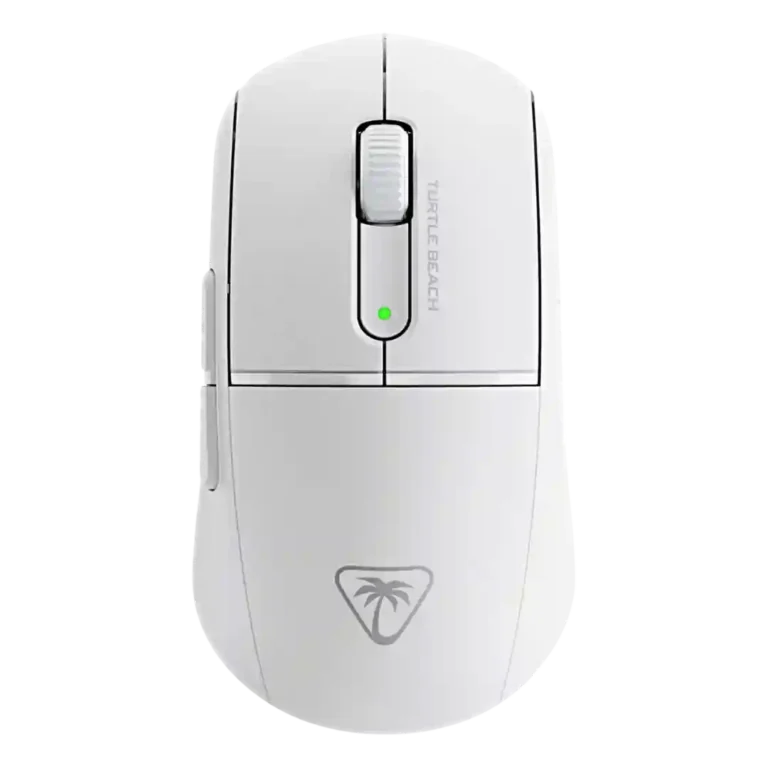
The Turtle Beach Burst II Air earns its strongest praise from its 47g weight, smooth glide, accurate Owl-Eye sensor, and satisfying optical clicks. It feels built for fast FPS play and works across 2.4GHz, Bluetooth, and wired modes, with battery life that is strong in Bluetooth and acceptable in 2.4GHz. The tradeoff is that its stripped-down design leaves out RGB, a richer button layout, and polling above 1,000Hz. Build impressions also vary: some reviewers found it solid for such a light shell, while others noticed flex or a cheap hollow feel. It is most compelling for players who value low weight and reliable core performance over visual flair or advanced pro-grade extras.

What Reviewers Agree On

Across the reviews, the Burst II Air’s biggest strength is its unusually low weight. Reviewers repeatedly called out the 47g body as the feature that changes how the mouse feels in hand, especially for fast movements, flick shots, and longer desktop use. The lightweight shell is paired with smooth skates, an accurate Owl-Eye sensor, and optical switches that most reviewers found tactile, responsive, and satisfying. Wireless flexibility also stood out because the mouse supports 2.4GHz, Bluetooth, and wired use, with Bluetooth stretching battery life much further than the gaming-focused 2.4GHz mode.

The main tension is that the same minimal design that makes the mouse so light also removes features some buyers expect at this price. Several reviews noted the lack of RGB, limited extra buttons, and no polling option above 1,000Hz. Build impressions were also not uniform: some reviewers praised the solid shell and satin feel, while others noticed side flex, a cheap or hollow plastic feel, or concerns about long-term abuse. Battery life was treated as good overall, but 2.4GHz runtime was sometimes described as shorter than competing wireless mice.

The happiest buyer is likely someone who wants a featherweight, shooter-focused mouse with accurate tracking and simple software controls, rather than a showpiece with lighting or a feature-heavy layout. Players who need many programmable buttons, a higher polling rate, or a more premium-feeling shell may find the Burst II Air’s focused design too stripped down. The overall picture is a mouse that favors speed, simplicity, and travel-friendly wireless flexibility over visual flair or maximal customization.

Pros

  • 5.0
    based on 12 reviews
    weight: 5.0, based on 12 reviews
    Weight is the defining strength. Reviews repeatedly emphasized 47g or sub-47g weight as unusually light for a mainstream wireless mouse.
  • 4.9
    based on 2 reviews
    balance and weight distribution: 4.9, based on 2 reviews
    Balance evidence was direct but limited. Reviewers who discussed it found the center of mass well placed and the mouse evenly balanced in hand.
  • 4.7
    based on 8 reviews
    DPI range: 4.7, based on 8 reviews
    DPI range is broad, with repeated support for 26K DPI and several reviews confirming 50-to-26,000 DPI adjustment.
  • 4.7
    based on 9 reviews
    glide smoothness: 4.7, based on 9 reviews
    Glide smoothness was widely praised. Reviews described effortless, smooth, topnotch, and surface-friendly glide with useful skate options.
  • 4.7
    based on 3 reviews
    onboard memory: 4.7, based on 3 reviews
    Onboard memory is clearly supported by five onboard profiles or storage for profiles in multiple reviews.
  • 4.7
    based on 12 reviews
    Accuracy and tracking precision: 4.7, based on 12 reviews
    Accuracy and tracking precision were praised across game, sensor, and surface testing. Reviewers described precise movement, impressive accuracy, no faltering, and issue-free tracking.
  • 4.7
    based on 9 reviews
    FPS gaming suitability: 4.7, based on 9 reviews
    FPS suitability is one of the strongest themes, with reviewers tying the light body, sensor, and flick-shot control to competitive shooters and FPS games.
  • 4.7
    based on 12 reviews
    sensor performance: 4.7, based on 12 reviews
    Sensor performance was widely praised through the Owl-Eye 26K sensor, 650 IPS tracking, accurate behavior, and flawless tests.
  • 4.7
    based on 7 reviews
    switch durability: 4.7, based on 7 reviews
    Switch durability is strongly supported by the repeated 100 million click optical switch rating.
  • 4.6
    based on 3 reviews
    click latency: 4.6, based on 3 reviews
    Click latency support comes from optical switch speed and low-latency language. Reviewers described quick response, optical-speed feel, and light-speed detection.
  • 4.6
    based on 5 reviews
    connection stability: 4.6, based on 5 reviews
    Connection stability was a strength, with instant recognition, no issues, no dropouts, seamless switching, and no lag or skipping reported.
  • 4.6
    based on 7 reviews
    ergonomic design: 4.6, based on 7 reviews
    Ergonomic design was praised through palm fit, symmetrical shape, ergonomic button placement, and comfortable speedy handling.
  • 4.6
    based on 3 reviews
    long-session comfort: 4.6, based on 3 reviews
    Long-session comfort is supported by daily-driver comments, pleasant sessions, ergonomic fit, and light weight that reduces effort.
  • 4.6
    based on 11 reviews
    2.4GHz connectivity: 4.6, based on 11 reviews
    2.4GHz is repeatedly supported as a gaming-focused wireless mode, often paired with Bluetooth and wired use. Reviews connect it to low latency, strong signal, and flexible device setup.
  • 4.6
    based on 10 reviews
    switch feel: 4.6, based on 10 reviews
    Switch feel was a highlight, with tactile, snappy, satisfying, optical click feel across many reviews.
  • 4.6
    based on 7 reviews
    wireless performance: 4.6, based on 7 reviews
    Wireless performance was reliable overall, with strong connection, flexible dual connectivity, device switching, and no dropouts.
  • 4.6
    based on 3 reviews
    cross-platform compatibility: 4.6, based on 3 reviews
    Cross-platform compatibility is supported by broad connectivity and direct Windows, Mac, and Android use without driver installation in one review.
  • 4.6
    based on 7 reviews
    cable flexibility: 4.6, based on 7 reviews
    The included cable was usually praised as flexible, soft, light, or malleable. One reviewer still felt wired use added some resistance compared with wireless.
  • 4.6
    based on 14 reviews
    Bluetooth support: 4.6, based on 14 reviews
    Bluetooth support is clearly present and useful for flexibility, portability, and longer battery life. Several reviewers treated Bluetooth as less gaming-focused than 2.4GHz.
  • 4.5
    based on 7 reviews
    button responsiveness: 4.5, based on 7 reviews
    Button responsiveness was mostly praised through crisp, precise, and meaningful clicks. One review noted the buttons were somewhat stiffer.
  • 4.5
    based on 9 reviews
    motion consistency: 4.5, based on 9 reviews
    Motion consistency was strong, with little variation, no spin-out, no skipping, and motion sync or angle snapping options discussed.
  • 4.5
    based on 4 reviews
    surface compatibility: 4.5, based on 4 reviews
    Surface compatibility was positive where tested, including any or almost any surface and multiple mousepads.
  • 4.5
    based on 5 reviews
    lift-off distance: 4.5, based on 5 reviews
    Lift-off distance is supported through DCU and lift-off calibration, with reviewers mentioning adjustable or low/very-low settings.
  • 4.5
    based on 7 reviews
    wireless latency: 4.5, based on 7 reviews
    Wireless latency was strong on 2.4GHz, with lag-free or no-perceivable-latency comments. Bluetooth was more often treated as a convenience mode.
  • 4.5
    based on 10 reviews
    debounce customization: 4.5, based on 10 reviews
    Debounce customization is well supported in Swarm II through debounce controls, sliders, and zero-millisecond testing.
  • 4.5
    based on 5 reviews
    left and right click quality: 4.5, based on 5 reviews
    Left and right click quality was strong overall, with tactile, deeper, snappy, and satisfying primary clicks, though one sample had uneven pre-travel.
  • 4.5
    based on 7 reviews
    charging convenience: 4.5, based on 7 reviews
    Charging is convenient overall, with quick charging, play-while-charging, common USB-C charging, and wired fallback all supported in reviews.
  • 4.5
    based on 4 reviews
    portability: 4.5, based on 4 reviews
    Portability is helped by low weight, Bluetooth, dongle storage, and easy device movement.
  • 4.5
    based on 4 reviews
    programmable buttons: 4.5, based on 4 reviews
    Programmable buttons are present through six or seven configurable inputs, but the layout is not button-rich.
  • 4.4
    based on 11 reviews
    battery life: 4.4, based on 11 reviews
    Battery life was generally strong, especially in Bluetooth mode. The 2.4GHz runtime around 40 hours was usable but occasionally framed as a tradeoff versus competitors.
  • 4.4
    based on 5 reviews
    profile switching: 4.4, based on 5 reviews
    Profile switching is supported through up to five DPI or saved profiles and multiple profile setup in Swarm II.
  • 4.4
    based on 7 reviews
    button customization: 4.4, based on 7 reviews
    Button customization is strong through Swarm II, with programmable controls, custom button functions, remapping, and saved profiles. The limited button count remains a constraint.
  • 4.4
    based on 5 reviews
    macro support: 4.4, based on 5 reviews
    Macro support is available through Swarm II, with macro adjustment, built-in macros, keyboard-command mapping, and Easy Shift-style layers.
  • 4.4
    based on 4 reviews
    fingertip grip comfort: 4.4, based on 4 reviews
    Fingertip comfort was positive, with reviewers calling it a strong option and noting the lightweight smaller shape suits fingertip users.
  • 4.4
    based on 6 reviews
    side button quality: 4.4, based on 6 reviews
    Side button quality was generally positive, with good thumb alignment, easy reach, clicky action, and clear separation.
  • 4.4
    based on 12 reviews
    shape comfort: 4.4, based on 12 reviews
    Shape comfort is mostly positive but subjective, with praise for natural fit and some caveats around size, rear shape, and grip preference.
  • 4.3
    based on 4 reviews
    ecosystem integration: 4.3, based on 4 reviews
    Ecosystem integration centers on Swarm II, ROCCAT continuity, Turtle Beach peripherals, migrated settings, and Easy Shift-style layering.
  • 4.2
    based on 6 reviews
    palm grip comfort: 4.2, based on 6 reviews
    Palm grip comfort is generally good but not universal. Several reviews found palm use comfortable or viable, with some shape caveats.
  • 4.2
    based on 5 reviews
    claw grip comfort: 4.2, based on 5 reviews
    Claw grip comfort is generally good, especially because of the rear hump and light body. Some reviewers found shape preferences could affect claw comfort.
  • 4.2
    based on 7 reviews
    scroll wheel quality: 4.2, based on 7 reviews
    Scroll wheel quality is mostly good but basic, with distinct notches and secure actuation alongside comments that it is standard or too small.
  • 4.2
    based on 9 reviews
    value for money: 4.2, based on 9 reviews
    Value for money was mixed-positive, with several reviewers seeing fair pricing or savings while others noted stripped-down features.
  • 4.1
    based on 8 reviews
    software usability: 4.1, based on 8 reviews
    Software usability is mostly positive but not universal. Some reviews praised clear/simple controls, while others found platform or UI issues.
  • 4.0
    based on 8 reviews
    grip texture: 4.0, based on 8 reviews
    Grip texture is mixed. The smooth shell and sweat/slip concerns are offset by grip tape and some positive texture comments.
  • 3.9
    based on 3 reviews
    software stability: 3.9, based on 3 reviews
    Software stability is mixed: Swarm II was reliable for some reviewers but buggy for another before firmware updates.
  • 3.9
    based on 5 reviews
    handedness options: 3.9, based on 5 reviews
    Handedness is limited ambidextrous: the shape is symmetrical and usable either way, but side buttons and wording favor right-handed users.
  • 3.9
    based on 4 reviews
    premium feel: 3.9, based on 4 reviews
    Premium feel is mixed: some reviews praised solid construction, while others found the shell hollow, cheap, or lacking premium extras.
  • 3.9
    based on 2 reviews
    durability over time: 3.9, based on 2 reviews
    Durability over time is mixed. Switch ratings are strong, but some reviewers raised shell flex or long-term abuse concerns.
  • 3.8
    based on 9 reviews
    build quality: 3.8, based on 9 reviews
    Build quality is mixed. Some reviews found the shell solid for its weight, while others reported cheap feel, side flex, or durability concerns.
  • 3.8
    based on 1 review
    MOBA gaming suitability: 3.8, based on 1 review
    MOBA suitability has limited direct support from League of Legends testing, but reviews do not deeply evaluate MOBA-specific needs.
  • 3.8
    based on 5 reviews
    materials quality: 3.8, based on 5 reviews
    Materials quality is mixed, ranging from pleasant satin plastic and solid shell comments to cheap, hollow, slippery, or thin-feeling plastic.
  • 3.8
    based on 5 reviews
    click noise: 3.8, based on 5 reviews
    Click noise is noticeable. Reviewers described clicky, lower-pitched, sharp, or loud clicks, with some users likely preferring quieter switches.
  • 3.7
    based on 5 reviews
    firmware reliability: 3.7, based on 5 reviews
    Firmware reliability is mixed-positive. Updates were seamless or easy for some, while one review reported bugs resolved by firmware update.
  • 3.5
    based on 10 reviews
    polling rate: 3.5, based on 10 reviews
    Polling rate is a repeated caveat. The mouse supports up to 1,000Hz with lower settings, but several reviewers wanted higher polling options.

Cons

  • 2.7
    based on 2 reviews
    MMO gaming suitability: 2.7, based on 2 reviews
    MMO suitability is limited because reviewers repeatedly point to few remappable buttons and a simple layout rather than button-heavy control.
  • 1.3
    based on 8 reviews
    RGB features: 1.3, based on 8 reviews
    RGB features are weak by design. Reviews repeatedly state there is no RGB beyond small indicator LEDs.

FAQ

Is the Turtle Beach Burst II Air worth buying?

It is worth considering if low weight, accurate tracking, and reliable wireless performance matter most. Reviews were more mixed on value for buyers who want RGB, more buttons, or polling above 1,000Hz.

Who is the Burst II Air best for?

It is best for FPS and competitive-style players who want a very light mouse that moves easily and tracks accurately. Fingertip and claw users received especially strong support across the reviews.

What is the main drawback?

The main drawback is the stripped-down feature set. Reviewers repeatedly noted no RGB, limited extra buttons, and a 1,000Hz polling ceiling.

How good is the battery life?

Battery life is strong overall, especially in Bluetooth mode where reviews cite up to 120 hours. The 2.4GHz mode is closer to 40 hours, which is usable but not class-leading in every review.

Does it work over Bluetooth and 2.4GHz?

Yes. Reviews confirm Bluetooth, 2.4GHz wireless, and wired USB-C use, with 2.4GHz treated as the better gaming option and Bluetooth as useful for battery life and device flexibility.

Is the software easy to use?

Most reviews found Swarm II useful for DPI, profiles, debounce, macros, and button mapping. TechRadar and MP1st raised usability or platform caveats, so the software experience is not universally praised.

Is it good for MMO games?

The reviews do not position it as an MMO mouse. Its six-button layout and limited remappable buttons make it less suitable for players who rely on many side buttons or complex MMO bindings.

Reviews we analyzed

Video Reviews

Article Reviews

#1
4.4
Choose the Harpe II Ace for ultralight FPS control, 8K wireless, and easy web setup. Skip it if you need many buttons or...
Pros: polling rate, weight, wireless performance, DPI range, switch durability, sensor performance, motion consistency
Cons: onboard memory, MMO gaming suitability, software stability, profile switching
#2
4.4
Choose the Razer Basilisk V3 Pro 35K for ergonomic comfort, precise tracking, and feature-rich wireless control. Skip it if you want an ultralight...
Pros: motion consistency, sensor performance, DPI range, build quality, macro support, click latency, acceleration control
Cons: handedness options, value for money, weight, fingertip grip comfort
#3
4.4
Choose it if you want a compact, comfortable work-and-play mouse with strong wireless options and battery life. Skip it if you want true...
Pros: switch durability, wireless performance, wireless latency, ecosystem integration, glide smoothness, Accuracy and tracking precision, DPI range
Cons: click noise, RGB features
#4
4.3
Choose it for fast 4K wireless tracking, strong software, and long battery life. Skip it if the honeycomb shell, rear-flared shape, or palm/fingertip...
Pros: wireless latency, motion consistency, glide smoothness, Accuracy and tracking precision, durability over time, polling rate, sensor performance
Cons: palm grip comfort, handedness options, fingertip grip comfort