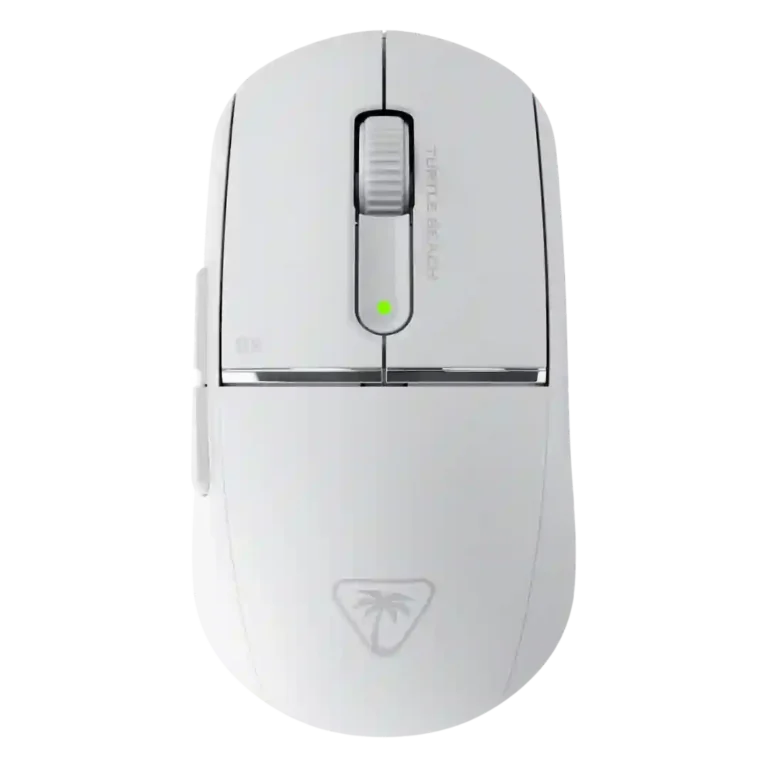
Turtle Beach Burst II Pro

Turtle Beach Burst II Pro Review

Brand: Turtle
Updated: 11 hours ago
4.3
Consolidated expert score
327
Review insights
55
Scored features
10
Expert reviews

Bottom Line

Choose the Turtle Beach Burst II Pro if you want a 57g wireless FPS mouse with 8K polling, strong tracking, and long battery life. Skip it if creaky sides, soft clicks, or a niche shape would bother you.

Best for

Best for FPS players who want an ultralight wireless mouse with 8K polling, strong tracking, long battery life, and deep Swarm II customization. It fits best when the user's grip matches its medium-hand, claw, fingertip, or relaxed palm-friendly shape.

Not for

Not for buyers who want the cheapest similar-spec mouse, a universally safe shape, a fully silent click feel, heavy RGB, or a mouse with no build-quality caveats. It is also less compelling for users who will not benefit from high polling rates.

Verdict

The Turtle Beach Burst II Pro comes through as a fast, light wireless gaming mouse built around 8K polling, a high-DPI Owl-Eye sensor, strong glide, and long battery life. Reviewers repeatedly liked its low weight, accurate tracking, Bluetooth and 2.4GHz flexibility, and Swarm II customization. The tradeoff is that its body and feel are not universally loved: some found the sides creaky, some disliked the soft or deep-sounding clicks, and the rear-flared shape worked better for palm, claw, or medium-hand users than for everyone. Its value also depends on comparison point, since it undercuts some Razer and Logitech flagships but is not the cheapest mouse with similar specs.

Reviewer Consensus

Strong agreement: Reviewers most consistently agree that the Burst II Pro is very light, fast, accurate, and well equipped for wireless FPS play.

Mixed opinions: Opinions split on the shape, click feel, build quality, and value because some praised the comfort and refinement while others noted creaking, awkward fit, or cheaper alternatives.

Common concern: The most repeated caveat is that the shape and physical feel are not universal, with side creaking and click feel mentioned as possible drawbacks.

Evidence coverage
  • 10 expert reviews
  • 45 of 55 scored features show reviewer agreement
  • 9 scored features have limited or less conclusive evidence
  • 1 scored feature shows reviewer disagreement or mixed evidence
  1. Limited review data
  2. Mixed evidence
  3. Moderate consensus
  4. Strong consensus

Compared in Reviews

Products reviewers directly compared with this model, grouped into quick takeaways.

  • Similar: in-hand feel and weight distribution GamesRadar says the Burst II Pro feels in hand like the Razer Deathadder V4 Pro thanks to balanced weight distribution.
  • More expensive: price versus flagship wireless 8K mice The review says the Burst II Pro costs less than the Razer flagship but is not the cheapest similar option.
  • Alternative: competitive preference and overall performance The reviewer still prefers a Logitech mouse but says the Burst II Pro is a serious challenger.
  • More expensive: price for similar high-end specs The duplicate Hikross review says the Burst II Pro undercuts Razer and Logitech while offering many of the same features.

Scored Features

Pros

  • 4.8
    based on 10 reviews
    polling rate: 4.8, based on 10 reviews
    Polling rate coverage was very strong: reviewers repeatedly cited 8K wired or wireless polling, though one measured lower real-world averages.
    Evidence

    Examples from reviews used for this score. Showing up to 3 quotes.

    • From: Turtle Beach Burst II Pro Mouse Review (FIRST LOOK!)
      true 8000Hz wireless polling rate
    • From: Turtle Beach Burst II Pro Review: Ultra-light, 8K polling, and a little creaky
      8,000 Hz polling rate over both its 2.4GHz wireless connection
    • From: 429 Too Many Requests
      true 8K wireless polling

    Quotes are examples; the score reflects all analyzed reviews for this feature.

  • 4.8
    based on 5 reviews
    switch durability: 4.8, based on 5 reviews
    Switch durability was backed by Titan optical switch ratings of 100 million clicks across multiple reviews.
    Evidence

    Examples from reviews used for this score. Showing up to 3 quotes.

    • From: Turtle Beach Burst II Pro Mouse Review (FIRST LOOK!)
      rated for 100 million presses
    • From: Turtle Beach Burst II Pro Review: Ultra-light, 8K polling, and a little creaky
      rated for up to 100 million clicks
    • From: Is This The Fastest Gaming Mouse Ever? | Turtle Beach Burst II Pro Review
      rated for about 100 million

    Quotes are examples; the score reflects all analyzed reviews for this feature.

  • 4.8
    based on 4 reviews
    click latency: 4.8, based on 4 reviews
    Click latency was rated highly where discussed, mainly due to optical switches, debounce behavior, and 0.125 ms polling claims.
    Evidence

    Examples from reviews used for this score. Showing up to 3 quotes.

    • From: 429 Too Many Requests
      latency of just 0.125ms
    • From: Turtle Beach Burst II Pro Mouse Review (FIRST LOOK!)
      eliminates debounce delay and provides faster, more reliable inputs
    • From: Turtle Beach Burst II Pro Review: Ultra-light, 8K polling, and a little creaky
      up to an 8,000 Hz (0.125ms latency) polling rate

    Quotes are examples; the score reflects all analyzed reviews for this feature.

  • 4.8
    based on 10 reviews
    weight: 4.8, based on 10 reviews
    Weight was one of the strongest points, with nearly every review emphasizing the 57g to 58g ultralight build.
    Evidence

    Examples from reviews used for this score. Showing up to 3 quotes.

    • From: Turtle Beach Burst II Pro Review – Ultra-Light 8K Gaming Mouse
      it's very, very light at 57 g
    • From: Turtle Beach Burst II Pro Review - Super Light Gaming Mouse
      It's 57 g. And I thought
    • From: Turtle Beach Burst II Pro Mouse Review (FIRST LOOK!)
      Coming in at just 57 g

    Quotes are examples; the score reflects all analyzed reviews for this feature.

  • 4.7
    based on 6 reviews
    surface compatibility: 4.7, based on 6 reviews
    Surface compatibility was very strong, with reviewers testing or citing fabric, hard, hybrid, glass, wood, laminate, and frosted glass surfaces.
    Evidence

    Examples from reviews used for this score. Showing up to 3 quotes.

    • From: Turtle Beach Burst II Pro Mouse Review (FIRST LOOK!)
      cloth and hard pads, but even on glass surfaces
    • From: Turtle Beach Burst II Pro Review: Ultra-light, 8K polling, and a little creaky
      did work perfectly on all of the surfaces I tested it on
    • From: 429 Too Many Requests
      On glass, cloth, and hybrid mousepads

    Quotes are examples; the score reflects all analyzed reviews for this feature.

  • 4.7
    based on 1 review
    palm grip comfort: 4.7, based on 1 review
    Palm grip comfort was specifically praised by GamesRadar, which found the wider body supportive for relaxed palm grip.
    Evidence

    Examples from reviews used for this score. Showing up to 3 quotes.

    • From: The Turtle Beach Burst 2 Pro proves you don't need a fingertip grip to win ranked matches | Review
      plenty of space for a comfortable palm grip

    Quotes are examples; the score reflects all analyzed reviews for this feature.

  • 4.7
    based on 7 reviews
    motion consistency: 4.7, based on 7 reviews
    Motion consistency was generally strong, with reviewers describing smooth, stable, predictable motion without noticeable stutter.
    Evidence

    Examples from reviews used for this score. Showing up to 3 quotes.

    • From: Turtle Beach Burst II Pro Mouse Review (FIRST LOOK!)
      performs reliably not just on cloth and hard pads
    • From: 429 Too Many Requests
      smoother motion and pixel-perfect tracking
    • From: Is This The Fastest Gaming Mouse Ever? | Turtle Beach Burst II Pro Review
      Burst 2 Pro is connected and locked

    Quotes are examples; the score reflects all analyzed reviews for this feature.

  • 4.7
    based on 6 reviews
    acceleration control: 4.7, based on 6 reviews
    Acceleration and motion control were supported through 70g acceleration specs, angle tuning, motion sync, and controlled starts and stops.
    Evidence

    Examples from reviews used for this score. Showing up to 3 quotes.

    • From: Turtle Beach Burst II Pro Mouse Review (FIRST LOOK!)
      tracking speed and 70 g of acceleration
    • From: Is This The Fastest Gaming Mouse Ever? | Turtle Beach Burst II Pro Review
      750 IPS, 70 gs of acceleration
    • From: 429 Too Many Requests
      750 IPS tracking and 70g acceleration

    Quotes are examples; the score reflects all analyzed reviews for this feature.

  • 4.7
    based on 6 reviews
    DPI range: 4.7, based on 6 reviews
    DPI support was described as high-end, with several reviews citing 30K DPI or broad DPI adjustment in software.
    Evidence

    Examples from reviews used for this score. Showing up to 3 quotes.

    • From: Turtle Beach Burst II Pro Review: Ultra-light, 8K polling, and a little creaky
      maximum resolution of 30,000 DPI
    • From: 429 Too Many Requests
      Owl-Eye™ 30K DPI sensor
    • From: Turtle Beach Burst II Pro Review – Ultra-Light 8K Gaming Mouse
      adjust it between 50 up to 30,000 DPI

    Quotes are examples; the score reflects all analyzed reviews for this feature.

  • 4.7
    based on 3 reviews
    connection stability: 4.7, based on 3 reviews
    Connection stability was strong where tested, with reviewers citing no disconnects, stable 2.4GHz behavior, and easy mode switching.
    Evidence

    Examples from reviews used for this score. Showing up to 3 quotes.

    • From: 429 Too Many Requests
      no input delay, no sudden disconnects
    • From: Turtle Beach Burst II Pro
      the connection is stable with a focus on low input lag
    • From: The Turtle Beach Burst 2 Pro proves you don't need a fingertip grip to win ranked matches | Review
      swapping between 2.4GHz and Bluetooth between devices

    Quotes are examples; the score reflects all analyzed reviews for this feature.

  • 4.7
    based on 9 reviews
    sensor performance: 4.7, based on 9 reviews
    Sensor performance was a core strength, with repeated praise for the Owl-Eye/30K sensor, stable tracking, and fast response.
    Evidence

    Examples from reviews used for this score. Showing up to 3 quotes.

    • From: Turtle Beach Burst II Pro Mouse Review (FIRST LOOK!)
      provides smooth tracking across a wide sensitivity range
    • From: 429 Too Many Requests
      rock solid. During tests in Borderlands 4
    • From: Is This The Fastest Gaming Mouse Ever? | Turtle Beach Burst II Pro Review
      30,000 DPI sensor capable of insane tracking

    Quotes are examples; the score reflects all analyzed reviews for this feature.

  • 4.6
    based on 8 reviews
    Accuracy and tracking precision: 4.6, based on 8 reviews
    Reviewers found tracking accurate across gaming and mixed surfaces, with only one note that low battery could introduce judder.
    Evidence

    Examples from reviews used for this score. Showing up to 3 quotes.

    • From: Turtle Beach Burst II Pro Mouse Review (FIRST LOOK!)
      resolution accuracy of 99.8%
    • From: 429 Too Many Requests
      accuracy remained rock solid
    • From: Is This The Fastest Gaming Mouse Ever? | Turtle Beach Burst II Pro Review
      It just didn't skip a beat

    Quotes are examples; the score reflects all analyzed reviews for this feature.

  • 4.6
    based on 10 reviews
    wireless latency: 4.6, based on 10 reviews
    Wireless latency was a major strength, repeatedly tied to low-latency 8K polling and no noticeable input delay.
    Evidence

    Examples from reviews used for this score. Showing up to 3 quotes.

    • From: Turtle Beach Burst II Pro Mouse Review (FIRST LOOK!)
      staggering 0.125 millisecond latency
    • From: 429 Too Many Requests
      practically eliminates input lag entirely
    • From: Is This The Fastest Gaming Mouse Ever? | Turtle Beach Burst II Pro Review
      polling, 025 milliseconds latency

    Quotes are examples; the score reflects all analyzed reviews for this feature.

  • 4.6
    based on 9 reviews
    wireless performance: 4.6, based on 9 reviews
    Wireless performance was rated strongly, with reviewers citing 8K wireless polling, responsive feel, and reliable dongle performance.
    Evidence

    Examples from reviews used for this score. Showing up to 3 quotes.

    • From: 429 Too Many Requests
      Turtle Beach nailed the wireless experience
    • From: Turtle Beach Burst II Pro Review – Ultra-Light 8K Gaming Mouse
      very consistent, very uh reliable as a whole
    • From: Turtle Beach Burst II Pro Mouse Review (FIRST LOOK!)
      true 8000Hz wireless polling rate

    Quotes are examples; the score reflects all analyzed reviews for this feature.

  • 4.6
    based on 3 reviews
    balance and weight distribution: 4.6, based on 3 reviews
    Balance and weight distribution were praised where discussed, especially the solid frame and balanced in-hand feel.
    Evidence

    Examples from reviews used for this score. Showing up to 3 quotes.

    • From: 429 Too Many Requests
      just a solid, well-balanced frame
    • From: Turtle Beach Burst II Pro
      The Burst II Pro continues to have an incredibly well-balanced size
    • From: The Turtle Beach Burst 2 Pro proves you don't need a fingertip grip to win ranked matches | Review
      nicely balanced weight distribution and no drag

    Quotes are examples; the score reflects all analyzed reviews for this feature.

  • 4.6
    based on 3 reviews
    onboard memory: 4.6, based on 3 reviews
    Onboard memory was supported by reviewers who said settings could be saved to the device and used across systems.
    Evidence

    Examples from reviews used for this score. Showing up to 3 quotes.

    • From: Turtle Beach Burst II Pro Mouse Review (FIRST LOOK!)
      The mouse also supports onboard memory
    • From: Turtle Beach Burst II Pro review - 58g, 8K polling and upto 150 hours battery life?
      it does seem to be saved to the device

    Quotes are examples; the score reflects all analyzed reviews for this feature.

  • 4.6
    based on 8 reviews
    glide smoothness: 4.6, based on 8 reviews
    Glide smoothness was a strength, helped by low weight, PTFE/UHMW-PE feet, and surface-specific skate options.
    Evidence

    Examples from reviews used for this score. Showing up to 3 quotes.

    • From: Turtle Beach Burst II Pro
      smooth gliding, and the design is symmetrical
    • From: Turtle Beach Burst II Pro Mouse Review (FIRST LOOK!)
      players can customize their Glide to match their preferred surface
    • From: 429 Too Many Requests
      giving it the kind of precision and fluidity

    Quotes are examples; the score reflects all analyzed reviews for this feature.

  • 4.5
    based on 10 reviews
    battery life: 4.5, based on 10 reviews
    Battery life was consistently praised, especially 150 hours at 1K and around 40 hours at 8K.
    Evidence

    Examples from reviews used for this score. Showing up to 3 quotes.

    • From: 429 Too Many Requests
      it stretches to 150 hours
    • From: Is This The Fastest Gaming Mouse Ever? | Turtle Beach Burst II Pro Review
      you can game all weekend
    • From: The Turtle Beach Burst 2 Pro proves you don't need a fingertip grip to win ranked matches | Review
      get up to 150 hours of juice

    Quotes are examples; the score reflects all analyzed reviews for this feature.

  • 4.5
    based on 6 reviews
    long-session comfort: 4.5, based on 6 reviews
    Long-session comfort was a recurring strength, supported by marathon-session comfort, low fatigue, and extended gaming use.
    Evidence

    Examples from reviews used for this score. Showing up to 3 quotes.

    • From: 429 Too Many Requests
      shockingly comfortable for marathon sessions
    • From: Is This The Fastest Gaming Mouse Ever? | Turtle Beach Burst II Pro Review
      my hands never got tired
    • From: Turtle Beach Burst II Pro review - 58g, 8K polling and upto 150 hours battery life?
      you'll get good long sessions out of it

    Quotes are examples; the score reflects all analyzed reviews for this feature.

  • 4.5
    based on 1 review
    ecosystem integration: 4.5, based on 1 review
    Ecosystem integration was supported by Swarm II acting as one hub for Turtle Beach devices and Easy Shift across supported devices.
    Evidence

    Examples from reviews used for this score. Showing up to 3 quotes.

    • From: Turtle Beach Burst II Pro Review – Ultra-Light 8K Gaming Mouse
      one hub to control all your different devices

    Quotes are examples; the score reflects all analyzed reviews for this feature.

  • 4.5
    based on 4 reviews
    button responsiveness: 4.5, based on 4 reviews
    Button responsiveness was praised as crisp, instantaneous, and responsive, especially in gaming contexts.
    Evidence

    Examples from reviews used for this score. Showing up to 3 quotes.

    • From: 429 Too Many Requests
      providing crisp, instantaneous responses
    • From: Turtle Beach Burst II Pro Review – Ultra-Light 8K Gaming Mouse
      works better, that performs better in terms of just the latency
    • From: Turtle Beach Burst II Pro review - 58g, 8K polling and upto 150 hours battery life?
      responsive, and I've been doing really well

    Quotes are examples; the score reflects all analyzed reviews for this feature.

  • 4.5
    based on 9 reviews
    2.4GHz connectivity: 4.5, based on 9 reviews
    2.4GHz connectivity was well supported through the included receiver/dongle and fast wireless tethering.
    Evidence

    Examples from reviews used for this score. Showing up to 3 quotes.

    • From: Turtle Beach Burst II Pro Review: Ultra-light, 8K polling, and a little creaky
      over both its 2.4GHz wireless connection and its wired connection
    • From: Turtle Beach Burst II Pro Mouse Review (FIRST LOOK!)
      true 8000Hz wireless polling rate
    • From: The Turtle Beach Burst 2 Pro proves you don't need a fingertip grip to win ranked matches | Review
      a simple USB-A 2.4GHz receiver for a faster tether

    Quotes are examples; the score reflects all analyzed reviews for this feature.

  • 4.5
    based on 7 reviews
    button customization: 4.5, based on 7 reviews
    Button customization was a clear strength through Swarm II remapping and keybinding tools, though one review noted the DPI button limitation.
    Evidence

    Examples from reviews used for this score. Showing up to 3 quotes.

    • From: Turtle Beach Burst II Pro Mouse Review (FIRST LOOK!)
      software provides deep customization
    • From: Turtle Beach Burst II Pro review - 58g, 8K polling and upto 150 hours battery life?
      you can change what the buttons do
    • From: The Turtle Beach Burst 2 Pro proves you don't need a fingertip grip to win ranked matches | Review
      a simple keybinding system mapped to a virtual image

    Quotes are examples; the score reflects all analyzed reviews for this feature.

  • 4.4
    based on 9 reviews
    FPS gaming suitability: 4.4, based on 9 reviews
    FPS gaming suitability was strong because reviewers repeatedly tested or framed the mouse around shooters and competitive play.
    Evidence

    Examples from reviews used for this score. Showing up to 3 quotes.

    • From: 429 Too Many Requests
      ideal feel for games like Valorant, CS2
    • From: Is This The Fastest Gaming Mouse Ever? | Turtle Beach Burst II Pro Review
      competitive gamer, you want the slickest input
    • From: Turtle Beach Burst II Pro Review – Ultra-Light 8K Gaming Mouse
      the shooter of the moment for me

    Quotes are examples; the score reflects all analyzed reviews for this feature.

  • 4.4
    based on 8 reviews
    claw grip comfort: 4.4, based on 8 reviews
    Claw grip comfort was widely supported because reviewers repeatedly described the shape as targeted toward claw users.
    Evidence

    Examples from reviews used for this score. Showing up to 3 quotes.

    • From: Turtle Beach Burst II Pro Review – Ultra-Light 8K Gaming Mouse
      designed for medium hands, which I so happen to be, and for claw grippers
    • From: 429 Too Many Requests
      ready to handle both claw and fingertip grip users
    • From: Is This The Fastest Gaming Mouse Ever? | Turtle Beach Burst II Pro Review
      built with a claw and fingertip type grip

    Quotes are examples; the score reflects all analyzed reviews for this feature.

  • 4.4
    based on 7 reviews
    programmable buttons: 4.4, based on 7 reviews
    Programmable button support was well covered, with remapping, multiple inputs, and software-level button changes repeatedly mentioned.
    Evidence

    Examples from reviews used for this score. Showing up to 3 quotes.

    • From: Turtle Beach Burst II Pro review - 58g, 8K polling and upto 150 hours battery life?
      customize each of those individually
    • From: Turtle Beach Burst II Pro Mouse Review (FIRST LOOK!)
      Players can remap buttons
    • From: Turtle Beach Burst II Pro Review: Ultra-light, 8K polling, and a little creaky
      six programmable buttons and eight programmable inputs

    Quotes are examples; the score reflects all analyzed reviews for this feature.

  • 4.4
    based on 6 reviews
    debounce customization: 4.4, based on 6 reviews
    Debounce customization was clearly supported in Swarm II, with reviewers noting adjustable debounce and click behavior tuning.
    Evidence

    Examples from reviews used for this score. Showing up to 3 quotes.

    • From: Turtle Beach Burst II Pro Mouse Review (FIRST LOOK!)
      adjustable debounce in the software
    • From: Turtle Beach Burst II Pro Review – Ultra-Light 8K Gaming Mouse
      You have debounce time
    • From: Turtle Beach Burst II Pro
      There is the option to save profiles and adjust debounce time

    Quotes are examples; the score reflects all analyzed reviews for this feature.

  • 4.4
    based on 8 reviews
    Bluetooth support: 4.4, based on 8 reviews
    Bluetooth support was consistently confirmed as an alternate lower-performance mode, useful for versatility more than competitive play.
    Evidence

    Examples from reviews used for this score. Showing up to 3 quotes.

    • From: Turtle Beach Burst II Pro Mouse Review (FIRST LOOK!)
      Bluetooth connectivity offers up to 165 hours of runtime
    • From: Turtle Beach Burst II Pro Review: Ultra-light, 8K polling, and a little creaky
      three forms of connectivity: 2.4GHz wireless, Bluetooth, and wired
    • From: Turtle Beach Burst II Pro Review - Super Light Gaming Mouse
      It also connects via Bluetooth

    Quotes are examples; the score reflects all analyzed reviews for this feature.

  • 4.3
    based on 4 reviews
    portability: 4.3, based on 4 reviews
    Portability was supported indirectly by the ultralight body, wireless options, and everyday use convenience.
    Evidence

    Examples from reviews used for this score. Showing up to 3 quotes.

    • From: Turtle Beach Burst II Pro Review - Super Light Gaming Mouse
      This will be my go-to mouse every day
    • From: Turtle Beach Burst II Pro Review: Ultra-light, 8K polling, and a little creaky
      very, very lightweight, weighing in at 2.01 ounces
    • From: The Turtle Beach Burst 2 Pro proves you don't need a fingertip grip to win ranked matches | Review
      low weight, comfortable shape, and a reliable sensor

    Quotes are examples; the score reflects all analyzed reviews for this feature.

  • 4.3
    based on 9 reviews
    grip texture: 4.3, based on 9 reviews
    Grip texture was mostly positive, especially with included grip tape, though the smooth shell may need tape for sweaty hands.
    Evidence

    Examples from reviews used for this score. Showing up to 3 quotes.

    • From: 429 Too Many Requests
      stays grippy even after long sessions
    • From: Turtle Beach Burst II Pro review - 58g, 8K polling and upto 150 hours battery life?
      having grip tape like this makes it easier to grip
    • From: Is This The Fastest Gaming Mouse Ever? | Turtle Beach Burst II Pro Review
      does come with three sets of skates

    Quotes are examples; the score reflects all analyzed reviews for this feature.

  • 4.3
    based on 5 reviews
    lift-off distance: 4.3, based on 5 reviews
    Lift-off distance customization was well supported in Swarm II, with reviewers noting preset and calibration options.
    Evidence

    Examples from reviews used for this score. Showing up to 3 quotes.

    • From: The Turtle Beach Burst 2 Pro proves you don't need a fingertip grip to win ranked matches | Review
      lift-off distances running the full 0.7mm, 1mm, and 2mm gamut
    • From: Turtle Beach Burst II Pro Review – Ultra-Light 8K Gaming Mouse
      You can adjust it
    • From: Turtle Beach Burst II Pro review - 58g, 8K polling and upto 150 hours battery life?
      between and the liftoff distance

    Quotes are examples; the score reflects all analyzed reviews for this feature.

  • 4.3
    based on 3 reviews
    scroll wheel quality: 4.3, based on 3 reviews
    Scroll wheel quality was positive overall, with reviewers noting quiet operation, notched tension, and comfortable resistance.
    Evidence

    Examples from reviews used for this score. Showing up to 3 quotes.

    • From: Turtle Beach Burst II Pro
      almost silently and has a comfortable, well-tuned resistance
    • From: The Turtle Beach Burst 2 Pro proves you don't need a fingertip grip to win ranked matches | Review
      scroll wheel feels nicely notched with a good amount of tension
    • From: Turtle Beach Burst II Pro review - 58g, 8K polling and upto 150 hours battery life?
      mouse wheel in terms of scroll forwards, scroll backwards, and middle click

    Quotes are examples; the score reflects all analyzed reviews for this feature.

  • 4.3
    based on 2 reviews
    skate durability: 4.3, based on 2 reviews
    Skate durability evidence was limited but positive because extra feet were included for replacement and different feel options.
    Evidence

    Examples from reviews used for this score. Showing up to 3 quotes.

    • From: Turtle Beach Burst II Pro Review: Ultra-light, 8K polling, and a little creaky
      does include a few different options for mouse feet
    • From: Turtle Beach Burst II Pro review - 58g, 8K polling and upto 150 hours battery life?
      if the standard ones wear out over time

    Quotes are examples; the score reflects all analyzed reviews for this feature.

  • 4.3
    based on 8 reviews
    macro support: 4.3, based on 8 reviews
    Macro support was repeatedly confirmed in Swarm II, Easy Shift, and preset game macro discussions.
    Evidence

    Examples from reviews used for this score. Showing up to 3 quotes.

    • From: Turtle Beach Burst II Pro Review – Ultra-Light 8K Gaming Mouse
      You can do macros, DPI shift
    • From: Turtle Beach Burst II Pro Mouse Review (FIRST LOOK!)
      remap buttons, adjust DPI levels, tweak pulling rates
    • From: The Turtle Beach Burst 2 Pro proves you don't need a fingertip grip to win ranked matches | Review
      easy macro recording to boot

    Quotes are examples; the score reflects all analyzed reviews for this feature.

  • 4.3
    based on 8 reviews
    switch feel: 4.3, based on 8 reviews
    Switch feel was mostly positive for tactile or satisfying clicks, but some reviewers found the main clicks soft or personally unappealing.
    Evidence

    Examples from reviews used for this score. Showing up to 3 quotes.

    • From: 429 Too Many Requests
      Every click feels deliberate, snappy, and consistent
    • From: Is This The Fastest Gaming Mouse Ever? | Turtle Beach Burst II Pro Review
      clicks. Crisp and satisfying
    • From: Turtle Beach Burst II Pro Mouse Review (FIRST LOOK!)
      giving them a crisp, satisfying feel

    Quotes are examples; the score reflects all analyzed reviews for this feature.

  • 4.3
    based on 5 reviews
    side button quality: 4.3, based on 5 reviews
    Side buttons were usually described as clicky, precise, easy to access, and better defined than the main clicks in one review.
    Evidence

    Examples from reviews used for this score. Showing up to 3 quotes.

    • From: Turtle Beach Burst II Pro Review – Ultra-Light 8K Gaming Mouse
      the side buns work really well
    • From: Turtle Beach Burst II Pro review - 58g, 8K polling and upto 150 hours battery life?
      the side buttons themselves are easy to access
    • From: Turtle Beach Burst II Pro
      side buttons are precise and muted

    Quotes are examples; the score reflects all analyzed reviews for this feature.

  • 4.3
    based on 2 reviews
    durability over time: 4.3, based on 2 reviews
    Durability over time was lightly supported; reviewers cited endurance-oriented design but also raised a concern about drop damage.
    Evidence

    Examples from reviews used for this score. Showing up to 3 quotes.

    • From: 429 Too Many Requests
      fast, featherlight, and built for endurance
    • From: Is This The Fastest Gaming Mouse Ever? | Turtle Beach Burst II Pro Review
      I am afraid if I dropped this on concrete

    Quotes are examples; the score reflects all analyzed reviews for this feature.

  • 4.2
    based on 8 reviews
    software usability: 4.2, based on 8 reviews
    Software usability was mostly positive: Swarm II was described as clear, functional, lightweight, deep, and control-rich.
    Evidence

    Examples from reviews used for this score. Showing up to 3 quotes.

    • From: Turtle Beach Burst II Pro Review – Ultra-Light 8K Gaming Mouse
      the software to also really be nice as well
    • From: The Turtle Beach Burst 2 Pro proves you don't need a fingertip grip to win ranked matches | Review
      Everything works just as it should
    • From: Turtle Beach Burst II Pro
      The interface is clear and functional without being cluttered

    Quotes are examples; the score reflects all analyzed reviews for this feature.

  • 4.2
    based on 5 reviews
    materials quality: 4.2, based on 5 reviews
    Materials quality was described as soft-touch, matte, smooth, and tactile, with one note that the finish attracts fingerprints.
    Evidence

    Examples from reviews used for this score. Showing up to 3 quotes.

    • From: 429 Too Many Requests
      matte coating has a soft-touch feel
    • From: Turtle Beach Burst II Pro
      smooth, matte finish supports a neutral grip
    • From: The Turtle Beach Burst 2 Pro proves you don't need a fingertip grip to win ranked matches | Review
      soft-touch finish that keeps things smooth and tactile

    Quotes are examples; the score reflects all analyzed reviews for this feature.

  • 4.2
    based on 1 review
    cross-platform compatibility: 4.2, based on 1 review
    Cross-platform compatibility evidence was limited but positive through onboard settings used across two machines.
    Evidence

    Examples from reviews used for this score. Showing up to 3 quotes.

    • From: Turtle Beach Burst II Pro review - 58g, 8K polling and upto 150 hours battery life?
      gone between two different machines

    Quotes are examples; the score reflects all analyzed reviews for this feature.

  • 4.2
    based on 8 reviews
    premium feel: 4.2, based on 8 reviews
    Premium feel was generally positive, with reviewers citing premium looks, solid feedback, refined specs, and bold presentation.
    Evidence

    Examples from reviews used for this score. Showing up to 3 quotes.

    • From: 429 Too Many Requests
      The Burst II Pro looks and feels premium
    • From: Turtle Beach Burst II Pro
      experience of quality, solidity and consistent feedback
    • From: Turtle Beach Burst II Pro Mouse Review (FIRST LOOK!)
      the Burst 2 Pro compares nicely specs-wise

    Quotes are examples; the score reflects all analyzed reviews for this feature.

  • 4.2
    based on 6 reviews
    charging convenience: 4.2, based on 6 reviews
    Charging convenience was generally positive, with USB-C use-while-charging and quick top-ups, though one review measured a long full charge.
    Evidence

    Examples from reviews used for this score. Showing up to 3 quotes.

    • From: Turtle Beach Burst II Pro Review - Super Light Gaming Mouse
      charge it via the front USBC and still use it
    • From: Turtle Beach Burst II Pro review - 58g, 8K polling and upto 150 hours battery life?
      back up to full charge
    • From: 429 Too Many Requests
      with USB-C quick charging, downtime was minimal

    Quotes are examples; the score reflects all analyzed reviews for this feature.

  • 4.1
    based on 3 reviews
    profile switching: 4.1, based on 3 reviews
    Profile switching was supported through save profiles and software profile controls in multiple reviews.
    Evidence

    Examples from reviews used for this score. Showing up to 3 quotes.

    • From: Turtle Beach Burst II Pro Review – Ultra-Light 8K Gaming Mouse
      You have different profiles
    • From: Turtle Beach Burst II Pro
      There is the option to save profiles
    • From: Turtle Beach Burst II Pro review - 58g, 8K polling and upto 150 hours battery life?
      it does seem to be saved to the device

    Quotes are examples; the score reflects all analyzed reviews for this feature.

  • 4.1
    based on 6 reviews
    fingertip grip comfort: 4.1, based on 6 reviews
    Fingertip grip comfort was more mixed: several reviews said it fits fingertip users, while GamesRadar reported fingertip strain.
    Evidence

    Examples from reviews used for this score. Showing up to 3 quotes.

    • From: 429 Too Many Requests
      ready to handle both claw and fingertip grip users
    • From: Is This The Fastest Gaming Mouse Ever? | Turtle Beach Burst II Pro Review
      built with a claw and fingertip type grip
    • From: Turtle Beach Burst II Pro
      with a focus on claw and fingertip grip

    Quotes are examples; the score reflects all analyzed reviews for this feature.

  • 4.1
    based on 9 reviews
    value for money: 4.1, based on 9 reviews
    Value for money was mixed-positive: several reviewers liked the value versus Razer/Logitech, while others said cheaper rivals exist.
    Evidence

    Examples from reviews used for this score. Showing up to 3 quotes.

    • From: Turtle Beach Burst II Pro Review – Ultra-Light 8K Gaming Mouse
      the value to be absolutely good
    • From: Turtle Beach Burst II Pro Mouse Review (FIRST LOOK!)
      undercuts Razer and Logitech slightly
    • From: Turtle Beach Burst II Pro review - 58g, 8K polling and upto 150 hours battery life?
      Tow Beach has done some good work with the battery optimization

    Quotes are examples; the score reflects all analyzed reviews for this feature.

  • 4.1
    based on 8 reviews
    ergonomic design: 4.1, based on 8 reviews
    Ergonomic design was generally positive for medium hands and claw/fingertip use, with caveats around the niche rear flare.
    Evidence

    Examples from reviews used for this score. Showing up to 3 quotes.

    • From: 429 Too Many Requests
      best suited for medium-sized hands
    • From: Turtle Beach Burst II Pro Review - Super Light Gaming Mouse
      comfortable, very lightweight, very easy to move with this
    • From: Is This The Fastest Gaming Mouse Ever? | Turtle Beach Burst II Pro Review
      It's essentially built with a claw and fingertip type grip

    Quotes are examples; the score reflects all analyzed reviews for this feature.

  • 4.0
    based on 6 reviews
    build quality: 4.0, based on 6 reviews
    Build quality was split: some reviewers found no flex or solid construction, while Tom's Hardware and GamesRadar reported creaking.
    Evidence

    Examples from reviews used for this score. Showing up to 3 quotes.

    • From: 429 Too Many Requests
      no flexing, no creaking, just a solid, well-balanced frame
    • From: Turtle Beach Burst II Pro
      appears solid and well-engineered in its construction
    • From: Is This The Fastest Gaming Mouse Ever? | Turtle Beach Burst II Pro Review
      It's feather light,","but it's still solid

    Quotes are examples; the score reflects all analyzed reviews for this feature.

  • 4.0
    based on 9 reviews
    shape comfort: 4.0, based on 9 reviews
    Shape comfort was polarizing: several reviewers found it comfortable, while Hikross found the flared rear shape awkward.
    Evidence

    Examples from reviews used for this score. Showing up to 3 quotes.

    • From: Is This The Fastest Gaming Mouse Ever? | Turtle Beach Burst II Pro Review
      a mouse that can just disappear into your hand
    • From: Turtle Beach Burst II Pro Review - Super Light Gaming Mouse
      very easy to move with this
    • From: Turtle Beach Burst II Pro
      neutral and well-balanced, making it suitable for multiple grip types

    Quotes are examples; the score reflects all analyzed reviews for this feature.

  • 3.9
    based on 8 reviews
    left and right click quality: 3.9, based on 8 reviews
    Left and right click quality was mixed-positive: many liked the firm or deliberate feel, while some disliked softer or deeper clicks.
    Evidence

    Examples from reviews used for this score. Showing up to 3 quotes.

    • From: 429 Too Many Requests
      Every click feels deliberate, snappy, and consistent
    • From: Is This The Fastest Gaming Mouse Ever? | Turtle Beach Burst II Pro Review
      each click has presence
    • From: Turtle Beach Burst II Pro Review: Ultra-light, 8K polling, and a little creaky
      firm, stable click with a solidly tactile feel

    Quotes are examples; the score reflects all analyzed reviews for this feature.

  • 3.9
    based on 3 reviews
    software stability: 3.9, based on 3 reviews
    Software stability was mixed: GamesRadar and KFT had stable experiences, while Provoke Prawn found Easy Shift flaky.
    Evidence

    Examples from reviews used for this score. Showing up to 3 quotes.

    • From: The Turtle Beach Burst 2 Pro proves you don't need a fingertip grip to win ranked matches | Review
      never failed or took up too much CPU space
    • From: Turtle Beach Burst II Pro Review – Ultra-Light 8K Gaming Mouse
      the software to also really be nice as well
    • From: Turtle Beach Burst II Pro review - 58g, 8K polling and upto 150 hours battery life?
      Didn't really work for me for some reason

    Quotes are examples; the score reflects all analyzed reviews for this feature.

  • 3.7
    based on 6 reviews
    cable flexibility: 3.7, based on 6 reviews
    Cable flexibility was adequate but not perfect: reviewers noted braided or flexible cabling, while Tom's and Provoke Prawn found stiffness or tugging.
    Evidence

    Examples from reviews used for this score. Showing up to 3 quotes.

    • From: Turtle Beach Burst II Pro Review – Ultra-Light 8K Gaming Mouse
      type-C to type A cable which is braided
    • From: Turtle Beach Burst II Pro Review - Super Light Gaming Mouse
      USB to USB C cable to charge it
    • From: Is This The Fastest Gaming Mouse Ever? | Turtle Beach Burst II Pro Review
      included cable is a 1.8 mm USBC

    Quotes are examples; the score reflects all analyzed reviews for this feature.

  • 3.6
    based on 6 reviews
    click noise: 3.6, based on 6 reviews
    Click noise was mixed: some reviewers found the clicks loud, others found them muted or quieter, and one disliked the sound.
    Evidence

    Examples from reviews used for this score. Showing up to 3 quotes.

    • From: Turtle Beach Burst II Pro
      low and controlled sound level
    • From: The Turtle Beach Burst 2 Pro proves you don't need a fingertip grip to win ranked matches | Review
      doesn't squeak, and has good action
    • From: Turtle Beach Burst II Pro Mouse Review (FIRST LOOK!)
      they sound deep and they sound thick

    Quotes are examples; the score reflects all analyzed reviews for this feature.

  • 3.5
    based on 4 reviews
    firmware reliability: 3.5, based on 4 reviews
    Firmware reliability evidence was limited to update/driver handling; one reviewer found setup confusing while others noted firmware or driver update access.
    Evidence

    Examples from reviews used for this score. Showing up to 3 quotes.

    • From: Turtle Beach Burst II Pro Review - Super Light Gaming Mouse
      drivers are up to date
    • From: Turtle Beach Burst II Pro Review: Ultra-light, 8K polling, and a little creaky
      download and install firmware updates
    • From: Turtle Beach Burst II Pro Mouse Review (FIRST LOOK!)
      It's a little confusing

    Quotes are examples; the score reflects all analyzed reviews for this feature.

Cons

  • 3.2
    based on 1 review
    handedness options: 3.2, based on 1 review
    Handedness evidence was limited to a pseudo-symmetrical shell; reviews did not establish a true ambidextrous button layout.
    Evidence

    Examples from reviews used for this score. Showing up to 3 quotes.

    • From: Turtle Beach Burst II Pro Review: Ultra-light, 8K polling, and a little creaky
      pseudo-symmetrical, with curved sides and a centered, even hump

    Quotes are examples; the score reflects all analyzed reviews for this feature.

  • 2.0
    based on 1 review
    RGB features: 2.0, based on 1 review
    RGB features were limited; one reviewer specifically framed the mouse as not flashy or RGB-heavy.
    Evidence

    Examples from reviews used for this score. Showing up to 3 quotes.

    • From: Is This The Fastest Gaming Mouse Ever? | Turtle Beach Burst II Pro Review
      flashy or RGB overloaded

    Quotes are examples; the score reflects all analyzed reviews for this feature.

Compared With Category Average

Compared with other Gaming Mouse, this product is above average in Bluetooth support, debounce customization, weight, below average in RGB features.

Attribute This product Category average Difference
Bluetooth support 4.4 3.3 +1.1
RGB features 2.0 3.2 -1.2
debounce customization 4.4 3.6 +0.8
weight 4.8 4.1 +0.7
polling rate 4.8 4.2 +0.6
palm grip comfort 4.7 3.9 +0.8
skate durability 4.3 3.6 +0.7
balance and weight distribution 4.6 4.0 +0.6

FAQ

Is the Turtle Beach Burst II Pro good for FPS games?

Yes. Multiple reviewers framed it around shooters, citing fast wireless performance, accurate tracking, low weight, and 8K polling for competitive play.

How is the battery life?

Reviews consistently point to strong battery life: up to 150 hours at 1K polling and around 40 hours at 8K. Several reviewers said they went days or weeks with little charging.

Does the Burst II Pro work over Bluetooth?

Yes. Reviewers confirmed Bluetooth support alongside 2.4GHz wireless and wired use, though competitive gaming comments focused more on dongle or wired modes.

Is the shape comfortable?

It depends on grip and hand fit. Some reviewers found it comfortable for palm, claw, fingertip, or medium-hand use, while Hikross found the rear-flared shape awkward.

How is the software?

Swarm II was mostly described as useful and deep, with DPI, polling, button remapping, lift-off distance, profiles, macros, and debounce controls. One reviewer found Easy Shift flaky.

Are there build-quality concerns?

Yes, but not every review found them. Tom's Hardware and GamesRadar reported creaking from the sides or hump, while GStyle found no flexing or creaking.

Is it a good value?

The value picture is mixed. Some reviewers said it undercuts Razer and Logitech flagships, while others noted cheaper mice with similar feature sets.

Expert Reviews We Analyzed

Video Reviews

Article Reviews

Consider This Instead

If you want better RGB features

Choose Razer Cobra Pro. It scores 4.6 vs 2.0 for RGB features, with a 4.0 overall score.

Compare

If you want better left and right click quality

Choose LAMZU Maya X. It scores 4.9 vs 3.9 for left and right click quality, with a 4.5 overall score.

Compare

Overall Top Gaming Mouse Alternatives

#1 LAMZU Maya X
4.5
10 reviews
Best battery life

Best for a 47g, high-performance 8K wireless mouse with excellent shape, skates, clicks, and web controls. Skip it if stiff side buttons, shorter high-polling battery life, or app/cable quirks would...

Pros: Accuracy and tracking precision, sensor performance

Cons: cable flexibility

#2 Razer Basilisk V3 Pro 35K
4.5
20 reviews
Best for FPS

Choose it if you want a comfortable, feature-rich wireless mouse for mixed gaming and productivity. Skip it if you need ultralight FPS speed, left-handed support, or better value than discounted...

Pros: programmable buttons, Bluetooth support

Cons: handedness options, firmware reliability

#3 Glorious Model D3
4.4
6 reviews
Best battery life

Good if you want ergonomic wireless gaming with hot-swappable batteries and strong tuning. Skip it if price, dock clutter, or short 8K battery life matters most.

Pros: switch durability, DPI range

Cons: grip texture, portability

#4 Razer Basilisk Mobile
4.4
10 reviews
Best battery life

Choose it if you want a compact, comfortable work-and-play mouse with strong wireless options and battery life. Skip it if you want true ultra-portability, quieter clicks, or better value.

Pros: switch durability, wireless performance

Cons: click noise, RGB features