- More expensive: price PCWorld says the Haste 2 Wireless costs far less than the DeathAdder V3 Pro while keeping upgraded tech.
- Worse: weight TechRadar says the Haste 2 Wireless is slightly lighter than the DeathAdder V3 Pro.
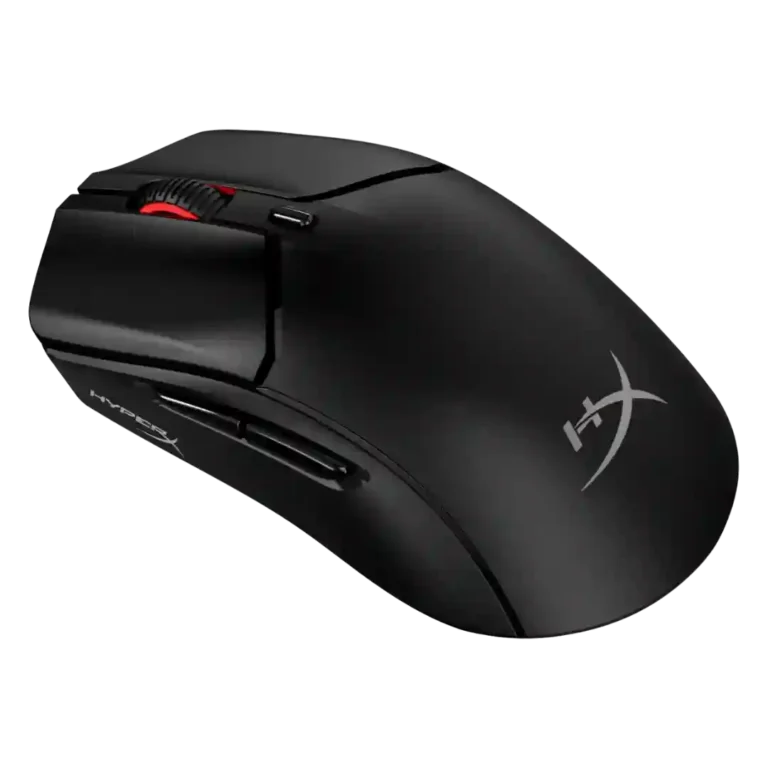
HyperX Pulsefire Haste 2 Review
Bottom Line
Choose the HyperX Pulsefire Haste 2 if you want an ultra-light mouse with smooth glide, strong sensor performance, and long battery life. Skip it if you need premium buttons, rich features, rock-solid software, or more onboard profiles.
Best for FPS and general gaming users who want an ultra-light mouse with smooth PTFE glide, a simple shape, broad DPI settings, and strong wireless battery life. It also suits claw and fingertip users better than palm users in several reviews.
Not for players who need many side buttons, multiple onboard profiles, premium ergonomic sculpting, heavy RGB, or a wireless platform with no reported firmware or software caveats.
Review evidence points to the HyperX Pulsefire Haste 2 as a lightweight, fast, and mostly accurate esports-style mouse whose best traits are weight, glide, battery life on the wireless model, and broad DPI support. The tradeoff is refinement: the simple six-button shell, minimal RGB, limited onboard profile support, and uneven side-button or click feel keep it from feeling universally premium. Mainstream reviewers were often impressed by the comfort, value, and smooth tracking, while several enthusiast reviewers raised concerns about wireless implementation, firmware updates, and software stability. It fits best when its low symmetrical shape matches the user’s grip and expectations stay focused on speed rather than feature depth.
Compared in Reviews
Products reviewers directly compared with this model, grouped into quick takeaways.
- Better: features and price Laptop Mag says the cheaper Basilisk V3 has more features than the Haste 2.
Endgame Gear
- Better: value and refinement The long-term review argues competing options around the same price are better buys.
Feature Scorecards
Pros
-
The 26,000 DPI ceiling is widely cited as more than enough, with reviewers valuing the broad range even when they used much lower settings.
-
Switch durability is strong on paper, with repeated 100 million-click ratings across reviews.
-
Weight is the strongest consensus point: reviewers consistently praise the 53g wired and roughly 60-61g wireless builds.
-
Battery life is one of the strongest points: multiple wireless reviewers cite up to 100 hours or weeks of use before needing a charge.
-
Low weight and smooth movement reduce strain in longer sessions, with reviewers linking the design to less fatigue.
-
Reviewers consistently note 2.4GHz dongle support as a useful wireless mode, generally easy to connect and preferable for gaming, though one reviewer reported wireless interference issues.
-
Glide is a standout strength: PTFE skates are repeatedly described as very smooth, low-friction, and effective even on hard surfaces or glass.
-
Bluetooth is repeatedly highlighted as a useful extra for multi-device use and console or casual connectivity alongside the dongle mode.
-
Reviewers who discussed balance found the mouse well distributed in hand, especially for low-weight wireless use.
-
Portability is helped by low weight, dongle storage, and laptop-bag friendliness.
-
Wireless latency is usually described as low or unnoticeable, but competitive reviewers note the wireless model is limited to 1,000Hz and not class-leading.
-
Several reviewers note console and Windows compatibility, including PS and Xbox support when games accept keyboard and mouse input.
-
The available evidence is mostly specification-level: reviewers mention 50G acceleration as part of the sensor spec rather than deep acceleration-tuning controls.
-
Clicks are usually described as responsive, quick, or spammable, although button force and layout drew criticism from some reviewers.
-
Most evidence supports FPS suitability thanks to low weight, glide, and accuracy, though some reviewers note click force or shape limits for elite users.
-
Shape is the core strength for many reviewers, especially fans of low, symmetrical ultralight mice, though it is not universal for palm users.
-
Claw grip comfort is a major strength across several reviews, with the low symmetrical shape repeatedly called suitable or excellent for claw users.
-
Reviewers liked that the mouse can be used wired while charging, with USB-C charging limiting downtime.
-
Most reviewers describe accurate, precise tracking in games and aim tests, though a few compare it as merely similar to other ultralight mice or report surface-specific issues.
-
Polling-rate evidence varies by wired versus wireless model: wired reviews cite 8,000Hz, while wireless reviews usually cite 1,000Hz.
-
Build quality is usually described as solid or high quality, with a few caveats about plastic feel and long-term cable wear.
-
The wired/paracord cable earns strong marks for softness and flexibility, especially on the wired version and while charging.
-
Button remapping is broadly available through NGENUITY, with several reviewers praising straightforward assignments while noting limits on premium-level control.
-
Fingertip grip is generally supported by the low, light shape, though sizing recommendations depend heavily on hand size.
-
Switch feel is generally crisp and tactile, but some reviewers found it firmer than preferred or less ideal than the first Haste.
-
Value is mostly positive thanks to low weight and performance at a midrange price, though a few reviewers felt stronger rivals exist near $90.
-
Macro support is available through NGENUITY, including a recorder or assignment options, though not every review used it deeply.
-
Connection setup is usually described as easy and stable, but some reviewers report software recognition problems, stuttering, or wireless dropouts.
-
Lift-off distance is adjustable or cited around 1mm/2mm in software, and reviewers generally considered that adequate.
-
The 26K/3395-class sensor is a major upgrade and generally performs well, but several enthusiast reviewers reported implementation or firmware issues.
-
Evidence is limited but positive where reviewed, with one source framing it as a good fit inside the HyperX ecosystem.
-
Wireless performance is usually convenient and smooth, but a small number of reviewers reported interference or firmware-related issues.
-
The six-button layout is programmable enough for basic gaming, but reviewers wanting richer MMO-style controls found it limited.
-
Profile switching exists mainly through software presets, but the lack of multiple onboard profiles keeps it from feeling premium.
-
Grip feedback is mixed: included grip tape helps, but some reviewers wanted more built-in texture or better coating.
-
Most reviewers found latency acceptable in use, but enthusiast reviewers flagged merely standard or not highly competitive click latency.
-
NGENUITY offers the needed remapping, DPI, polling, RGB, and macro tools, but reviewers disagree on whether it is simple or unintuitive.
-
Materials feedback is mixed: some reviewers praised sturdy lightweight plastic, while others found the plastic scratchy or slippery.
-
Premium feel is uneven: some reviewers felt the components were high quality, while others saw it as a budget-feeling or merely above-average mouse.
-
Surface compatibility is mixed: the skates work well on many pads and glass, but some reviewers saw problems on leatherette or lower-friction surfaces.
-
Palm comfort depends on hand size: some reviewers liked the support, while others found the low profile poor for palm grip.
-
Motion consistency is strong in many mainstream reviews, but enthusiast testing found stuttering, buggy sensor behavior, or wireless tracking issues.
-
Click sound is divisive: some liked the crisp, satisfying sound, while others found the mouse loud for shared spaces.
-
The symmetrical shell helps left-handers, but left-side thumb buttons and no true left-handed model limit real ambidextrous use.
-
RGB is minimal and limited to the scroll wheel, which some reviewers liked for simplicity and others considered underwhelming.
-
Main clicks are crisp and responsive for many reviewers, but firmer actuation, side play, and post-travel drew criticism from others.
-
Only limited long-term durability evidence appears; one reviewer questioned how the paracord wiring would hold up after extended use.
-
Scroll wheel quality is mixed, ranging from adequately notched and quiet to too small, light, or mushy on middle click.
-
Ergonomic opinions are mixed: the simple symmetrical shell fits many hands, but reviewers who prefer sculpted ergonomic mice found it less comfortable.
Cons
-
Side buttons are divisive: some reviewers praise their firmness, while others describe shallow travel, post-travel, or mushiness.
-
Firmware reliability is one of the weakest areas, with multiple reviewers describing failed updates, sensor weirdness after updates, or even a bricked unit.
-
The sparse six-button layout makes the mouse a weak fit for complex games needing many inputs.
-
Onboard memory is a repeated limitation, with reviewers noting one onboard profile or no storage for multiple presets.
-
Software stability is a clear weak spot, with reports of freezes, recognition failures, and repeated disconnects from the app.
Compared With Category Average
Compared with other Gaming Mouse, this product is above average in Bluetooth support, weight, handedness options, below average in onboard memory, software stability, motion consistency.
| Attribute | This product | Category average | Difference |
|---|---|---|---|
| onboard memory | 2.3 | 4.1 | -1.8 |
| Bluetooth support | 4.6 | 3.2 | +1.4 |
| software stability | 2.0 | 3.3 | -1.3 |
| weight | 4.7 | 4.1 | +0.6 |
| handedness options | 3.6 | 2.8 | +0.8 |
| motion consistency | 3.6 | 4.5 | -0.9 |
| MMO gaming suitability | 2.5 | 3.4 | -0.9 |
| cable flexibility | 4.3 | 3.6 | +0.7 |
FAQ
Is the HyperX Pulsefire Haste 2 good for FPS games?
Yes. Reviewers repeatedly praised its low weight, smooth glide, and accurate sensor for shooters, though some competitive-focused reviewers wanted stronger latency or button refinement.
How is the battery life on the wireless version?
Battery life is one of the strongest points. Multiple reviews cited the advertised 100-hour figure or said they used it for days or weeks before charging.
Does it support both Bluetooth and 2.4GHz wireless?
Yes. Reviews describe dual wireless connectivity with Bluetooth and a 2.4GHz dongle, plus wired use while charging.
Is the software good?
It is functional but inconsistent. Reviewers liked being able to adjust DPI, polling, RGB, macros, and button assignments, but several reported freezes, recognition issues, or unintuitive controls.
Which grip styles work best?
Claw and fingertip grips received the most consistent praise. Palm grip was more divisive because the mouse is low-profile and may not fill larger hands.
Does it have onboard memory?
Only limited onboard support is described. Reviewers repeatedly noted one onboard profile or no storage for multiple presets, with more profile handling kept inside the app.
Is it worth the price?
Most reviews found it a good value for weight, glide, sensor performance, and battery life, but some felt the $90 wireless model faces better-refined competitors nearby.
Consider This Instead
If you want better onboard memory
Choose Razer Naga V2 Pro. It scores 5.0 vs 2.3 for onboard memory, with a 4.3 overall score.
If you want better software stability
Choose Corsair Katar Elite Wireless. It scores 4.6 vs 2.0 for software stability, with a 3.9 overall score.
If you want better MMO gaming suitability
Choose ASUS ROG Gladius III Wired. It scores 4.8 vs 2.5 for MMO gaming suitability, with a 4.2 overall score.
If you want better left and right click quality
Choose Turtle Beach Kone II Air. It scores 5.0 vs 3.5 for left and right click quality, with a 4.3 overall score.
Overall Top Gaming Mouse Alternatives
Best for a 47g, high-performance 8K wireless mouse with excellent shape, skates, clicks, and web controls. Skip it if stiff side buttons, shorter high-polling battery life, or app/cable quirks would...
Pros: Accuracy and tracking precision, sensor performance
Cons: cable flexibility
Choose it if you want a comfortable, feature-rich wireless mouse for mixed gaming and productivity. Skip it if you need ultralight FPS speed, left-handed support, or better value than discounted...
Pros: programmable buttons, Bluetooth support
Cons: handedness options, firmware reliability
Good if you want an ultra-light esports mouse with 8K wireless, precise tracking, and web setup. Skip it if you need MMO buttons, onboard memory, large-hand palm support, or the...
Pros: polling rate, click latency
Cons: onboard memory, tilt gesture controls
Good if you want ergonomic wireless gaming with hot-swappable batteries and strong tuning. Skip it if price, dock clutter, or short 8K battery life matters most.
Pros: switch durability, DPI range
Cons: grip texture, portability