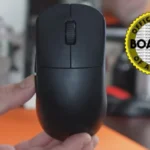
Endgame Gear OP1we Review
Bottom Line
Choose the Endgame Gear OP1we if you want a small, sturdy, grippy mouse with strong aiming performance and switch tinkering. Skip it if heavy clicks, limited buttons, or basic software would bother you.
Best for claw and fingertip players who want a small, stable, grippy gaming mouse with strong build quality, precise tracking, and real switch/customization options.
Not for MMO players, macro-heavy users, RGB-focused buyers, or anyone who dislikes heavier clicks, small narrow shapes, or basic-looking configuration software.
The Endgame Gear OP1we earns its strongest praise for shape, build quality, grip, and aiming feel. Across the supplied reviews, the small narrow body, grippy coating, light weight, and reliable sensor performance make it especially appealing for claw and fingertip users who want a simple competitive mouse. The biggest tradeoff is feel: several reviewers like the crisp, premium click implementation, while others find the stock clicks too heavy, hollow, or difficult to spam. The software also favors function over polish, with useful settings but a dated interface and at least one reported stability issue. It is a strong fit for performance-focused buyers who value shape and durability over flashy features, RGB, macros, or lots of extra buttons.
What Reviewers Agree On
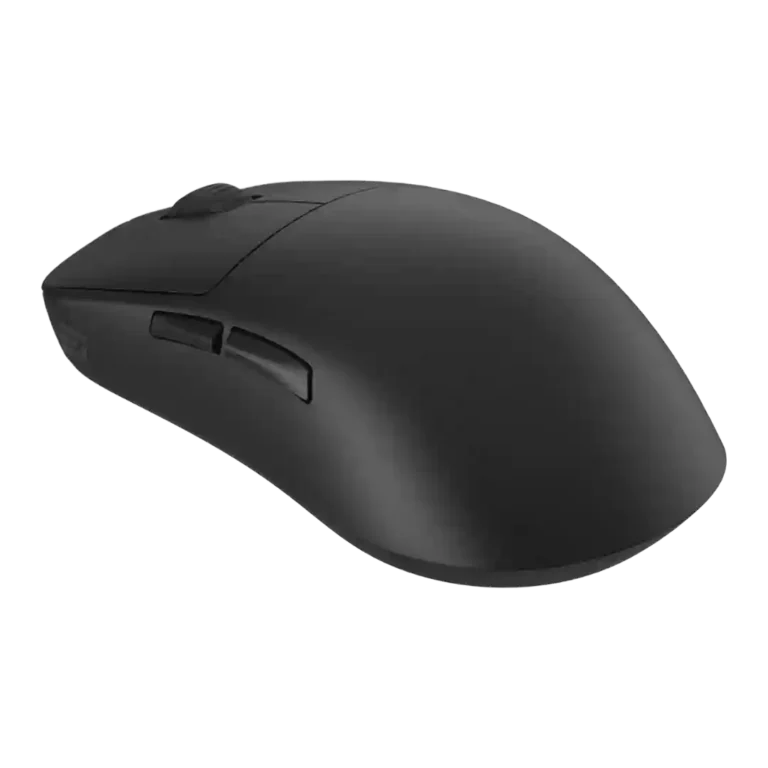
The clearest pattern across the supplied reviews is that the OP1we and closely related OP1 variants win people over through fundamentals rather than flash. The shape gets repeated attention: reviewers describe a small, narrow body with flat sides, rear-hump stability, and enough finger-placement flexibility to work especially well for claw and fingertip grips. Build quality is another repeated strength. Multiple reviewers call the mouse solid, durable, premium-feeling, or unusually well put together, and the grippy coating is often treated as a performance advantage even when fingerprints, sweat, or grime are noted as cosmetic drawbacks.
Performance comments are also largely positive. Reviewers point to accurate tracking, low weight, smooth glide, responsive side buttons, and dependable wireless or high-polling behavior depending on the variant being discussed. The mouse is repeatedly framed as a good competitive or FPS option because it keeps the basics tight: shape, sensor feel, clicks, and control. Customization is a major theme as well. The ability to open the mouse, change switches, adjust software settings, remap buttons, and tune debounce or polling settings gives it more enthusiast appeal than a typical stripped-back gaming mouse.
The main caution is that not every reviewer likes the same implementation. The stock click feel divides opinion, with some praising snappy, satisfying switches and others finding them too heavy, mushy, or hard to spam. The software is useful but visually dated, and one review reported stability issues. It also lacks the feature depth that MMO players, macro users, RGB fans, or buyers wanting many buttons may expect. The happiest buyer is likely someone who prioritizes a stable small shape, strong build, grippy coating, and precise aiming over software polish or extra features.
Scored Features
Pros
-
Build quality is one of the strongest repeated positives, with reviewers calling the mouse durable, solid, creak-free, and built to a very high standard.
-
Weight is widely praised as light, typically around 50.5g for wired variants and about 58g for OP1we/OP1w-style wireless units.
-
Weight balance is consistently positive where discussed, with reviewers noting dexterity, stability, and very good front-to-back balance.
-
Click latency evidence is strong on the wired/high-polling models and configurable on others, with reviewers citing very low latency or latency-related software modes.
-
Wireless performance is positive overall, with reviewers describing reliable wireless operation, simple receiver use, and good low-latency connectivity.
-
Cable evidence applies to wired or charging use: reviewers praise the light, flexible, braided or drag-reducing cable design.
-
Connection stability is generally praised, especially for 2.4GHz or receiver-based use, with reviewers describing stable, reliable, low-latency operation.
-
Ergonomic design is supported by natural hand fit, flatter sides, and shape decisions intended to reduce strain and support control.
-
Premium feel is repeatedly supported through comments about high-quality feel, premium construction, and strong overall finish.
-
Switch durability is positive where discussed, with 80-million-click ratings, optical double-click resistance, and durable switch implementation cited.
-
Multiple reviews support strong aiming accuracy, citing accurate tracking, high precision sensors, and sharper tracking or flicking in games.
-
Grip texture is a major positive, with reviewers praising grippy coating, non-slip feel, and secure hold; some also note fingerprints or grime.
-
Fingertip grip support is repeatedly noted, especially because of the small size, flat sides, narrow profile, and flexible finger placement.
-
Onboard memory has limited support, but one review states switch settings are saved directly on the mouse’s onboard storage.
-
FPS suitability is strongly supported by competitive-gaming comments, fast aiming, high polling, low weight, and specific FPS testing.
-
Sensor performance is broadly positive, with PAW3370, PW3395, and PixArt references tied to accurate or reliable in-game performance.
-
The supplied reviews describe 2.4GHz or receiver-based wireless as the main gaming connection, with praise for response time, stability, and simple receiver setup.
-
Claw grip comfort is strongly supported, with several reviewers calling the shape claw-focused, suitable for relaxed or aggressive claw, or mostly a claw grip mouse.
-
Customization is a recurring strength, covering swappable switches, software settings, button assignment, DPI, polling, and hardware tinkering.
-
Side button quality is mostly praised for tactile, crisp, premium-feeling actuation, though one review found the side buttons harsh.
-
Shape comfort is a major strength but still preference-dependent; many reviewers praise the small, narrow, stable shape while one notes secure grip may vary.
-
Charging convenience is supported by references to USB-C, quick charging, and the cable serving both charging and receiver-converter use.
-
Click sound is described positively where mentioned, with thocky, satisfying, or pleasing button sound impressions.
-
Long-session comfort is generally positive because reviewers mention no cramping, extended-session comfort, stability, and low fatigue, although coating sweat appears in some reviews.
-
DPI coverage is strong, with reviews citing 19,000 DPI, 26,000 DPI, broad DPI ranges, and quick DPI settings.
-
Value is generally positive, with reviewers praising pricing against premium mice, though one review says the wired 8K model does not justify its asking price.
-
Motion consistency is supported by Motion Sync, sensor-data synchronization, real-world polling consistency, and consistent tracking impressions.
-
Cross-platform compatibility has limited direct support, but one review explicitly links Bluetooth 5.1 to broader device compatibility.
-
Firmware reliability has limited but positive support through comments about switch and firmware integration.
-
Programmable buttons are supported by key mapping, button remapping, software reassignment, and keybinding assignment.
-
Glide is mostly praised for smooth skates and low-friction movement, though one review found the small stock skate area less smooth on hard surfaces.
-
Debounce and multiclick controls are well supported, with multiple reviews mentioning debounce time, multi-click filters, or related click filtering settings.
-
Polling-rate support is well documented across variants, with 1000Hz, 4000Hz, and 8000Hz configurations or claims appearing in the reviews.
-
Materials are described as decent to premium, including matte shells, dry-grip plastic, and PBT plastic, with some cosmetic fingerprint concerns.
-
Button responsiveness is mostly praised for precision and responsive actuation, though one reviewer found the heavy click feel harder to spam.
-
Software usability is mixed: reviewers like its simplicity and no-fuss customization, but several call it dated, basic, unexplained, or rough.
-
Profile switching is supported through underside mode buttons, DPI or polling cycling, and multiple quick settings.
-
Durability evidence is positive for the shell and switches, though one wired-model review raises a concern about cable-fray durability.
-
Battery evidence is mostly positive for the wireless variants, ranging from seven-day claims to 70-hour figures, while 4K use is described as closer to 30 hours.
-
Switch feel is one of the most divisive attributes: reviewers praise crisp or satisfying clicks, but several find the stock clicks heavy, hollow, or hard to actuate.
-
Wireless latency evidence is mostly positive for stable low-latency 2.4GHz use, with one reviewer noting it may lag behind some newer 4K implementations.
-
Lift-off distance is configurable in the software where reviewed, with explicit mention of LOD adjustment and lift-off settings.
-
Main click quality is polarizing: several reviews praise crisp, satisfying clicks, while others criticize heaviness, mushiness, rebound, or quick-fire suitability.
-
Handedness evidence is mixed but useful: reviews mention right-handed layouts, ambidextrous/symmetrical shapes, and a left-handed software mode.
-
Scroll wheel quality is mixed, with praise for tactile steps but criticism of light actuation, shallow grip, or notchy feel in some reviews.
-
Weight tuning has limited but real support through reviewer discussion of lowering weight by changing skates, cable, or modding.
Cons
-
Surface compatibility is mixed: one review reports hard-surface grating, while another says the skates felt stable across multiple mouse pads.
-
Palm grip comfort is mixed: the mouse can work for smaller hands or provide palm stability, but larger hands and full-palm users are often discouraged.
-
Bluetooth support is inconsistent across the supplied reviews: one says Bluetooth would have been nice, while another describes Bluetooth 5.1 support and broader device compatibility.
-
Acceleration-control evidence is limited and mixed: one review says angle snapping can help straight-line movement but also made acceleration feel jarring.
-
RGB evidence is negative or neutral: multiple reviews state there is no RGB, framing the mouse as performance-focused rather than flashy.
-
Software stability has one clear negative data point: a review reports the configuration tool crashing and apply-button issues.
-
Macro support is weak; the supplied reviews that discuss it explicitly say macro support is missing or limited.
-
MMO suitability is weak because one review explicitly warns MMO players about the lack of buttons and omitted macro features.
FAQ
Is the Endgame Gear OP1we worth buying?
It is worth considering if you care most about shape, build quality, grip, and competitive aiming fundamentals. The reviews are less favorable for buyers who want polished software, RGB, many buttons, or very light clicks.
Who is the Endgame Gear OP1we best for?
It is best for claw and fingertip players, especially those who like smaller, narrower mice with flat sides and a stable rear hump. Several reviewers found the shape comfortable and precise for competitive play.
What is the main drawback of the Endgame Gear OP1we?
The most repeated drawback is the click feel. Some reviewers praised the clicks, but others found the stock switches heavy, hollow, or harder to spam than they wanted.
Is the OP1we good for FPS games?
Yes, the review evidence points strongly toward FPS and competitive use. Reviewers praised the light weight, stable shape, accurate tracking, responsive buttons, and smooth movement.
Is the OP1we good for MMO gaming?
It is not a strong MMO choice based on the supplied reviews. One review specifically warns MMO players about the lack of buttons and missing macro features.
How good is the OP1we software?
The software is useful for core settings such as DPI, polling, button assignment, and debounce controls, but several reviewers describe it as basic or dated. One review also reported a crash and apply-button issue.
Does the OP1we have RGB?
No strong RGB feature evidence appears in the supplied reviews. Multiple reviewers describe the mouse as stripped-back or lacking RGB, with the design focused more on performance than lighting.
Video Reviews
Article Reviews
Best Gaming Mouse Alternatives
Choose the Model D3 for flexible wireless gaming, comfort, and precise control. Skip it if the high price or shorter high-polling battery life matters more.
Pros: Accuracy and tracking precision, switch durability, FPS gaming suitability, charging convenience, sensor performance, click latency, wireless latency
Cons: none
Choose the Harpe II Ace for ultralight FPS control, 8K wireless, and easy web setup. Skip it if you need many buttons or steady long battery life in...
Pros: polling rate, weight, wireless performance, DPI range, switch durability, sensor performance, motion consistency
Cons: onboard memory, MMO gaming suitability, software stability, profile switching
Choose the Razer Basilisk V3 Pro 35K for ergonomic comfort, precise tracking, and feature-rich wireless control. Skip it if you want an ultralight FPS mouse or better value...
Pros: motion consistency, sensor performance, DPI range, build quality, macro support, click latency, acceleration control
Cons: handedness options, value for money, weight, fingertip grip comfort
Choose it for precise tracking, comfortable right-handed shape, and swappable switches. Skip it if you need ultralight weight, left-handed ergonomics, or cleaner software value.
Pros: click latency, durability over time, wireless latency, switch durability, Accuracy and tracking precision, 2.4GHz connectivity, sensor performance
Cons: software stability, handedness options, firmware reliability