Best for polling rate
Razer Naga V2 HyperSpeed
5.0 feature score
Highest scored product for this feature based on supporting review evidence.
Highest scored product for this feature based on supporting review evidence.
Balances feature score, supporting reviews, and overall product strength.
Has the broadest review evidence for this feature.
Strongest overall product among items with scored evidence for this feature.
Showing Razer only. Switch back to all brands anytime.
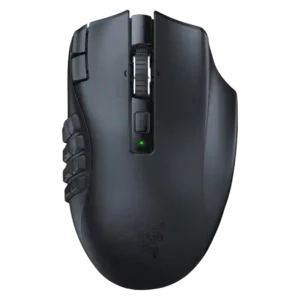
Measured polling was excellent, with stable 1000Hz operation and minimal jitter in the detailed latency test.
Pros: Accuracy and tracking precision, sensor performance
Cons: handedness options, fingertip grip comfort

Polling was generally viewed positively: 1,000Hz was enough for most, while 4K/8K support was valuable but battery-hungry or dongle-dependent.
Pros: motion consistency, wireless latency
Cons: handedness options, onboard memory

8,000Hz polling was viewed as cutting-edge and useful for esports, but several reviewers said many casual players may barely notice it and it hurts battery life.
Pros: Accuracy and tracking precision, sensor performance
Cons: onboard memory, handedness options

8,000Hz polling earned praise from competitive-focused reviewers, while others found the difference subtle or unnecessary for most players.
Pros: balance and weight distribution, build quality
Cons: dock compatibility, Bluetooth support

Polling was praised in 2.4GHz mode, but Bluetooth’s lower polling and latency limits made performance mode choice important.
Pros: ecosystem integration, sensor performance
Cons: AI Prompt Master, durability over time

Polling-rate feedback was positive overall, but mixed in practice: reviewers liked 8,000Hz support while some saw little benefit or stuttering.
Pros: Accuracy and tracking precision, sensor performance
Cons: handedness options, tilt gesture controls

Polling rate was viewed as suitable for most gamers rather than elite or unusually high-end.
Pros: Accuracy and tracking precision, motion consistency
Cons: click noise, onboard memory

Polling support was useful and sometimes praised for reducing lag, but reviewers noted higher rates require extra accessories and that the stock 1,000Hz rate trails some competitors.
Pros: motion consistency, sensor performance
Cons: software stability, MMO gaming suitability

The 1,000Hz polling rate was usually seen as enough for most users, though lack of higher polling disappointed some.
Pros: sensor performance, click latency
Cons: software stability, Bluetooth support

Polling-rate evidence was mixed-positive: 1,000Hz was widely considered enough, while the separate HyperPolling dongle was a repeated caveat.
Pros: click latency, motion consistency
Cons: handedness options, Bluetooth support

Polling rate feedback was mixed: high rates were valued, but accessories and battery penalties limited their practical appeal.
Pros: lift-off distance, motion consistency
Cons: cross-platform compatibility, handedness options

The default 1,000 Hz polling rate was generally considered good enough, but reviewers criticized the need for extra hardware to unlock higher polling.
Pros: 2.4GHz connectivity, surface compatibility
Cons: click noise, software stability

The 8K polling capability impressed reviewers technically, but many found its real-world benefit subtle, hardware-dependent, or not worth constant use.
Pros: click latency, balance and weight distribution
Cons: 2.4GHz connectivity, software stability