- More expensive: price bracket and features The Cobra Pro is presented as a more feature-rich option in a different price bracket.
- Similar: optical mouse switches The Cobra uses the same Gen-3 optical switches as the Cobra Pro.
Bottom Line
Choose the Razer Cobra if you want a light, precise, budget-friendly wired gaming mouse with strong Razer build and RGB. Skip it if you need wireless freedom, quiet clicks, several onboard profiles, or a larger mouse for big hands.
Best for small to medium-handed gamers who want a lightweight, accurate, low-drag wired mouse with Razer customization and RGB at a budget-friendly price.
Not for users who need wireless connectivity, quiet office-friendly clicks, multiple onboard profiles, or a larger shape for big hands.
The Razer Cobra earns broadly positive reviewer sentiment as a lightweight wired gaming mouse that feels more polished than its price suggests. Reviewers repeatedly praised its solid build, low-drag cable, smooth glide, accurate sensor, RGB presentation, and strong budget value. The clearest tradeoff is that the mouse prioritizes a simple, small, wired esports-style design over premium extras: onboard profiles are limited, there is no wireless evidence to score, and large-handed users may want a bigger shape. Click feel also split reviewers; many found the optical switches responsive and satisfying, while others described hollow clicks, louder noise, or a mushier scroll wheel.
Compared in Reviews
Products reviewers directly compared with this model, grouped into quick takeaways.
- Better: visual slickness The Cobra costs less but is not considered as slick-looking as the Basilisk V3 Pro.
- Similar: optical mouse switches The Cobra shares its switch family with the DeathAdder V3.
Feature Scorecards
Summary
40 reviewed features- Very positive 4.5-5.0 53% 21 features
- Positive 3.5-4.4 35% 14 features
- Neutral 2.5-3.4 8% 3 features
- Negative 1.5-2.4 5% 2 features
- Very negative below 1.5 0% 0 features
Pros
-
Reviewers consistently reported accurate tracking, with no missed beats, no skipping, and strong precision even in games or daily use.
-
Motion consistency was excellent in the tested evidence, with reviewers reporting no lag, jitters, skip, or sensor dropout.
-
High-speed movement and acceleration did not cause sensor skip in the reviewer evidence.
-
Long-session comfort was praised in the review that noted extended play without hand strain.
-
Sensor performance was strongly positive overall, with reviewers praising responsiveness, stability, calibration, and real-world tracking.
-
Glide smoothness was strongly praised across reviews, with repeated comments about low drag, smooth feet, and easy movement.
-
Click latency evidence was positive, with reviewers emphasizing optical-switch responsiveness, zero debounce, and reduced delay.
-
Palm grip comfort was positive in the reviews that tested it, especially for medium or smaller hands.
-
Build quality was one of the strongest themes, with most reviewers calling the Cobra solid, durable, sturdy, or well made.
-
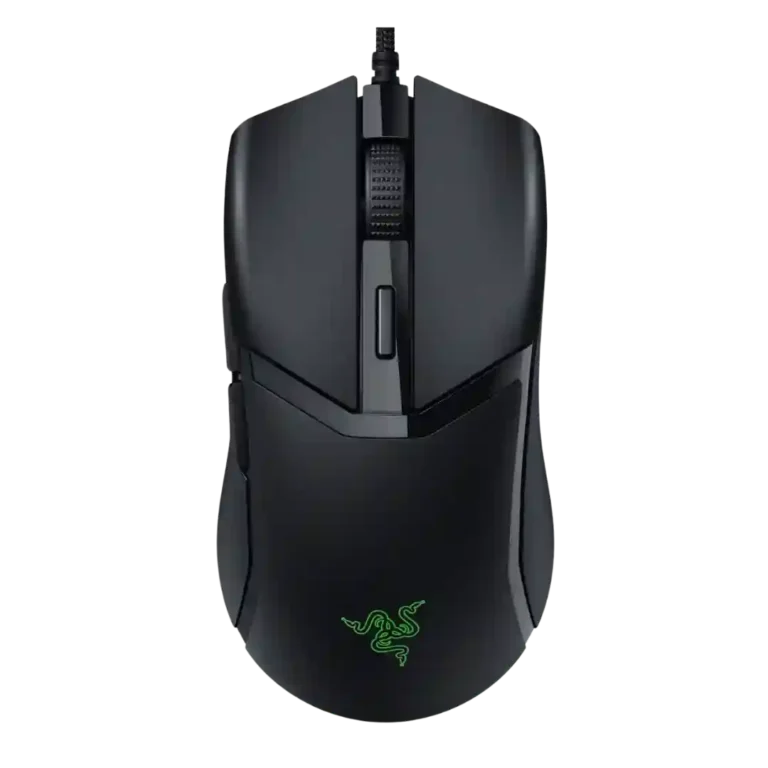
Weight was consistently praised as light, comfortable, and well suited to fast movement without feeling cheap.
-
Ergonomics were broadly praised, with reviewers describing the mouse as comfortable, well shaped, and easy for fingertips or hands to settle into.
-
Button responsiveness was generally strong, especially where reviewers praised optical switches, low debounce, and effortless clicking.
-
Value was a consistent strength, with reviewers calling the Cobra affordable, impressive for the price, or a strong budget buy.
-
Shape comfort was broadly positive for small to medium hands, although large-handed users may find the mouse too small.
-
Claw grip comfort was positive in the reviews that tested it, especially for small to medium hands.
-
Durability impressions were positive, though mostly based on build, switch lifespan claims, and reviewer confidence rather than long-term abuse testing.
-
One review praised the centered weight balance for keeping the mouse stable.
-
Synapse integration was described as seamless in one review, supporting the broader Razer accessory/software ecosystem.
-
Fingertip grip comfort was positive in the one review that tested it directly.
-
Materials were praised where reviewed, especially the robust and sturdy plastic feel.
-
Switch durability evidence was positive, centered on the optical switch lifespan and double-click resistance discussed by reviewers.
-
The SpeedFlex-style cable was repeatedly praised as flexible, light, and low-drag, making the wired design less intrusive.
-
Button remapping and customization were praised through Synapse, though one first-impression review was less enthusiastic overall.
-
Software usability was generally positive for customization, RGB, DPI, calibration, and profiles, though Mac software support was limited.
-
RGB features were generally praised for subtle, attractive lighting and customization, with one reviewer personally less enthusiastic.
-
DPI and sensitivity were considered sufficient for most users, with reviewers finding the 8500 DPI range smooth or workable in practice.
-
FPS suitability was positive for small to medium hands and lightweight preferences, though one reviewer suggested top-tier FPS players may want a better sensor.
-
Programmable buttons were praised as customizable through Synapse and useful for standard gaming mouse controls.
-
Premium feel was mostly positive for the price, though one first-impression review felt the clicks made the mouse seem mediocre.
-
Scroll wheel quality was mixed: several reviewers liked the tactile or firm feel, but others found it mushy, low, or weak.
-
Surface compatibility was positive, with reviewers finding it usable on desk mats, wood, mouse pads, and other materials, despite more drag on rough wood.
-
Polling rate was viewed as suitable for most gamers rather than elite or unusually high-end.
-
Switch feel was mixed-positive: many liked the satisfying optical clicks, while some found them hollow or unusual at first.
-
Left and right click quality was mixed, ranging from firm and clean to hollow or weaker than expected.
-
Grip texture was mixed: several reviewers liked the grippy texture, while others wished for more rubber or found the coating low-grip.
Cons
-
Side button quality was mixed, with praise for placement and speed but criticism of free play, hollowness, or loudness in some reviews.
-
Cross-platform compatibility was mixed because the mouse works on Windows and Mac, but the software support was described as Windows-only.
-
Profile switching was a drawback because reviewers noted the single-profile limit or friction when changing scenarios.
-
Onboard memory was a clear limitation, with reviews noting only one profile or no saved settings across computers.
-
Click noise was a repeated drawback, with reviewers noting the clicks are loud enough to bother people in quiet spaces.
Compared With Category Average
Compared with other Gaming Mouse, this product is above average in cable flexibility, value for money, palm grip comfort, below average in onboard memory, profile switching, click noise.
Summary
8 compared features- Above average 0.4+ pts higher 50% 4 features
- Same as average within 0.3 pts 0% 0 features
- Below average 0.4+ pts lower 50% 4 features
| Attribute | This product | Category average | Difference |
|---|---|---|---|
| onboard memory | 2.3 | 3.9 | -1.6 |
| profile switching | 2.5 | 3.8 | -1.3 |
| click noise | 2.3 | 3.5 | -1.2 |
| cable flexibility | 4.4 | 3.6 | +0.9 |
| value for money | 4.6 | 3.7 | +0.8 |
| palm grip comfort | 4.8 | 3.8 | +0.9 |
| cross-platform compatibility | 3.0 | 3.9 | -0.9 |
| fingertip grip comfort | 4.5 | 3.7 | +0.8 |
FAQ
Is the Razer Cobra good for FPS gaming?
Yes, reviewers found it light, accurate, smooth, and responsive, and one review specifically called it tailored for FPS players with small to medium hands. One caveat was that top-tier FPS players may still prefer a higher-end sensor.
Is the Razer Cobra comfortable for long sessions?
The comfort evidence is positive for small and medium hands. One reviewer specifically said the shape allowed long play sessions without hand strain.
Are the clicks quiet?
No. Multiple reviewers described the clicks as loud, and one said they could disturb people in a quiet office environment.
How good is the sensor?
Reviewer evidence was strongly positive. They reported exceptional accuracy, no lag or jitters, no skipped flicks, and reliable performance despite the entry-level positioning.
Does it support wireless use?
The reviews discuss the Cobra as a wired mouse. Wireless-related attributes were not scored because reviewers only made factual no-wireless mentions, not quality judgments about wireless performance.
Does it save multiple profiles onboard?
No reviewer evidence praised multiple onboard profiles. Instead, reviewers criticized the single-profile limit or said settings would need software again on another computer.
Consider This Instead
If you want better onboard memory
Choose Razer Naga V2 Pro. It scores 5.0 vs 2.3 for onboard memory, with a 4.4 overall score.
If you want better profile switching
Choose Logitech G502 X Lightspeed. It scores 5.0 vs 2.5 for profile switching, with a 4.2 overall score.
If you want better click noise
Choose HyperX Pulsefire Haste 2 Pro. It scores 4.8 vs 2.3 for click noise, with a 4.1 overall score.
If you want better cross-platform compatibility
Choose Corsair Scimitar Elite Wireless SE. It scores 5.0 vs 3.0 for cross-platform compatibility, with a 4.2 overall score.
Overall Top Gaming Mouse Alternatives
Choose the ROG Harpe II Ace for ultralight FPS play, precise tracking, smooth glide, and web-based tuning. Skip it if you need palm-grip support, MMO buttons, onboard profiles, or long...
Pros: acceleration control, wireless latency
Cons: onboard memory, MMO gaming suitability

Best for MMO/MOBA control, swappable panels, strong wireless performance, and long battery life. Skip it if you want a light FPS mouse, low price, or no Synapse quirks.
Pros: sensor performance, click latency
Cons: software stability, Bluetooth support
Choose the Aerox 3 Wireless Gen 2 if you want a light, fast wireless FPS mouse with strong software and battery life. Skip it if you dislike honeycomb shells, need...
Pros: click latency, motion consistency
Cons: palm grip comfort, fingertip grip comfort
Choose the Kone II if you want a large, ergonomic mouse with deep customization and strong sensor performance. Skip it if you have small hands, need an ambidextrous mouse, or...
Pros: click latency, motion consistency
Cons: handedness options, portability