Best for side button quality
Razer Viper V3 HyperSpeed
4.7 feature score
Highest scored product for this feature based on supporting review evidence.
Highest scored product for this feature based on supporting review evidence.
Balances feature score, supporting reviews, and overall product strength.
Has the broadest review evidence for this feature.
Strongest overall product among items with scored evidence for this feature.
Showing Razer only. Switch back to all brands anytime.

Side buttons were one of the most consistent positives, with reviewers calling them easier to reach, premium, and among Razer's best.
Pros: motion consistency, wireless latency
Cons: handedness options, onboard memory

Side button quality was widely praised for placement, spacing, access, and responsiveness, with a few reviews noting mushiness or preference caveats.
Pros: click latency, motion consistency
Cons: handedness options, Bluetooth support

Side buttons were often praised as tactile, reachable, and top-tier, with a minor caveat that they are not always as satisfying as the main clicks.
Pros: balance and weight distribution, build quality
Cons: dock compatibility, Bluetooth support

Side buttons were widely praised for better spacing, tactile response, and easier identification in fast gameplay.
Pros: Accuracy and tracking precision, sensor performance
Cons: onboard memory, handedness options

Side button quality was mostly praised for placement, tactile feel, and low accidental-press risk, though one reviewer struggled with reach.
Pros: Accuracy and tracking precision, sensor performance
Cons: handedness options, tilt gesture controls

Side buttons were generally a strength, often called well placed, firm, separated, and easy to identify, though one review found tactility only decent.
Pros: click latency, balance and weight distribution
Cons: 2.4GHz connectivity, software stability

Side button quality was usually praised for tactile feel and secure panels, though the dense 12-button layout challenged some users.
Pros: sensor performance, click latency
Cons: software stability, Bluetooth support

Side buttons were generally praised for placement, tactility, and accessibility without many accidental presses.
Pros: lift-off distance, motion consistency
Cons: cross-platform compatibility, handedness options

Side buttons were usually praised for access, low travel, and tactility, with a few reviewers finding them softer or simply adequate.
Pros: motion consistency, sensor performance
Cons: software stability, MMO gaming suitability

Side button feedback was polarized, with strong praise from some reviewers and a budget-feeling complaint from another.
Pros: 2.4GHz connectivity, surface compatibility
Cons: click noise, software stability
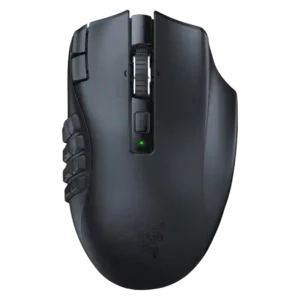
Side button quality was mixed but mostly positive: several reviewers liked reach, tactility, and click feel, while one found the grid hard to learn.
Pros: Accuracy and tracking precision, sensor performance
Cons: handedness options, fingertip grip comfort

Side buttons were useful and tactile for some reviewers, but their smaller size and third-button placement created strain or mis-click concerns for others.
Pros: ecosystem integration, sensor performance
Cons: AI Prompt Master, durability over time

Side button quality was mixed, with praise for placement and speed but criticism of free play, hollowness, or loudness in some reviews.
Pros: Accuracy and tracking precision, motion consistency
Cons: click noise, onboard memory