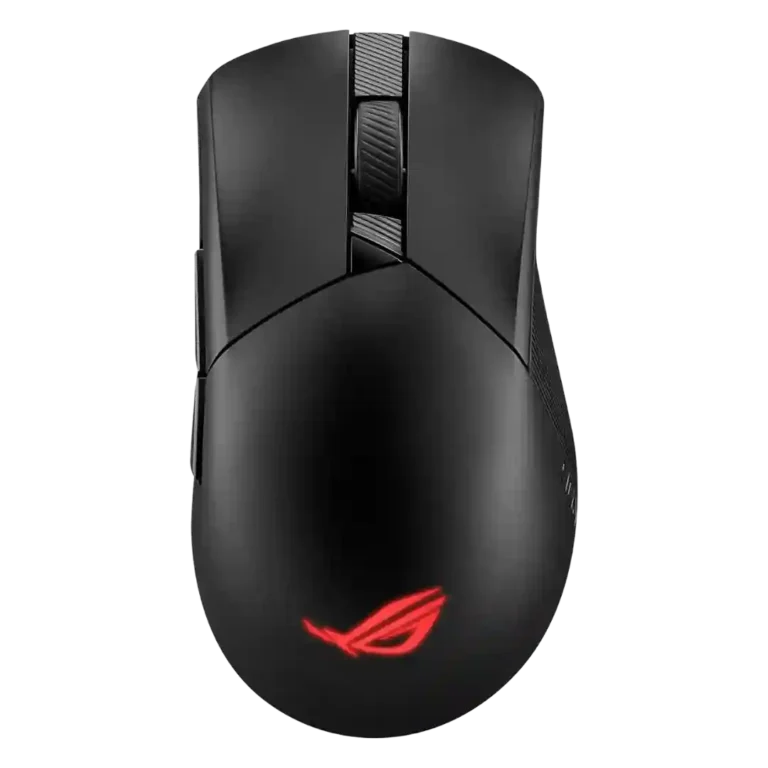
- Compared: high-end gaming mouse competition Pokde says the Gladius III AimPoint is strong but faces notable competition from Razer and Logitech.
ASUS ROG Gladius III Wireless Review
Bottom Line
Choose it for a comfortable right-handed gaming mouse with precise tracking, flexible wireless modes, and replaceable switches. Skip it if you need left-handed support, ultralight esports weight, or hassle-free software.
Best for right-handed gamers who want a comfortable palm or claw-grip mouse with low-latency 2.4GHz wireless, Bluetooth flexibility, high DPI headroom, and replaceable switches for long-term use. It also fits users who value onboard profiles and ASUS Aura integration.
Not for left-handed users, dedicated MMO players who need many thumb buttons, or buyers who prioritize the absolute lightest esports shell. It is also a risky fit for anyone who dislikes Armoury Crate or wants a bargain-first mouse.
The ASUS ROG Gladius III Wireless earns its strongest praise for comfort, sensor performance, tri-mode connectivity, and user-replaceable switches. Reviewers repeatedly liked the right-handed shape for palm and claw grips, the smooth PTFE glide, and the low-latency 2.4GHz wireless experience. The main tradeoff is that it feels premium to some reviewers but plasticky, bulky, or pricey to others, especially against lighter esports rivals. Armoury Crate is also divisive: it unlocks deep DPI, profile, lighting, macro, polling, lift-off, and calibration controls, but several reviewers found it overloaded, update-dependent, or unstable. Overall, the evidence supports a capable high-end gaming mouse with standout repairability and flexibility, balanced by software friction and a right-hand-only design.
Compared in Reviews
Products reviewers directly compared with this model, grouped into quick takeaways.
Logitech Pro X Superlight
- Better: lighter esports alternative PCMag says competitors such as the Logitech Pro X Superlight deliver similar specs in a lighter body.
- Compared: premium wireless gaming mouse competition Tom’s Hardware frames the Gladius III as a worthy rival to Logitech’s lighter flagship option.
Logitech G602
- Compared: build confidence and long-term durability BinaryFork contrasts the Gladius III with an older Logitech G602 that felt more durable over years of use.
Feature Scorecards
Summary
56 reviewed features- Very positive 4.5-5.0 57% 32 features
- Positive 3.5-4.4 36% 20 features
- Neutral 2.5-3.4 5% 3 features
- Negative 1.5-2.4 0% 0 features
- Very negative below 1.5 2% 1 feature
Pros
-
Click latency was a major strength in reviews that measured or discussed it, including reports of near-instant or 0 ms wireless response.
-
Connection stability was strong where tested, with reviewers reporting stable wireless links and no noticeable lag or drops.
-
Sensor performance was one of the strongest areas, with reviewers repeatedly praising the AimPoint sensor, precision, and high-end tracking.
-
Switch durability was a standout feature, with replaceable switches and 70-million-click ratings repeatedly highlighted.
-
Wireless latency was consistently strong, with SpeedNova, low-latency 2.4GHz, and even 0 ms wireless latency evidence.
-
Tracking accuracy was generally strong, especially in FPS testing, though one reviewer noted extreme DPI settings became impractical.
-
FPS suitability was strong, with reviewers praising precision, flicking, fast-paced shooter performance, and low-latency wireless use.
-
Wireless performance was broadly positive, with no lag, stable RF use, and smooth gaming performance across reviews.
-
Cross-platform and multi-device use was a plus, with evidence for macOS, iPadOS, and simultaneous/multi-device workflows.
-
Glide smoothness was consistently praised, mainly due to PTFE feet and smooth movement on mousepads or desks.
-
Macro support appears in Armoury Crate evidence, where reviewers note macros can be assigned to buttons.
-
Motion consistency was supported indirectly through accurate DPI, no jitter, stable polling, and precise sensor behavior across tests.
-
Charging convenience was a clear strength because the mouse can be used wired while charging through USB-C.
-
Onboard memory was a clear advantage, with many reviews noting four or five saved profiles on the mouse.
-
Button customization was widely supported through Armoury Crate, with reviewers noting remapping, DPI changes, and full button configurability.
-
Durability over time was strongly tied to replaceable switches, spare feet, and repairability, though one reviewer lacked confidence in the shell.
-
Ergonomic design was generally praised, especially the tall right-handed shape and hand support.
-
Premium feel was mixed-positive: some reviewers saw a premium or quality product, while price and plastic feel prevented universal agreement.
-
Only one review directly discussed balance, and it found the mouse felt well balanced despite the internal battery placement.
-
Reviewers consistently found useful 2.4GHz/RF connectivity, often linking it to low-latency gaming or tri-mode versatility.
-
Palm grip comfort was one of the strongest comfort themes, especially for the larger, high-hump shape.
-
Bluetooth was repeatedly praised as a useful secondary mode for multi-device use, longer battery life, or broader compatibility.
-
Claw grip comfort was usually positive, with multiple reviewers finding the shape stable or comfortable for claw use.
-
Shape comfort was strongly positive for palm and claw users, but size could be too small or bulky depending on hand size.
-
Side button quality was mostly praised for reachability, placement, and satisfying clicks.
-
Skate durability was positive because several reviews noted spare PTFE feet or easy replacement if feet wear out.
-
Profile switching was widely supported through onboard profiles and a bottom profile button.
-
DPI range was repeatedly highlighted as high-end, especially on AimPoint versions with 36,000 DPI or earlier versions tuned up to 26,000 DPI.
-
Button responsiveness was mostly strong thanks to quick switch response and low-lag feel, though one reviewer found the clicks firmer than expected.
-
Surface compatibility was positive where reviewed, with calibration support and successful rough testing across glass, cardboard, and mousepads.
-
Polling rate evidence was positive at 1000 Hz, including one benchmark that exceeded the advertised rate on average.
-
Ecosystem integration was positive for ASUS users because Aura Sync and Armoury Crate can connect the mouse with other ASUS hardware.
-
Lift-off distance customization was well supported in Armoury Crate, though one reviewer found its effect unclear.
-
Battery life was usually positive, ranging from decent multi-day use to spectacular endurance, with RGB usage as the main limiter.
-
Grip texture was generally helpful, with grooves, ridges, PBT, rubber, or grip tape improving control, though one reviewer found a side slightly slippery.
-
Build quality drew mixed but mostly positive reactions: several reviewers found it sturdy, while a few felt the plastic seemed cheap or fragile.
-
Long-session comfort was mostly positive due to shape and weight, but larger-hand fit, sweat, and cramped feel created some caveats.
-
Programmable buttons were consistently six-button oriented and useful, though not enough for dedicated MMO users.
-
The cable was often considered light and flexible, but one review criticized it for kinking easily.
-
Left and right click quality was mostly positive for low wobble, little pre/post-travel, and pleasant pressure, with some criticism of firmer clicks.
-
Portability was a useful but secondary strength, supported by dongle storage, multi-device use, and bring-one-mouse convenience.
-
Switch feel was generally good and customizable, though preferences differed between mechanical and optical switches.
-
Weight was generally favorable for the AimPoint at 79 g, while the older 89 g wireless version was considered heavier than some competitors.
-
RGB features were well covered, with Aura Sync, profile-linked effects, and multiple zones on some models, but RGB reduced battery life.
-
MOBA suitability had limited positive evidence, mainly from side-button reassignment for skill-based games.
-
Scroll wheel quality was generally good for tactile steps and texture, but there were complaints about noise and no adjustable resistance.
-
Materials quality was mixed: PBT, rubber, and clean finish were praised, while some plastic was described as hollow or cheap.
-
Value for money was divided: several reviewers found the feature set justified, while others saw the price as steep or insufficient versus rivals.
-
Fingertip comfort was more conditional than palm or claw; some reviewers said it works, while others were unsure or preferred larger hands.
-
Firmware reliability had limited evidence: updates are available in software, but the update process sometimes required extra steps.
-
Software usability was polarizing: Armoury Crate offers deep controls, but several reviewers called it overloaded, unintuitive, or unreliable.
-
MMO suitability was limited; precision was fine, but one reviewer specifically said there were not enough buttons for true MMO use.
Cons
-
Click noise was mixed: some found the buttons quiet or acceptable, while others described the clicks as loud, hollow, or noisy.
-
Handedness is a limitation: the mouse is repeatedly described as right-handed, with left-handed users told to look elsewhere.
-
Software stability was one of the more common weaknesses, with Bluetooth detection, forced update, and Armoury Crate failure complaints.
-
Tilt gesture controls are effectively absent; the relevant review evidence says the wheel is pressable but not tiltable.
Compared With Category Average
Compared with other Gaming Mouse, this product is above average in Bluetooth support, RGB features, skate durability, below average in tilt gesture controls, software stability.
Summary
8 compared features- Above average 0.4+ pts higher 75% 6 features
- Same as average within 0.3 pts 0% 0 features
- Below average 0.4+ pts lower 25% 2 features
| Attribute | This product | Category average | Difference |
|---|---|---|---|
| Bluetooth support | 4.6 | 3.2 | +1.3 |
| tilt gesture controls | 1.0 | 2.6 | -1.6 |
| RGB features | 4.2 | 3.1 | +1.1 |
| skate durability | 4.5 | 3.5 | +1.0 |
| palm grip comfort | 4.6 | 3.9 | +0.7 |
| software stability | 2.5 | 3.3 | -0.8 |
| side button quality | 4.5 | 3.8 | +0.8 |
| cable flexibility | 4.3 | 3.6 | +0.7 |
FAQ
Is the ASUS ROG Gladius III Wireless good for FPS games?
Yes. Reviews repeatedly praised its precise sensor, low-latency 2.4GHz wireless, smooth glide, and flick-friendly feel for shooters, though casual players may not notice every spec advantage.
Does it work well for palm and claw grip?
Mostly yes. Reviewers most often liked the right-handed shape for palm and claw grip, with the high hump and side texture helping comfort and control.
Is the mouse good for left-handed users?
No. Multiple reviews describe it as a right-handed design, and reviewers specifically note that left-handed users should look elsewhere.
How useful are the swappable switches?
They are one of the clearest strengths. Reviewers liked that the left and right click switches can be replaced without soldering, which helps customization and long-term repairability.
How is the battery life?
Battery life is generally good to excellent, especially with RGB off. Reviews reported multi-day use, around 55 to 119 hours depending on model and wireless mode, and longer Bluetooth endurance.
Is Armoury Crate a problem?
It depends on your tolerance for software. Reviewers praised the depth of settings, but several complained that Armoury Crate felt overloaded, unintuitive, update-dependent, or unstable.
Is it worth the price?
The value is mixed. Some reviewers said the feature set, accessories, and repairable switches justify the price, while others felt lighter or more functional rivals are better buys.
Consider This Instead
If you want better tilt gesture controls
Choose Turtle Beach Kone II. It scores 4.6 vs 1.0 for tilt gesture controls, with a 4.2 overall score.
If you want better software stability
Choose ASUS ROG Gladius III Wired. It scores 4.7 vs 2.5 for software stability, with a 4.2 overall score.
If you want better handedness options
Choose Logitech G Pro 2 Lightspeed. It scores 4.8 vs 2.9 for handedness options, with a 4.1 overall score.
If you want better software usability
Choose ASUS ROG Harpe II Ace. It scores 4.7 vs 3.9 for software usability, with a 4.4 overall score.
Overall Top Gaming Mouse Alternatives
Best for a 47g, high-performance 8K wireless mouse with excellent shape, skates, clicks, and web controls. Skip it if stiff side buttons, shorter high-polling battery life, or app/cable quirks would...
Pros: Accuracy and tracking precision, sensor performance
Cons: cable flexibility
Choose it if you want a comfortable, feature-rich wireless mouse for mixed gaming and productivity. Skip it if you need ultralight FPS speed, left-handed support, or better value than discounted...
Pros: programmable buttons, Bluetooth support
Cons: handedness options, firmware reliability
Good if you want an ultra-light esports mouse with 8K wireless, precise tracking, and web setup. Skip it if you need MMO buttons, onboard memory, large-hand palm support, or the...
Pros: polling rate, click latency
Cons: onboard memory, tilt gesture controls
Good if you want ergonomic wireless gaming with hot-swappable batteries and strong tuning. Skip it if price, dock clutter, or short 8K battery life matters most.
Pros: switch durability, DPI range
Cons: grip texture, portability