Review: ROG Harpe Ace Extreme

Updated: 14 hours ago
4.2
Based on methodology below
325
Insights analyzed
53
Grouped by key features
15
From expert reviews
Scores below reflect consolidated expert coverage across these features.
Bottom Line

Choose it for elite ultralight speed, carbon-fiber build, and high polling. Skip it if price, software friction, or a safer smaller shape matters more.

Best for

Best for competitive FPS players and mouse enthusiasts who already like the Harpe Ace shape and want a featherweight carbon-fiber build with premium accessories.

Not for

Not for value-focused buyers, small-hand users who prefer shorter shapes, or anyone who wants simple software and long battery life at high polling rates.

Verdict

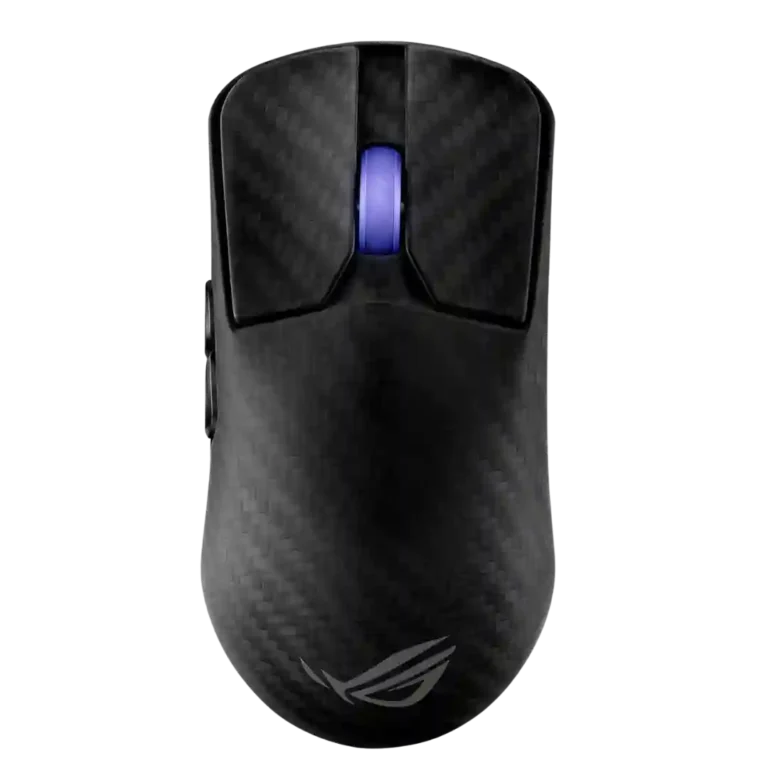
The ROG Harpe Ace Extreme is a showcase mouse: extremely light, stiff, fast, and loaded with enthusiast extras. Across the reviews, its strongest case is the combination of a sub-50g carbon-fiber shell, accurate AimPoint Pro sensor, high polling-rate support, and a premium accessory bundle. The tradeoff is that the experience does not scale as cleanly as the price. Battery life drops hard at high polling, the software can be annoying, and the shape divides reviewers more than the technical performance does. It makes the most sense for players who already like the Harpe Ace shape and want the most premium version of it.

What Reviewers Agree On

The clearest praise centers on performance and construction. Reviewers repeatedly describe the ROG Harpe Ace Extreme as very light for its size, with a carbon-fiber top shell that feels stiff, premium, and visually distinctive. The sensor is treated as a flagship part: tracking is called accurate, responsive, consistent, and suitable for fast FPS play. High polling-rate support is also a major part of the appeal, especially through the included booster, though several reviewers suggest the real-world advantage of 8K is small compared with the battery cost.

The comfort picture is more divided. The symmetrical shape works well for many claw users and some fingertip or palm users, especially with medium to large hands. Smaller-hand reviewers, or reviewers who prefer shorter shapes, often find the mouse long, awkward, or less natural. Side buttons are another split point: some reviewers praise their tactility, while others call them small, far forward, loud, or harder to reach. The scroll wheel lands in the same mixed zone, with some praise for defined steps and some complaints about stiffness or ordinary feel.

The biggest tradeoff is value. The mouse delivers premium materials, low weight, strong wireless performance, glass and PTFE skates, a case, and extensive controls, but the price is repeatedly described as niche, extreme, or hard to justify. Software is useful but uneven, with praise for Armoury Crate Gear being simpler than Armoury Crate and criticism for pop-ups, setup friction, or bugs. Buyers most likely to be satisfied are competitive mouse enthusiasts who already know they like this shape, care about premium materials, and can tolerate paying far more for refinement than for basic functionality.

Pros

  • 5.0
    based on 6 reviews
    Accuracy and tracking precision: 5.0, based on 6 reviews
    Tracking accuracy is one of the strongest areas: reviewers describe the sensor as accurate, precise, consistent, and difficult to disrupt across testing and gameplay.
  • 5.0
    based on 5 reviews
    switch durability: 5.0, based on 5 reviews
    Switch durability is strongly supported by repeated 100-million-click optical switch ratings. This is one of the clearest durability claims in the reviews.
  • 5.0
    based on 4 reviews
    click latency: 5.0, based on 4 reviews
    Click latency is presented as very low, helped by optical switches and high polling modes. Measurements and subjective comments support fast response, with little reason to worry about delay.
  • 5.0
    based on 3 reviews
    durability over time: 5.0, based on 3 reviews
    Durability evidence centers on structural integrity, carbon-fiber strength, and 100-million-click optical switches. Long-term field wear is not deeply tested, but the stated and observed durability signals are strong.
  • 5.0
    based on 2 reviews
    acceleration control: 5.0, based on 2 reviews
    Sensor acceleration handling is documented through repeated 50G acceleration specifications. The reviews support strong acceleration capability, though they do not describe a separate user-facing acceleration tuning feature.
  • 5.0
    based on 2 reviews
    onboard memory: 5.0, based on 2 reviews
    Onboard memory is supported by reviews noting saved profiles and the ability to configure settings once, then use the mouse without keeping software open.
  • 5.0
    based on 2 reviews
    surface compatibility: 5.0, based on 2 reviews
    Surface compatibility is strong, with reviews citing hard, soft, glass, cloth, wood, and calibration support. The sensor is repeatedly described as reliable across surfaces.
  • 5.0
    based on 1 review
    profile switching: 5.0, based on 1 review
    Profile switching is supported through onboard profiles and hardware combinations. Reviews cite up to five stored profiles and mouse-based profile changes.
  • 5.0
    based on 11 reviews
    sensor performance: 5.0, based on 11 reviews
    Sensor performance is consistently excellent. Reviews cite the AimPoint Pro/PAW3950-class sensor, high DPI, accuracy, responsiveness, and reliable performance.
  • 4.9
    based on 9 reviews
    button responsiveness: 4.9, based on 9 reviews
    Button responsiveness is generally strong, with many reviews praising precise, brisk, instant, or consistent actuation. One review reports a left-click pre-travel defect, so the evidence is strong but not perfectly uniform.
  • 4.9
    based on 10 reviews
    DPI range: 4.9, based on 10 reviews
    The DPI/CPI ceiling is repeatedly cited at 42,000, with several reviews also discussing fine adjustment steps. The range is clearly flagship-level.
  • 4.9
    based on 13 reviews
    weight: 4.9, based on 13 reviews
    Weight is a core strength. Reviews repeatedly cite 46-48g figures and emphasize the sub-50g feel, especially for a non-perforated carbon-fiber mouse.
  • 4.9
    based on 8 reviews
    materials quality: 4.9, based on 8 reviews
    Materials quality is one of the defining strengths. Reviews repeatedly highlight the carbon-fiber shell, premium construction, and stronger/lighter material story.
  • 4.9
    based on 7 reviews
    Bluetooth support: 4.9, based on 7 reviews
    Bluetooth is repeatedly confirmed as present alongside 2.4GHz and wired modes. Reviewers treat it as a convenience mode rather than the main gaming connection.
  • 4.8
    based on 6 reviews
    2.4GHz connectivity: 4.8, based on 6 reviews
    Reviews consistently identify 2.4GHz wireless as the main performance connection, often tied to the Omni receiver or polling-rate booster. The mode is treated as the best route for high polling and gaming responsiveness.
  • 4.8
    based on 13 reviews
    polling rate: 4.8, based on 13 reviews
    Polling-rate support is a standout feature, with repeated 8,000Hz references over wireless and, in some reviews, wired mode with the booster. Higher polling trades off heavily with battery life.
  • 4.8
    based on 4 reviews
    balance and weight distribution: 4.8, based on 4 reviews
    Balance is described positively where tested, with reviewers noting solid balance and excellent weight distribution that does not tilt when lifted.
  • 4.8
    based on 4 reviews
    FPS gaming suitability: 4.8, based on 4 reviews
    FPS suitability is strong. Reviews repeatedly position the mouse around fast shooters, esports, low weight, fast inputs, and accurate tracking.
  • 4.7
    based on 7 reviews
    premium feel: 4.7, based on 7 reviews
    Premium feel is strong in packaging, carbon fiber, accessories, and presentation. Some reviewers still feel the price makes the premium treatment hard to justify.
  • 4.7
    based on 6 reviews
    wireless latency: 4.7, based on 6 reviews
    Wireless latency is generally praised as very low through high polling, optical switches, and solid receiver performance. Some reviewers caution that 8K benefits are small.
  • 4.6
    based on 7 reviews
    portability: 4.6, based on 7 reviews
    Portability is strong because many reviews mention the carrying case, travel case, or accessory storage. The missing onboard dongle slot is offset by the included case.
  • 4.6
    based on 12 reviews
    build quality: 4.6, based on 12 reviews
    Build quality is a major strength in most reviews, especially the stiff carbon-fiber top shell, tight buttons, and lack of creaking or flex. A few critiques focus on the nylon/plastic lower section rather than structural weakness.
  • 4.6
    based on 9 reviews
    wireless performance: 4.6, based on 9 reviews
    Wireless performance is broadly strong, with praise for stable, responsive 2.4GHz operation and high polling. One review reports disconnects, but most evidence is positive.
  • 4.5
    based on 8 reviews
    glide smoothness: 4.5, based on 8 reviews
    Glide is a clear strength. PTFE and glass feet are described as smooth, fast, and low-friction, although glass feet may require adjustment.
  • 4.5
    based on 6 reviews
    button customization: 4.5, based on 6 reviews
    Button and performance customization are well supported through Armoury Crate Gear, Armoury Crate, and hardware controls. Reviewers cite remapping, DPI, polling, lift-off, lighting, and related adjustments.
  • 4.5
    based on 2 reviews
    motion consistency: 4.5, based on 2 reviews
    Motion consistency is supported by consistent sensor tracking, Motion Sync, stable polling, and smooth wireless behavior. One source notes Motion Sync is not user-configurable.
  • 4.3
    based on 4 reviews
    connection stability: 4.3, based on 4 reviews
    Connection stability is mostly praised through stable wireless and strong receiver performance, but one review reports wireless disconnects during gameplay, making this a generally strong but not flawless area.
  • 4.2
    based on 11 reviews
    scroll wheel quality: 4.2, based on 11 reviews
    Scroll wheel quality is mixed-to-good. Several reviews praise defined steps and tactility, while others find it stiff, small, recessed, or unremarkable.
  • 4.2
    based on 9 reviews
    lift-off distance: 4.2, based on 9 reviews
    Lift-off distance is well covered through software and hardware controls. Reviews mention LOD adjustment, low/high settings, and surface calibration.
  • 4.2
    based on 8 reviews
    switch feel: 4.2, based on 8 reviews
    Switch feel is generally strong, with reviewers praising tactile, crisp, clicky, and consistent feedback. A minority find the clicks heavier, squishier, or not best-in-class.
  • 4.1
    based on 7 reviews
    left and right click quality: 4.1, based on 7 reviews
    Left and right click quality receives strong praise in many reviews for tightness, tactility, and minimal wobble. A few units or reviewers report pre-travel, squishiness, or a defect, so results are not unanimous.
  • 4.0
    based on 7 reviews
    claw grip comfort: 4.0, based on 7 reviews
    Claw grip support is broadly positive, especially for medium to large hands. Several reviewers identify claw as a natural fit, though smaller hands may find the mouse long or awkward.
  • 4.0
    based on 5 reviews
    cable flexibility: 4.0, based on 5 reviews
    Cable impressions are mixed. Several reviews call the paracord-style cable flexible or lightweight, while others say it is stiff or not especially good.
  • 4.0
    based on 3 reviews
    ergonomic design: 4.0, based on 3 reviews
    Ergonomics are shape-dependent. The mouse is often comfortable for larger hands and safe grip styles, but some reviewers find the hump, length, or button height awkward.
  • 4.0
    based on 1 review
    ecosystem integration: 4.0, based on 1 review
    Ecosystem integration appears through the Omni receiver, shared ASUS dongle support, Armoury software, and ROG peripherals. Reviewers mention the benefit, though some question how many users will need it.
  • 3.9
    based on 6 reviews
    fingertip grip comfort: 3.9, based on 6 reviews
    Fingertip comfort is supported for some hands, but not universally. Larger hands or certain grip styles fare better; smaller-hand reviewers sometimes find the mouse too long.
  • 3.9
    based on 11 reviews
    side button quality: 3.9, based on 11 reviews
    Side button quality is one of the most divided areas. Some reviews praise tactility and implementation, while others find the buttons too small, too far forward, loud, or less accessible.
  • 3.9
    based on 4 reviews
    charging convenience: 3.9, based on 4 reviews
    Charging is handled through USB-C and wired operation. Reviews describe it as functional and convenient enough, though wired mode can have polling-rate limits depending on setup.
  • 3.8
    based on 9 reviews
    grip texture: 3.8, based on 9 reviews
    Grip texture is mixed. Carbon fiber is often grippy or secure, but the nylon/plastic sides can feel slippery to some reviewers, making included grip tape useful.
  • 3.8
    based on 2 reviews
    long-session comfort: 3.8, based on 2 reviews
    Long-session comfort depends on hand size and grip. Some reviews mention prolonged comfort, while others cite fatigue, palm irritation, or awkward shape details.
  • 3.7
    based on 9 reviews
    shape comfort: 3.7, based on 9 reviews
    Shape comfort is divisive. The safe symmetrical shape works for many, especially larger hands, but multiple reviewers find it too long, awkward, or not ideal for their grip.
  • 3.7
    based on 3 reviews
    programmable buttons: 3.7, based on 3 reviews
    Programmable controls are supported, but quantity is modest. Reviewers cite five to seven programmable inputs depending on whether scroll directions are counted.
  • 3.6
    based on 10 reviews
    battery life: 3.6, based on 10 reviews
    Battery life is usable but not class-leading. Several reviews cite 70-hour 2.4GHz figures at 1,000Hz, while high polling and RGB reduce runtime substantially.
  • 3.5
    based on 3 reviews
    handedness options: 3.5, based on 3 reviews
    The shape is symmetrical, but handedness is limited by side-button placement. Reviews support basic ambidextrous hand feel while noting practical right-hand bias.

Cons

  • 3.4
    based on 7 reviews
    palm grip comfort: 3.4, based on 7 reviews
    Palm grip comfort is mixed. Some larger-hand reviewers can palm or relaxed-palm it, while others say the mouse is short, irritating, or less suitable for palm use.
  • 3.4
    based on 6 reviews
    RGB features: 3.4, based on 6 reviews
    RGB is limited to the scroll wheel. Reviews confirm lighting is present and configurable, but repeatedly frame it as basic or restrained rather than elaborate.
  • 3.2
    based on 9 reviews
    software usability: 3.2, based on 9 reviews
    Software usability is mixed. The lighter Gear app is simpler and useful, but several reviewers still call the software overkill, annoying, complicated, or frustrating.
  • 3.1
    based on 5 reviews
    click noise: 3.1, based on 5 reviews
    Click noise is mixed. Some reviewers find the clicks pleasant or not annoying, while others describe the switches or side buttons as loud.
  • 3.0
    based on 3 reviews
    debounce customization: 3.0, based on 3 reviews
    Debounce support is mixed in a narrow way: optical switches allow very low debounce behavior, but multiple reviews note no user-adjustable debounce setting.
  • 3.0
    based on 1 review
    firmware reliability: 3.0, based on 1 review
    Firmware reliability is mixed because at least one reviewer received updates quickly but also saw sporadic 8K wireless shutoff behavior. The evidence points to active support with some remaining rough edges.
  • 2.5
    based on 1 review
    skate durability: 2.5, based on 1 review
    Skate durability evidence is limited and cautious. One review warns glass feet can wear quickly, so smoothness is clearer than long-term skate durability.
  • 2.4
    based on 4 reviews
    software stability: 2.4, based on 4 reviews
    Software stability is inconsistent. Reviewers appreciate lighter Armoury Crate Gear, but report pop-ups, installation confusion, download problems, and troubleshooting.
  • 2.2
    based on 10 reviews
    value for money: 2.2, based on 10 reviews
    Value for money is the largest weakness. Nearly every review treats the mouse as expensive or niche, with some calling it hard to justify despite strong performance.

FAQ

Is the ROG Harpe Ace Extreme worth buying?

It is worth considering for enthusiasts who want a very light carbon-fiber Harpe Ace with flagship sensor performance and high polling support. Reviews repeatedly say the price is hard to justify for most buyers.

Who is the ROG Harpe Ace Extreme best for?

It best fits competitive FPS players and mouse enthusiasts with medium to large hands who like the Harpe Ace shape, claw grip, low weight, and premium materials.

What is the main drawback?

The price is the clearest drawback. Reviews also point to software friction, mixed side-button placement, shape sensitivity, and reduced battery life at high polling rates.

How good is the sensor performance?

The reviews are consistently positive on the AimPoint Pro sensor. They describe accurate tracking, high responsiveness, strong surface handling, and performance suitable for fast shooters.

Does 8,000Hz polling matter?

The mouse supports very high polling with the booster, and reviewers confirm it works. Several also note that the practical improvement can be small while battery drain increases significantly.

Is it comfortable for small hands?

Small-hand comfort is not its strongest use case. Multiple reviewers say the mouse feels better for medium to large hands, and some found the length, hump, or side buttons awkward.

How is the battery life?

Battery life is acceptable at standard 1,000Hz wireless settings, with many reviews citing around 70 hours without RGB. At 8,000Hz, reviewers describe much shorter runtimes.

Reviews we analyzed

Video Reviews

Article Reviews

#1
4.4
Choose the Harpe II Ace for ultralight FPS control, 8K wireless, and easy web setup. Skip it if you need many buttons or...
Pros: polling rate, weight, wireless performance, DPI range, switch durability, sensor performance, motion consistency
Cons: onboard memory, MMO gaming suitability, software stability, profile switching
#2
4.4
Choose it if you want a compact, comfortable work-and-play mouse with strong wireless options and battery life. Skip it if you want true...
Pros: switch durability, wireless performance, wireless latency, ecosystem integration, glide smoothness, Accuracy and tracking precision, DPI range
Cons: click noise, RGB features
#3
4.3
Choose the LAMZU Maya X for a very light, precise claw-grip wireless mouse. Skip it if stiff side buttons or faster battery drain...
Pros: click latency, weight, Accuracy and tracking precision, sensor performance, polling rate, wireless performance, glide smoothness
Cons: cable flexibility, click noise, charging convenience, fingertip grip comfort, side button quality
#4
4.3
Choose the ASUS ROG Harpe Ace Mini for ultra-light, accurate esports play in a compact shape. Skip it if you need larger-hand palm...
Pros: weight, sensor performance, DPI range, battery life, switch durability, FPS gaming suitability, connection stability
Cons: software stability, debounce customization, handedness options