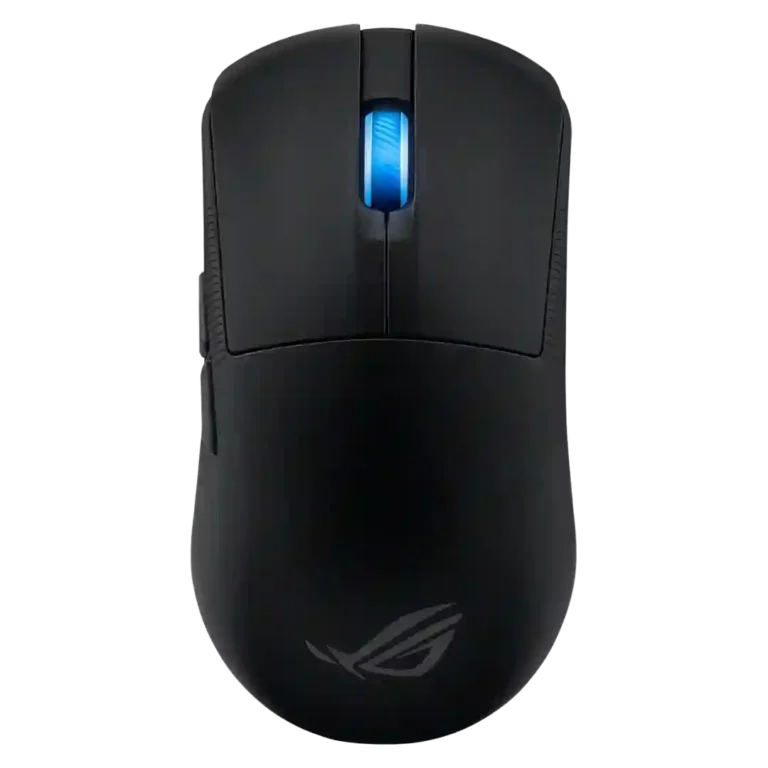
- Worse: DPI and weight TechRadar said the Cobra Pro is the closest size rival but has lower DPI and more weight.
- Better: RGB and battery life Trusted Reviews said the Razer Cobra Pro offers more RGB options and slightly better battery life.
ASUS ROG Harpe Ace Mini Review
Bottom Line
Choose the ASUS ROG Harpe Ace Mini if you want a very light, compact esports mouse with precise tracking and strong battery life. Skip it if you need left-handed buttons, richer software, or 8K polling without an extra accessory.
Best for competitive or FPS-focused gamers with small to medium hands who want a very light wireless mouse, precise tracking, strong battery life, and claw or fingertip comfort.
Not for left-handed users, large-hand palm grippers, or buyers who want stronger software, more productivity buttons, or 8K polling included in the box.
The ASUS ROG Harpe Ace Mini comes across as a compact esports mouse that gets the fundamentals right: low weight, strong sensor performance, smooth glide, long battery life, and flexible wired, 2.4GHz, and Bluetooth connectivity. Reviewers repeatedly praised its small-hand comfort, claw and fingertip fit, precise tracking, and tactile optical switches. The tradeoff is that its best polling-rate capability depends on a separately purchased booster, and Armoury Crate varies from useful to clunky depending on the reviewer. Its right-hand-favoring side-button layout and compact body also make it less universal for left-handed users, large hands, and palm-grip players.
Compared in Reviews
Products reviewers directly compared with this model, grouped into quick takeaways.
- Worse: esports mouse value and equipment PCMag said the Harpe Ace Mini costs less than the prior pick while being better equipped.
- Worse: size and DPI ceiling PCMag said it is smaller than the Katar Elite Wireless and has a more sensitive sensor.
Feature Scorecards
Pros
-
Cable flexibility was strongly praised where mentioned, with reviewers calling the included paracord highly flexible or thin and high quality.
-
Weight was one of the strongest positives, with nearly every review emphasizing the sub-50g or 49g class and its easy, fast movement.
-
Switch durability was well supported by the 100-million-click optical-switch rating and reduced double-click-risk commentary.
-
Sensor performance was a major strength, repeatedly tied to the AimPoint Pro sensor, high DPI ceiling, precise tracking, and reliable gaming performance.
-
Battery life drew broad praise, with reviewers citing 105-139 hour claims, weekslong practical impressions, and strong endurance for such a light mouse.
-
Bluetooth support was widely confirmed as part of the tri-mode design and was repeatedly described as easy, convenient, or useful for non-gaming devices.
-
DPI range was repeatedly supported by the 42,000 DPI/CPI ceiling and, in some cases, preset or adjustable DPI controls.
-
Left and right click quality was positive, with tactile, comfortable, and well-implemented main clicks noted in several reviews.
-
Wireless performance was praised for reliability, top-level responsiveness, SpeedNova 2.4GHz behavior, and consistently great performance.
-
Cross-platform or multi-device flexibility was supported by wired, Bluetooth, and 2.4GHz modes, plus evidence of use across Windows, MacBook, work, gaming, and mobile setups.
-
FPS gaming suitability was strongly supported through esports positioning, Counter-Strike, Valorant, Apex, pro-FPS references, and emphasis on precision.
-
Long-session comfort was supported by one review that explicitly connected the shape to extended gaming-session comfort.
-
Accuracy was one of the strongest themes, with reviewers describing the mouse as fast, precise, pixel-perfect, and reliable in shooting-game or tracking tests.
-
Reviewers consistently documented 2.4GHz wireless as a core mode, usually tied to the included receiver, SpeedNova/RF language, or quoted battery figures.
-
Surface compatibility was strong, with reviewers citing mousepad calibration, different-surface configuration, glass/nylon pad use, and tracking on almost any surface.
-
Glide smoothness was praised through pure PTFE feet, smooth pad movement, slick slide pads, and positive comments on the included skates.
-
Button responsiveness was praised across reviews, especially for tactile clicks, bouncy buttons, spam-click ease, and solid click implementation.
-
Switch feel was positive overall, with tactile and responsive optical switches, crisp button feel, and safer optical switch implementation noted.
-
Fingertip grip comfort was consistently positive where discussed, with reviewers saying the shape supports fingertip use and keeps fingers naturally placed.
-
Claw grip comfort was one of the best-supported fit attributes, with multiple reviewers saying the small shape suits claw grip users and pro-FPS play.
-
Grip texture was broadly praised, with reviewers citing ridged sides, grip tape, grippy coating, rubber grips, and textured matte surfaces.
-
Click latency evidence was positive, with reviewers citing NVIDIA Reflex measurement, optical-switch speed, latency reduction, and low click-latency behavior.
-
Charging convenience was supported by USB-C charging, fast charging, and the included braided cable or extender accessories.
-
Build quality was generally praised as sturdy, solid, and well put together despite the very low weight and compact shell.
-
Premium feel was generally positive, with reviewers describing the mouse as impressive, masterful, premium-feeling, and solid despite its simple design.
-
Side button quality was positive overall, with reviewers praising placement, programmable side buttons, satisfying side clicks, and easy thumb activation.
-
Connection stability was generally positive, with evidence around secure dongle fit, reduced signal-dropout risk, easy pairing, lag-free connectivity, and problem-free modes.
-
Motion consistency was strong in most testing, with several reviewers citing smooth or consistent tracking, though one saw high-DPI rattling and severe jitter at unrealistic settings.
-
Wireless latency evidence was generally positive through low-latency 2.4GHz RF, SpeedNova precision, booster latency reduction, and lag-free connectivity.
-
Lift-off distance was configurable where mentioned, with onboard or software options for LOD adjustment.
-
Skate durability evidence centered on slick slide pads and included larger or replacement skates, with generally positive comments but little direct wear testing.
-
Portability was a strength because reviewers called it compact, travel-friendly, small, lightweight, and easy to take on the go.
-
Shape comfort was strong for smaller hands and compact-grip preferences, but reviewers cautioned that the small, less curved shape may not suit everyone.
-
Button customization was supported by Armoury Crate or Armoury Crate Gear, with reviewers noting button remapping and assignment controls, though some disliked the software.
-
Ecosystem integration was supported through the ROG Omni receiver, single-dongle multi-device pairing, Aura Sync, and compatibility with other ROG peripherals.
-
Profile switching was supported by five-profile configuration and onboard profile-switching controls, though Pokde found the control method clunky.
-
Onboard memory and controls were supported by profile controls, memory profiles, and on-the-go settings access.
-
Programmable buttons were supported by evidence of programmable side buttons, remappable buttons, and five programmable buttons.
-
Acceleration-related evidence was positive overall: reviewers cited zero acceleration or jitter, 50G acceleration capability, and software angle-snapping or tuning options.
-
MMO gaming suitability was lightly supported by one review that included MMORPG games among use cases, but evidence was much thinner than for FPS.
-
MOBA gaming suitability was lightly supported by one review that explicitly listed MOBA games among suitable genres.
-
Polling-rate evidence was mixed: reviewers noted standard 1,000Hz operation and optional 8,000Hz support, but repeatedly criticized the separate booster requirement.
-
Durability over time was mostly positive because of optical-switch lifespan and sturdy build, but one travel-use review reported visible finish scuffing.
-
Ergonomic design was mixed: smaller-handed users found the frame comfortable, while one review said the semi-symmetrical shape gives up some ergonomic specificity.
-
Balance evidence was limited but split: one reviewer found it slightly back-weighted, while another said the balance felt spot on.
-
Value was mixed-to-positive: several reviewers liked its price relative to rivals or sales, while others still called $130 expensive or not cheap.
-
Scroll wheel quality was mixed: some liked the resistance or steps, while others found it stiff, soft, or tighter than the larger model.
-
Palm grip comfort was context-dependent: small-handed reviewers could palm it comfortably, while larger-hand or palm-first users were cautioned.
-
Software usability was divided: reviewers valued Armoury Crate Gear and tuning options but often criticized Armoury Crate as clunky, difficult, large, or outdated.
-
RGB features were intentionally minimal, with nearly all evidence pointing to a single scroll-wheel lighting zone and software-controlled effects.
-
Materials quality was mixed: reviewers cited bio-based nylon and premium-feeling coatings, but also noted a finish that scuffed or held fingerprints.
Cons
-
Macro support was limited because one review said macro settings required the fuller Armoury Crate and Aura Sync software rather than just the lighter utility.
-
Software stability was a weakness where directly tested, especially with reported connection and setting-change errors.
-
Handedness was a clear limitation: reviewers repeatedly noted side buttons on the left and right-hand-favoring design despite some symmetrical or ambidextrous shaping.
-
Debounce customization was weak: one reviewer specifically noted the software did not allow bounce-setting adjustment.
Compared With Category Average
Compared with other Gaming Mouse, this product is above average in Bluetooth support, cable flexibility, RGB features, below average in debounce customization, macro support.
| Attribute | This product | Category average | Difference |
|---|---|---|---|
| Bluetooth support | 4.7 | 3.2 | +1.5 |
| debounce customization | 2.0 | 3.6 | -1.6 |
| cable flexibility | 4.8 | 3.6 | +1.2 |
| macro support | 3.2 | 4.3 | -1.1 |
| RGB features | 4.0 | 3.1 | +0.8 |
| fingertip grip comfort | 4.6 | 3.7 | +0.9 |
| skate durability | 4.5 | 3.5 | +1.0 |
| weight | 4.8 | 4.1 | +0.7 |
FAQ
Is the ASUS ROG Harpe Ace Mini good for FPS games?
Yes. Multiple reviewers tied it to esports or FPS use because of its light weight, accurate sensor, fast clicks, and compact control.
Who is the shape best suited for?
The review evidence points most strongly to small and medium hands, especially claw and fingertip grip users. Palm grip can work for some small-handed users, but larger hands were repeatedly cautioned.
Does it support 8,000Hz polling?
Yes, but reviewers repeatedly noted that the higher polling rate requires ASUS's separate Polling Rate Booster. Without it, the mouse is generally discussed around standard 1,000Hz operation.
How is the battery life?
Reviewers were positive about battery life, citing long official ratings and practical impressions ranging from several days to weeks depending on use and connection mode.
Is the software good?
The software is useful for remapping, DPI, RGB, surface calibration, and profiles, but opinions were mixed. Several reviewers called Armoury Crate clunky, difficult, large, or unreliable.
Is it good for left-handed users?
Not really. Several reviews noted that the shell is symmetrical or semi-ambidextrous, but the side buttons are on the left, so the mouse favors right-handed users.
Consider This Instead
If you want better debounce customization
Choose Glorious Model D3. It scores 4.9 vs 2.0 for debounce customization, with a 4.4 overall score.
If you want better handedness options
Choose Logitech G Pro 2 Lightspeed. It scores 4.8 vs 2.6 for handedness options, with a 4.1 overall score.
If you want better software stability
Choose ASUS ROG Gladius III Wired. It scores 4.7 vs 2.7 for software stability, with a 4.2 overall score.
If you want better macro support
Choose Razer Basilisk V3 Pro 35K. It scores 4.9 vs 3.2 for macro support, with a 4.5 overall score.
Overall Top Gaming Mouse Alternatives
Best for a 47g, high-performance 8K wireless mouse with excellent shape, skates, clicks, and web controls. Skip it if stiff side buttons, shorter high-polling battery life, or app/cable quirks would...
Pros: Accuracy and tracking precision, sensor performance
Cons: cable flexibility
Choose it if you want a comfortable, feature-rich wireless mouse for mixed gaming and productivity. Skip it if you need ultralight FPS speed, left-handed support, or better value than discounted...
Pros: programmable buttons, Bluetooth support
Cons: handedness options, firmware reliability
Good if you want an ultra-light esports mouse with 8K wireless, precise tracking, and web setup. Skip it if you need MMO buttons, onboard memory, large-hand palm support, or the...
Pros: polling rate, click latency
Cons: onboard memory, tilt gesture controls
Good if you want ergonomic wireless gaming with hot-swappable batteries and strong tuning. Skip it if price, dock clutter, or short 8K battery life matters most.
Pros: switch durability, DPI range
Cons: grip texture, portability