- Better: price and compactness PCMag suggested the Pulsefire Haste 2 is cheaper, similarly capable, and more compact.
Turtle Beach Kone II Review
Bottom Line
Choose the Turtle Beach Kone II if you want a large, comfortable wired mouse with strong customization, smooth glide, and easy extra commands. Skip it if you have small hands or want an ultralight FPS mouse.
Best for right-handed gamers with medium-to-large hands who want comfort, many remappable controls, a 4D wheel, RGB, and MMO or productivity utility from a wired mouse.
Not for left-handed users, small-handed players, frequent laptop travelers, or competitive FPS players who prioritize the lightest and most nimble mouse possible.
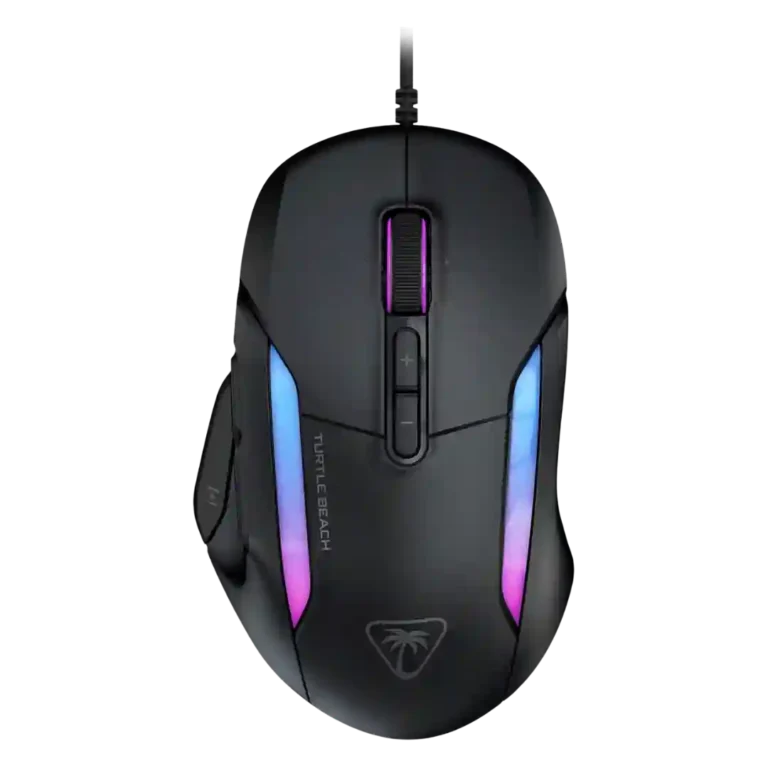
Reviewers consistently frame the Turtle Beach Kone II as a large, right-handed wired mouse that leans into comfort, utility, and customization rather than ultralight esports minimalism. Its strongest evidence centers on the ergonomic shell, easy side and Easy-Shift controls, 4D tilt wheel, 26K Owl-Eye sensor, smooth PTFE glide, RGB lighting, and Swarm II remapping/macros. The tradeoff is size: several reviewers praised the fit for medium-to-large hands while warning that small hands, fingertip grip users, left-handed players, and serious competitive FPS players may find it bulky or less nimble. A few notes on tracking feel, software layout, cable braiding, and price temper the enthusiasm, but the overall evidence supports a versatile, comfortable wired gaming mouse with strong everyday and MMO-style utility.
Compared in Reviews
Products reviewers directly compared with this model, grouped into quick takeaways.
- Worse: weight among MMO-style mice PCWorld described the Kone II as lighter than many MMO options, including the Basilisk V3.
- Better: competitive FPS agility IGN treated the Razer Deathadder V3 as more competition-focused than the bulkier Kone II.
Feature Scorecards
Summary
49 reviewed features- Very positive 4.5-5.0 47% 23 features
- Positive 3.5-4.4 45% 22 features
- Neutral 2.5-3.4 6% 3 features
- Negative 1.5-2.4 2% 1 feature
- Very negative below 1.5 0% 0 features
Pros
-
Switch durability is supported by repeated references to TITAN optical switches rated for 100 million clicks.
-
MMO suitability is strong in the reviews that discuss it, especially because Easy-Shift and extra commands suit games like Final Fantasy XIV and WoW.
-
Surface compatibility is positive where tested, with reviewers reporting smooth use on cloth, hard, wooden, marble, couch-arm, and mouse-pad surfaces.
-
Durability over time is supported mainly by the optical switch rating and a review claim that it should survive many gaming sessions.
-
Programmable button coverage is very strong, with reviews repeatedly citing 7 buttons, 10 programmable inputs, or up to 23 functions.
-
Onboard memory is directly supported by PCMag and IGN through profile or onboard-profile references.
-
Tilt gesture controls are a clear feature strength, with the 4D wheel repeatedly described as side-clicking or tilting for extra inputs.
-
Left and right clicks are described as strong, snappy, uniform, and responsive in the reviews that discuss them directly.
-
Click latency evidence is positive overall, with fast actuation, wired latency advantages, and responsive switch behavior.
-
Glide smoothness is strongly supported by PTFE feet and repeated reports of smooth, low-friction movement.
-
Customization is a major consensus strength thanks to Easy-Shift, remapping, button assignments, and extensive Swarm II controls.
-
Ergonomic design is a central strength, repeatedly praised through the thumb rest, grooves, large shape, and comfort-first shell.
-
Button responsiveness is a strength, with reviewers repeatedly calling clicks fast, responsive, satisfying, or well balanced.
-
Multiple reviews confirm a 26K DPI ceiling and software-adjustable DPI steps, giving the Kone II a wide sensitivity range.
-
Side buttons and thumb controls are mostly praised for placement and access, with a few caveats about accidental presses or average-sized thumbs.
-
Lift-off distance appears as a software-adjustable sensor setting in the TweakTown review.
-
Reviewers mostly found tracking accurate and precise, though one review noted a subtle issue in very fine pixel-perfect movements.
-
RGB is widely covered and generally positive, with multi-zone lighting, AIMO effects, color controls, and functional DPI color cues.
-
Ecosystem integration is supported through AIMO, Swarm II, and syncing or managing other Turtle Beach devices.
-
The 26K Owl-Eye sensor was generally praised as responsive, dependable, and competitive, with one dissenting review finding it less smooth than expected.
-
Most reviewers found motion consistent, smooth, and issue-free, although competitive FPS movement was not always considered nimble.
-
Switch feel is generally crisp, tactile, and satisfying, although one review found the Kone II slightly mushier than the Burst II Air.
-
Profile switching evidence is present but narrower, mainly around different profiles and Photoshop-oriented profile use.
-
Macro support is clearly available through Swarm II, including game-specific and productivity-oriented macro assignments.
-
Swarm II usability is mostly positive because it is clean, modern, and easy to customize, although one review disliked parts of the interface.
-
Cable comments are mostly positive, especially around PhantomFlex softness and low drag, with one minor complaint about fuzzy braiding.
-
Long-session comfort is mostly strong because the ergonomic shape reduces strain, though one reviewer with medium hands noticed fatigue.
-
Palm grip comfort is well supported, with several reviewers saying palm grip works well or is the most natural fit.
-
Claw grip is also well supported, though some reviewers frame the mouse as more relaxed claw than aggressive claw.
-
Shape comfort is one of the strongest themes, especially for large hands, while small-hand fit remains the main limitation.
-
Debounce customization is repeatedly visible in Swarm II controls, though the reviews mostly mention it as a setting rather than test it deeply.
-
Software controls such as angle snapping, motion sync, smoothing, and acceleration-related settings give users some control over motion behavior.
-
Value is broadly positive at the wired model’s price, though some reviewers still wanted a lower price or saw cheaper alternatives.
-
Build quality is generally strong, with solid feel and robust construction, though one reviewer noticed creaking around the wheel area.
-
Software stability has limited but positive evidence, with one review saying the mouse works well even without using Swarm II.
-
Firmware reliability evidence focuses on update handling and firmware setup rather than long-term failures; the signal is useful but not deep.
-
MOBA suitability has limited but relevant support through game-profile and programmable-function references for League of Legends.
-
Premium feel is limited but supported by robust build quality and ample RGB, placing it more mid-range than luxury.
-
The scroll wheel earns praise for tactile feedback and 4D functionality, though one review disliked the lack of dual-mode scrolling.
-
Grip texture is mixed: the shell has some stickiness and grip tape helps, but smooth or hard grip surfaces can feel slippery to some reviewers.
-
The Kone II is consistently described around a 1,000Hz polling ceiling, with software controls for polling adjustments.
-
Materials are acceptable to good, with matte plastic and a clean finish, but cable braiding and plastic feel drew some minor caveats.
-
Fingertip grip evidence is mixed, with some comfort reports but also concern that the mouse is too bulky and heavy for fingertip use.
-
Weight impressions are mixed: the wired Kone II is around 90g and sometimes called light for its size, but not ultralight.
-
Cross-platform compatibility is mixed: Windows support is clear and Xbox plug-and-play is noted, but macOS and non-Windows support are limited.
Cons
-
FPS suitability is mixed: the sensor and buttons work, but size and weight make it less ideal for serious competitive shooters.
-
Click noise is mixed: clicks can sound hollow or louder, which some users may like and others may not.
-
Portability is a weakness because the large wired design was specifically described as not ideal for laptop users.
-
Handedness is a weakness because the body and controls are repeatedly described as right-handed and unsuitable for left-handed users.
Compared With Category Average
Compared with other Gaming Mouse, this product is above average in tilt gesture controls, RGB features, MMO gaming suitability, below average in portability, FPS gaming suitability.
Summary
8 compared features- Above average 0.4+ pts higher 75% 6 features
- Same as average within 0.3 pts 0% 0 features
- Below average 0.4+ pts lower 25% 2 features
| Attribute | This product | Category average | Difference |
|---|---|---|---|
| tilt gesture controls | 4.6 | 2.5 | +2.1 |
| RGB features | 4.5 | 3.2 | +1.3 |
| MMO gaming suitability | 4.7 | 3.4 | +1.3 |
| portability | 2.8 | 4.0 | -1.2 |
| firmware reliability | 4.2 | 3.2 | +0.9 |
| FPS gaming suitability | 3.3 | 4.2 | -0.9 |
| side button quality | 4.5 | 3.8 | +0.7 |
| cable flexibility | 4.4 | 3.6 | +0.8 |
FAQ
Is the Turtle Beach Kone II comfortable for large hands?
Yes. Reviewers repeatedly described the Kone II as especially comfortable for medium-to-large or larger hands, with an ergonomic shell, thumb rest, and grooves that reduce strain.
Is the Kone II good for small hands?
The review evidence says this is the main fit risk. Several reviewers warned that small-handed users may struggle because the mouse is wide, large, and built around a right-handed ergonomic shape.
How does the Kone II perform for FPS games?
Its sensor, switches, and wired response are capable, but reviewers were split on serious FPS use. The bulky size and 90g weight make it less ideal for high-level competitive shooters than lighter, more nimble mice.
Is the Kone II better for MMO or productivity use?
The evidence is stronger for MMO-style and everyday utility than for esports minimalism. Reviewers liked the Easy-Shift function, 4D wheel, programmable buttons, macros, and extra commands for games and work.
Does the Kone II have good software?
Mostly yes. Swarm II was praised for clean customization, profiles, macros, DPI, polling, RGB, debounce, and angle-snapping controls, though one review found parts of the interface wasteful or unintuitive.
Is the Kone II worth the price?
Most reviewers viewed the wired Kone II as a strong value because it offers a 26K sensor, optical switches, RGB, macros, and many programmable functions. A few still wanted a lower price or pointed to cheaper alternatives.
Consider This Instead
If you want better handedness options
Choose Logitech G Pro 2 Lightspeed. It scores 4.8 vs 2.3 for handedness options, with a 4.1 overall score.
If you want better portability
Choose SteelSeries Aerox 9 Wireless. It scores 4.7 vs 2.8 for portability, with a 4.0 overall score.
If you want better FPS gaming suitability
Choose Razer Viper V3 Pro. It scores 4.8 vs 3.3 for FPS gaming suitability, with a 4.0 overall score.
If you want better weight
Choose ASUS ROG Keris II Ace. It scores 5.0 vs 3.8 for weight, with a 4.2 overall score.
Overall Top Gaming Mouse Alternatives
Best for a 47g, high-performance 8K wireless mouse with excellent shape, skates, clicks, and web controls. Skip it if stiff side buttons, shorter high-polling battery life, or app/cable quirks would...
Pros: Accuracy and tracking precision, sensor performance
Cons: cable flexibility
Choose it if you want a comfortable, feature-rich wireless mouse for mixed gaming and productivity. Skip it if you need ultralight FPS speed, left-handed support, or better value than discounted...
Pros: programmable buttons, Bluetooth support
Cons: handedness options, firmware reliability
Good if you want an ultra-light esports mouse with 8K wireless, precise tracking, and web setup. Skip it if you need MMO buttons, onboard memory, large-hand palm support, or the...
Pros: polling rate, click latency
Cons: onboard memory, tilt gesture controls
Good if you want ergonomic wireless gaming with hot-swappable batteries and strong tuning. Skip it if price, dock clutter, or short 8K battery life matters most.
Pros: switch durability, DPI range
Cons: grip texture, portability