If you want better ecosystem integration
Choose Razer Basilisk Mobile. It scores 4.8 vs 2.3 for ecosystem integration, with a 4.1 overall score.
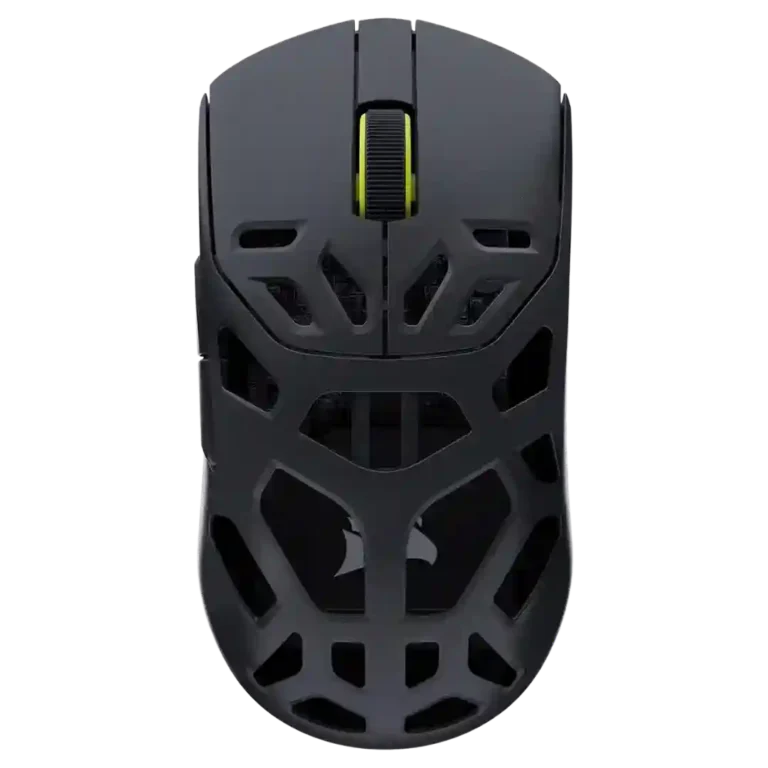
Choose the Corsair Sabre v2 Pro MG for a sturdy, light magnesium mouse with precise wireless performance and strong battery life. Skip it if you want the absolute lightest shell, sculpted ergonomics, flexible wired use, or better value.
Best for competitive FPS players who want a rigid, light magnesium wireless mouse with accurate tracking, strong battery life, and easy browser-based customization. It also suits claw and fingertip users who prefer a safe symmetrical shape.
Not for buyers chasing the absolute lowest weight, deep ergonomic contouring, heavy RGB features, or a polished Corsair iCUE ecosystem experience. It is also a poor fit for anyone planning to play wired often because reviewers found the cable stiff.
Across the reviews, the Corsair Sabre v2 Pro MG comes across as a focused competitive mouse with standout rigidity, accurate tracking, strong wireless response, and useful battery gains over lighter Sabre models. Its magnesium shell earns real praise for strength and a cooler, more premium feel, but that same design brings tradeoffs: it is heavier than the Ultralight, the perforations may not suit palm users or clean-freaks, and the charging cable is repeatedly criticized as stiff. The Web Hub is widely liked for quick browser-based setup, while iCUE separation annoys Corsair ecosystem users. Value is the biggest split, with some calling it worth the money and others seeing the magnesium premium as hard to justify.
Compared with other Gaming Mice, this product is above average in software usability, click noise, polling rate, near average in battery life, claw grip comfort, below average in ecosystem integration, cable flexibility, switch durability.
| Attribute | This product | Category average | Difference |
|---|---|---|---|
| ecosystem integration | 2.3 | 4.2 | -1.9 |
| cable flexibility | 2.0 | 3.6 | -1.6 |
| switch durability | 3.0 | 4.2 | -1.2 |
| surface compatibility | 3.2 | 4.3 | -1.1 |
| software usability | 4.6 | 3.8 | +0.8 |
| click noise | 4.1 | 3.4 | +0.7 |
| palm grip comfort | 3.2 | 3.8 | -0.7 |
| polling rate | 4.5 | 3.9 | +0.6 |
Choose Razer Basilisk Mobile. It scores 4.8 vs 2.3 for ecosystem integration, with a 4.1 overall score.
Choose ASUS ROG Strix Impact III Wireless. It scores 4.7 vs 4.0 for premium feel, with a 4.2 overall score.
Choose ASUS ROG Harpe Ace Mini. It scores 4.8 vs 2.0 for cable flexibility, with a 4.2 overall score.
Choose Logitech G502 X Lightspeed. It scores 4.9 vs 4.2 for button responsiveness, with a 4.2 overall score.
Products reviewers directly compared with this model, grouped into quick takeaways.
Yes. Reviewers repeatedly tied its low weight, precise sensor, responsive wireless mode, and 8,000Hz polling to strong FPS and esports performance.
Most reviewers liked its rigidity, cool touch, and premium impression, but one found the shell feel underwhelming compared with the price.
Palm grip feedback was mixed. One reviewer found enough rear support, while others said the low, perforated shape is better for claw or fingertip grip.
Battery life was widely praised, especially around 1kHz 2.4GHz use. Reviewers noted that 8,000Hz drains it faster, but several still found runtime practical.
Generally yes. Reviews liked the browser-based setup for remapping, profiles, DPI, macros, and sensor options, though iCUE users may dislike the separate workflow.
The repeated downsides are price, a stiff charging cable, mixed side-button feel, less palm-friendly shaping, and possible dust or cleanliness concerns from the large holes.
These are a few of the reviews included in our analysis.

Choose the ROG Harpe II Ace for ultralight FPS play, precise tracking, smooth glide, and web-based tuning. Skip it if you need palm-grip support, MMO buttons, onboard profiles, or long...
Pros: acceleration control, wireless latency
Cons: onboard memory, MMO gaming suitability

Choose it if you want a premium MMO/productivity mouse with 12 adjustable side buttons, strong battery life, and Stream Deck integration. Skip it if you need an ultralight FPS mouse,...
Pros: click latency, macro support
Cons: firmware reliability, tilt gesture controls

Best for ultra-light, competition-focused speed, precise tracking, stable wireless, and long battery life. Skip it if you need quieter clicks, left-handed support, Bluetooth, more buttons, or better value for casual...
Pros: balance and weight distribution, build quality
Cons: dock compatibility, Bluetooth support

Best for precise wireless tracking, smooth glide, strong battery life, and unusually good 8K value. Skip it if you need polished software, quiet snappy clicks, true left-handed controls, or gentle...
Pros: Accuracy and tracking precision, click latency
Cons: software stability, profile switching