- Better: DPI ceiling PCMag said the Model D 2 Pro has a lower DPI ceiling than the Razer DeathAdder V3 Pro.
- Better: ergonomic lightweight mouse benchmark The reviewer still treated Razer's DeathAdder V3 Pro as the ergonomic lightweight benchmark.
- Better: grip texture The reviewer found the Model D 2 Pro shell more slippery than Razer's DeathAdder V3 Pro.
Glorious Model D 2 Pro 4k/8k Review
Bottom Line
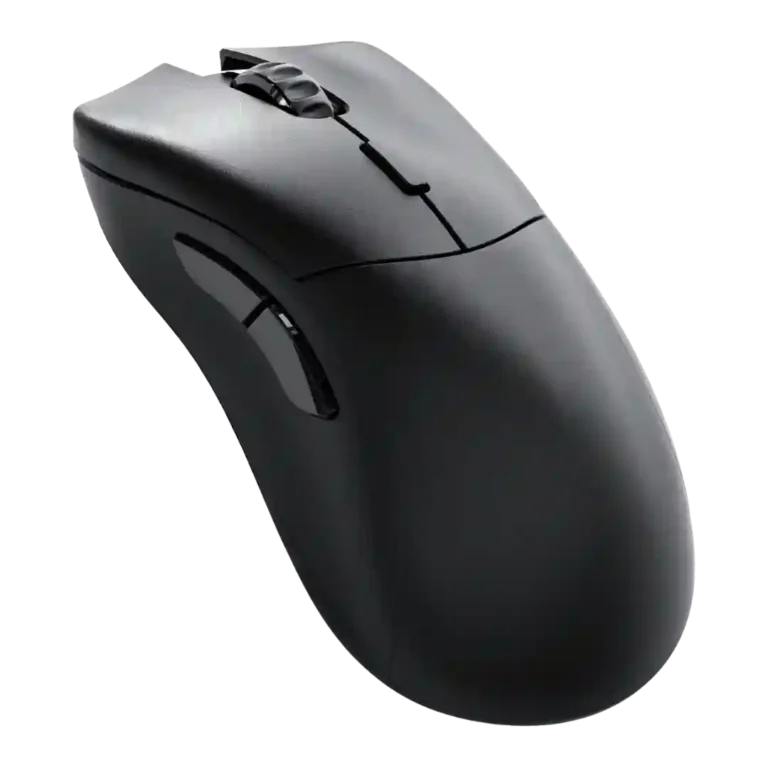
Choose the Glorious Model D 2 Pro if you want a very light right-handed esports mouse with strong tracking and easy software. Skip it if 4K/8K polling, short high-rate battery life, or cheaper-feeling plastics bother you.
Best for right-handed competitive FPS players who prioritize low weight, strong tracking, smooth skates, and high polling-rate options over flashier design or long 4K battery life.
Not for left-handed users, gamers who dislike frequent charging, buyers who want a clearly premium-feeling shell, or anyone unlikely to notice 4K/8K polling gains.
The Glorious Model D 2 Pro 4K/8K is best understood as a focused esports mouse with excellent tracking, low weight, smooth glide, and easy software. Reviewers repeatedly liked the sensor, PTFE feet, right-handed ergonomic shape, and competitive responsiveness. The tradeoff is that its headline polling rate is not universally meaningful: several reviewers could not feel a real difference versus 1,000Hz or 2,000Hz, while high polling sharply reduced battery life. Premium feel, side-button placement, firmware updating, and dongle/charging convenience also drew recurring criticism, making the mouse stronger as a performance tool than as an all-around premium package.
Compared in Reviews
Products reviewers directly compared with this model, grouped into quick takeaways.
- Better: value for money Tom's Guide said the Cherry M68 Pro offers better value for money.
Fnatic x Lamzu Maya 8K
- Better: value for money Tom's Guide said the Fnatic x Lamzu Maya 8K offers better value for money.
Feature Scorecards
Summary
50 reviewed features- Very positive 4.5-5.0 24% 12 features
- Positive 3.5-4.4 40% 20 features
- Neutral 2.5-3.4 22% 11 features
- Negative 1.5-2.4 14% 7 features
- Very negative below 1.5 0% 0 features
Pros
-
The direct click-latency evidence was very positive, with the optical switches described as triggering particularly quickly.
-
Surface compatibility was positive in the direct evidence, including tracking on glass and clear glass.
-
Switch durability evidence was positive but limited to the reviewer’s judgment of the optical switches as durable.
-
Glide smoothness was one of the strongest attributes, with nearly every direct review praising the PTFE feet or smooth movement.
-
Sensor performance was strongly praised for smooth, consistent updates and problem-free tracking across games and surfaces.
-
Reviewers consistently praised tracking and in-game precision, though one noted extreme DPI levels became difficult or unusable.
-
Weight was a major strength, with reviewers repeatedly praising the very light 60-62g body.
-
Reviewers strongly agreed the mouse is suited to FPS and competitive gaming because it is light, accurate, and responsive.
-
Button responsiveness was praised by YouTube reviewers who found the optical switches quick, light, and spammable.
-
The only direct balance judgment was positive, with the reviewer calling the weight balancing solid.
-
The one direct long-session comfort judgment was positive, linking the ergonomic angle to reduced fatigue over marathon play.
-
Customization drew strong praise because Glorious Core made remapping and performance settings easy, with many options available.
-
Build quality was mostly positive, with several reviewers finding the shell sturdy or well built, despite some premium-feel complaints elsewhere.
-
Onboard memory was praised because settings and multiple profiles could be stored without relying on software every time.
-
Profile switching was praised where discussed, especially for quickly changing profiles and swapping settings between PCs or games.
-
Programmable buttons were positively judged because reviewers could remap all buttons and assign macros or key bindings.
-
Debounce customization was viewed positively where discussed, with reviewers noting accessible performance-parameter and debounce settings.
-
Software usability was broadly praised as simple, clean, intuitive, and easy to use, despite some feature-depth and platform caveats.
-
Claw grip comfort was positive in the two direct mentions, with reviewers finding the shape easier or nicer for claw grip.
-
Lift-off distance customization was positively received as a fine-tuning option in the software.
-
Skate durability had limited but positive evidence, with one reviewer saying the skates were good enough not to replace.
-
Scroll wheel quality was generally positive, though one reviewer found it merely average.
-
Wireless latency was judged strong for serious competitors, though multiple reviewers could not feel the advantage over lower polling rates.
-
Ergonomics were generally praised for right-handed comfort, but one reviewer disliked the front and left-side slope.
-
Shape comfort was mostly positive, especially for ergonomic right-handed use, but some reviewers found the side/front shape imperfect.
-
Switch feel was generally positive for light, spammable, tactile optical clicks, though one reviewer found them less refined than rivals.
-
DPI evidence was mixed but generally useful: reviewers valued adjustment and 26,000 DPI headroom, while one found very high DPI practically unusable.
-
Wireless performance was mixed, with strong praise from some reviewers but dropouts or battery tradeoffs in others.
-
Macro support was mixed: reviewers liked having a macro recorder and extensive functions, but one found macros hit-or-miss in practice.
-
Grip texture was mixed: some praised the grippy coating, while others found it ordinary, less soft, or a tradeoff for weight.
-
Value for money was mixed: several reviewers liked the competitive price, while others preferred the 1K model or rival mice due to battery and polish concerns.
-
Primary click quality was mixed, ranging from impeccable optical buttons to complaints about less refined or less tactile clicks.
Cons
-
Polling rate was the main tradeoff: reviewers valued the high ceiling for serious competitors but often called it overkill or hard to notice.
-
Motion consistency split sharply: lab-style testing found the sensor consistent, while one reviewer saw random direction clicks at 4K.
-
Materials quality was split between sturdy, high-quality impressions and complaints that the plastic or coating felt cheaper than rivals.
-
Side button quality was highly mixed, with some reviewers praising access and solidity while others found the placement awkward or too close.
-
Palm comfort was highly dependent on hand and button reach, ranging from a very good palm fit to awkward thumb stretching or narrowness.
-
Portability was mixed, helped by profile transfer but hurt by the lack of onboard dongle storage.
-
Battery life was the most divided area: 1,000Hz runtime drew praise, but 4,000Hz use caused rapid drain, surprise shutdowns, and battery anxiety.
-
Premium feel was mixed-to-negative overall, with some saying it did not feel cheap and others saying it looked tacky or less premium.
-
Click noise was a drawback: reviewers repeatedly noted the switches were loud or noticeably picked up.
-
Cross-platform compatibility was mixed because the mouse worked on macOS, but the required Glorious Core software was not available on Apple devices.
-
Software stability was weak where directly discussed, especially when firmware updating required reinstalling software.
-
Charging convenience scored poorly because reviewers disliked the recessed or one-way USB-C connection, dongle cable setup, frequent charging, and weak low-battery warnings.
-
Firmware reliability was a recurring weak spot, with reviewers needing multiple attempts or reinstalling software after failed updates.
-
Connection stability was a concern in two reviews, with one reporting dropouts and another describing random direction clicks at 4K.
-
One reviewer reported a real 2.4GHz adapter drawback, saying it could strain connected devices, so evidence for the wireless dongle was negative rather than broadly tested.
-
RGB features were a negative for reviewers who felt the lack of lighting made the mouse look generic.
-
Handedness options were negative because reviewers repeatedly called out the right-handed-only design and lack of a left-handed variant.
-
Bluetooth absence became a practical complaint in one test because a 2.4GHz issue forced wired use.
Compared With Category Average
Compared with other Gaming Mouse, this product is below average in 2.4GHz connectivity, connection stability, Bluetooth support.
Summary
8 compared features- Above average 0.4+ pts higher 0% 0 features
- Same as average within 0.3 pts 0% 0 features
- Below average 0.4+ pts lower 100% 8 features
| Attribute | This product | Category average | Difference |
|---|---|---|---|
| 2.4GHz connectivity | 2.0 | 4.4 | -2.4 |
| connection stability | 2.2 | 4.5 | -2.4 |
| Bluetooth support | 1.5 | 3.6 | -2.1 |
| charging convenience | 2.3 | 4.0 | -1.7 |
| RGB features | 2.0 | 3.7 | -1.7 |
| battery life | 2.9 | 4.2 | -1.3 |
| cross-platform compatibility | 2.5 | 3.9 | -1.4 |
| premium feel | 2.9 | 4.1 | -1.1 |
FAQ
Is the Glorious Model D 2 Pro good for competitive gaming?
Yes. Reviewers repeatedly praised its light weight, accurate sensor, smooth glide, and high polling options for competitive or FPS use.
Is 4K/8K polling worth it?
Only for very serious competitive players with the right setup. Several reviewers said they could not reliably feel the difference, and high polling reduced battery life.
How is the battery life?
At 1,000Hz, reviewers found the rated 80 hours solid or good. At 4,000Hz, multiple reviewers complained about much shorter runtime, surprise shutdowns, or battery anxiety.
Is it comfortable?
Mostly for right-handed palm or claw users. The shape earned praise, but side-button placement and certain contours bothered several reviewers.
How good is the software?
Glorious Core was usually described as simple, clean, and easy for DPI, polling, profiles, remapping, macros, debounce, and lift-off settings. Firmware updates and macros were less reliable in some reviews.
Does it work for left-handed users?
No reviewer treated it as a good left-handed option. The right-handed shape and side-button placement were repeatedly called out as limiting.
Does it feel premium?
Not consistently. Some reviewers found the build sturdy, but others said the plastic, coating, and plain design felt cheap or less premium than rivals.
Consider This Instead
If you want better Bluetooth support
Choose Glorious Model I 2 Wireless. It scores 4.8 vs 1.5 for Bluetooth support, with a 4.0 overall score.
If you want better 2.4GHz connectivity
Choose Razer Cobra HyperSpeed. It scores 5.0 vs 2.0 for 2.4GHz connectivity, with a 4.3 overall score.
If you want better handedness options
Choose Corsair M75 Wireless. It scores 4.7 vs 1.8 for handedness options, with a 3.9 overall score.
If you want better connection stability
Choose Razer Naga V2 Pro. It scores 5.0 vs 2.2 for connection stability, with a 4.4 overall score.
Overall Top Gaming Mouse Alternatives
Choose the ROG Harpe II Ace for ultralight FPS play, precise tracking, smooth glide, and web-based tuning. Skip it if you need palm-grip support, MMO buttons, onboard profiles, or long...
Pros: acceleration control, wireless latency
Cons: onboard memory, MMO gaming suitability

Best for MMO/MOBA control, swappable panels, strong wireless performance, and long battery life. Skip it if you want a light FPS mouse, low price, or no Synapse quirks.
Pros: sensor performance, click latency
Cons: software stability, Bluetooth support
Choose the Aerox 3 Wireless Gen 2 if you want a light, fast wireless FPS mouse with strong software and battery life. Skip it if you dislike honeycomb shells, need...
Pros: click latency, motion consistency
Cons: palm grip comfort, fingertip grip comfort
Choose the Kone II if you want a large, ergonomic mouse with deep customization and strong sensor performance. Skip it if you have small hands, need an ambidextrous mouse, or...
Pros: click latency, motion consistency
Cons: handedness options, portability