- Compared: ultralight gaming mouse competition IGN places the M68 Pro against premium ultralight rivals including the Asus ROG Keris II Ace.
Cherry M68 Pro Review
Bottom Line
Choose the Cherry M68 Pro if you want a very light, precise, comfortable esports mouse with strong wireless performance. Skip it if you need software tuning, easy wired use, or better value.
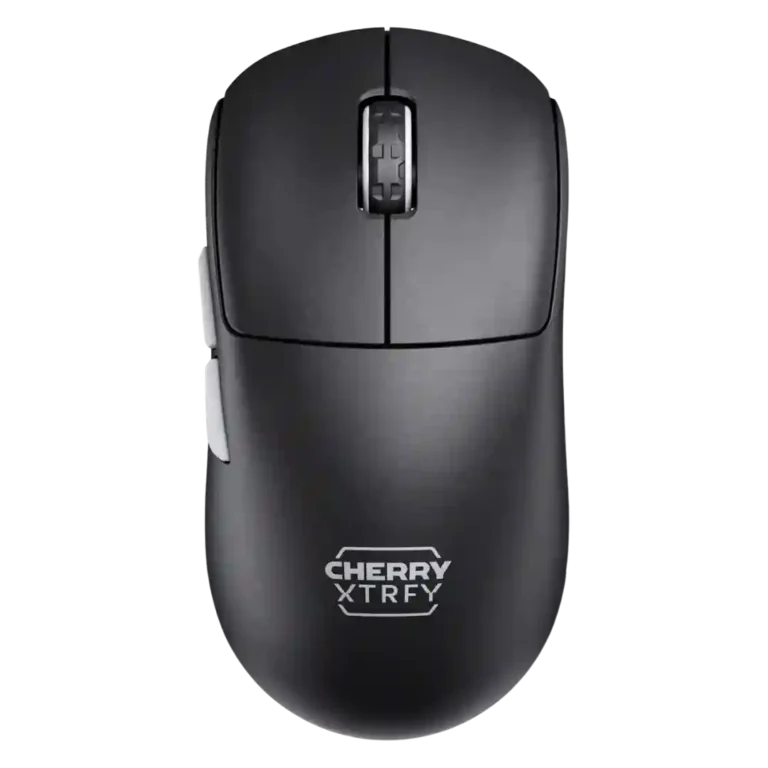
Best for competitive FPS players who want a very light, low-front wireless mouse with strong tracking, stable 2.4GHz performance, and a shape that favors claw or relaxed claw control.
Not ideal for buyers who need software remapping, exact CPI tuning, visible battery management, comfortable wired play, or a safer palm/fingertip shape.
The Cherry M68 Pro lands as a performance-first wireless gaming mouse with broad praise for its sensor, low weight, stable 2.4GHz connection, and low-front shape that many reviewers said improved control. It is especially convincing for FPS and claw-style players who value fast, precise movement over feature depth. The tradeoff is convenience: reviewers repeatedly criticized the software-free setup, manual-dependent button combinations, limited CPI granularity, weak battery visibility, and side-mounted USB-C port. Battery life is good in standard modes but falls quickly at high polling rates, so its esports focus comes with practical compromises.
Compared in Reviews
Products reviewers directly compared with this model, grouped into quick takeaways.
- Worse: weight and ease of movement The M68 is presented as much lighter than the Razer Basilisk V3 Pro 35K.
- More expensive: price and 8K wireless specs TechRadar says the M68 Pro costs less than the Razer DeathAdder V3 Pro while competing spec-for-spec.
Feature Scorecards
Summary
42 reviewed features- Very positive 4.5-5.0 33% 14 features
- Positive 3.5-4.4 43% 18 features
- Neutral 2.5-3.4 17% 7 features
- Negative 1.5-2.4 7% 3 features
- Very negative below 1.5 0% 0 features
Pros
-
The 2.4GHz connection was praised directly as fast and reliable in competitive use.
-
Long-session comfort had limited but strong support, with one reviewer reporting no hand fatigue over extended gaming.
-
Connection stability was strong, especially over 2.4GHz, with repeated reports of no hiccups, lag, or stuttering.
-
Motion consistency was a major strength, with reviewers reporting no inconsistencies, no hiccups, and flawless wireless tracking.
-
Wireless latency impressions were excellent, with reviewers reporting instantaneous responsiveness, no lag, and no delays.
-
The mouse was described as well-balanced by reviewers who focused on weight distribution and in-hand balance.
-
The Pixart sensor drew broad praise for responsive, accurate tracking, with several reviewers calling it wonderful, snappy, or beautiful in use.
-
FPS suitability was a major strength, with reviewers praising precise, responsive performance in shooters such as Counter-Strike, Valorant, and CS:GO.
-
Reviewers consistently found tracking precise and confidence-inspiring, from accurate desktop movement to flawless aim adjustments in games.
-
Wireless performance was praised across reviews for smooth operation, reliable tracking, and no obvious hiccups.
-
Reviewers strongly agreed the mouse is impressively light and easy to move, with the 55g class weight repeatedly praised.
-
The low-front ergonomic design was widely credited with improving control, grip security, and comfort.
-
Primary clicks were described as quick, responsive, and swift to reset, supporting low-latency-feeling inputs in the reviewed units.
-
Firmware reliability had limited evidence, but one reviewer found the dongle and mouse firmware update easy.
-
Claw grip support was a clear strength, with multiple reviewers saying the low-front shape suits relaxed or claw-style control.
-
Build quality was consistently strong, with reviewers describing the shell as sturdy, solid, well-constructed, or tank-like.
-
Left and right clicks were generally solid, easy, and satisfying, though one reviewer noted the M68 felt a little stiffer than the M64.
-
The 8K polling rate impressed some reviewers with smooth responsiveness, while others found little detectable difference and noted battery tradeoffs.
-
Switch feel was mostly praised as excellent or snappy, with one early-look reviewer finding the implementation only okay.
-
Button responsiveness was usually praised for quick actuation and reset, though one reviewer treated the buttons as merely fine in-game.
-
Shape comfort was the most polarizing area: several reviewers loved the low, controlled feel, while others found it cramped, wide, or odd.
-
Glide was usually smooth and easy, though reviewers noted skates, hard surfaces, or the missing center foot could affect feel.
-
The scroll wheel was generally smooth, controlled, and pleasant, with a few reviewers describing it as merely okay or not ideal for repeated clicks.
-
Side buttons received positive notes for feedback and positioning, but some criticism appeared around travel and feel.
-
Premium feel was mostly positive due to a solid, non-hollow shell, though one reviewer felt some details were not top-tier.
-
Debounce customization had enough increments for preferences in one review, but broader setup friction remained tied to no software.
-
Battery life was good in standard or lower polling modes, but 8K/Pro modes shortened runtime and battery warnings were a recurring weakness.
-
Cable impressions were mixed: reviewers liked the flexible braided/EZcord cables, but side-cable movement could feel encumbered.
-
Click noise was acceptable to positive for some reviewers, but another found the buttons pretty loud.
-
Surface compatibility was solid on pads and several non-glass surfaces, but reviewers still recommended a mouse pad or adjusted LOD on hard surfaces.
-
Grip texture was mixed: several reviewers liked the traction or rubber grip, while the black coating drew fingerprint complaints.
-
DPI/CPI coverage was useful for preset users, but reviewers criticized the lack of granular software tuning for non-preset sensitivities.
Cons
-
Materials quality was good but imperfect, combining useful traction and durable plastic with residue and fingerprint concerns.
-
Value was mixed: reviewers liked the performance and shape, yet several thought the price was hard to justify against rivals.
-
Lift-off options were adequate but not standout, and one reviewer had to raise LOD on hard surfaces.
-
Fingertip grip support was less certain, with one reviewer saying a G Pro X was probably the safer fingertip option.
-
Charging convenience was sharply mixed: quick charging and flexible cables helped, but the side USB-C placement annoyed many reviewers.
-
Durability-over-time evidence was mixed-negative, centered on coating residue and concern about click wobble rather than failures.
-
Palm grip comfort was limited for larger hands, with one reviewer specifically calling it cramped in palm grips.
-
Software usability was the most repeated complaint: no software meant awkward manuals, color LEDs, and button-combo setup.
-
Button customization was limited by the software-free design, especially for remapping and fine adjustments.
-
Programmable-button support was weak because reviewers noted that buttons could not be reprogrammed without software.
Compared With Category Average
Compared with other Gaming Mice, this product is above average in firmware reliability, below average in button customization, programmable buttons, software usability.
Summary
8 compared features- Above average 0.4+ pts higher 13% 1 feature
- Same as average within 0.3 pts 0% 0 features
- Below average 0.4+ pts lower 88% 7 features
| Attribute | This product | Category average | Difference |
|---|---|---|---|
| button customization | 2.0 | 4.3 | -2.3 |
| programmable buttons | 2.0 | 4.1 | -2.1 |
| firmware reliability | 4.5 | 2.7 | +1.8 |
| software usability | 2.4 | 3.9 | -1.5 |
| palm grip comfort | 2.5 | 3.8 | -1.3 |
| durability over time | 2.8 | 4.0 | -1.3 |
| charging convenience | 2.9 | 4.0 | -1.1 |
| DPI range | 3.5 | 4.2 | -0.7 |
FAQ
Is the Cherry M68 Pro good for FPS gaming?
Yes. Reviewers repeatedly praised its precise sensor, stable wireless performance, low weight, and control-focused shape for FPS play.
Does the 8K polling rate make a difference?
Opinions were mixed. Some reviewers noticed smoother, more responsive movement, while others could not detect much difference versus lower polling rates.
How is the battery life?
Battery life is strong in standard or lower polling modes, but it can drop to only a few days at 8K or Pro Gaming settings.
Is the side charging port a problem?
Often, yes. Several reviewers found the side USB-C port awkward for wired use, although quick charging and flexible cables helped in some cases.
Does it have software customization?
No. Reviewers described the software-free design as convenient for plug-and-play use but frustrating for remapping, CPI precision, battery visibility, and settings changes.
What grip style fits it best?
Claw and relaxed claw grips received the most praise. Palm grip can feel cramped for larger hands, and fingertip grip drew more cautious feedback.
Sample Expert Reviews We Analyzed
These are a few of the reviews included in our analysis.
Video Reviews
- Review score
- 3.9/5
- Review score
- 4.3/5
Article Reviews
- Review score
- 3.9/5
Consider This Instead
If you want better programmable buttons
Choose Corsair Scimitar Elite Wireless SE. It scores 4.9 vs 2.0 for programmable buttons, with a 4.2 overall score.
If you want better button customization
Choose SteelSeries Rival 5. It scores 4.9 vs 2.0 for button customization, with a 4.2 overall score.
If you want better software usability
Choose ASUS ROG Harpe II Ace. It scores 4.7 vs 2.4 for software usability, with a 4.4 overall score.
If you want better charging convenience
Choose Logitech G502 X Wired. It scores 5.0 vs 2.9 for charging convenience, with a 4.2 overall score.
Overall Top Gaming Mice Alternatives
Choose the ROG Harpe II Ace for ultralight FPS play, precise tracking, smooth glide, and web-based tuning. Skip it if you need palm-grip support, MMO buttons, onboard profiles, or long...
Pros: acceleration control, wireless latency
Cons: onboard memory, MMO gaming suitability

Best for MMO/MOBA control, swappable panels, strong wireless performance, and long battery life. Skip it if you want a light FPS mouse, low price, or no Synapse quirks.
Pros: sensor performance, click latency
Cons: software stability, Bluetooth support
Choose the Aerox 3 Wireless Gen 2 if you want a light, fast wireless FPS mouse with strong software and battery life. Skip it if you dislike honeycomb shells, need...
Pros: click latency, motion consistency
Cons: palm grip comfort, fingertip grip comfort
Choose the Kone II if you want a large, ergonomic mouse with deep customization and strong sensor performance. Skip it if you have small hands, need an ambidextrous mouse, or...
Pros: click latency, motion consistency
Cons: handedness options, portability