If you want better acceleration control
Choose Razer Cobra. It scores 5.0 vs 3.4 for acceleration control, with a 4.2 overall score.
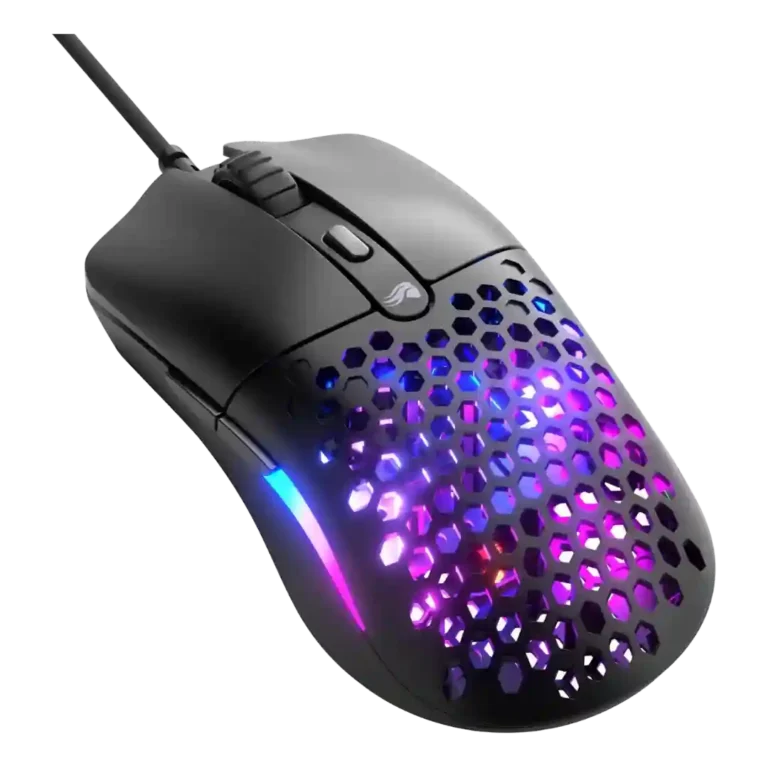
Choose the Glorious Model O Eternal for a very light, responsive wired budget mouse with strong value. Skip it if you need wireless, premium cabling, large side buttons, or high-end polling rates.
Best for budget-focused wired mouse buyers who want an ultralight 55g shell, reliable tracking, bright RGB, and strong main-click feel for shooters and general gaming.
Not for players who need wireless connectivity, very high polling rates, a premium cable, or large, easy-to-hit side buttons for frequent thumb-button use.
Reviewers frame the Glorious Model O Eternal as a standout budget gaming mouse because its 55g shell, reliable sensor, crisp main clicks, smooth glide, bright RGB, and simple software make it feel more capable than its price suggests. The central tradeoff is that Glorious keeps the essentials strong while trimming premium touches: the cable feels cheap or snag-prone, the side buttons split opinion sharply, and the 1,000Hz polling rate is fine for most players but behind higher-end competitive mice. Comfort feedback favors fingertip and general symmetrical use, with palm and claw comfort depending more on hand size and grip style.
Compared with other Gaming Mice, this product is above average in handedness options, value for money, fingertip grip comfort, near average in premium feel, software usability, below average in water and dust resistance, acceleration control, cable flexibility.
| Attribute | This product | Category average | Difference |
|---|---|---|---|
| water and dust resistance | 2.0 | 3.9 | -1.9 |
| handedness options | 4.0 | 2.6 | +1.4 |
| value for money | 4.9 | 3.7 | +1.2 |
| acceleration control | 3.4 | 4.4 | -1.1 |
| cable flexibility | 2.6 | 3.6 | -1.0 |
| lift-off distance | 2.9 | 3.8 | -1.0 |
| fingertip grip comfort | 4.5 | 3.7 | +0.8 |
| weight | 4.8 | 4.1 | +0.7 |
Choose Razer Cobra. It scores 5.0 vs 3.4 for acceleration control, with a 4.2 overall score.
Choose SteelSeries Rival 3 Gen 2 Wired. It scores 4.6 vs 2.6 for cable flexibility, with a 4.1 overall score.
Choose Razer DeathAdder V3. It scores 5.0 vs 3.7 for click noise, with a 4.4 overall score.
Choose ASUS ROG Gladius III Wired. It scores 4.5 vs 2.9 for lift-off distance, with a 4.2 overall score.
Products reviewers directly compared with this model, grouped into quick takeaways.
Yes for most players. Reviews praised its reliable tracking, light 55g shell, responsive buttons, and shooter performance, but noted that very competitive players on high-refresh displays may want polling above 1,000Hz.
Fingertip grip received the clearest praise. Claw grip was usually comfortable but not unanimous, and palm grip depended on hand size and side-button reach.
The cable is the biggest repeated weakness. Reviewers described it as cheap-feeling, sticky, prone to kinking, or not as free-moving as better wired mouse cables.
Reviewers found the sensor reliable and precise in actual play. Its 12,000 DPI ceiling trails high-end spec sheets, but reviewers repeatedly said performance was strong for the price.
Most reviews liked the bright, customizable lighting and the way it shines through the honeycomb shell. One reviewer felt the RGB detracted from the cleaner look.
Glorious Core was described as simple, tidy, and functional for DPI, polling, RGB, profiles, and button mapping. It lacks some advanced controls such as lift-off-distance adjustment.
Yes, value was the strongest area of agreement. Reviewers repeatedly framed it as a bargain or standout budget option because the core feel and gaming performance are strong.
These are a few of the reviews included in our analysis.

Choose the ROG Harpe II Ace for ultralight FPS play, precise tracking, smooth glide, and web-based tuning. Skip it if you need palm-grip support, MMO buttons, onboard profiles, or long...
Pros: acceleration control, wireless latency
Cons: onboard memory, MMO gaming suitability

Choose it if you want a premium MMO/productivity mouse with 12 adjustable side buttons, strong battery life, and Stream Deck integration. Skip it if you need an ultralight FPS mouse,...
Pros: click latency, macro support
Cons: firmware reliability, tilt gesture controls

Best for ultra-light, competition-focused speed, precise tracking, stable wireless, and long battery life. Skip it if you need quieter clicks, left-handed support, Bluetooth, more buttons, or better value for casual...
Pros: balance and weight distribution, build quality
Cons: dock compatibility, Bluetooth support

Best for precise wireless tracking, smooth glide, strong battery life, and unusually good 8K value. Skip it if you need polished software, quiet snappy clicks, true left-handed controls, or gentle...
Pros: Accuracy and tracking precision, click latency
Cons: software stability, profile switching