- Better: overall features and tradeoffs One reviewer says the Basilisk V3 is better in many ways, while the G502 X is lighter and has more buttons.
- Similar: glide smoothness The G502 X glide is described as at least on par with the Razer Basilisk V3.
Logitech G502 X Wired Review
Bottom Line
Choose the Logitech G502 X Wired if you want a lighter G502 with excellent tracking, strong button access, and ergonomic support. Skip it if you need RGB, tunable weights, smaller-hand comfort, or a smoother, quieter scroll wheel.
Best for right-handed gamers who want a wired, ergonomic mouse with accurate tracking, many programmable controls, fast DPI/sniper access, and lower weight than older G502 models.
Not for users who need RGB on the wired model, adjustable weights, Bluetooth or wireless features, a travel-friendly mouse, quiet scrolling, or reliable comfort for small hands and claw grip.
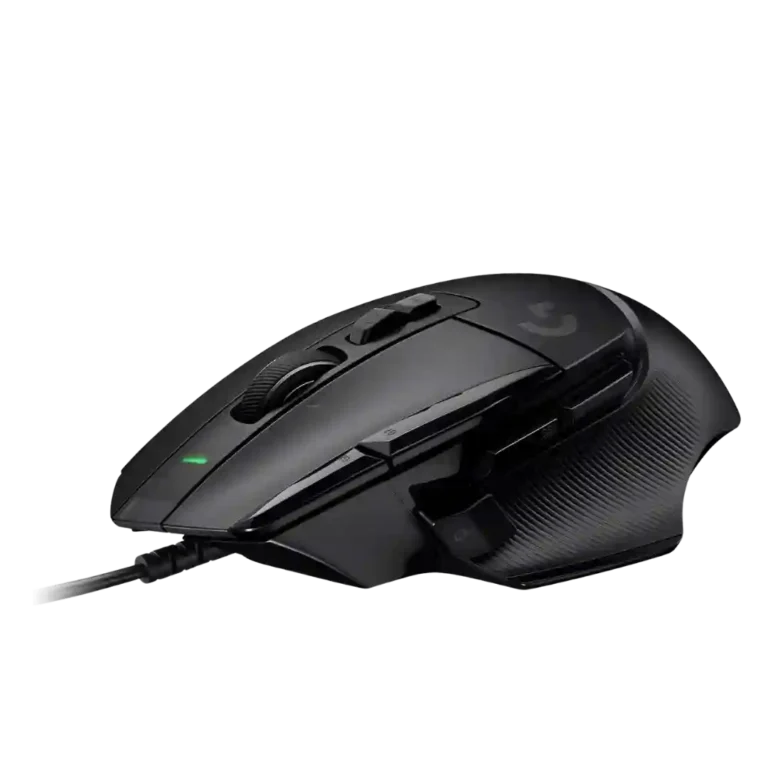
Across the reviews, the Logitech G502 X Wired comes across as a successful modernization of the G502 formula: lighter, easier to move, highly accurate, and especially strong for users who want many accessible commands under one hand. Reviewers repeatedly praise the Hero 25K sensor, programmable layout, improved sniper/DPI controls, grippy shape, and long flexible cable. The tradeoff is that the weight reduction removes several old luxuries, most notably RGB lighting, tunable weights, and the heavier metal scroll wheel feel some reviewers preferred. Comfort is also hand-size and grip dependent, with smaller hands and claw grip called out as weaker fits. Its strongest case is performance-plus-functionality, not minimalism or flashy extras.
Compared in Reviews
Products reviewers directly compared with this model, grouped into quick takeaways.
- Better: weight for fast FPS games The G502 X is heavier than ultra-lightweight FPS-focused alternatives such as the HyperX Pulsefire Haste.
- Worse: glide smoothness The reviewer says the G502 X glides noticeably smoother than the Pro Superlight.
Scored Features
Pros
-
Charging convenience is favorable by omission of charging needs: one review points out that the wired model does not require charging.
Evidence
Examples from reviews used for this score. Showing up to 3 quotes.
-
From:
Cheapest Logitech G502 X Review - Should you get the Wired Version?
it's wired so you don't have to charge it
Quotes are examples; the score reflects all analyzed reviews for this feature.
-
From:
Cheapest Logitech G502 X Review - Should you get the Wired Version?
-
Reviewers who discussed tracking found the mouse accurate and precise, with especially strong praise for gaming and pointer control.
Evidence
Examples from reviews used for this score. Showing up to 3 quotes.
-
From:
Logitech G502X review: The best button configuration on a gaming mouse
very accurate and precise tracking
-
From:
The Logitech G502 X Mouse Review
tracking on this mouse is insane
-
From:
Cheapest Logitech G502 X Review - Should you get the Wired Version?
gonna be very accurate um very precise
Quotes are examples; the score reflects all analyzed reviews for this feature.
-
From:
Logitech G502X review: The best button configuration on a gaming mouse
-
Tilt gesture controls are directly supported by reviews that note the wheel tilts left and right for horizontal input or extra controls.
Evidence
Examples from reviews used for this score. Showing up to 3 quotes.
-
From:
Cheapest Logitech G502 X Review - Should you get the Wired Version?
you could click it you could tilt it
-
From:
Logitech G502X Review: Not Everything is Better!
tilt this wheel left and right
Quotes are examples; the score reflects all analyzed reviews for this feature.
-
From:
Cheapest Logitech G502 X Review - Should you get the Wired Version?
-
Click latency is measured favorably in one review, which describes it as responsive for in-game use.
Evidence
Examples from reviews used for this score. Showing up to 3 quotes.
-
From:
LogitechG G502 X Gaming Mouse Review | Buttons on Buttons
fantastic click latency of 2 2.1 milliseconds
Quotes are examples; the score reflects all analyzed reviews for this feature.
-
From:
LogitechG G502 X Gaming Mouse Review | Buttons on Buttons
-
The Hero 25K sensor is consistently treated as a high-end strength, with reviewers calling out strong performance and top-level tracking.
Evidence
Examples from reviews used for this score. Showing up to 3 quotes.
-
From:
Logitech G502X review: The best button configuration on a gaming mouse
still one of the best in the business
-
From:
Logitech G502 X review: two clicks forward, one scroll back
this mouse uses the same Logitech 25K sensor
-
From:
The Logitech G502 X Mouse Review
HERO 25K sensor which boasts performance
Quotes are examples; the score reflects all analyzed reviews for this feature.
-
From:
Logitech G502X review: The best button configuration on a gaming mouse
-
Motion consistency is a clear strength: reviewers report flawless performance, no lag or stutter, and expected behavior in games.
Evidence
Examples from reviews used for this score. Showing up to 3 quotes.
-
From:
Logitech G502X review: The best button configuration on a gaming mouse
without a hint of lag or stuttering
-
From:
Logitech G502 X review: two clicks forward, one scroll back
In-game performance is flawless
-
From:
Logitech G502X Review: Not Everything is Better!
top level tracking with this
Quotes are examples; the score reflects all analyzed reviews for this feature.
-
From:
Logitech G502X review: The best button configuration on a gaming mouse
-
Reviewers connect the optical-mechanical switch design with improved double-click resistance and stronger long-term reliability.
Evidence
Examples from reviews used for this score. Showing up to 3 quotes.
-
From:
Logitech G502X Wired Gaming Mouse Review
that does not happen on this
-
From:
Logitech G502X Review: Not Everything is Better!
should not start double clicking like the previous models
-
From:
Logitech G502 X Review: When the Downgrade Is an Upgrade - FullCleared
They should also be very durable
Quotes are examples; the score reflects all analyzed reviews for this feature.
-
From:
Logitech G502X Wired Gaming Mouse Review
-
Long-session comfort is strong where discussed, with reviewers reporting several-hour sessions and comfort over extended use.
Evidence
Examples from reviews used for this score. Showing up to 3 quotes.
-
From:
Logitech G502 X Review: When the Downgrade Is an Upgrade - FullCleared
gaming sessions lasting several hours I never got sweaty or sticky
-
From:
Cheapest Logitech G502 X Review - Should you get the Wired Version?
love using this mouse for hours and hours and hours
Quotes are examples; the score reflects all analyzed reviews for this feature.
-
From:
Logitech G502 X Review: When the Downgrade Is an Upgrade - FullCleared
-
Glide smoothness is strongly praised, with reviewers calling the feet smooth, low-friction, and in one case the smoothest glide they had used.
Evidence
Examples from reviews used for this score. Showing up to 3 quotes.
-
From:
Logitech G502 X Review: When the Downgrade Is an Upgrade - FullCleared
smoothest gliding mouse I’ve ever used
-
From:
Logitech G502X Review: Not Everything is Better!
glides really very smoothly on a mousepad
-
From:
Cheapest Logitech G502 X Review - Should you get the Wired Version?
they made it much less like frictionless
Quotes are examples; the score reflects all analyzed reviews for this feature.
-
From:
Logitech G502 X Review: When the Downgrade Is an Upgrade - FullCleared
-
Button customization is highly praised thanks to remappable inputs, reversible or removable thumb controls, and software assignments.
Evidence
Examples from reviews used for this score. Showing up to 3 quotes.
-
From:
Logitech G502X review: The best button configuration on a gaming mouse
You still get all 13 programmable options
-
From:
Logitech G502 X review: two clicks forward, one scroll back
you can do with all 11 inputs
-
From:
Cheapest Logitech G502 X Review - Should you get the Wired Version?
whatever you assign this little mut button or macro to
Quotes are examples; the score reflects all analyzed reviews for this feature.
-
From:
Logitech G502X review: The best button configuration on a gaming mouse
-
Programmable buttons are one of the strongest consensus positives, with reviews repeatedly praising the large number of mappable controls.
Evidence
Examples from reviews used for this score. Showing up to 3 quotes.
-
From:
Logitech G502X review: The best button configuration on a gaming mouse
You still get all 13 programmable options
-
From:
Logitech G502X Wired Gaming Mouse Review
lots of customization here 13 different buttons
-
From:
Logitech G502X Review: Not Everything is Better!
you don’t find this many buttons
Quotes are examples; the score reflects all analyzed reviews for this feature.
-
From:
Logitech G502X review: The best button configuration on a gaming mouse
-
The DPI range is viewed as more than sufficient, with reviews citing the very high 25K or 25,600 DPI ceiling.
Evidence
Examples from reviews used for this score. Showing up to 3 quotes.
-
From:
Logitech G502X review: The best button configuration on a gaming mouse
resolution of between 100 to 25,600 DPI
-
From:
Logitech G502 X Gaming Mouse review
up to 25,600 — much higher than you'll ever need
-
From:
Best Mouse For Gaming of 2024? (Logitech G502 X Review)
25,000 600k it's freaking smoking
Quotes are examples; the score reflects all analyzed reviews for this feature.
-
From:
Logitech G502X review: The best button configuration on a gaming mouse
-
Macro support is well supported by reviews that mention assigning macros or quick-access functions to the mouse buttons.
Evidence
Examples from reviews used for this score. Showing up to 3 quotes.
-
From:
Logitech G502X review: The best button configuration on a gaming mouse
that one must-hit command or macro
-
From:
Logitech G502X Review: Not Everything is Better!
set all kinds of functions and macros
-
From:
Cheapest Logitech G502 X Review - Should you get the Wired Version?
whatever you assign this little mut button or macro to
Quotes are examples; the score reflects all analyzed reviews for this feature.
-
From:
Logitech G502X review: The best button configuration on a gaming mouse
-
The side controls are a major strength, especially the sniper/DPI clutch, though reach can be harder for smaller hands.
Evidence
Examples from reviews used for this score. Showing up to 3 quotes.
-
From:
Logitech G502X review: The best button configuration on a gaming mouse
trigger button is now nearer your thumb
-
From:
Logitech G502 X review: two clicks forward, one scroll back
A more overtly practical upgrade is the reworked DPI clutch
-
From:
Cheapest Logitech G502 X Review - Should you get the Wired Version?
best thing that happened to this mouse
Quotes are examples; the score reflects all analyzed reviews for this feature.
-
From:
Logitech G502X review: The best button configuration on a gaming mouse
-
Grip texture is well regarded, with reviewers praising the rubberized or textured side grips for control and cleanliness.
Evidence
Examples from reviews used for this score. Showing up to 3 quotes.
-
From:
Logitech G502 X Review: When the Downgrade Is an Upgrade - FullCleared
The textured grips on each side are great
-
From:
Logitech G502X review: The best button configuration on a gaming mouse
plastic thumb rest has been replaced by rubber
-
From:
Logitech G502 X review: two clicks forward, one scroll back
integrated side grips and a generous thumb rest
Quotes are examples; the score reflects all analyzed reviews for this feature.
-
From:
Logitech G502 X Review: When the Downgrade Is an Upgrade - FullCleared
-
Profile switching earns positive evidence through app-specific profiles and a dedicated profile setup path in software.
Evidence
Examples from reviews used for this score. Showing up to 3 quotes.
-
From:
Logitech G502X Review: Not Everything is Better!
different profiles to automatically activate for different applications
-
From:
Logitech G502 X Gaming Mouse review
set up profiles for individual games and apps
Quotes are examples; the score reflects all analyzed reviews for this feature.
-
From:
Logitech G502X Review: Not Everything is Better!
-
One review likes the roughly three-ounce weight as a sweet spot, giving limited but positive evidence for balance and distribution.
Evidence
Examples from reviews used for this score. Showing up to 3 quotes.
-
From:
Logitech G502 X Review: When the Downgrade Is an Upgrade - FullCleared
three ounces is a real sweet spot
Quotes are examples; the score reflects all analyzed reviews for this feature.
-
From:
Logitech G502 X Review: When the Downgrade Is an Upgrade - FullCleared
-
One review confirms onboard memory for saving two profiles, giving this attribute direct but limited evidence.
Evidence
Examples from reviews used for this score. Showing up to 3 quotes.
-
From:
Logitech G502X Review: Not Everything is Better!
onboard memory to save two of the profiles
Quotes are examples; the score reflects all analyzed reviews for this feature.
-
From:
Logitech G502X Review: Not Everything is Better!
-
Software stability has limited but positive evidence from one reviewer who says the software caused no problems.
Evidence
Examples from reviews used for this score. Showing up to 3 quotes.
-
From:
Cheapest Logitech G502 X Review - Should you get the Wired Version?
very easy to use and for me cause no problems
Quotes are examples; the score reflects all analyzed reviews for this feature.
-
From:
Cheapest Logitech G502 X Review - Should you get the Wired Version?
-
Ergonomics are a standout strength, with repeated praise for the thumb rest, slanted design, neutral support, and comfortable hand position.
Evidence
Examples from reviews used for this score. Showing up to 3 quotes.
-
From:
Logitech G502 X Review: When the Downgrade Is an Upgrade - FullCleared
keeps your hand in a supported, neutral position
-
From:
Logitech G502 X
you have yourself a superbly ergonomic mouse
-
From:
Logitech G502 X review: two clicks forward, one scroll back
marginally more comfortable and satisfying to have under your fingers
Quotes are examples; the score reflects all analyzed reviews for this feature.
-
From:
Logitech G502 X Review: When the Downgrade Is an Upgrade - FullCleared
-
The Lightforce switches are usually praised for instant, precise, or faster response, though some reviewers note slightly higher actuation force.
Evidence
Examples from reviews used for this score. Showing up to 3 quotes.
-
From:
Logitech G502X review: The best button configuration on a gaming mouse
actuate instantly but feel satisfyingly tactile
-
From:
The Logitech G502 X Mouse Review
provide ultimate precision and provide satisfying click feedback
-
From:
Cheapest Logitech G502 X Review - Should you get the Wired Version?
it is definitely lighter and faster
Quotes are examples; the score reflects all analyzed reviews for this feature.
-
From:
Logitech G502X review: The best button configuration on a gaming mouse
-
Cable flexibility is a strength for a wired mouse, with reviews saying the rubber cable moves easily and stays out of the way.
Evidence
Examples from reviews used for this score. Showing up to 3 quotes.
-
From:
Logitech G502 X
It's long and flexible enough that it doesn't get in the way
-
From:
Cheapest Logitech G502 X Review - Should you get the Wired Version?
it moves very easily
-
From:
LogitechG G502 X Gaming Mouse Review | Buttons on Buttons
flexible enough to not get in the way
Quotes are examples; the score reflects all analyzed reviews for this feature.
-
From:
Logitech G502 X
-
Durability over time is supported by durable-switch expectations and comments that the design should last for years.
Evidence
Examples from reviews used for this score. Showing up to 3 quotes.
-
From:
Logitech G502 X Review: When the Downgrade Is an Upgrade - FullCleared
They should also be very durable
-
From:
Logitech G502X Wired Gaming Mouse Review
that does not happen on this
-
From:
Logitech G502X Review: Not Everything is Better!
should last you for years for work and play
Quotes are examples; the score reflects all analyzed reviews for this feature.
-
From:
Logitech G502 X Review: When the Downgrade Is an Upgrade - FullCleared
-
FPS suitability is generally strong because reviews praise the lighter weight, sniper/DPI controls, fast movement, and accurate aim, with some caution about ultralight rivals.
Evidence
Examples from reviews used for this score. Showing up to 3 quotes.
-
From:
Logitech G502X Wired Gaming Mouse Review
have a very precise Aim
-
From:
Logitech G502 X
FPS players with average sized hands are likely to be over the moon
-
From:
Best Mouse For Gaming of 2024? (Logitech G502 X Review)
reduces the DPI so you can get more accurate shots
Quotes are examples; the score reflects all analyzed reviews for this feature.
-
From:
Logitech G502X Wired Gaming Mouse Review
-
Shape comfort is generally strong, with many reviewers liking the fit, but the large/narrow shape can be less ideal for small hands.
Evidence
Examples from reviews used for this score. Showing up to 3 quotes.
-
From:
Logitech G502 X Review: When the Downgrade Is an Upgrade - FullCleared
my hand falls into place perfectly on the G502 X
-
From:
Logitech G502 X
fantastic thumb rest, longer buttons
-
From:
Logitech G502X review: The best button configuration on a gaming mouse
kept my hand tucked cozily into its slender grooves
Quotes are examples; the score reflects all analyzed reviews for this feature.
-
From:
Logitech G502 X Review: When the Downgrade Is an Upgrade - FullCleared
-
Switch feel is broadly positive for tactility and feedback, but opinions vary because some reviewers prefer the sound or feel of traditional switches.
Evidence
Examples from reviews used for this score. Showing up to 3 quotes.
-
From:
Logitech G502X review: The best button configuration on a gaming mouse
actuate instantly but feel satisfyingly tactile
-
From:
Logitech G502 X Review: When the Downgrade Is an Upgrade - FullCleared
really satisfying clicky mechanical sensations
-
From:
Logitech G502 X review: two clicks forward, one scroll back
feel more solid and finely-crafted
Quotes are examples; the score reflects all analyzed reviews for this feature.
-
From:
Logitech G502X review: The best button configuration on a gaming mouse
-
Build quality is generally positive, with reviewers describing the mouse as solid, grown-up, and confidence-inspiring.
Evidence
Examples from reviews used for this score. Showing up to 3 quotes.
-
From:
Logitech G502X Wired Gaming Mouse Review
solid Mouse I've been using this for a long time
-
From:
LogitechG G502 X Gaming Mouse Review | Buttons on Buttons
excellent build quality feeling solid in my hands
-
From:
Logitech G502X review: The best button configuration on a gaming mouse
this mouse is a class act on just about all fronts
Quotes are examples; the score reflects all analyzed reviews for this feature.
-
From:
Logitech G502X Wired Gaming Mouse Review
-
Left and right clicks feel solid and finely crafted, with reviewers emphasizing hybrid actuation and improved click quality.
Evidence
Examples from reviews used for this score. Showing up to 3 quotes.
-
From:
Logitech G502 X review: two clicks forward, one scroll back
feel more solid and finely-crafted
-
From:
Logitech G502 X
combine optical speed with a mechanical actuation
Quotes are examples; the score reflects all analyzed reviews for this feature.
-
From:
Logitech G502 X review: two clicks forward, one scroll back
-
The sensor specification includes a high acceleration rating, though only one review gives direct evidence for this attribute.
Evidence
Examples from reviews used for this score. Showing up to 3 quotes.
-
From:
Logitech G502X review: The best button configuration on a gaming mouse
maximum speed of 400 IPS (inches per second) and acceleration of 40G
Quotes are examples; the score reflects all analyzed reviews for this feature.
-
From:
Logitech G502X review: The best button configuration on a gaming mouse
-
MOBA suitability has limited positive support from one review mentioning League of Legends in the context of programmable controls.
Evidence
Examples from reviews used for this score. Showing up to 3 quotes.
-
From:
Best Mouse For Gaming of 2024? (Logitech G502 X Review)
World of Warcraft League of Legends you don't want to have
Quotes are examples; the score reflects all analyzed reviews for this feature.
-
From:
Best Mouse For Gaming of 2024? (Logitech G502 X Review)
-
One review notes the available polling-rate options, supporting solid responsiveness configuration for wired play.
Evidence
Examples from reviews used for this score. Showing up to 3 quotes.
-
From:
LogitechG G502 X Gaming Mouse Review | Buttons on Buttons
sensors have four polling rate options
Quotes are examples; the score reflects all analyzed reviews for this feature.
-
From:
LogitechG G502 X Gaming Mouse Review | Buttons on Buttons
-
Palm grip comfort is mostly positive, especially for larger hands, although the steep palm slope changes wrist position.
Evidence
Examples from reviews used for this score. Showing up to 3 quotes.
-
From:
Logitech G502 X review: two clicks forward, one scroll back
works well for palm and finger grips alike
-
From:
Logitech G502X Review: Not Everything is Better!
palm grip also being comfortable for larger hands
-
From:
Logitech G502 X Review: When the Downgrade Is an Upgrade - FullCleared
steeply sloped palm area puts my hand back
Quotes are examples; the score reflects all analyzed reviews for this feature.
-
From:
Logitech G502 X review: two clicks forward, one scroll back
-
Reviewers repeatedly highlight the 89g weight as a major reduction from earlier G502 models, while noting it is not a true ultralight mouse.
Evidence
Examples from reviews used for this score. Showing up to 3 quotes.
-
From:
LogitechG G502 X Gaming Mouse Review | Buttons on Buttons
coming in at 89 grams
-
From:
Logitech G502 X
It comes in at 89g, which is a significant difference
-
From:
Logitech G502 X Review: When the Downgrade Is an Upgrade - FullCleared
At 89 grams/3.14 ounces, the G502 X is lighter
Quotes are examples; the score reflects all analyzed reviews for this feature.
-
From:
LogitechG G502 X Gaming Mouse Review | Buttons on Buttons
-
Finger and fingertip grip evidence is positive but limited, with reviewers saying the shape works for finger grips and may suit fingertip users.
Evidence
Examples from reviews used for this score. Showing up to 3 quotes.
-
From:
Logitech G502 X review: two clicks forward, one scroll back
works well for palm and finger grips alike
-
From:
Logitech G502 X
perhaps aimed more at fingertip grippers
Quotes are examples; the score reflects all analyzed reviews for this feature.
-
From:
Logitech G502 X review: two clicks forward, one scroll back
-
MMO suitability has limited but positive support from the many programmable controls and references to MMO-style games.
Evidence
Examples from reviews used for this score. Showing up to 3 quotes.
-
From:
Best Mouse For Gaming of 2024? (Logitech G502 X Review)
World of Warcraft League of Legends you don't want to have
-
From:
Logitech G502 X Review: When the Downgrade Is an Upgrade - FullCleared
I’m not an MMO person, but I could see it being good there, too
Quotes are examples; the score reflects all analyzed reviews for this feature.
-
From:
Best Mouse For Gaming of 2024? (Logitech G502 X Review)
-
Premium feel is mixed: some reviews call it high quality, while another says the ordinary cable makes it feel less premium.
Evidence
Examples from reviews used for this score. Showing up to 3 quotes.
-
From:
Logitech G502X review: The best button configuration on a gaming mouse
this mouse is a class act on just about all fronts
-
From:
Logitech G502X Wired Gaming Mouse Review
Logitech makes some of the best gaming gear
-
From:
Logitech G502X Review: Not Everything is Better!
less premium in front of its competition
Quotes are examples; the score reflects all analyzed reviews for this feature.
-
From:
Logitech G502X review: The best button configuration on a gaming mouse
-
Value is context-dependent, with praise at lower sale prices and wired pricing, but criticism for an expensive wired mouse missing RGB and weights.
Evidence
Examples from reviews used for this score. Showing up to 3 quotes.
-
From:
Logitech G502X review: The best button configuration on a gaming mouse
has to be worth at least a quarter of the Logitech G502X’s $70 price
-
From:
Logitech G502 X Review: When the Downgrade Is an Upgrade - FullCleared
wired version is 30 percent off right now
-
From:
Logitech G502 X
For $80 I have no issues recommending the wired G502 X
Quotes are examples; the score reflects all analyzed reviews for this feature.
-
From:
Logitech G502X review: The best button configuration on a gaming mouse
-
Materials quality is mixed: reviewers praise the materials and rubber touches, but plastic scroll-wheel and plain cable choices reduce the premium feel.
Evidence
Examples from reviews used for this score. Showing up to 3 quotes.
-
From:
The Logitech G502 X Mouse Review
ergonomic shapes along with the build materials
-
From:
Cheapest Logitech G502 X Review - Should you get the Wired Version?
it's rubber if you guys are wondering it's not braided
-
From:
Logitech G502 X
scroll wheel is now plastic instead of metal
Quotes are examples; the score reflects all analyzed reviews for this feature.
-
From:
The Logitech G502 X Mouse Review
-
Software usability is mixed: reviewers like G Hub improvements and assignments, but one finds setup time-consuming and another says options are limited.
Evidence
Examples from reviews used for this score. Showing up to 3 quotes.
-
From:
Cheapest Logitech G502 X Review - Should you get the Wired Version?
Logitech software is much better now
-
From:
Logitech G502X Review: Not Everything is Better!
way to set these functions is unnecessarily time consuming
-
From:
Logitech G502 X Gaming Mouse review
That's pretty much all you can do
Quotes are examples; the score reflects all analyzed reviews for this feature.
-
From:
Cheapest Logitech G502 X Review - Should you get the Wired Version?
-
Scroll wheel reactions are mixed: reviewers like dual-mode and hyperfast scrolling, but some criticize plastic feel, loudness, resistance, or buggy behavior.
Evidence
Examples from reviews used for this score. Showing up to 3 quotes.
-
From:
Logitech G502 X Gaming Mouse review
changes the scroll wheel's resistance between rigid and free-scrolling modes
-
From:
Logitech G502X Wired Gaming Mouse Review
also has the hyperfast scroll wheel
-
From:
The Logitech G502 X Mouse Review
includes the dual mode scroll button
Quotes are examples; the score reflects all analyzed reviews for this feature.
-
From:
Logitech G502 X Gaming Mouse review
Cons
-
Noise is mixed to negative: reviewers mention a more resounding click, a ringy thud, and a loud scroll wheel.
Evidence
Examples from reviews used for this score. Showing up to 3 quotes.
-
From:
Logitech G502 X
There's a slightly more resounding click to the newer switches
-
From:
LogitechG G502 X Gaming Mouse Review | Buttons on Buttons
far more resounding click to the newer switches
-
From:
Logitech G502X Review: Not Everything is Better!
sounds like a ringy thud
Quotes are examples; the score reflects all analyzed reviews for this feature.
-
From:
Logitech G502 X
-
Portability is weak because reviewers note the wired design and non-removable cord are not ideal for laptop-sleeve or no-wires users.
Evidence
Examples from reviews used for this score. Showing up to 3 quotes.
-
From:
LogitechG G502 X Gaming Mouse Review | Buttons on Buttons
no wires Nation this will not be the mouse
-
From:
Logitech G502 X Review: When the Downgrade Is an Upgrade - FullCleared
not going to be slipping this into a laptop sleeve
Quotes are examples; the score reflects all analyzed reviews for this feature.
-
From:
LogitechG G502 X Gaming Mouse Review | Buttons on Buttons
-
Handedness options are limited because one review identifies the mouse as right-handed.
Evidence
Examples from reviews used for this score. Showing up to 3 quotes.
-
From:
Logitech G502X review: The best button configuration on a gaming mouse
The right-handed G502X looks
Quotes are examples; the score reflects all analyzed reviews for this feature.
-
From:
Logitech G502X review: The best button configuration on a gaming mouse
-
Claw grip comfort is weak because one reviewer explicitly says the shape does not work well for claw grip.
Evidence
Examples from reviews used for this score. Showing up to 3 quotes.
-
From:
Logitech G502 X Review: When the Downgrade Is an Upgrade - FullCleared
prefer a claw grip since it definitely does not work with one
Quotes are examples; the score reflects all analyzed reviews for this feature.
-
From:
Logitech G502 X Review: When the Downgrade Is an Upgrade - FullCleared
-
RGB is the clearest missing feature on the wired model, with several reviewers noting its absence or the need to buy another version for lighting.
Evidence
Examples from reviews used for this score. Showing up to 3 quotes.
-
From:
LogitechG G502 X Gaming Mouse Review | Buttons on Buttons
sadly resulting in the sacrifice of RGB
-
From:
Best Mouse For Gaming of 2024? (Logitech G502 X Review)
not spending an extra $80 for RGB
-
From:
Logitech G502X Review: Not Everything is Better!
lack of any RGB
Quotes are examples; the score reflects all analyzed reviews for this feature.
-
From:
LogitechG G502 X Gaming Mouse Review | Buttons on Buttons
-
Weight tuning scores poorly because multiple reviews state that tunable or customizable weights were removed.
Evidence
Examples from reviews used for this score. Showing up to 3 quotes.
-
From:
Logitech G502 X
it doesn't come with the option to configure the weight
-
From:
Logitech G502 X review: two clicks forward, one scroll back
worth the loss of the repositionable weights system
-
From:
Logitech G502 X Gaming Mouse review
ditched both tunable weights and RGB lighting
Quotes are examples; the score reflects all analyzed reviews for this feature.
-
From:
Logitech G502 X
Compared With Category Average
Compared with other Gaming Mouse, this product is above average in tilt gesture controls, software stability, side button quality, below average in claw grip comfort, RGB features, portability.
| Attribute | This product | Category average | Difference |
|---|---|---|---|
| claw grip comfort | 1.5 | 4.1 | -2.6 |
| tilt gesture controls | 4.8 | 2.7 | +2.1 |
| RGB features | 1.4 | 3.2 | -1.9 |
| portability | 2.3 | 4.0 | -1.8 |
| weight tuning | 1.3 | 2.6 | -1.3 |
| software stability | 4.5 | 3.3 | +1.2 |
| side button quality | 4.5 | 3.8 | +0.7 |
| cable flexibility | 4.4 | 3.6 | +0.8 |
FAQ
Is the Logitech G502 X Wired good for FPS games?
Yes. Reviewers praise the lighter 89g body, accurate sensor, quick switches, and improved sniper/DPI controls, though one review still recommends lighter mice for the fastest FPS players.
Does the wired G502 X have RGB lighting?
No. Multiple reviews note that the wired model removes RGB, with lighting reserved for another version or limited to a small DPI indicator.
How does the scroll wheel perform?
Opinions are mixed. Some reviewers like the dual-mode or hyperfast/free-scroll feature, while others dislike the plastic feel, loud ratcheting, or buggy-feeling infinite scroll.
Is it comfortable for small hands?
It can be less ideal. Several reviews praise the ergonomic shape, but others say smaller hands may struggle to reach controls or that the mouse feels large.
Does it still have adjustable weights?
No. Reviews repeatedly point out that the G502 X is lighter than older models but loses the tunable weight system.
How useful are the programmable buttons?
Very useful according to the review set. Reviewers repeatedly praise the many mappable controls, improved button access, and macro or profile options through Logitech software.
Expert Reviews We Analyzed
Video Reviews
Article Reviews
Consider This Instead
If you want better RGB features
Choose Razer Cobra Pro. It scores 4.6 vs 1.4 for RGB features, with a 4.0 overall score.
If you want better weight tuning
Choose Razer Viper V3 HyperSpeed. It scores 4.6 vs 1.3 for weight tuning, with a 4.1 overall score.
If you want better claw grip comfort
Choose Endgame Gear XM2we. It scores 4.7 vs 1.5 for claw grip comfort, with a 4.0 overall score.
If you want better handedness options
Choose Logitech G Pro 2 Lightspeed. It scores 4.8 vs 2.0 for handedness options, with a 4.1 overall score.
Overall Top Gaming Mouse Alternatives
Best for a 47g, high-performance 8K wireless mouse with excellent shape, skates, clicks, and web controls. Skip it if stiff side buttons, shorter high-polling battery life, or app/cable quirks would...
Pros: Accuracy and tracking precision, sensor performance
Cons: cable flexibility
Choose it if you want a comfortable, feature-rich wireless mouse for mixed gaming and productivity. Skip it if you need ultralight FPS speed, left-handed support, or better value than discounted...
Pros: programmable buttons, Bluetooth support
Cons: handedness options, firmware reliability
Good if you want ergonomic wireless gaming with hot-swappable batteries and strong tuning. Skip it if price, dock clutter, or short 8K battery life matters most.
Pros: switch durability, DPI range
Cons: grip texture, portability
Choose it if you want a compact, comfortable work-and-play mouse with strong wireless options and battery life. Skip it if you want true ultra-portability, quieter clicks, or better value.
Pros: switch durability, wireless performance
Cons: click noise, RGB features