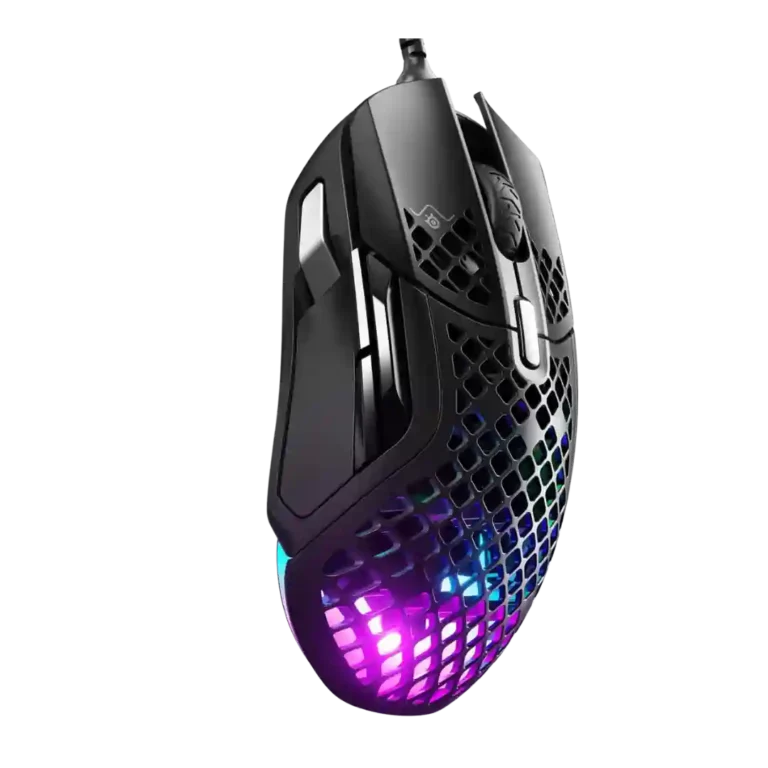
- Compared: mouse size The reviewer said the Aerox 5 felt a little larger than the glorious model o.
SteelSeries Aerox 5 Wired Review
Bottom Line
Choose the Aerox 5 Wired if you want a very light, comfortable mouse with smooth glide, crisp clicks, and useful extra buttons. Skip it if side-button accuracy, simple software, or $80 value matters most.
Best for right-handed players with medium-to-large hands who want a lightweight wired mouse with strong glide, tactile clicks, RGB style, and several programmable controls. It especially suits users who value comfort and are willing to tune the software.
Not for users who need simple side buttons, a DPI clutch, left-handed support, or a low-risk $80 purchase. Reviewers with FPS-focused side-button needs or low tolerance for clunky software were the least satisfied.
Across the reviews, the Aerox 5 Wired comes across as a lightweight, comfortable gaming mouse with unusually strong glide, satisfying main clicks, and a sensor that several reviewers trusted for shooters and MOBA-style setups. The best feedback centers on shape comfort, low weight, tactile scroll action, flexible cable, RGB presentation, and build quality. The tradeoff is control layout: the extra side paddle and skinny thumb buttons drew repeated criticism for misclicks, awkward reach, or limited usefulness. Software feedback is sharply split, ranging from easy and refined to clunky and confusing, especially around DPI controls. Value also divides reviewers; the mouse feels premium to some, but several felt $80 is hard to justify against cheaper or wireless alternatives.
Compared in Reviews
Products reviewers directly compared with this model, grouped into quick takeaways.
- Cheaper: price and value The reviewer noted the Razer Basilisk V3 was cheaper than the Aerox 5.
Corsair M65 RGB Ultra
- Better: DPI clutch functionality The reviewer compared the experience with the Corsair M65 RGB Ultra and criticized the Aerox 5's missing DPI throttle.
- Cheaper: price and FPS feature set The reviewer presented the Corsair M65 RGB Ultra as a cheaper alternative to the Aerox 5.
- Better: DPI clutch functionality After using the Corsair M65 RGB Ultra, the reviewer was disappointed by the Aerox 5's missing DPI throttle.
Feature Scorecards
Summary
38 reviewed features- Very positive 4.5-5.0 21% 8 features
- Positive 3.5-4.4 53% 20 features
- Neutral 2.5-3.4 24% 9 features
- Negative 1.5-2.4 3% 1 feature
- Very negative below 1.5 0% 0 features
Pros
-
Glide smoothness was a consistent strength, with reviewers praising the PTFE skates, low friction, and very smooth movement.
-
Ergonomic design was broadly praised for comfort and contouring, with repeated positive comments on hand fit and relaxed use.
-
Long-session comfort was consistently positive, with reviewers citing wrist comfort, long play sessions, all-day use, and hours without discomfort.
-
Wired responsiveness was viewed positively, with reviewers noting less lag and no perceived click-latency issues.
-
Macro support was viewed positively where mentioned, with reviewers liking broad customization and straightforward macro setup.
-
Fingertip grip comfort had limited but positive evidence from one reviewer who said the low weight suited fingertip-style movement.
-
Grip texture had limited positive evidence, with one reviewer saying the textured, contoured surface suited the hand.
-
Shape comfort was widely praised, especially for larger hands and relaxed ergonomic use, though some size caveats remained.
-
Premium feel was generally positive, with reviewers describing the mouse as premium, high-end, or not bad despite price concerns.
-
Reviewers mostly praised tracking accuracy, with one calling it highly accurate and another describing tracking as self-like, while one found it slightly less accurate and floaty versus a daily driver.
-
Durability over time had positive but limited evidence, including no click creaking, long-lasting feel, and expected long-term use.
-
Left and right clicks were praised for crispness, tactile feedback, and satisfying feel.
-
Weight was one of the strongest positives, with reviewers repeatedly describing the wired mouse as very light, easy to move, and comfortable.
-
Sensor performance was generally strong, especially on the wired version, though one reviewer felt it was less accurate and floatier than a familiar competitor.
-
RGB features were generally well received as stylish, bright, impressive, or tastefully implemented.
-
The scroll wheel was consistently praised for tactile steps, weight, and an absence of major complaints.
-
Motion consistency was mostly positive, though one reviewer noticed a different tracking feel from the low sensor position before adapting.
-
Switch feel was generally positive, described as light, crisp, sharp, and snappy, with a slight softness noted by one review.
-
Build quality was mostly positive, ranging from solid to top notch, though one review noted only minor creaking under pressure.
-
Cable quality and flexibility were generally positive, though one reviewer called the stock cable good rather than great.
-
MOBA suitability was positive where discussed, with reviewers finding the extra buttons useful for MOBA-style games and Dota or League setups.
-
Palm grip comfort was positive in the limited evidence, with reviewers finding the shape suitable or unaffected by the honeycomb button holes.
-
Portability was positive because reviewers tied the light design to easy travel and portable use.
-
Surface compatibility had limited positive evidence, with one reviewer finding low initial friction on every pad tested.
-
Switch durability had limited but positive evidence, with one review calling the gold-plated switches reliable.
-
Materials quality was mixed: one review criticized the plastic as not premium, while another said the mouse looked and felt great.
-
Programmable buttons were useful and plentiful, but the layout reduced the benefit for reviewers who disliked the side paddle or crowded controls.
-
Button customization was praised as broad and flexible, but two reviews criticized the inability to make the silver thumb button a DPI toggle.
Cons
-
FPS suitability was mixed: weight and sensor performance helped shooters, but the missing DPI throttle and side-button issues hurt some FPS use cases.
-
Water and dust resistance was mostly positive thanks to AquaBarrier/IP54 reassurance, though two reviews worried about open circuitry and debris.
-
Software usability was sharply split, from easy, refined, and nearly perfect to terrible, clunky, and confusing.
-
Claw grip comfort was mixed: one reviewer found relaxed claw use comfortable, while another warned that the honeycomb button holes could irritate claw users.
-
Button responsiveness split reviewers: main-button execution was described as snappy, but the side rocker needed too much force in two reviews.
-
Software stability had limited mixed evidence, with one reviewer reporting a lighting setting that briefly failed to persist.
-
Value for money was mixed to negative overall: some saw mid-range or affordable quality, but several felt the $80 price was hard to justify.
-
Side button quality was the most divisive area: some found the buttons natural and reachable, while others reported narrow, uncomfortable, or misclick-prone controls.
-
DPI tuning helped one reviewer reach a preferred sensitivity, but two reviews criticized the DPI controls as overly granular and confusing.
-
Handedness options were criticized because the design was described as right-hand-only.
Compared With Category Average
Compared with other Gaming Mice, this product is above average in fingertip grip comfort, below average in DPI range, button responsiveness, side button quality.
Summary
8 compared features- Above average 0.4+ pts higher 13% 1 feature
- Same as average within 0.3 pts 0% 0 features
- Below average 0.4+ pts lower 88% 7 features
| Attribute | This product | Category average | Difference |
|---|---|---|---|
| DPI range | 2.7 | 4.2 | -1.5 |
| button responsiveness | 3.1 | 4.5 | -1.3 |
| side button quality | 2.7 | 3.8 | -1.1 |
| value for money | 2.9 | 3.7 | -0.8 |
| button customization | 3.5 | 4.3 | -0.8 |
| FPS gaming suitability | 3.4 | 4.2 | -0.7 |
| claw grip comfort | 3.3 | 4.1 | -0.8 |
| fingertip grip comfort | 4.5 | 3.7 | +0.8 |
FAQ
Is the SteelSeries Aerox 5 Wired comfortable?
Yes, most reviewers praised its shape, light weight, and long-session comfort. The strongest caveat is that smaller hands or claw-grip users may notice the size or honeycomb button holes more.
Are the side buttons good?
They are useful and programmable, but this was the most divisive feature. Several reviewers disliked the thin thumb buttons or the up/down paddle because of awkward reach, force, or misclicks.
How is the sensor performance?
Most reviews described the sensor as accurate, consistent, or high quality. One reviewer found it slightly less accurate and floatier than their usual Glorious Model D Wireless.
Is the software easy to use?
Software opinions were split. Some reviewers found SteelSeries GG easy, refined, or nearly perfect, while others called it confusing, clunky, or terrible, especially around DPI settings.
Is it good for FPS and MOBA games?
It can work well for both because it is light, fast-gliding, and has extra programmable buttons. However, FPS-focused reviewers criticized the missing DPI throttle and side-button layout.
Is the Aerox 5 Wired worth the price?
Value was mixed. Some saw a quality mid-range or affordable mouse, while several others felt $80 was too high given the side-button design and competing options.
Sample Expert Reviews We Analyzed
These are a few of the reviews included in our analysis.

Video Reviews
- Review score
- 4.4/5
- Review score
- 3.6/5
Article Reviews
- Review score
- 2.3/5
- Review score
- 2.8/5
Consider This Instead
If you want better handedness options
Choose Corsair M75 Wireless. It scores 4.7 vs 2.0 for handedness options, with a 3.9 overall score.
If you want better DPI range
Choose Razer DeathAdder V3. It scores 5.0 vs 2.7 for DPI range, with a 4.2 overall score.
If you want better side button quality
Choose Razer Viper V3 HyperSpeed. It scores 4.7 vs 2.7 for side button quality, with a 4.0 overall score.
If you want better value for money
Choose Glorious Model O Eternal. It scores 4.9 vs 2.9 for value for money, with a 4.1 overall score.
Overall Top Gaming Mice Alternatives
Choose the ROG Harpe II Ace for ultralight FPS play, precise tracking, smooth glide, and web-based tuning. Skip it if you need palm-grip support, MMO buttons, onboard profiles, or long...
Pros: acceleration control, wireless latency
Cons: onboard memory, MMO gaming suitability

Best for MMO/MOBA control, swappable panels, strong wireless performance, and long battery life. Skip it if you want a light FPS mouse, low price, or no Synapse quirks.
Pros: sensor performance, click latency
Cons: software stability, Bluetooth support
Choose the Aerox 3 Wireless Gen 2 if you want a light, fast wireless FPS mouse with strong software and battery life. Skip it if you dislike honeycomb shells, need...
Pros: click latency, motion consistency
Cons: palm grip comfort, fingertip grip comfort
Choose the Kone II if you want a large, ergonomic mouse with deep customization and strong sensor performance. Skip it if you have small hands, need an ambidextrous mouse, or...
Pros: click latency, motion consistency
Cons: handedness options, portability