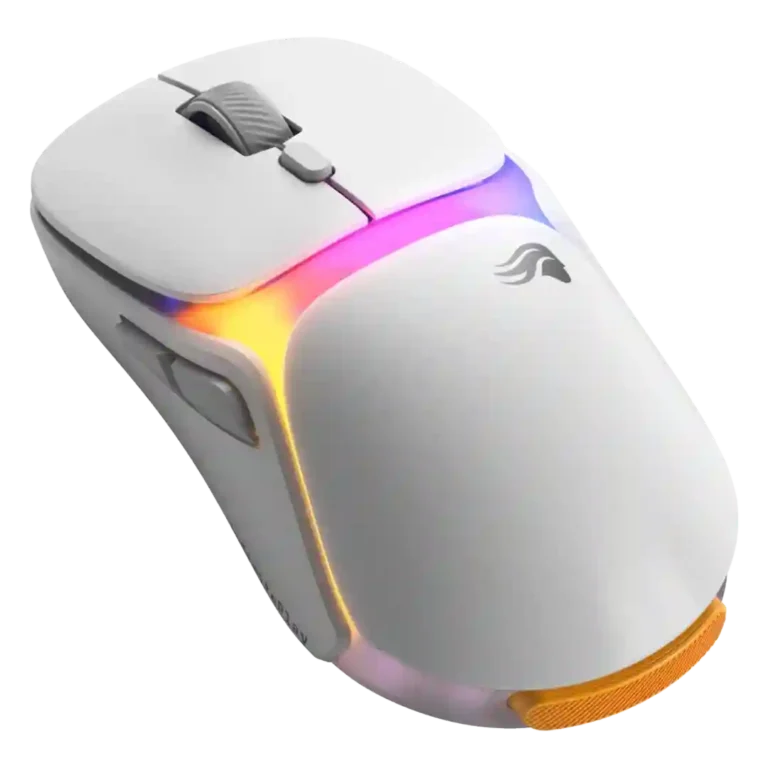
Review: Glorious Model O3

Updated: 32 minutes ago
3.7
Based on methodology below
227
Insights analyzed
56
Grouped by key features
8
From expert reviews
Scores below reflect consolidated expert coverage across these features.
Bottom Line

Choose the Glorious Model O3 if swappable batteries and comfortable wireless play matter most. Skip it if you want the lightest FPS shape or the most polished scroll wheel and wireless tracking.

Best for

Best for players who hate plugging in a wireless mouse and want a comfortable, customizable mouse with a dock-based battery-swap system. It especially suits casual or everyday competitive play where charging convenience matters more than ultralight feel.

Not for

Not for buyers who want the lightest competitive FPS mouse, a compact travel setup, or a flawless premium scroll wheel. It is also risky if rear weight, long shapes, or value at a high price are deal-breakers.

Verdict

The Glorious Model O3 is built around a genuinely useful swappable-battery system, and the reviews show that the system mostly works as promised. Its dock, spare batteries, Guardian backup, and no-downtime swaps make charging feel almost irrelevant for users who dislike cables. Performance fundamentals are also respectable, with strong DPI, polling-rate, sensor, and button-customization support. The tradeoff is that the battery-first design affects the rest of the mouse. Several reviewers questioned the price, the rear weight, the long shape, the grip texture, and especially the scroll wheel. It looks strongest as a convenience-focused wireless gaming mouse, not as the safest pick for competitive players who want the lightest, most polished flagship feel.

What Reviewers Agree On

The clearest praise centers on the InfinitePlay battery system. Across reviews, the swappable batteries, Guardian backup battery, and dock were treated as more than a gimmick because the mouse can keep running while a battery is removed or replaced. Several reviewers highlighted the lack of disconnections, the practical battery indicators, and the convenience of not reaching for a USB-C cable during play. The dock also adds value by holding the receiver, showing battery or performance information, and offering an extra configurable control.

Performance impressions were generally solid but not spotless. Reviewers repeatedly pointed to strong specs such as 30K DPI, up to 8,000 Hz wireless polling, optical switches, assignable buttons, and useful Glorious Core settings like DPI, polling, lift-off distance, debounce time, and lighting. The sensor was usually considered capable in practice, and several reviewers reported no lag, hiccups, or dropouts. At the same time, wireless tracking consistency was questioned in more technical testing, and software or firmware reliability was not perfect in every review.

The biggest buying tradeoff is the physical design. Some reviewers found the O3 comfortable, sturdy, light enough, and easy to use for claw, fingertip, or general gaming. Others disliked the added rear length, back-heavy feel, standard plastic texture, large dock, and mixed scroll wheel. The mouse is most likely to satisfy buyers who strongly value uninterrupted wireless use and enjoy the idea of a charging dock. It is less convincing for players who prioritize an ultralight competitive FPS shape, a premium scroll wheel, or the best value at a $160-style flagship price.

Pros

  • 4.7
    based on 3 reviews
    glide smoothness: 4.7, based on 3 reviews
    Glide smoothness was consistently positive where mentioned, with PTFE feet described as effortless, smooth, or low-friction.
  • 4.7
    based on 6 reviews
    connection stability: 4.7, based on 6 reviews
    Connection stability was a standout during battery swaps, with multiple reviewers noting no disconnections, no downtime, or no noticeable dropouts.
  • 4.6
    based on 3 reviews
    switch durability: 4.6, based on 3 reviews
    Switch durability is well supported by the stated 130-million-click optical switch rating mentioned in multiple reviews.
  • 4.5
    based on 8 reviews
    charging convenience: 4.5, based on 8 reviews
    Charging convenience was excellent for reviewers who valued battery swapping, though one critic saw the extra battery steps as unnecessary.
  • 4.5
    based on 8 reviews
    battery life: 4.5, based on 8 reviews
    Battery life was the headline strength, supported by 71-hour 2.4 GHz claims, Bluetooth runtime, Guardian backup, and repeated praise for near-continuous use.
  • 4.4
    based on 3 reviews
    wireless latency: 4.4, based on 3 reviews
    Wireless latency evidence was favorable where measured subjectively, with reviewers noting ultra-low latency, no lag, or no hiccups during use.
  • 4.4
    based on 1 review
    fingertip grip comfort: 4.4, based on 1 review
    Fingertip comfort had limited but positive support from one review that identified the O3 as comfortable for claw and fingertip grip gamers.
  • 4.4
    based on 5 reviews
    sensor performance: 4.4, based on 5 reviews
    The BAMF sensor was generally treated as capable, with 30K DPI, high speed specs, and practical precision, though wireless consistency affected confidence for some reviewers.
  • 4.4
    based on 2 reviews
    surface compatibility: 4.4, based on 2 reviews
    Surface compatibility has limited but positive support from reviewers who tested or described smooth PTFE movement across mouse pads.
  • 4.3
    based on 7 reviews
    polling rate: 4.3, based on 7 reviews
    Polling-rate support is a clear spec strength, with several reviews noting up to 8,000 Hz wireless polling and dock or software controls.
  • 4.3
    based on 3 reviews
    debounce customization: 4.3, based on 3 reviews
    Debounce customization is available in software, with multiple reviews noting debounce time controls alongside lift-off and other performance settings.
  • 4.3
    based on 6 reviews
    button customization: 4.3, based on 6 reviews
    Button customization is a strength, with app, dock, and software controls allowing reassignment or adjustment of buttons and sensitivity controls.
  • 4.3
    based on 2 reviews
    onboard memory: 4.3, based on 2 reviews
    Onboard memory is supported through saved profiles, with reviews noting profiles that can be saved to the mouse.
  • 4.3
    based on 6 reviews
    2.4GHz connectivity: 4.3, based on 6 reviews
    2.4 GHz connectivity is well supported through the receiver, dock, and wireless polling setup, with several reviews treating it as the main high-performance wireless mode.
  • 4.3
    based on 4 reviews
    button responsiveness: 4.3, based on 4 reviews
    Button responsiveness was mostly favorable, with reviewers calling the clicks easy to hit, precise, well placed, or very responsive.
  • 4.3
    based on 5 reviews
    programmable buttons: 4.3, based on 5 reviews
    Programmable-button support is strong, with assignable buttons, dock controls, and reprogrammable mouse functions noted across reviews.
  • 4.3
    based on 4 reviews
    lift-off distance: 4.3, based on 4 reviews
    Lift-off distance is configurable through Glorious Core, appearing alongside other sensor tuning options in several reviews.
  • 4.3
    based on 2 reviews
    click latency: 4.3, based on 2 reviews
    Click response was viewed positively where tested, with reviewers describing speed-focused or directly responsive inputs.
  • 4.2
    based on 7 reviews
    dock compatibility: 4.2, based on 7 reviews
    Dock compatibility is central to the product, with the dock handling charging, receiver placement, indicators, and control functions, though it adds desk or bag space.
  • 4.2
    based on 4 reviews
    materials quality: 4.2, based on 4 reviews
    Materials were mostly seen as sturdy or high quality, with matte plastic and a firm shell, though one reviewer described the coating as standard rather than premium.
  • 4.2
    based on 3 reviews
    claw grip comfort: 4.2, based on 3 reviews
    Claw grip comfort was generally positive for reviewers using claw or hybrid palm-claw grips, especially where the O3 shape avoided the D3 gap issue.
  • 4.2
    based on 1 review
    acceleration control: 4.2, based on 1 review
    Acceleration capability is supported by the sensor spec, with one review noting a 50G acceleration rating.
  • 4.2
    based on 7 reviews
    DPI range: 4.2, based on 7 reviews
    DPI support is strong, with reviewers noting 30K DPI or multiple DPI levels that can be adjusted through software, mouse controls, or the dock.
  • 4.1
    based on 5 reviews
    software usability: 4.1, based on 5 reviews
    Software usability was usually positive, especially after updates, with reviewers calling Core lightweight, cleaner, intuitive, or easy to use.
  • 4.1
    based on 5 reviews
    wireless performance: 4.1, based on 5 reviews
    Wireless performance was mostly good in real play, but confidence was reduced by tracking consistency complaints in some testing.
  • 4.1
    based on 6 reviews
    build quality: 4.1, based on 6 reviews
    Build quality was generally solid to strong, though one premium comparison review felt the overall build lagged behind similarly priced flagships.
  • 4.1
    based on 6 reviews
    Bluetooth support: 4.1, based on 6 reviews
    Bluetooth support is clearly present and can extend runtime, although one review found setup or mode switching a little finicky.
  • 4.0
    based on 4 reviews
    switch feel: 4.0, based on 4 reviews
    Switch feel was generally good, though not flawless: reviewers praised optical switches, while one noted a harsher landing or denser feel.
  • 3.9
    based on 2 reviews
    Accuracy and tracking precision: 3.9, based on 2 reviews
    Tracking precision was mixed: one review reported inconsistent wireless tracking graphs, while another found high precision and speed in practical use.
  • 3.9
    based on 4 reviews
    long-session comfort: 3.9, based on 4 reviews
    Long-session comfort had positive evidence from wider-base and lightweight handling, but one reviewer warned different grips may have issues with the rear protrusion.
  • 3.8
    based on 3 reviews
    profile switching: 3.8, based on 3 reviews
    Profile switching is supported, especially through DPI, polling, and preset profiles, though automatic game-based profile assignment was noted as absent.
  • 3.7
    based on 7 reviews
    RGB features: 3.7, based on 7 reviews
    RGB is prominent and configurable, but reviewer reactions were mixed from quick and painless customization to tacky, blotchy, or purely taste-based design concerns.
  • 3.7
    based on 6 reviews
    side button quality: 3.7, based on 6 reviews
    Side button quality varied: some reviewers liked the Model O3 side buttons and placement, while others found them underwhelming or merely okay.
  • 3.7
    based on 4 reviews
    motion consistency: 3.7, based on 4 reviews
    Motion consistency was mixed: reviewers praised motion sync and practical performance, but some noted fluctuating or erratic wireless tracking consistency.
  • 3.7
    based on 3 reviews
    left and right click quality: 3.7, based on 3 reviews
    Main click quality was mostly acceptable to good, with normal clicks described as fine and optical switches offering a good pop, though one review warned left/right swapping affects side-button usability.
  • 3.6
    based on 3 reviews
    premium feel: 3.6, based on 3 reviews
    Premium feel was mixed, with one reviewer calling it solid and premium, another saying it lacked premium polish, and a video review praising the fresh innovation.

Cons

  • 3.4
    based on 4 reviews
    software stability: 3.4, based on 4 reviews
    Software stability was mixed: some reviewers praised improvements, while others reported system load, pre-launch reliability problems, or firmware-related setup friction.
  • 3.4
    based on 8 reviews
    weight: 3.4, based on 8 reviews
    The mouse is light enough for wireless use but not ultralight by current premium standards, with reviewers repeatedly noting the 66 to 68 gram loaded weight.
  • 3.3
    based on 5 reviews
    ergonomic design: 3.3, based on 5 reviews
    Ergonomics were polarized, with praise for the overall Model O shape and comfort offset by criticism that the large, long shape hurts fit for some users.
  • 3.3
    based on 1 review
    durability over time: 3.3, based on 1 review
    Durability over time is uncertain for the battery mechanism, with one reviewer explicitly saying only time will tell.
  • 3.3
    based on 6 reviews
    FPS gaming suitability: 3.3, based on 6 reviews
    FPS suitability depends on priority: some reviewers liked the precision and fast aiming, while others said the shape and weight are not ideal for competitive FPS players.
  • 3.2
    based on 7 reviews
    scroll wheel quality: 3.2, based on 7 reviews
    Scroll wheel quality was one of the most divisive areas, ranging from sturdy or nice to weak, slippery, stiff, or lacking precision.
  • 3.2
    based on 3 reviews
    grip texture: 3.2, based on 3 reviews
    Grip texture was mixed, with one review saying the matte surface did not slip and others finding the plastic coating less grippy or fairly standard.
  • 3.2
    based on 1 review
    handedness options: 3.2, based on 1 review
    Handedness support is partial: the symmetrical shell can be used left-handed, but side-button placement limits true left-hand usability.
  • 3.2
    based on 6 reviews
    balance and weight distribution: 3.2, based on 6 reviews
    Balance was mixed: some reviewers felt the added battery weight was well managed, while others noticed rear weight or shifting balance.
  • 3.1
    based on 8 reviews
    value for money: 3.1, based on 8 reviews
    Value for money was sharply divided: some saw strong value from the dock and battery system, while others felt the price was hard to justify beside premium rivals.
  • 3.1
    based on 5 reviews
    shape comfort: 3.1, based on 5 reviews
    Shape comfort divided reviewers, with some adapting quickly or liking the Model O feel while others called the shape awkward because of size and rear battery protrusion.
  • 3.0
    based on 3 reviews
    palm grip comfort: 3.0, based on 3 reviews
    Palm grip comfort was inconsistent: one reviewer could rest a palm on it, while others said palm users may feel the rear extension or battery contact.
  • 3.0
    based on 3 reviews
    weight tuning: 3.0, based on 3 reviews
    Weight tuning comes from using or removing the swappable battery, but reviewers treated this more as a tradeoff than a refined tuning feature.
  • 3.0
    based on 1 review
    cross-platform compatibility: 3.0, based on 1 review
    Cross-platform compatibility is limited by software availability, with one review stating Glorious Core was only available for Windows.
  • 3.0
    based on 2 reviews
    macro support: 3.0, based on 2 reviews
    Macro support is mixed: one review found macro and multimedia functions, while another said custom macro recording was missing for the mouse.
  • 2.8
    based on 2 reviews
    click noise: 2.8, based on 2 reviews
    Click noise drew criticism in two reviews, including hollow ringing or pinging from the main buttons.
  • 2.5
    based on 1 review
    firmware reliability: 2.5, based on 1 review
    Firmware reliability had limited negative evidence from one review that ran into a receiver connection issue after updating firmware.
  • 2.0
    based on 1 review
    MMO gaming suitability: 2.0, based on 1 review
    MMO suitability was weakly supported and negative, with one reviewer saying the mouse did not add enough side buttons for that audience.
  • 2.0
    based on 1 review
    MOBA gaming suitability: 2.0, based on 1 review
    MOBA suitability was weakly supported and negative, with one reviewer grouping MOBA-style use with MMO concerns and questioning the need for the design.
  • 2.0
    based on 1 review
    portability: 2.0, based on 1 review
    Portability was criticized by one reviewer because the dock and battery pieces add items to carry and take up bag space.

FAQ

Is the Glorious Model O3 worth buying?

It is worth considering if the swappable-battery system is a major convenience for you. Reviewers were less convinced if you judge it mainly by price, scroll wheel feel, or competitive FPS shape.

What is the main benefit of the Model O3?

The main benefit is uninterrupted wireless use. Reviews repeatedly highlighted the hot-swappable batteries, Guardian backup battery, and dock as the standout feature.

What is the biggest drawback?

The biggest drawback is the tradeoff created by the battery system. Some reviewers disliked the rear weight, added length, dock size, grip texture, or scroll wheel.

Is it good for competitive FPS games?

It can work for FPS play, and some reviews praised its precision and fast aiming. However, several reviewers said the shape, weight, or wireless tracking consistency make it less ideal for serious competitive FPS players.

How good is the battery system?

The battery system was the most consistently praised feature. Reviewers found swaps easy, noted no downtime or disconnections, and valued the dock indicators and Guardian backup battery.

Does it support Bluetooth and 2.4GHz wireless?

Yes. Reviews confirmed both Bluetooth and 2.4GHz wireless support, with the higher-performance polling mode tied to 2.4GHz wireless.

How is the software?

Glorious Core was generally seen as improved and useful for DPI, polling, lighting, button mapping, profiles, lift-off distance, and debounce settings. A few reviews still reported rough edges, system load, pre-launch reliability issues, or firmware-related setup friction.

Reviews we analyzed

Video Reviews

Article Reviews

#1
4.4
Choose the Harpe II Ace for ultralight FPS control, 8K wireless, and easy web setup. Skip it if you need many buttons or...
Pros: polling rate, weight, wireless performance, DPI range, switch durability, sensor performance, motion consistency
Cons: onboard memory, MMO gaming suitability, software stability, profile switching
#2
4.4
Choose the Razer Basilisk V3 Pro 35K for ergonomic comfort, precise tracking, and feature-rich wireless control. Skip it if you want an ultralight...
Pros: motion consistency, sensor performance, DPI range, build quality, macro support, click latency, acceleration control
Cons: handedness options, value for money, weight, fingertip grip comfort
#3
4.4
Choose it if you want a compact, comfortable work-and-play mouse with strong wireless options and battery life. Skip it if you want true...
Pros: switch durability, wireless performance, wireless latency, ecosystem integration, glide smoothness, Accuracy and tracking precision, DPI range
Cons: click noise, RGB features
#4
4.3
Choose it for fast 4K wireless tracking, strong software, and long battery life. Skip it if the honeycomb shell, rear-flared shape, or palm/fingertip...
Pros: wireless latency, motion consistency, glide smoothness, Accuracy and tracking precision, durability over time, polling rate, sensor performance
Cons: palm grip comfort, handedness options, fingertip grip comfort