- Better: wireless value The reviewer notes the Asus ROG Strix Scope II 96 offers a lower-priced wireless alternative.
SteelSeries Apex Pro Gen 3 Review
Bottom Line
Choose the SteelSeries Apex Pro Gen 3 if you want elite Hall Effect speed, per-key actuation, strong build, and rich customization. Skip it if price, simpler software, USB passthrough, or flawless wireless reliability matter more.
Best for competitive gamers and desk-based users who want fast Hall Effect switches, per-key actuation, Rapid Trigger/Tap, Protection Mode, RGB/OLED profile control, and a sturdy build.
Not for budget buyers or users who want plug-and-play simplicity, USB passthrough, full analog-stick emulation, or flawless wireless performance; reviewers flagged price, software complexity, and connectivity caveats.
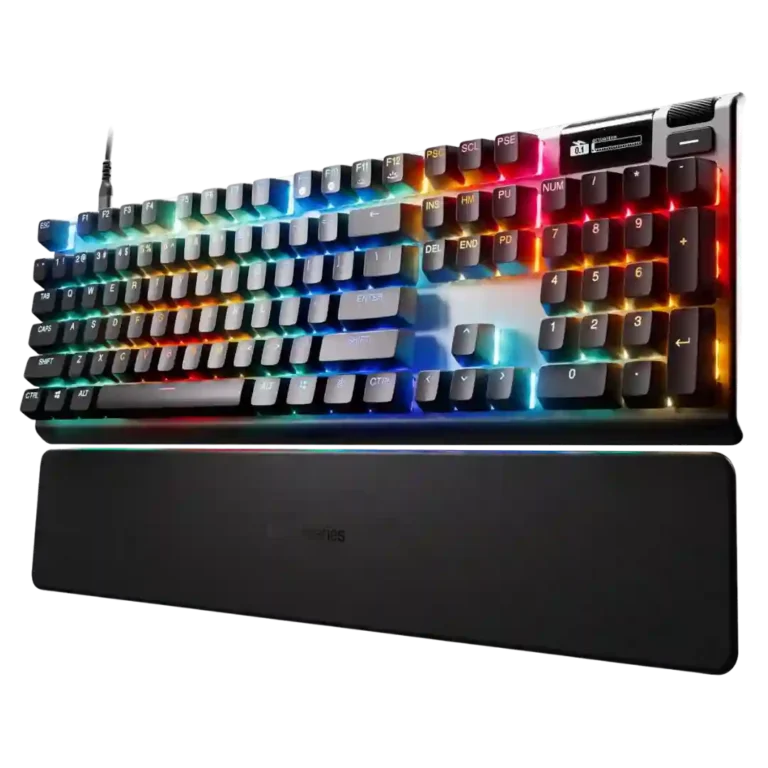
The Apex Pro Gen 3 comes across as a high-end gaming keyboard built around speed and deep control. Reviewers repeatedly praised the OmniPoint 3.0 switches for smooth, fast, responsive play, and the strongest evidence points to useful competitive tools like Rapid Trigger, Rapid Tap, Protection Mode, per-key actuation, profiles, and OLED-based adjustments. The hardware is generally sturdy, with strong keycaps, improved dampening, and a useful wrist rest. The tradeoff is that the premium price exposes smaller annoyances: software can feel cluttered, some layouts or media controls are awkward, USB passthrough is gone, and wireless feedback ranges from smooth to problematic. Overall, the consensus is that its performance features are genuinely impressive, but the value depends on whether those advanced controls matter.
Compared in Reviews
Products reviewers directly compared with this model, grouped into quick takeaways.
- Alternative: simpler high-quality alternative The HyperX Alloy Origins is suggested for buyers who want quality without as many bells and whistles.
- Better: build and typing feel The Keychron Q1 HE is framed as offering similar features plus aluminum build and gasket mounting for more enjoyable typing.
Feature Scorecards
Pros
-
Customization options were among the product’s strongest attributes, covering per-key actuation, RGB, profiles, bindings, and protection settings.
-
Sound dampening was a clear upgrade, with damping layers and triple-layer foam repeatedly credited for improving sound and reducing harshness.
-
Responsiveness was one of the strongest points, with reviewers repeatedly describing inputs as accurate, fast, and able to keep up with quick keystrokes.
-
Reviewers generally praised the OmniPoint 3.0 switch feel as smooth, light, fast, and well-lubed, though one review found the lightness less suited to personal preference.
-
Durability evidence was positive, with reviewers citing rugged construction and robust typing hardware able to withstand intense use.
-
Frame rigidity was strong in the evidence, with reviewers noting no wobble, no slipping, and resistance to flexing.
-
Gaming performance was a major strength, with reviewers citing smooth fast-paced play, precise movement, low delay, and strong competitive features.
-
Size and form factor varied by model: TKL and 60% versions save space, while full-size keeps traditional function and number-pad layouts.
-
Extra gaming features were a strong differentiator, especially Rapid Tap, Protection Mode, N-key rollover, and mis-input prevention.
-
Rapid Trigger support was widely praised as useful for faster resets, snappier movement, repeated inputs, and competitive play.
-
Per-key lighting control was repeatedly supported through individual-key RGB adjustment, Prism customization, and section-level selection.
-
Typing feel was usually praised as smooth, flowing, and enjoyable, though the Mini review found the tray-mounted feel less lively than some competitors.
-
Cable quality was consistently positive, with reviewers noting detachable braided USB-C cables as practical and premium.
-
Onboard memory was supported through onboard presets, saved keyboard profiles, and built-in profile storage.
-
Keycap quality was generally strong, especially on PBT models; the Mini’s ABS caps were considered acceptable but less premium.
-
Macro customization was well supported through GG, OLED/menu controls, key bindings, and custom keystroke settings.
-
Build quality was broadly strong, with tank-like feel, robust frames, and premium impressions, though the Mini’s plastic case drew criticism.
-
Wrist rest quality was usually a plus, especially for magnetic attachment and support, but comfort varied by reviewer and model.
-
Layout options were strong across full-size, TKL, wireless, and smaller versions, giving users meaningful size choices.
-
RGB customization was deep overall, with Prism, presets, layered effects, and per-key designs, though some onboard lighting limits and software friction appeared.
-
Noise level was generally acceptable to good, with quieter, muted typing, though not every reviewer found the sound fully refined.
-
RGB lighting quality was often praised for even, attractive illumination, but one lab review found color accuracy imperfect.
-
Actuation was praised for consistency and predictable force, though one lab review found the software-set actuation points were not perfectly accurate in hardware.
-
Compatibility evidence was limited but positive, with one Mini review describing use across consoles and PC.
-
Key stability evidence was positive around the dual-rail switch design reducing side-to-side wobble.
-
Reliability evidence was positive where reviewed directly, especially around rapid key presses not canceling or failing to register.
-
Profile management was a strength through QuickSet, OLED access, and onboard profiles, though one review disliked being forced to keep five profiles loaded.
-
Latency evidence was mostly positive in wired use, with measured low latency and no-delay impressions, while Bluetooth was called a poor competitive option in one review.
-
Volume control was a useful strength, with multiple reviewers noting the wheel, dial, or roller for volume adjustment.
-
Typing comfort was strong for several reviewers, though one wireless review disliked the tall keycaps and productivity typing feel.
-
Key spacing and reach were generally manageable or excellent, though the compact layout required some adjustment.
-
Materials quality was generally good thanks to aluminum plates and solid plastics, but one Mini review disliked the plastic-only case choice.
-
Acoustics improved versus older models and were often described as thocky or muted, but some reviewers still heard hollowness or crunch.
-
Ergonomics were mostly positive around reach, posture, and long-session comfort, with some caveats about wrist-rest shape on the wireless TKL.
-
Portability depended on version: full-size wired models are desktop-first, while detachable cables, TKL, and 60% layouts improve travel use.
-
Legend visibility was good on white/TKL and shine-through keycaps, though Mini front-facing function legends were not equally shine-through.
-
Software quality was powerful but mixed: reviewers praised GG’s depth and ease in places, while others found it bloated, cluttered, or inconsistent.
-
Connectivity was mixed: setup and Bluetooth switching could be smooth, but one review reported 2.4GHz dongle issues.
-
Battery life was acceptable rather than standout, with cited 40 to 45 hour ratings and several days of use in testing.
-
Dual actuation and two-action key behavior were supported and useful, but one wireless review wanted fuller analog-stick style control.
-
Desk space efficiency depended heavily on version: full-size models take up room, while TKL and 60% variants were praised for saving space.
-
Media controls were mixed: OLED, wheel, and playback controls were useful, but some reviewers found them awkward, limited, or lacking dedicated buttons.
-
Wireless performance was split, ranging from smooth no-lag typing and several days of use to intermittent 2.4GHz input failures.
-
Value for money was the most divided area: many reviewers thought the premium was justified, while others flagged the high price or better-value rivals.
-
The polling rate was consistently described as 1,000 Hz: sufficient for most users, but not record-breaking compared with newer 8,000 Hz competitors.
Cons
-
Switch choice is less flexible than the rest of the keyboard: reviewers noted proprietary or mixed switch types, with some frustration when different rows use different switches.
-
Stabilizer quality was mixed: some reviewers praised reduced wobble, while others found rattling, scratchiness, or inconsistent tuning.
-
Backlight brightness was mixed: reviewers liked adjustable brightness, but multiple reviewers said the lighting was dimmer than expected.
-
Hot-swap support was conflicting by model/reviewer: several reviews said no switch hot-swap, while one TKL review said Hall effect switches were hot-swappable.
-
Ease of switch replacement was limited in several reviews because switch hot-swap was absent or constrained, despite some model-specific conflict.
-
Passthrough features were weak because reviewers noted the missing USB passthrough compared with expectations or earlier models.
Compared With Category Average
Compared with other Gaming Keyboard, this product is above average in wrist rest quality, rapid trigger support, cable quality, below average in ease of switch replacement, hot-swappable switches, backlight brightness.
| Attribute | This product | Category average | Difference |
|---|---|---|---|
| wrist rest quality | 4.3 | 2.7 | +1.6 |
| ease of switch replacement | 1.8 | 3.4 | -1.6 |
| rapid trigger support | 4.6 | 3.4 | +1.2 |
| hot-swappable switches | 2.4 | 3.3 | -0.9 |
| backlight brightness | 3.2 | 4.1 | -0.9 |
| cable quality | 4.5 | 3.7 | +0.7 |
| analog input support | 3.8 | 3.1 | +0.6 |
| stabilizer quality | 3.3 | 3.9 | -0.6 |
FAQ
Is the SteelSeries Apex Pro Gen 3 good for competitive gaming?
Yes. Reviewers repeatedly praised its fast OmniPoint 3.0 switches, adjustable actuation, Rapid Trigger, Rapid Tap, Protection Mode, and low-delay feel in shooters and fast-paced games.
Is it comfortable for typing?
Mostly, but not universally. Several reviewers called typing smooth, comfortable, or excellent, while a few disliked the Mini or wireless TKL feel because of the mounting, key height, or wrist-rest shape.
How good is the SteelSeries GG software?
It is powerful and feature-rich, with per-key actuation, RGB, macros, profiles, and QuickSet support. The tradeoff is that some reviewers found it bloated, cluttered, inconsistent, or less intuitive than rivals.
Should I get the wireless version?
The evidence is mixed. Some reviewers had smooth Bluetooth or several days of battery life, but one reported Bluetooth latency for competitive play and intermittent 2.4GHz input failures, so wired is the safer performance pick.
Does it have hot-swappable switches?
Review evidence conflicts by model and reviewer. Several reviews said the Apex Pro Gen 3 lacks hot-swap switch support, while one TKL review said it is hot-swappable with other Hall Effect switches.
Is the Apex Pro Gen 3 worth the price?
It is most defensible if you will use the advanced actuation, gaming, profile, and RGB features. Buyers who only need a simple keyboard or want the best value may find cheaper Hall Effect competitors more appealing.
Consider This Instead
If you want better ease of switch replacement
Choose Glorious GMMK 3 HE. It scores 4.9 vs 1.8 for ease of switch replacement, with a 4.1 overall score.
If you want better hot-swappable switches
Choose Corsair K65 Plus. It scores 5.0 vs 2.4 for hot-swappable switches, with a 4.1 overall score.
If you want better value for money
Choose McHose GX87 Keyboard. It scores 4.9 vs 3.5 for value for money, with a 4.2 overall score.
If you want better backlight brightness
Choose Alienware Pro Wireless Gaming Keyboard. It scores 4.9 vs 3.2 for backlight brightness, with a 4.1 overall score.
Overall Top Gaming Keyboard Alternatives
Best for 8K polling, magnetic-switch gaming control, premium build, and deep web customization. Skip it if you need broad switch compatibility, USB passthrough, a wrist rest, or a portable keyboard.
Pros: latency, polling rate
Cons: portability, switch options
Good if you want a premium full-size Hall Effect keyboard with smooth switches, strong gaming controls, and quiet acoustics. Skip it if you need a portable, budget, or broadly switch-compatible...
Pros: key stability, frame rigidity
Cons: portability, switch options

Best for a premium, quiet Hall Effect TKL with strong wireless, software, and gaming features. Skip it if price, switch flexibility, USB passthrough, or an included wrist rest matter most.
Pros: rapid trigger support, typing feel
Cons: switch options, portability
Best for a premium 96% metal keyboard with Hall Effect tuning, strong wireless, and excellent typing feel. Skip it for travel, bargain pricing, or maximum esports specs.
Pros: build quality, frame rigidity
Cons: portability, switch options