- Worse: Bluetooth flexibility The Kone XP Air is presented as more flexible because it offers Bluetooth where the Logitech model does not.
- Better: free-scrolling wheel The Kone XP Air lacks the free-scrolling feature associated with the Logitech G502.
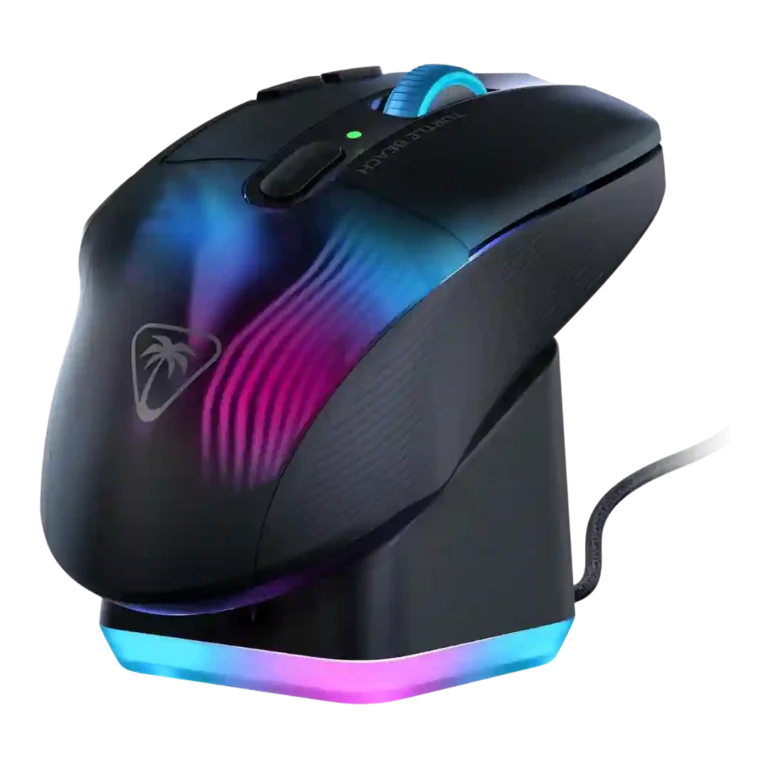
Turtle Beach Kone XP Air Review
Bottom Line
Choose it for deep button customization, RGB, strong wireless response, and easy dock charging. Skip it if you need light FPS focus, quiet controls, polished software, or premium feel for the price.
Best for right-handed gamers or productivity users who will use the many buttons, Easy-Shift, profiles, RGB ecosystem, wireless modes, and charging dock. It especially fits MMO, MOBA, multi-genre, and shortcut-heavy workflows.
Not ideal for buyers focused on ultralight FPS performance, quiet/simple controls, flawless software, or maximum value. It is also risky for users sensitive to palm shape, click feel, or 4D scroll-wheel stiffness.
Reviewers describe the Turtle Beach Kone XP Air as a feature-heavy wireless gaming mouse with standout RGB, broad button mapping, a useful charging dock, and generally strong sensor and wireless performance. The tradeoff is focus: its many controls can help MMO, MOBA, productivity, and multi-genre players, but they add weight and complexity that some FPS-focused reviewers disliked. Comfort and build impressions split sharply, with several reviewers praising the shape and long-session feel while others criticized hand strain, mushy clicks, loud or awkward scroll-wheel behavior, software bugs, and a price that often felt hard to justify. Its best evidence is for users who will actually use the dock, profiles, macros, and extra buttons.
Compared in Reviews
Products reviewers directly compared with this model, grouped into quick takeaways.
- Worse: weight The Kone XP Air is lighter than the Asus ROG Chakram X.
- Better: weight The Kone XP Air is slightly heavier than the Razer Basilisk V3.
Feature Scorecards
Summary
58 reviewed features- Very positive 4.5-5.0 34% 20 features
- Positive 3.5-4.4 48% 28 features
- Neutral 2.5-3.4 12% 7 features
- Negative 1.5-2.4 5% 3 features
- Very negative below 1.5 0% 0 features
Pros
-
Click-latency evidence was strongly positive in the one scored review, which framed the optical click response as light-speed input.
-
Motion consistency was strongly praised in one review that described smooth cursor tracking for daily use and in-game snaps.
-
Connection stability was praised in the reviews that discussed it, with strong-signal, fast-connect, and no-input-issue evidence.
-
Wireless latency evidence was strongly positive, with multiple reviewers reporting no perceptible lag, input lag, or delay.
-
Programmable-button evidence was one of the product’s strongest areas, with reviewers repeatedly valuing the large number of inputs and easy access to functions.
-
Macro support was consistently positive among reviewers who used it for productivity, profiles, or game-specific commands.
-
Wireless performance was mostly positive, with reviewers praising the 2.4GHz/wireless experience as strong, responsive, or indistinguishable from wired, despite one otherwise negative review.
-
Long-session comfort was positive in scored reviews, with reviewers reporting little strain and comfortable extended use.
-
Tracking accuracy was praised where reviewers tested surfaces directly, with evidence of seamless tracking and excellent responsiveness.
-
Fingertip-grip comfort had limited positive evidence from reviewers who found the mouse comfortable across grip styles.
-
Glide smoothness was consistently praised across reviews, with PTFE feet and smooth movement repeatedly highlighted.
-
Profile switching was praised for easy profile storage, app activation, and quick switching without constant software use.
-
Sensor impressions were mostly strong, with many reviewers calling tracking smooth, responsive, accurate, or flawless, though one negative review still only rated it as good rather than class-leading.
-
Dock compatibility and dock behavior were mostly praised for easy placement, stability, and convenience, with isolated complaints about sensitivity or slipping.
-
2.4GHz connectivity evidence was positive where reviewers tested the receiver or dongle, especially for low-lag or stutter-free use.
-
Shape comfort was generally praised in the scored evidence, especially by reviewers who liked the larger ergonomic Kone shape.
-
Ecosystem integration was positively supported by AIMO/RGB sync evidence for Roccat devices and dock syncing.
-
Portability evidence was positive but limited, mostly tied to multi-device reliability and the ability to travel without the dock.
-
Durability over time had limited positive evidence from a reviewer whose dropped unit showed no damage.
-
Button customization was widely praised for remapping, Easy-Shift, and macros, though a few reviewers found the Easy-Shift layout cumbersome or fiddly.
-
Button responsiveness was usually praised as fast, crisp, or snappy, but one review criticized the main buttons as insufficiently responsive.
-
MMO gaming suitability was generally positive because of programmable controls, though one reviewer wanted more MMO-specific button placement.
-
RGB features were a major strength for many reviewers, but a few called the lighting muted, limited, or an afterthought compared with expectations.
-
Charging convenience was usually praised because of the dock and quick charge, but several reviewers disliked dock sensitivity, complexity, or unusability while docked.
-
Lift-off distance evidence was positive, with reviewers citing LOD customization and no erratic movement during use.
-
Bluetooth support was generally valued for flexibility and secondary-device use, although one review called it suboptimal for gaming.
-
Onboard memory received positive but limited evidence for storing profiles and making the mouse useful across systems.
-
Battery life drew broad but mixed evidence: many reviewers praised long life, while others fell short of the 100-hour claim or needed frequent charging with full features enabled.
-
Cable flexibility was mostly praised as flexible, low-friction, and usable while charging, though one reviewer found it stiffer than ideal.
-
Build quality ranged from cheap or disappointing in some reviews to solid, durable, or top-notch in others.
-
Ergonomic design was highly polarized, with many reviewers praising comfort and right-hand fit while others criticized awkward shape or immediate discomfort.
-
Side-button quality was usually praised for placement, tactile feel, and low accidental-click risk, though some reviewers found access cramped, sensitive, or only average.
-
Weight opinions were context-dependent: many reviewers found around 99g reasonable or light for the feature set, while others considered it heavy for FPS play.
-
Switch durability evidence was mixed: two reviewers trusted the optical-switch longevity, while one raised quality-assurance concerns.
-
Polling-rate comments were positive but limited, tying the 1,000Hz option to smooth movement and expected gaming performance.
-
Switch feel split across reviews: many liked the tactile or crisp optical feel, while several criticized mushiness, variance, or a harsh main-click feel.
-
Claw-grip comfort was mixed-positive overall, with several reviewers reporting support for claw grip and one finding the forced claw position uncomfortable.
-
The 19K DPI range was generally considered broad enough, but some reviewers noted it was not the fastest or highest-resolution option at the price.
-
Software usability was mixed, ranging from easy, robust, and feature-rich to clunky, overwhelming, dated, or rough around the edges.
-
Premium feel was mixed, with some reviewers calling it premium or top-of-the-line and others saying the build was not truly premium.
-
Surface compatibility was mixed-positive: reviewers praised desk and glass tracking but warned against reflective, marble, granite, or glass-like surfaces in some cases.
-
Palm-grip comfort split sharply, with one reviewer reporting palm-grip strain while others found the shape pleasing or broadly comfortable.
-
Click noise was mixed: button clicks were often quiet or unobtrusive, but the scroll wheel could be extremely loud.
-
MOBA gaming suitability was mixed-positive overall, with some reviews framing it as suitable for MOBA-style controls and one strongly negative gaming review rejecting it.
-
Cross-platform compatibility was mixed: reviewers liked laptop and multi-device use, but one found limited button recognition on iPadOS.
-
Balance evidence was limited and mixed, with one reviewer describing the mouse as balanced only when held at the middle.
-
Debounce customization had limited positive evidence, with one reviewer calling adjustable debounce a notable gaming feature but caveating its usefulness for casual players.
-
Handedness evidence was limited, but one review framed comfort as conditional on being right-handed.
Cons
-
Scroll-wheel quality drew mixed reactions, with praise for feel and grip from some reviewers but complaints about stiffness, loudness, 4D implementation, or messiness from others.
-
FPS gaming suitability was mixed: reviewers liked performance and responsiveness, but weight, extra buttons, or genre focus kept it from being a pure FPS pick.
-
Value for money was one of the most divided attributes, with some reviewers seeing feature-rich value and others finding the price steep or unjustified.
-
Left and right click quality was highly divisive, ranging from very fast or well-shaped clicks to mushy, uneven, or poor main-button feel.
-
Grip texture was mixed: some reviewers had no grip issues, while others disliked slick sides, lack of rubber, or sticky surface texture.
-
Software stability was a repeated concern in negative evidence, including bugs, sync issues, broken-feeling behavior, and disappearing settings, though one review found support good.
-
Materials quality leaned mixed-negative where discussed, with praise limited by complaints about cheap plastic, fingerprints, grime, or non-premium surfaces.
-
Tilt gesture controls were mixed-negative overall, with several reviewers finding 4D tilt stiff, awkward, or hard to use despite some functional praise.
-
Weight tuning evidence was negative because one reviewer noted the lack of adjustable weights as a drawback.
-
Firmware reliability had limited negative evidence tied to a reviewer’s software/firmware update and battery-reporting problems.
Compared With Category Average
Compared with other Gaming Mouse, this product is above average in fingertip grip comfort, RGB features, programmable buttons, below average in materials quality, firmware reliability, left and right click quality.
Summary
8 compared features- Above average 0.4+ pts higher 50% 4 features
- Same as average within 0.3 pts 0% 0 features
- Below average 0.4+ pts lower 50% 4 features
| Attribute | This product | Category average | Difference |
|---|---|---|---|
| materials quality | 2.5 | 3.9 | -1.4 |
| firmware reliability | 1.5 | 2.8 | -1.3 |
| left and right click quality | 3.1 | 4.2 | -1.1 |
| grip texture | 3.0 | 4.0 | -1.0 |
| fingertip grip comfort | 4.8 | 3.7 | +1.1 |
| RGB features | 4.3 | 3.6 | +0.7 |
| programmable buttons | 4.8 | 4.0 | +0.8 |
| dock compatibility | 4.5 | 3.8 | +0.7 |
FAQ
Is the Turtle Beach Kone XP Air good for MMO games?
Yes, many reviewers liked the large number of programmable controls for MMO-style play. A few still preferred more dedicated thumb-button layouts for pure MMO use.
Does the wireless connection feel laggy?
Most reviewers reported no perceptible lag, no input issues, or a strong wireless signal over 2.4GHz. Bluetooth was valued for flexibility but was not always treated as the best gaming mode.
How is the battery life?
Battery feedback was mixed-positive. Several reviewers praised long life and the dock, but others said real use fell short of the 100-hour claim when RGB and high-performance settings were active.
Is the charging dock useful?
Usually yes. Reviewers often called the dock convenient, easy, or game-changing, though a few complained about sensitivity, desk grip, or the fact that the mouse cannot be used while sitting on the dock.
Is it comfortable for long sessions?
Comfort was split. Several reviewers found it comfortable for long sessions, but others reported hand strain, awkward palm support, or a shape that did not suit their grip.
Are the software and customization good?
Customization was a major strength, with macros, profiles, RGB, DPI, and button remapping praised. Software quality was mixed because some reviewers found Swarm clunky, buggy, overwhelming, or dated.
Consider This Instead
If you want better firmware reliability
Choose Turtle Beach Burst II Air. It scores 4.7 vs 1.5 for firmware reliability, with a 4.3 overall score.
If you want better software stability
Choose Turtle Beach Kone II Air. It scores 5.0 vs 2.5 for software stability, with a 4.3 overall score.
If you want better tilt gesture controls
Choose Razer Naga V2 HyperSpeed. It scores 5.0 vs 2.4 for tilt gesture controls, with a 4.0 overall score.
If you want better weight tuning
Choose Razer Viper V3 HyperSpeed. It scores 4.8 vs 2.0 for weight tuning, with a 4.0 overall score.
Overall Top Gaming Mouse Alternatives
Choose the ROG Harpe II Ace for ultralight FPS play, precise tracking, smooth glide, and web-based tuning. Skip it if you need palm-grip support, MMO buttons, onboard profiles, or long...
Pros: acceleration control, wireless latency
Cons: onboard memory, MMO gaming suitability

Best for MMO/MOBA control, swappable panels, strong wireless performance, and long battery life. Skip it if you want a light FPS mouse, low price, or no Synapse quirks.
Pros: sensor performance, click latency
Cons: software stability, Bluetooth support
Choose the Aerox 3 Wireless Gen 2 if you want a light, fast wireless FPS mouse with strong software and battery life. Skip it if you dislike honeycomb shells, need...
Pros: click latency, motion consistency
Cons: palm grip comfort, fingertip grip comfort
Choose the Kone II if you want a large, ergonomic mouse with deep customization and strong sensor performance. Skip it if you have small hands, need an ambidextrous mouse, or...
Pros: click latency, motion consistency
Cons: handedness options, portability