- Alternative: macro-friendly wireless use The reviewer recommended the Logitech G502 Lightspeed for buyers wanting a more macro-friendly wireless mouse.
- Better: battery life and versatility The reviewer preferred the Logitech G502 X Lightspeed for much better battery life at the same price.
- Compared: extra buttons and ergonomic shape The reviewer compared the Aerox 5's extra-button shape to the Logitech G502, but with subtler ergonomics.
SteelSeries Aerox 5 Wireless Review
Bottom Line
Choose it for a lightweight, comfortable wireless mouse with smooth glide and many programmable inputs. Skip it if you need dependable long battery life, easy-to-reach side controls, left-handed support, or top value at full price.
Best for right-handed palm or claw grip users who play across genres and want a light wireless mouse with extra programmable buttons, smooth glide, and strong 2.4GHz performance.
Not ideal for left-handed users, fingertip grippers, smaller hands that struggle with forward side buttons, competitive FPS specialists, or buyers who expect maximum battery life with RGB and high polling enabled.
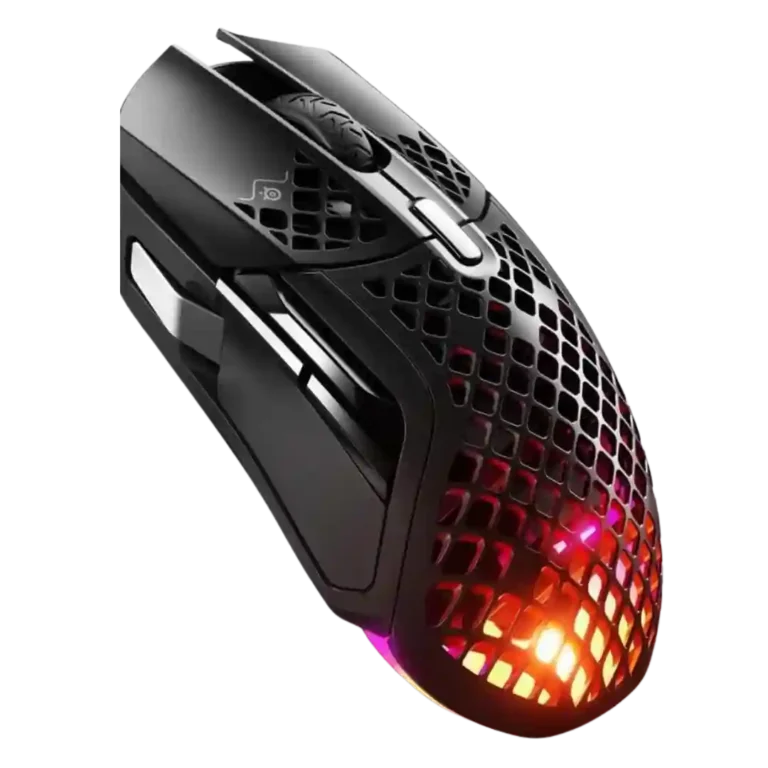
Across reviews, the SteelSeries Aerox 5 Wireless lands as a versatile, comfortable multi-genre mouse rather than a specialist. Reviewers consistently liked its light feel, smooth PTFE glide, accurate sensor, crisp switches, and broad button customization. The tradeoff is that the very features meant to broaden its appeal also create friction: the forward thumb button and up/down rocker are repeatedly awkward, Bluetooth is best treated as a convenience mode, and real battery life varies sharply with RGB, polling, and efficiency settings. Build quality and water/dust reassurance were stronger than the holey shell might suggest, but value depends heavily on sale pricing because several reviewers felt the launch price was hard to justify.
Compared in Reviews
Products reviewers directly compared with this model, grouped into quick takeaways.
- Better: weight The reviewer cited the Logitech G Pro X Superlight as a newer, lighter wireless alternative.
- Better: weight without honeycomb design The reviewer said the Logitech G Pro X Superlight weighs slightly less without needing the Aerox 5's honeycomb design.
- Similar: shape and dimensions The reviewer compared the Aerox 5 shape closely to the Glorious Model O but noted the Aerox 5 is taller.
Feature Scorecards
Summary
58 reviewed features- Very positive 4.5-5.0 33% 19 features
- Positive 3.5-4.4 48% 28 features
- Neutral 2.5-3.4 9% 5 features
- Negative 1.5-2.4 10% 6 features
- Very negative below 1.5 0% 0 features
Pros
-
Motion consistency was praised in testing, with movements registering without skipping or overshooting.
-
Connection stability was repeatedly praised, especially over the 2.4GHz dongle, with reviewers reporting no dropouts or lag.
-
Acceleration-related control was praised where reviewers discussed precise tuning or the sensor avoiding unwanted acceleration.
-
Click latency feedback was positive where tested, with reviewers noting instant execution and no missed inputs.
-
Charging convenience was a strength thanks to fast USB-C top-ups, charge-and-play support, and painless cable use.
-
Glide smoothness was one of the strongest areas, with PTFE feet repeatedly described as effortless, smooth, or floating on surfaces.
-
Wireless latency was praised overall, with reviewers repeatedly reporting no noticeable latency over the 2.4GHz connection.
-
Tracking accuracy was widely praised, with reviewers repeatedly describing precise, consistent, or pixel-perfect cursor control.
-
Button responsiveness was strongly praised, with reviewers describing immediate, satisfying, and reliable inputs.
-
Long-session comfort was strong, with reviewers citing low fatigue, cool hands, and comfort across extended use.
-
Switch feel was frequently praised for crisp, tactile, consistent clicks.
-
Button customization was a major strength, with reviewers liking the broad remapping options and flexible software control.
-
Programmable buttons were a major strength, giving the mouse multi-genre flexibility and extra inputs beyond typical lightweight mice.
-
Left and right click quality was praised for crispness, responsiveness, and strong tactile feel.
-
Materials quality was praised for high-quality plastic, soft-touch/matte finishes, and a premium impression.
-
Premium feel was praised where reviewers described the mouse as sturdy, high-quality, and premium in hand.
-
Click noise feedback was limited but positive, with one reviewer specifically liking the quiet, precise button actuation.
-
Cross-platform use was supported by positive Xbox testing, though software features were more limited outside Windows.
-
Long-term durability evidence was limited but positive where reviewers described the shell as rigid or durable despite low weight.
-
The included USB-C cable was usually praised for being flexible, light, or well-sleeved enough for charging or wired play.
-
Shape comfort was broadly praised for a comfortable larger right-handed shape, though some found it big or less suited to small hands.
-
Palm grip comfort was consistently positive because the taller body and thumb area fit palm users well.
-
Ergonomics were generally praised for a comfortable right-handed shape suited to palm and claw grips.
-
Weight was usually praised as light and agile, though a few reviewers felt it was only middling by modern ultralight standards.
-
Sensor performance was mostly strong, with precise, reliable tracking, though a few reviewers considered it not top-tier.
-
Wireless performance was generally reliable and responsive, though Bluetooth was often treated as the weaker mode.
-
Build quality was consistently viewed as sturdy despite the honeycomb shell, with little flex, creaking, or fragility reported.
-
Macro support was positively received where reviewers noted broad macro assignment and useful extra-button workflows.
-
Water and dust resistance was generally viewed positively, reassuring reviewers about the honeycomb shell and spill/dust exposure.
-
Claw grip support was mostly positive, though a few reviews noted holes or reach issues that can bother some claw users.
-
MMO suitability was positive for lighter MMO use, but reviewers noted it falls short of dedicated MMO mice with more buttons.
-
Reviewers generally found the 2.4GHz dongle responsive and gaming-ready, though several disliked the USB-C dongle/adapter arrangement.
-
The 18,000 CPI range was useful for most reviewers, but some considered it merely middling against other high-end mice.
-
Scroll wheel quality was mostly positive for resistance and tactility, though one reviewer found scrolling underwhelming.
-
MOBA suitability was generally positive because the extra buttons helped in games like League of Legends, DOTA 2, and Dota 2.
-
Switch durability was supported by limited positive evidence around wear resistance and high-rated IP54 switches.
-
The rear-weighted balance drew limited but positive feedback for improving control in palm grip.
-
Profile switching was positively noted in Windows software, especially for creating and switching multiple profiles.
-
Surface compatibility was positive but lightly evidenced, with PTFE feet remaining usable across desk mats, wood, pads, and textured surfaces.
-
FPS suitability was mixed: reviewers liked the lightness and precision for casual or fast FPS play, but competitive-focused reviewers found the size/buttons limiting.
-
Grip texture was mixed-positive: the matte/coarse finish helped grip for many, while a few found it slippery or affected by holes.
-
Onboard memory was useful for saving profiles, but one reviewer criticized Bluetooth mode for not preserving some settings.
-
Software usability was mixed: some found SteelSeries GG clear and powerful, while others called it cluttered, bloated, or limited on macOS.
-
Bluetooth was valued for versatility and secondary-device use, but several reviewers warned it is less suitable for serious gaming than 2.4GHz.
-
Battery life was the most divisive area: some reviewers reported strong multi-session endurance, while others found real-world runtime far below claims.
-
Portability evidence was mixed, with lightweight design helping travel but slipperiness and size limiting it for some.
-
Value for money was mixed: sale pricing and feature density were praised, but many reviewers felt the launch price was too high.
Cons
-
RGB opinions were mixed: reviewers liked customization and glow, but often complained the lighting was hidden or underwhelming in use.
-
Polling rate feedback was split: 1000Hz was praised, while Bluetooth or efficiency modes dropping to 125Hz were criticized.
-
Side button quality was the most repeated ergonomic issue, especially the forward button and up/down rocker being hard to reach or actuate.
-
Lift-off distance was mentioned negatively by reviewers who wanted adjustment or found the default higher than average.
-
Firmware or settings reliability drew limited criticism around settings resets or update-related pairing issues.
-
Tilt/flick gesture controls were widely criticized as stiff, awkward, or hard to use under pressure despite occasional novelty value.
-
Software stability was mixed-to-poor where reviewers reported inaccurate battery readings, bugs, or an unresponsive interface.
-
Handedness was a weakness because reviewers treated the design as right-handed and not ambidextrous.
-
Fingertip grip support was weak; reviewers found the mouse too large or better suited to other grip styles.
-
Debounce customization was only mentioned as a missing high-end feature, making it a weakness for advanced users.
-
Weight tuning was a weakness because one reviewer noted competing mice offer weight adjustment that the Aerox 5 lacks.
Compared With Category Average
Compared with other Gaming Mice, this product is above average in click noise, cable flexibility, below average in fingertip grip comfort, debounce customization, lift-off distance.
Summary
8 compared features- Above average 0.4+ pts higher 25% 2 features
- Same as average within 0.3 pts 0% 0 features
- Below average 0.4+ pts lower 75% 6 features
| Attribute | This product | Category average | Difference |
|---|---|---|---|
| fingertip grip comfort | 2.0 | 3.7 | -1.7 |
| debounce customization | 2.0 | 3.7 | -1.7 |
| lift-off distance | 2.5 | 3.8 | -1.3 |
| side button quality | 2.9 | 3.8 | -0.9 |
| battery life | 3.6 | 4.2 | -0.7 |
| click noise | 4.5 | 3.4 | +1.1 |
| cable flexibility | 4.4 | 3.6 | +0.9 |
| software stability | 2.1 | 3.0 | -0.9 |
FAQ
Is the Aerox 5 Wireless good for FPS games?
It works well for casual and fast FPS play thanks to its low weight, smooth glide, and accurate sensor. Competitive-focused reviewers were more mixed because the size, weight, and side-button layout can limit fine aim or quick access.
How is the battery life in real use?
Battery life is highly settings-dependent. Some reviewers got strong multi-session endurance, while others reported much shorter runtime with RGB and high polling enabled.
Are the side buttons easy to use?
The two standard side buttons were often usable, but the forward thumb button and up/down rocker were the most repeated complaints. Several reviewers found them stiff, far forward, or awkward under pressure.
Is Bluetooth good for gaming?
Bluetooth is useful for portability and secondary devices, but reviewers generally preferred 2.4GHz for gaming. Several described Bluetooth as slower, choppier, or less suitable for competitive play.
Does the honeycomb shell feel durable?
Most reviewers found the shell surprisingly sturdy, with good build quality and reassuring IP54 water/dust protection. A few still disliked the feel or look of the holes.
Is the software good?
Opinions on SteelSeries GG were split. Some reviewers found it clear and powerful, while others called it cluttered, bloated, buggy, or limited on macOS.
Is it worth the full price?
Value was mixed. Reviewers liked the feature set and sale pricing, but many felt the launch price was steep given battery caveats, awkward buttons, and strong alternatives.
Sample Expert Reviews We Analyzed
These are a few of the reviews included in our analysis.
Video Reviews
- Review score
- 4.0/5
- Review score
- 3.8/5
- Review score
- 4.1/5
Article Reviews
- Review score
- 4.1/5
- Review score
- 4.2/5
Consider This Instead
If you want better fingertip grip comfort
Choose Logitech G PRO X Superlight 2. It scores 5.0 vs 2.0 for fingertip grip comfort, with a 4.1 overall score.
If you want better software stability
Choose Turtle Beach Kone II Air. It scores 5.0 vs 2.1 for software stability, with a 4.3 overall score.
If you want better tilt gesture controls
Choose Razer Naga V2 HyperSpeed. It scores 5.0 vs 2.4 for tilt gesture controls, with a 4.0 overall score.
If you want better debounce customization
Choose Glorious Model D3. It scores 4.8 vs 2.0 for debounce customization, with a 4.2 overall score.
Overall Top Gaming Mice Alternatives
Choose the ROG Harpe II Ace for ultralight FPS play, precise tracking, smooth glide, and web-based tuning. Skip it if you need palm-grip support, MMO buttons, onboard profiles, or long...
Pros: acceleration control, wireless latency
Cons: onboard memory, MMO gaming suitability

Best for MMO/MOBA control, swappable panels, strong wireless performance, and long battery life. Skip it if you want a light FPS mouse, low price, or no Synapse quirks.
Pros: sensor performance, click latency
Cons: software stability, Bluetooth support
Choose the Aerox 3 Wireless Gen 2 if you want a light, fast wireless FPS mouse with strong software and battery life. Skip it if you dislike honeycomb shells, need...
Pros: click latency, motion consistency
Cons: palm grip comfort, fingertip grip comfort
Choose the Kone II if you want a large, ergonomic mouse with deep customization and strong sensor performance. Skip it if you have small hands, need an ambidextrous mouse, or...
Pros: click latency, motion consistency
Cons: handedness options, portability