
Review: WYZE Duo Cam Pan Camera
Updated: 2 months ago
3.8
Based on methodology below
141
Insights analyzed
39
Grouped by key features
7
From expert reviews
Scores below reflect consolidated expert coverage across these features.
Bottom Line
Choose the WYZE Duo Cam Pan if you want wide coverage from one budget camera, thanks to its fixed view plus 360/180 pan-tilt lens. Skip it if you need reliable smart alerts without a subscription or you dislike occasional tracking and waypoint quirks.
Best for
Budget-focused homeowners who want one camera to cover a large area, especially if they already use Wyze gear and plan to rely on local microSD continuous recording.
Not for
Anyone who needs dependable person/vehicle filtering and frequent alerts without paying for a plan, or who requires RTSP/ONVIF streaming into a third-party NVR.
Verdict
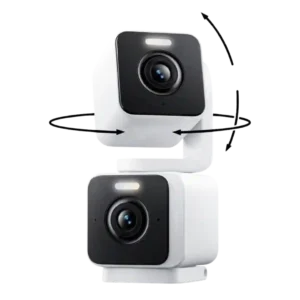
Wyze’s Duo Cam Pan is a smart value play: two 2K lenses in one housing keep a steady overview while a second lens pans and tilts to follow activity, helping reduce blind spots. Reviewers liked the sharp daytime image, usable color night vision aided by spotlights, and the option for 24/7 microSD recording up to 512GB. Setup and day-to-day control in the Wyze app are generally straightforward, with zones and waypoint patrols for coverage. The tradeoff is that richer detections, better filtering, web viewing, and more frequent notifications lean heavily on a subscription, and at least one tester found tracking and saved positions can drift or chase motion like swaying leaves.
Pros
-
4.7based on 6 reviewsArticulation range: 4.7, based on 6 reviewsThe pan/tilt module is described as offering an extremely wide motion envelope (commonly cited as 360 degrees pan and 180 degrees tilt), enabling near wraparound coverage when mounted well.
-
4.7based on 6 reviewsDual-camera design: 4.7, based on 6 reviewsReviews consistently praise the dual-lens concept (one fixed, one pan/tilt) for keeping a stable context view while reducing blind spots as the moving lens follows activity.
-
4.7based on 4 reviewsContinuous recording capability: 4.7, based on 4 reviewsContinuous 24/7 recording to microSD is repeatedly mentioned as supported, and reviewers recommend using a larger card because two lenses can fill storage faster.
-
4.6based on 5 reviewsPrice value: 4.6, based on 5 reviewsAcross reviews, the camera is positioned as a standout value around the $70 range for Duo Cam Pan coverage (and similar Wyze pan models even less), often compared favorably to buying multiple cameras for the same coverage.
-
4.5based on 6 reviewsLocal storage option convenience: 4.5, based on 6 reviewsLocal storage support via a microSD card slot (often noted up to 512GB) is repeatedly highlighted as a major advantage, especially for those avoiding cloud fees.
-
4.4based on 3 reviewsDual-stream recording: 4.4, based on 3 reviewsWhen discussed, recordings are described as two separate streams/clips (one per lens) even though the app presents the device as a single camera, which helps with reviewing events from each perspective.
-
4.3based on 5 reviewsWeather resistance rating (IP code): 4.3, based on 5 reviewsMultiple reviews cite an IP65 rating and describe it as suitable for indoor/outdoor use, but several also flag that outdoor installs may require an outdoor-rated power adapter or power supply.
-
4.3based on 2 reviewsColor accuracy: 4.3, based on 2 reviewsWhere discussed, reviewers describe colors as natural and accurate in daylight footage, rather than overly saturated.
-
4.2based on 6 reviewsVideo resolution and detail: 4.2, based on 6 reviewsMost Duo Cam Pan coverage highlights sharp 2K footage from both lenses, though some note compression artifacts in fast motion; a related Wyze pan model review praises crisp 4K detail, underscoring how good Wyze image quality can be at the price.
-
4.2based on 3 reviewsNotification speed: 4.2, based on 3 reviewsNotification speed is often reported as quick (seconds in the best cases), though at least one test observed closer to under 30 seconds and others note limitations when not subscribed.
-
4.2based on 6 reviewsApp controls and settings: 4.2, based on 6 reviewsThe Wyze app is repeatedly described as the control center, offering dual live views, per-lens settings, waypoints/patrol modes, spotlight controls, and deep customization.
-
4.2based on 5 reviewsIncluded accessories: 4.2, based on 5 reviewsThe box contents are consistently described as complete for basic installs, typically including mounting hardware, a bracket/template, and a USB-C power cable and adapter.
-
4.2based on 2 reviewsCustomizable motion zones: 4.2, based on 2 reviewsActivity or motion zones are described as available in the app and useful for masking out busy areas to cut down on unwanted triggers.
-
4.2based on 1 reviewDetection range: 4.2, based on 1 reviewOne test reports reliable detections out to around 40 feet with high sensitivity, suggesting solid range for typical yard and driveway placements.
-
4.2based on 1 reviewStreaming reliability: 4.2, based on 1 reviewStreaming and live view performance are generally described as quick and reliable in the Wyze app when Wi-Fi is solid.
-
4.2based on 3 reviewsMounting flexibility: 4.2, based on 3 reviewsReviewers describe flexible placement options, including table/shelf use, wall or ceiling mounting, and inverted installs with app-based image rotation.
-
4.1based on 3 reviewsLow-light performance: 4.1, based on 3 reviewsLow-light sensitivity is often described as better than expected for a budget camera, with at least one reviewer impressed by usable imagery even in very dim scenes (with some motion blur in darker conditions).
-
4.1based on 5 reviewsSpotlight features: 4.1, based on 5 reviewsSpotlights are frequently described as a practical add-on for color night footage and deterrence, brightening entryways well for their size (though not positioned as a floodlight-class solution).
-
4.1based on 6 reviewsInstallation and Mounting: 4.1, based on 6 reviews
-
4.0based on 5 reviewsMobile app reliability: 4.0, based on 5 reviewsApp stability is generally reported as good with quick live views, but some users note quirks such as waypoint drift or differences between Wyze and third-party app integrations.
-
4.0based on 6 reviewsNight vision: 4.0, based on 6 reviewsColor night vision is a recurring highlight, helped by built-in spotlights and optional infrared; most call it strong for the price, though one test encountered occasional night-mode quirks during tracking.
-
4.0based on 1 reviewFirmware update frequency: 4.0, based on 1 reviewAt least one reviewer expects frequent firmware updates and suggests the camera needs software tuning, particularly for tracking behavior and waypoint accuracy.
-
3.9based on 5 reviewsPTZ (pan/tilt/zoom) control responsiveness: 3.9, based on 5 reviewsManual pan/tilt control and waypoint patrols are generally responsive, but experiences vary: some testers report smooth, quiet movement while others saw drifting waypoints or motion tracking that behaves inconsistently.
-
3.9based on 3 reviewsIFTTT/automation compatibility: 3.9, based on 3 reviewsIFTTT support is mentioned as available for basic automations, typically to trigger other smart home actions alongside Wyze’s own automation options.
-
3.8based on 5 reviewsDetection features: 3.8, based on 5 reviewsMotion detection and tracking are core strengths on paper, with subscription tiers adding person/vehicle/pet style alerts; real-world reports range from fast, accurate tracking to occasional over-sensitive behavior that follows any motion.
-
3.8based on 5 reviewsSmart-home integration (Alexa, Google, Siri, HomeKit, Matter, Thread): 3.8, based on 5 reviewsReviews mention compatibility with major voice assistant ecosystems (Alexa and Google) and limited viewing in third-party apps, but the best experience is generally described as staying inside the Wyze app.
-
3.8based on 6 reviewsAudio recording quality: 3.8, based on 6 reviewsTwo-way audio is generally considered usable for quick conversations, though reviewers note it is not premium-grade and can vary depending on ambient noise and streaming conditions.
-
3.8based on 3 reviewsField of view: 3.8, based on 3 reviewsField of view impressions are mixed: some testers quote wide angles (and appreciate the overall coverage), while others wish the lens were wider on certain Wyze pan cameras, making placement important for full-area coverage.
-
3.7based on 1 reviewFrame rate: 3.7, based on 1 reviewOne hands-on test notes the camera records around 20 fps by day and about 15 fps at night, which is adequate but not as fluid as higher-frame-rate systems.
-
3.7based on 1 reviewSmart search accuracy: 3.7, based on 1 reviewA higher-tier subscription is described as adding AI video search, which is appealing for heavy users but increases ongoing cost.
-
3.6based on 1 reviewWeb portal access: 3.6, based on 1 reviewWeb/browser viewing is described as a subscription-gated feature rather than a default capability.
Cons
-
3.4based on 5 reviewsCloud storage plan value: 3.4, based on 5 reviewsCloud plans are framed as the unlock for smarter alerts, richer notifications, and longer event history; several reviewers consider the pricing reasonable, but also call out the dependence on subscriptions for the best detection experience.
-
3.3based on 3 reviewsFalse alert filter effectiveness: 3.3, based on 3 reviewsFiltering performance varies: activity zones can reduce unwanted triggers, but at least one tester found tracking can still chase movement like swaying plants when enabled.
-
3.2based on 4 reviewsCable management: 3.2, based on 4 reviewsPower and cabling get mixed feedback: some appreciate the included cable, while others call the power cord short for outdoor placement and note that outdoor-rated power accessories may be needed.
-
3.0based on 1 reviewRecording start-time lag: 3.0, based on 1 reviewOne review notes occasional cases where clips start late or begin after the camera has already begun moving to track, which can reduce context for fast events.
-
2.7based on 1 reviewNotification management: 2.7, based on 1 reviewOne reviewer highlights a notification cooldown behavior without a subscription, which can reduce how often alerts are pushed even if continuous recording is enabled locally.
-
1.5based on 1 reviewDual-band (2.4/5GHz) performance: 1.5, based on 1 reviewOne hands-on review explicitly notes 2.4GHz-only Wi-Fi, which may limit performance in congested environments compared with true dual-band cameras.
-
1.0based on 1 reviewONVIF/RTSP support: 1.0, based on 1 reviewOne reviewer explicitly notes the camera does not support RTSP-style streaming into third-party servers, reinforcing that it is primarily designed to be used through the Wyze app ecosystem.
FAQ
Can it record 24/7 without a subscription?
Yes. Multiple reviews note continuous local recording to a user-supplied microSD card (up to 512GB). Without a plan, you may have fewer smart alerts and some notification limitations, but the SD timeline still provides full footage.
Is it OK for outdoor use?
Reviews describe the camera as IP65-rated for weather resistance, but several also note you may need an outdoor-rated power adapter or power supply for exterior installs.
Does it support 5GHz Wi-Fi?
At least one hands-on test notes it is 2.4GHz-only, so plan your placement and Wi-Fi coverage accordingly.
How good is the motion tracking?
Results vary. Some reviewers saw smooth, quiet tracking and fast alerts, while another reported drifting waypoints and tracking that follows any motion, including wind-blown plants, and recommended turning tracking off until firmware updates improve it.
Will it work with Alexa, Google Assistant, and IFTTT?
Multiple reviews mention support for Alexa and Google Assistant, plus IFTTT integration. Native Apple HomeKit support is not indicated in these reviews.
Can I view the camera in a web browser?
One review notes browser viewing is available as a subscription feature, alongside extended event recording and smarter detection alerts.
Reviews we analyzed
Video Reviews


Article Reviews


Best Surveillance Cameras
#1
4.3
Choose the S4 Max for fast PoE reliability, local AI search, and cross-camera tracking; Skip if you cannot run Ethernet or need HomeKit...
Pros: Cloud storage plan value, PoE), Dual-camera design, Recording start-time lag, Event recording reliability, Cross-camera tracking, Articulation range
Cons: ONVIF/RTSP support, IFTTT/automation compatibility, HomeKit integration
#2
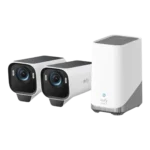
4.2
Choose the EufyCam S3 Pro for subscription-free 4K footage and standout color night vision; Skip it if you need smoother high-fps motion or...
Pros: Weather resistance rating (IP code), Recording start-time lag, Installation ease, Durability, Video resolution & detail, Included accessories, Night vision brightness & detail
Cons: Cloud storage plan value, Frame rate, Connectivity options
#3
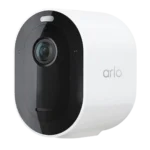
4.1
Choose it for sharp 2K HDR video and lightning-fast, accurate alerts. Skip it if you do not want to pay for Arlo Secure...
Pros: Event recording reliability, Field of view, Notification speed, Smart home integration (Alexa, IFTTT/automation compatibility, Power options (solar panel), Notification management
Cons: Customer support responsiveness, HomeKit integration, Cloud storage plan value, Local storage option convenience, Durability, Hub requirement, Price value
#4

4.1
Choose the G5 Pro for standout color night vision and a built-in Matter/Thread hub; Skip it if you need battery or solar flexibility,...
Pros: Connectivity options, PoE, ONVIF/RTSP support, On-device processing (AI), Operating temperature range, Smart home accessory compatibility, HomeKit integration
Cons: Power options (solar panel), Power options (battery, Pre-event recording length, Included accessories, Cloud storage plan value, Sound detection accuracy, Cable management