
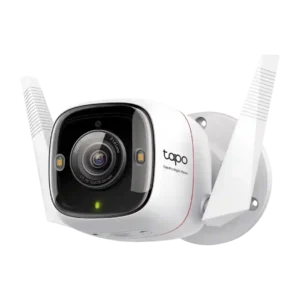
Review: TP-Link Tapo ColorPro C325WB Outdoor Camera
Updated: 2 months ago
4.0
Based on methodology below
250
Insights analyzed
49
Grouped by key features
13
From expert reviews
Scores below reflect consolidated expert coverage across these features.
Bottom Line
Choose the Tapo C325WB if you want standout color night vision and free AI alerts with local recording. Skip if you need 5GHz Wi-Fi, PoE, or perfect person detection out of the box without tweaking sensitivity.
Best for
Homeowners who can run power and want best-in-class color night vision on a budget, with free AI alerts and local storage as the default.
Not for
Anyone who needs battery power, 5GHz Wi-Fi or PoE, Apple HomeKit support, or truly hands-off detection with zero sensitivity tweaking.
Verdict
TP-Link's Tapo C325WB stands out as a hardwired value pick because it delivers genuinely usable, full-color night footage in very dim conditions, plus sharp 2K HDR video once you enable the right settings. Across reviews, local microSD recording (up to 512GB) and free on-device person/pet/vehicle alerts make it practical without paying monthly. The tradeoff is that it is 2.4GHz-only, the Ethernet port is not PoE, and some owners needed to tune motion sensitivity to reduce false positives or mislabels. Expect solid app controls and quick alerts, but occasional smart-display streaming quirks and a siren that is more deterrent than house-wide loud.
Pros
-
5.0based on 2 reviewsHub requirement: 5.0, based on 2 reviewsNo hub is required; the camera connects directly to your network, which keeps setup simpler and reduces extra hardware.
-
4.7based on 3 reviewsContinuous recording capability: 4.7, based on 3 reviewsSupports 24/7 recording to microSD (in addition to motion events), which is a key advantage of being hardwired.
-
4.6based on 13 reviewsNight vision: 4.6, based on 13 reviewsNight clips are a standout, with multiple reviewers calling the color night vision among the best they have tested; motion blur can still appear in very dark scenes or with fast movement.
-
4.6based on 1 reviewDetection range: 4.6, based on 1 reviewDetection was reported as long-range in at least one test (around 40 feet for person detection), though real-world results depend on placement and sensitivity settings.
-
4.6based on 12 reviewsLocal storage option convenience: 4.6, based on 12 reviewsLocal recording via microSD (up to 512GB) is widely praised for avoiding subscriptions; the card slot is protected and managed through the app.
-
4.6based on 13 reviewsLow-light performance: 4.6, based on 13 reviewsColorPro is the headline: reviewers consistently report unusually bright, full-color footage in very low light, often without needing to blast the area with lights.
-
4.5based on 5 reviewsNotification speed: 4.5, based on 5 reviewsAlerts typically arrive quickly, and opening the live view from a notification is often fast; snapshot-rich alerts are a paid add-on.
-
4.5based on 11 reviewsPrice value: 4.5, based on 11 reviewsAcross sources it is repeatedly framed as excellent value, often selling well below its MSRP while still offering strong night performance and free AI alerts.
-
4.5based on 6 reviewsPrivacy zone masking ease: 4.5, based on 6 reviewsPrivacy zones are simple to set up in-app to block sensitive areas like neighbors windows, and they are frequently recommended as part of initial configuration.
-
4.5based on 12 reviewsDetection features: 4.5, based on 12 reviewsOn-device detection covers people, pets/animals, and vehicles, with extras like line-crossing and tamper alerts mentioned in multiple reviews.
-
4.5based on 4 reviewsOn-device processing (AI): 4.5, based on 4 reviewsPeople/pet/vehicle detection is handled on-device and is often described as free and effective, avoiding the common paywall for smart alerts.
-
4.5based on 6 reviewsCustomizable motion zones: 4.5, based on 6 reviewsActivity/motion zones are easy to create and can be combined with detection-type filters, helping you focus alerts on the areas that matter.
-
4.4based on 4 reviewsNotification management: 4.4, based on 4 reviewsYou can schedule alerts, filter by detection type, and (with Tapo Care) add snapshot-rich notifications; overall the management options are considered robust for the price.
-
4.4based on 2 reviewsONVIF/RTSP support: 4.4, based on 2 reviewsAt least one reviewer confirmed ONVIF use with an NVR, and another referenced RTSP/NAS-style use, making it friendlier to local-first setups than many app-only cameras.
-
4.4based on 7 reviewsWeather resistance rating (IP code): 4.4, based on 7 reviewsThe IP66 weather rating is repeatedly cited, supporting outdoor use in rain and dusty conditions.
-
4.3based on 10 reviewsApp controls and settings: 4.3, based on 10 reviewsDeep controls for video quality, HDR, spotlights, alarms, detection types, and schedules, plus privacy and activity zones. A few reviewers disliked the clip-saving workflow or reported initial setup friction, but day-to-day control is generally excellent.
-
4.3based on 1 reviewOperating temperature range: 4.3, based on 1 reviewSpecs and testing commonly cite operation down to about -4°F and up to roughly 104–113°F, which should cover most outdoor residential climates.
-
4.3based on 2 reviewsArticulation range: 4.3, based on 2 reviewsThe adjustable arm and ball-joint style mount make it easy to aim precisely and lock in position for walls or eaves.
-
4.3based on 2 reviewsDurability: 4.3, based on 2 reviewsWeather-focused testing and specs suggest it holds up well outdoors; reviewers used it through rain and typical seasonal conditions without major issues.
-
4.3based on 2 reviewsMounting flexibility: 4.3, based on 2 reviewsThe mount and bracket design allow wall, post, or under-eave placement and easy re-aiming after installation.
-
4.2based on 13 reviewsVideo resolution and detail: 4.2, based on 13 reviewsSharp 2K video with HDR is frequently praised, but a few reviews warn you may need to change default settings to get full 2K/HDR and that motion at night can introduce some blur or ghosting.
-
4.2based on 3 reviewsColor accuracy: 4.2, based on 3 reviewsDaytime color is typically described as well-saturated and accurate, though one or two demos suggested it can look slightly washed depending on settings and scene lighting.
-
4.2based on 2 reviewsIFTTT/automation compatibility: 4.2, based on 2 reviewsIFTTT support is mentioned for automations and third-party device workflows, adding flexibility beyond basic voice assistants.
-
4.2based on 2 reviewsPre-event recording length: 4.2, based on 2 reviewsSeveral demos show clips that include a short lead-in before the subject fully enters frame, which helps reduce missed starts on motion events.
-
4.2based on 2 reviewsRecording start-time lag: 4.2, based on 2 reviewsBeing continuously powered helps it trigger and open streams quickly, but dialing in sensitivity can matter for the best results in tricky scenes.
-
4.2based on 1 reviewIncluded accessories: 4.2, based on 1 reviewMost reviews note a complete kit for basic installation, including mounting hardware, templates, and waterproofing accessories for the cable connections.
-
4.2based on 3 reviewsMicrophone sensitivity: 4.2, based on 3 reviewsMic pickup is generally strong, and at least one reviewer noted improved placement that helps capture voices more clearly.
-
4.2based on 2 reviewsLED indicator visibility: 4.2, based on 2 reviewsStatus LEDs clearly show connection states and can be toggled off in settings if you prefer a less visible device.
-
4.1based on 8 reviewsInstallation and Mounting: 4.1, based on 8 reviews
-
4.1based on 1 reviewSystem scalability: 4.1, based on 1 reviewThe app supports multi-camera views and subscriptions scale to multiple devices, making it reasonable to expand to a broader Tapo setup over time.
-
4.1based on 6 reviewsAudio recording quality: 4.1, based on 6 reviewsTwo-way talk is generally clear with both push-to-talk and voice-call modes noted, and audio is usable for conversations at the door or yard.
-
4.1based on 12 reviewsConnectivity options: 4.1, based on 12 reviewsConnects via 2.4GHz Wi-Fi and also offers a hardwired Ethernet data option, which helps in weak Wi-Fi spots. Several reviews emphasized the flexibility of having both.
-
4.0based on 7 reviewsFalse alert filter effectiveness: 4.0, based on 7 reviewsFalse positives are the main mixed point: some reviewers saw flaky labels (like pets flagged as people) or needed to lower sensitivity, while others reported very accurate filtering once tuned.
-
4.0based on 11 reviewsCloud storage plan value: 4.0, based on 11 reviewsTapo Care is optional and relatively inexpensive for 30-day cloud history and rich notifications; most core features work without paying monthly, so the subscription is mainly about convenience.
-
4.0based on 3 reviewsFrame rate: 4.0, based on 3 reviewsUp to 20 fps is commonly cited and generally looks smooth for a consumer outdoor cam, though fast motion at night can still blur depending on lighting.
-
4.0based on 7 reviewsSmart-home integration (Alexa, Google, Siri, HomeKit, Matter, Thread): 4.0, based on 7 reviewsAlexa and Google Assistant support is common, but experiences on smart displays are mixed: some had smooth Echo Show playback while others reported Nest Hub or Google Home app limitations or timeouts.
-
3.9based on 8 reviewsMobile app reliability: 3.9, based on 8 reviewsOnce running, the app is usually stable and responsive, but some reviewers hit a one-time Wi-Fi discovery/setup hiccup and a few noted clunky playback/export steps or intermittent smart-display behavior.
-
3.9based on 10 reviewsSpotlight features: 3.9, based on 10 reviewsSpotlights can be set to trigger on motion with adjustable brightness and duration, working as both illumination and deterrent. A few reviewers wanted finer control over the darkness threshold or shorter minimum on-time.
-
3.8based on 4 reviewsFloodlight brightness: 3.8, based on 4 reviewsThe built-in lights act more like spotlights than a true floodlight: illumination is helpful up close and adjustable, but some reviewers wanted more brightness or better auto-on behavior.
-
3.7based on 4 reviewsBuild quality: 3.7, based on 4 reviewsBuild is mostly plastic but generally considered solid for the price, with compact housing and outdoor-ready design.
-
3.7based on 3 reviewswired: 3.7, based on 3 reviewsIt is a plug-in, always-powered camera, which enables faster alerts and optional continuous recording, but it also limits placement to spots with accessible power.
-
3.7based on 4 reviewsField of view: 3.7, based on 4 reviewsThe 127-degree view is wide enough for side yards and driveways, but several reviewers noted it is narrower than some 140- to 160-degree competitors.
-
3.6based on 4 reviewsSpeaker volume: 3.6, based on 4 reviewsThe built-in speaker and siren are useful for deterrence and conversation, but several reviewers wished the siren or speaker output carried farther indoors.
-
3.5based on 1 reviewStreaming reliability: 3.5, based on 1 reviewLive view is usually quick in the Tapo app, but a minority of tests noted occasional slow or failed loads on certain smart displays or networks.
Cons
-
3.4based on 3 reviewsCable management: 3.4, based on 3 reviewsPower-cable routing is the main constraint: the cord is often longer than average but you may still need drilling, an extension cord, or to deal with a chunky angled plug and weatherproof outlet covers.
-
2.0based on 3 reviewsDual-band (2.4/5GHz) performance: 2.0, based on 3 reviewsNo 5GHz Wi-Fi is a recurring limitation; you get 2.4GHz range and stability, but not the higher-speed 5GHz option.
-
1.5based on 3 reviewsPoE: 1.5, based on 3 reviewsPoE is not supported; Ethernet is for data only, so you still need the DC power adapter (or a separate PoE splitter solution).
-
1.5based on 1 reviewWeb portal access: 1.5, based on 1 reviewThere is no dedicated web portal/web UI in at least one review, so management is primarily through the Tapo app or via NVR protocols when used.
-
1.0based on 1 reviewHomeKit integration: 1.0, based on 1 reviewApple HomeKit is not supported, so HomeKit households will need a different camera or accept using Alexa/Google only.
FAQ
Do I need a Tapo Care subscription to use the camera well?
No. Reviews consistently note that local microSD recording and core AI alerts work without a plan. Tapo Care mainly adds cloud history plus rich notifications with snapshots and sorting.
Can it record continuously 24/7?
Yes, multiple reviewers show a recording schedule that supports continuous recording to a microSD card in addition to motion clips.
Does the Ethernet port support PoE?
No. The Ethernet jack is for data only and the camera still needs its DC power adapter, though some users use a PoE splitter/adapter workaround.
Does it work with Apple HomeKit?
No, HomeKit support is repeatedly listed as missing. It does work with Alexa and Google Assistant for basic viewing and voice commands, with mixed results on some smart displays.
How bright are the spotlight and how loud is the siren?
The spotlights help illuminate close areas and are adjustable in the app, but several reviewers did not consider them floodlight-level bright. The siren is useful as a deterrent, yet a few people wished it was louder indoors.
Reviews we analyzed
Video Reviews



Article Reviews
Tech Advisor
Best Surveillance Cameras
#1
4.3
Choose the S4 Max for fast PoE reliability, local AI search, and cross-camera tracking; Skip if you cannot run Ethernet or need HomeKit...
Pros: Cloud storage plan value, PoE), Dual-camera design, Recording start-time lag, Event recording reliability, Cross-camera tracking, Articulation range
Cons: ONVIF/RTSP support, IFTTT/automation compatibility, HomeKit integration
#2
4.2
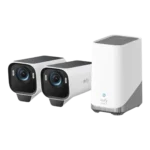
Choose the EufyCam S3 Pro for subscription-free 4K footage and standout color night vision; Skip it if you need smoother high-fps motion or...
Pros: Weather resistance rating (IP code), Recording start-time lag, Installation ease, Durability, Video resolution & detail, Included accessories, Night vision brightness & detail
Cons: Cloud storage plan value, Frame rate, Connectivity options
#3
4.1
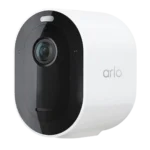
Choose it for sharp 2K HDR video and lightning-fast, accurate alerts. Skip it if you do not want to pay for Arlo Secure...
Pros: Event recording reliability, Field of view, Notification speed, Smart home integration (Alexa, IFTTT/automation compatibility, Power options (solar panel), Notification management
Cons: Customer support responsiveness, HomeKit integration, Cloud storage plan value, Local storage option convenience, Durability, Hub requirement, Price value
#4

4.1
Choose the G5 Pro for standout color night vision and a built-in Matter/Thread hub; Skip it if you need battery or solar flexibility,...
Pros: Connectivity options, PoE, ONVIF/RTSP support, On-device processing (AI), Operating temperature range, Smart home accessory compatibility, HomeKit integration
Cons: Power options (solar panel), Power options (battery, Pre-event recording length, Included accessories, Cloud storage plan value, Sound detection accuracy, Cable management