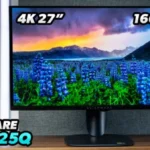
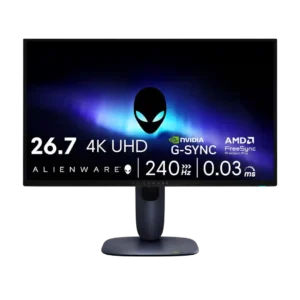
Review: Alienware 27 4K Gaming Monitor AW2725Q
Updated: 2 hours ago
4.3
Based on methodology below
101
Insights analyzed
48
Grouped by key features
18
From expert reviews
Scores below reflect consolidated expert coverage across these features.
Bottom Line
Choose it for stunning 4K OLED image quality and very fast gaming performance. Skip it if you need brighter daytime use or laptop-friendly extras like KVM and USB-C video.
Best for
Gamers with a strong PC or modern console who want very sharp 27-inch OLED visuals, strong VRR support, and fast response. It also suits buyers who want one display for gaming, media, and some creative work.
Not for
People who work in bright rooms, rely on KVM or single-cable USB-C laptop setups, or want the most esports-first feature set. It is also a tougher sell for current OLED owners who mainly want more features rather than better pixel density.
Verdict
Alienware’s AW2725Q stands out for combining a very sharp 27-inch 4K image with OLED contrast, strong color, low input lag, and smooth 240Hz gaming. Reviews consistently praise how crisp, responsive, and premium it feels, and several also like its compact stand and attractive pricing versus rival 27-inch 4K OLEDs. The tradeoff is clear: brightness is a recurring weakness in brighter rooms, and Alienware trims convenience features like KVM, USB-C display input, and DisplayPort 2.1. For gamers who care most about image quality and speed, that compromise makes sense. For mixed laptop workflows or sunlit setups, it is easier to question.
Pros
-
5.0based on 3 reviewsinput lag: 5.0, based on 3 reviewsInput responsiveness is consistently praised, with reviews describing immediate or very low-lag control.
-
5.0based on 2 reviewscontrast: 5.0, based on 2 reviewsContrast is repeatedly described in emphatic terms, with OLED delivering the deep scene separation reviewers wanted.
-
5.0based on 2 reviewsPC gaming compatibility: 5.0, based on 2 reviewsReviews say it pairs especially well with powerful gaming PCs and can run 4K/240Hz without issues when the hardware is there.
-
5.0based on 2 reviewsresponse time: 5.0, based on 2 reviewsReviews repeatedly cite the near-instant response behavior as a major gaming strength.
-
5.0based on 1 reviewadaptive sync performance: 5.0, based on 1 reviewAdaptive sync support is credited with eliminating tearing and keeping gameplay smooth.
-
5.0based on 1 reviewghosting control: 5.0, based on 1 reviewOne review reports no visible ghosting or tearing in use.
-
5.0based on 1 reviewlocal dimming performance: 5.0, based on 1 reviewOLED per-pixel control is highlighted as a major HDR strength, minimizing blooming and cleanly separating bright and dark areas.
-
5.0based on 1 reviewmotion clarity: 5.0, based on 1 reviewMotion is described as extremely smooth and sharp.
-
5.0based on 1 reviewpanel type: 5.0, based on 1 reviewOne review explicitly identifies the display as a QD-OLED panel and treats that panel tech as the basis for its image quality.
-
5.0based on 1 reviewResolution: 5.0, based on 1 reviewThe 4K resolution is presented as a core part of the monitor's appeal.
-
5.0based on 1 reviewsingle-player cinematic gaming suitability: 5.0, based on 1 reviewA review strongly praises the monitor for cinematic, atmospheric games thanks to OLED contrast and image quality.
-
5.0based on 1 reviewstand adjustability: 5.0, based on 1 reviewThe stand is praised for broad tilt, swivel, and pivot adjustment.
-
4.9based on 4 reviewsVRR compatibility: 4.9, based on 4 reviewsVRR support is broad and repeatedly confirmed across Nvidia, AMD, and VESA standards.
-
4.9based on 2 reviewsblack levels: 4.9, based on 2 reviewsReviews consistently praise deep, inky blacks.
-
4.9based on 2 reviewscolor gamut: 4.9, based on 2 reviewsReviews cite broad gamut coverage and saturated color output.
-
4.8based on 3 reviewsconsole gaming compatibility: 4.8, based on 3 reviewsConsole compatibility is a clear positive, with reviewers calling it great for PS5/Xbox use and saying it supports those signals well.
-
4.8based on 2 reviewsHDMI 2.1 support: 4.8, based on 2 reviewsReviews consistently mention dual HDMI 2.1 ports as part of the monitor's gaming-friendly connectivity.
-
4.8based on 2 reviewspremium feel: 4.8, based on 2 reviewsReviewers describe the monitor as premium-looking and premium-feeling.
-
4.8based on 2 reviewssharpness: 4.8, based on 2 reviewsSharpness is one of the clearest selling points, with reviewers emphasizing crisp text and very high pixel density.
-
4.8based on 2 reviewsVESA mount compatibility: 4.8, based on 2 reviewsReviews directly mention standard VESA support and easy arm mounting.
-
4.8based on 1 reviewbuild quality: 4.8, based on 1 reviewA review describes the monitor as sturdy, compact, and well made.
-
4.8based on 1 reviewviewing angles: 4.8, based on 1 reviewOne detailed review says the viewing angles are wide and easy to use even at extreme positions.
-
4.8based on 2 reviewsHDR performance: 4.8, based on 2 reviewsHDR is widely praised for looking impressive on this pixel-dense OLED, even if brightness limits still come up elsewhere.
-
4.8based on 2 reviewsrefresh rate: 4.8, based on 2 reviewsThe 240Hz refresh rate is repeatedly framed as smooth and high-end, even if some reviewers note faster esports-focused options exist.
-
4.7based on 2 reviewscolor accuracy: 4.7, based on 2 reviewsReviewers report strong color accuracy and confidence in the image.
-
4.5based on 3 reviewsgaming image presets: 4.5, based on 3 reviewsReviewers note multiple game and creator presets, with useful mode variety for different genres and workflows.
-
4.5based on 3 reviewsport selection: 4.5, based on 3 reviewsPort selection is generally seen as good or ample, even if some reviewers still wanted richer USB-C/KVM functionality.
-
4.5based on 2 reviewscable management: 4.5, based on 2 reviewsReviews consistently note useful cable management in the stand or post.
-
4.5based on 1 reviewoverdrive tuning: 4.5, based on 1 reviewOne gaming review says there is no overshoot leading to inverse ghosting, suggesting solid tuning.
-
4.5based on 1 reviewscreen uniformity: 4.5, based on 1 reviewA measured review reports very good uniformity on the tested unit.
-
4.4based on 3 reviewscompetitive gaming suitability: 4.4, based on 3 reviewsCompetitive gaming performance is praised thanks to low lag and strong motion handling, but some reviews still note that 240Hz is not the most esports-focused option available.
-
4.3based on 4 reviewsdesign and aesthetics: 4.3, based on 4 reviewsThe new blue AW30-style design is frequently praised as attractive and distinctive, though not every reviewer loved it equally.
-
4.2based on 2 reviewsscreen size: 4.2, based on 2 reviewsThe 27-inch size is praised for desk friendliness and multi-monitor use, though one review notes it may not be ideal for everyone as a single display.
-
4.2based on 1 reviewheat management: 4.2, based on 1 reviewThermal design gets positive mention through the heatsink and cooling approach.
-
4.2based on 1 reviewpicture-in-picture and picture-by-picture: 4.2, based on 1 reviewOne review explicitly confirms PiP and PbP support.
-
4.0based on 1 reviewblack equalizer performance: 4.0, based on 1 reviewVisibility-boosting gaming modes are present, with one review specifically noting increased visibility or center-screen contrast options.
-
3.9based on 4 reviewsvalue for money: 3.9, based on 4 reviewsValue is mixed but generally favorable for the category: some call the price attractive or well worth it, while others still emphasize the high absolute cost.
-
3.9based on 4 reviewsproductivity versatility: 3.9, based on 4 reviewsReviewers see real value for mixed work and play, text, and creative tasks, but laptop-centric convenience is held back by missing KVM or single-cable USB-C features.
-
3.7based on 3 reviewson-screen display usability: 3.7, based on 3 reviewsOSD impressions are mixed but lean positive; some found it clean and easy with the joystick, while another found it awkward.
-
3.7based on 4 reviewsreflection handling: 3.7, based on 4 reviewsReflection handling is mixed: some reviewers found glare manageable, but others say reflections and raised blacks remain an issue in bright rooms.
-
3.6based on 4 reviewsreliability over time: 3.6, based on 4 reviewsLongevity evidence is mixed; reviews mention burn-in concerns and one wake issue, but also panel-longevity features and a six-month report with no burn-in or image retention.
-
3.5based on 2 reviewsUSB hub functionality: 3.5, based on 2 reviewsUSB connectivity is useful, but reviews repeatedly note that the lack of KVM or display-capable USB-C reduces convenience.
Cons
-
3.4based on 3 reviewsDisplayPort connectivity: 3.4, based on 3 reviewsThe monitor includes DisplayPort, but several reviews call out the use of DisplayPort 1.4 instead of 2.1 as a compromise.
-
3.3based on 5 reviewsbrightness: 3.3, based on 5 reviewsBrightness is the most consistent caveat; some reviewers still call it good for OLED, but several say SDR brightness is limited and direct sunlight is a problem.
-
3.2based on 2 reviewssoftware support: 3.2, based on 2 reviewsAlienware Command Center exists and can adjust settings, but one reviewer found it annoying.
-
2.5based on 1 reviewcurved screen immersion: 2.5, based on 1 reviewThis flat panel does not satisfy reviewers who specifically prefer the immersive feel of a curved display.
-
2.2based on 1 revieweye comfort features: 2.2, based on 1 reviewOne review flags PWM-related dimming concerns and possible fatigue/headache issues for sensitive users.
-
1.5based on 2 reviewsbuilt-in speakers: 1.5, based on 2 reviewsMultiple reviews explicitly say there are no built-in speakers, making external audio necessary.
FAQ
Is the AW2725Q good for PS5 and Xbox?
Yes. Reviews call it a strong console option and note HDMI 2.1 support, with one review saying it supports PS5 and Xbox signals well.
Is brightness a problem?
It can be. Several reviews praise HDR impact, but low SDR brightness and weaker performance in direct sunlight come up repeatedly.
Does it have speakers or a KVM switch?
Reviews repeatedly say it has no built-in speakers, and several also call out the lack of KVM and laptop-friendly USB-C display connectivity.
Is it usable for work too?
Yes, within limits. Reviews praise sharp text and note it works well for web, editing, and mixed work/play use, but convenience is reduced if you switch between multiple computers.
What about burn-in?
Reviews still mention OLED burn-in as a concern, but one six-month update reported no burn-in or image retention, and multiple reviews mention burn-in warranty coverage.
Reviews we analyzed
Video Reviews

YouTube - NotebookcheckReviews

YouTube - Viktor's Reality

YouTube - The Tech Chap

YouTube - RTINGS Computer
Article Reviews


Best Gaming Monitor
#1
4.3
Choose it for stunning 4K OLED image quality and very fast gaming performance. Skip it if you need brighter daytime use or laptop-friendly...
Pros: Resolution, panel type, response time, motion clarity, input lag, adaptive sync performance, contrast
Cons: built-in speakers, eye comfort features, curved screen immersion, software support, brightness, DisplayPort connectivity